50. Administrator Basics
Most of what you do on amadeOS needs no special rights: your documents, your settings and your programs' data belong to you. A few things change the computer for everybody, and those need an administrator: installing and removing software, installing updates, adding users, changing system settings under /etc.
Who is an administrator
| On… | The administrator is… |
|---|---|
| The live system | The live user amadeos (password amadeos). |
| An installed system | The first user, the one you created in the installer (chapter 14), and everyone you later add to the group sudo (chapter 53). |
There is no root password. The account root exists, as on every Linux system, but you cannot log in with it. An administrator proves who they are with their own password.
Coming from Windows or macOS
This is how Windows treats an account of the type Administrator and macOS an Admin user: you work with your normal account and type your password when the system asks for permission.
When amadeOS asks for your password
When a program needs an administrator's permission, a window Authentication Required appears in the middle of the screen. It says what the program wants to do, for example Authentication is required to change the installed software.
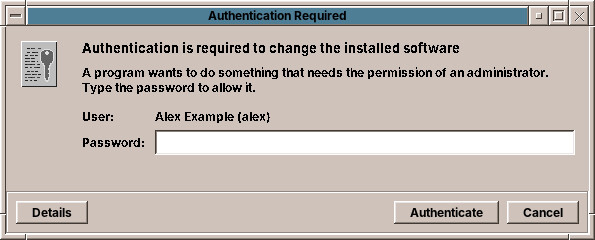
- Type your password and press Authenticate (or Enter).
- Cancel refuses; the program then says Not done: the password was not given.
- If several users are administrators, the User list chooses whose password you type.
- Details shows the exact action and the command that is waiting for permission.
If the password is wrong, the window says so and asks again. For software, amadeOS keeps the permission for a few minutes, so that installing three programs in a row asks only once.
Some things need no password although they change the system, because they are harmless:
| Without a password | Who may |
|---|---|
| Refreshing the list of available software (Check now) | The user at the computer |
| Joining a WLAN, changing network connections | Members of the group netdev |
| Pausing printers, choosing the default printer, cancelling your own print jobs | Members of the group lpadmin (own jobs: everyone) |
| Starting the installer in the live system | Members of the group sudo |
The first user and the live user are in all these groups.
Warning
The password window always comes from the desktop itself and always looks like this. It never appears inside a web page. Type your password only when you have just asked for something that needs it.
The Root Console
Some administration happens in a terminal: editing a configuration file, a command from a guide. Root Console (sudo) in the Tools drawer opens a terminal that asks for your password once and then runs everything with administrator rights. Its prompt ends with # instead of $ to remind you.
In a normal terminal, put sudo before a single command:
To change a system file, use sudoedit, which opens a copy in your editor and puts it back when you save:
Tip
Close the Root Console when you are done. A terminal with administrator rights is a terminal in which a typing mistake can break the system.
Your data
Your password stays on the computer. It is stored only as a one-way hash in /etc/shadow, which only the system can read, and it is checked there; no server sees it.
Under the hood
amadeOS asks for permission through polkit, the permission service of Linux desktops. A program asks polkit whether the user may do an action; polkit checks its rules and, where they say auth_admin, asks the session's authentication agent for a password. The agent of amadeOS is a Motif dialog started at login by /etc/amadeos/autostart.d/30-amadeos-polkit-agent. The rules of amadeOS are in /usr/share/polkit-1/rules.d/ (50-amadeos-packages.rules, 50-amadeos-network.rules, 50-amadeos-installer.rules); your own go into /etc/polkit-1/rules.d/. The terminal side is sudo: members of the group sudo may run every command as root with their own password. pkexec COMMAND runs a command through polkit and so shows the password window instead of asking in the terminal.