11. Web
Every Debian package brings documentation: a README, a changelog, often a manual in HTML. It sits in /usr/share/doc, and most people never see it, because opening it takes a terminal or a full web browser. amade-web is the second application of the book: a small viewer for that documentation. It shows local HTML pages, text files and directories, in the look of the desktop, without a network.
And when a page links to the web? Then amade-web does not try to be a browser. It hands the link to the real one. Doing that safely is the new part of amade-commons in this chapter.
What you build
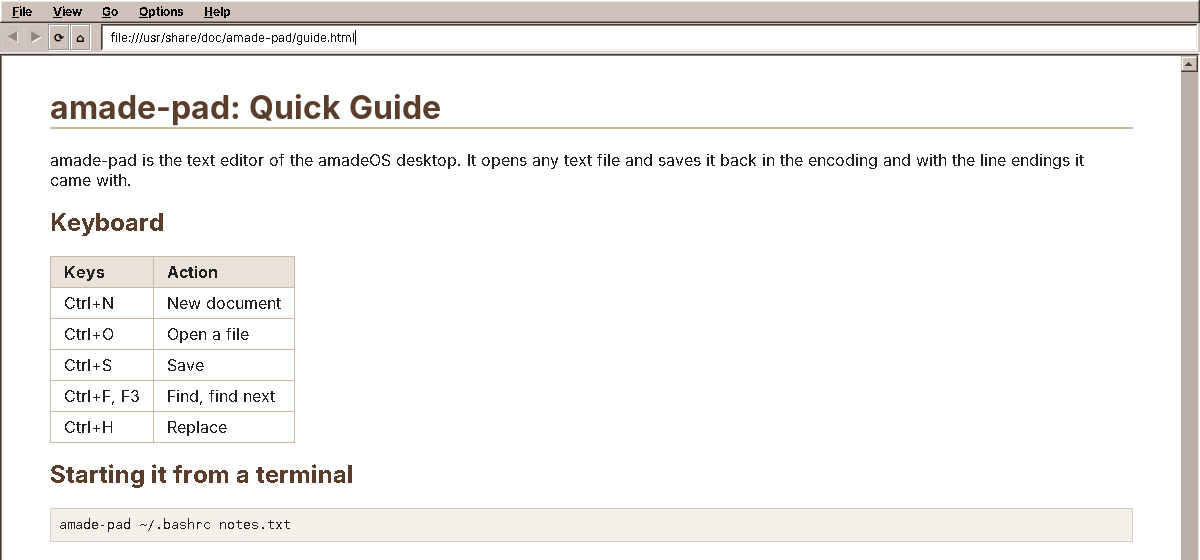
- Local HTML with CSS: headings, tables, lists, images, style sheets next to the page.
- Text files, also compressed ones (
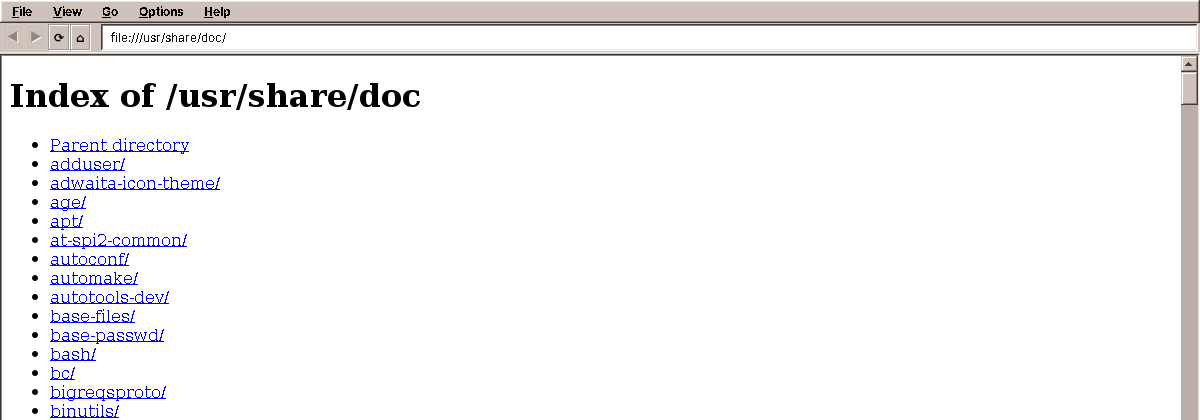
README.Debian.gz,changelog.gz), shown as preformatted text. - Directories as a list of links, with the folders first.
- Back, forward, reload, home (the home page is
/usr/share/doc), and an address field. - Zoom with Ctrl++ and Ctrl+-.
- Links to the web open in the web browser, PDFs and office documents in their applications.
- No scripts, no network: a page can load its style sheet and pictures from the disk, nothing else.
The program is about 850 lines of Java. Almost all the hard work, turning HTML into pixels, is done by two libraries.
What you will learn
- How to show HTML in a Swing program, and why "show HTML" does not mean "write a browser".
- How to model "what a URL leads to" with a sealed interface and records, and handle every case with a
switch. - How to keep a slow load from overwriting a later one.
- How to make a viewer that never goes online by itself.
- How to start another program for a link or a file, and which files never to start.
- When a program is small enough to do without a presenter, and what that costs.
Two libraries do the drawing
Writing an HTML renderer is a project of years. amade-web uses two libraries that have done it:
| Library | Job |
|---|---|
| jsoup | Reads HTML as browsers do: it repairs missing end tags, wrong nesting and other mistakes that real pages are full of, and gives a clean document tree. |
Flying Saucer (xhtmlrenderer) |
Lays out and draws XHTML with CSS 2.1 in a Swing component. No JavaScript, no CSS 3. |
Why not Swing's own JEditorPane, which can show HTML too? It understands HTML 3.2 from 1997 and very little CSS. Documentation written since then looks broken in it. Flying Saucer handles the layout of a modern manual page (tables, floats, margins, fonts from a style sheet) well, and it is plain Java like the rest of the program.
Why not a real browser engine (JavaFX's WebView, or the Chromium Embedded Framework)? Both are large native components with their own threading, and both bring JavaScript and the network with them, which a documentation viewer should not have. For the web there is a web browser on the desktop already.
Behind the scenes: the amadeOS handbooks
The handbooks of amadeOS, this book included, are built with MkDocs and need JavaScript for their search and navigation. That is why the Help drawer opens them in Firefox, not in amade-web.
What a URL leads to
When the user clicks a link, three different things can happen: amade-web shows a page, the web browser opens, or another application opens a file. The loader decides which, and says so with its return type:
    /** What a URL leads to. */
    public sealed interface Result permits Page, WebLink, OtherFile {
    }

    /**
     * A page to show.
     *
     * @param url    the URL that was loaded, with {@code index.html} added for directories that have one
     *               and the fragment ({@code #id}) of the request kept
     * @param title  the {@code <title>}, or the file name
     */
    public record Page(org.w3c.dom.Document document, String url, String title) implements Result {
        /** The URL without its fragment: the base for relative links. */
        public String documentUrl() {
            int hash = url.indexOf('#');
            return hash < 0 ? url : url.substring(0, hash);
        }

        /** The id after {@code #}, or null. */
        public String fragment() {
            int hash = url.indexOf('#');
            return hash < 0 || hash == url.length() - 1 ? null : url.substring(hash + 1);
        }
    }

    /** {@code http:}, {@code https:}, {@code mailto:} and other non-file URLs: for the web browser. */
    public record WebLink(String url) implements Result {
    }

    /** A local file this viewer does not show (PDF, office documents, ...): for its application. */
    public record OtherFile(Path file) implements Result {
    }
sealed means: these three, and no others. The compiler knows it, so a switch over a Result must handle all three, and adding a fourth one later makes every incomplete switch fail to compile. That is a much stronger promise than returning null for "not a page", or throwing an exception for "open it elsewhere".
The loader itself goes from the URL to the bytes and from the bytes to the kind of document:
    public Result load(String url) throws IOException {
        String fragment = "";
        String location = url.strip();
        int hash = location.indexOf('#');
        if (hash >= 0) {
            fragment = location.substring(hash);
            location = location.substring(0, hash);
        }
        if (location.isEmpty() || location.equals("about:blank")) {
            return page(Document.createShell("about:blank"), "about:blank", "");
        }
        URI uri = URI.create(location);
        if (!"file".equalsIgnoreCase(uri.getScheme())) return new WebLink(url.strip());

        Path path = Path.of(uri);
        if (!Files.exists(path)) throw new NoSuchFileException(path.toString());
        if (Files.isDirectory(path)) {
            Path index = path.resolve("index.html");
            if (!Files.isRegularFile(index)) return directory(path);
            path = index;
        }
        String fileUrl = path.toUri().toString();
        String name = path.getFileName().toString();
        byte[] bytes = Files.readAllBytes(path);
        if (name.toLowerCase(Locale.ROOT).endsWith(".gz")) {
            try (InputStream in = new GZIPInputStream(new ByteArrayInputStream(bytes))) {
                bytes = in.readAllBytes();
            }
            name = name.substring(0, name.length() - 3);
        }
        String extension = extension(name);
        if (HTML.contains(extension)) {
            Document html = Jsoup.parse(new ByteArrayInputStream(bytes), null, fileUrl);
            String title = html.title().isBlank() ? name : html.title().strip();
            return page(html, fileUrl + fragment, title);
        }
        if (IMAGES.contains(extension)) return image(fileUrl, name);
        if (TEXT.contains(extension) || (!OTHER.contains(extension) && looksLikeText(bytes))) {
            return text(fileUrl, name, decode(bytes));
        }
        return new OtherFile(path);
    }
- Everything that is not a
file:URL is aWebLink:https:,http:,mailto:. - A directory shows its
index.html, or a generated list of its entries. .gzfiles are unpacked in memory first; Debian compresses most of its documentation.- HTML goes to jsoup. Images, text and directories become small generated pages, so that one component shows all of them.
- What is left (PDFs, office documents, binary files) is an
OtherFile.
The loader reads files and builds documents, but it never touches a window. It runs on a background thread, and the tests call it directly:
    @Test
    void htmlIsRepairedIntoXhtmlWithoutScripts() throws IOException {
        Path file = Files.writeString(dir.resolve("guide.html"),
                "<title>Guide</title><p>One<p>Two<script>alert(1)</script><br>");
        Page page = assertInstanceOf(Page.class, loader.load(file.toUri() + "#install"));

        assertEquals("Guide", page.title());
        assertEquals(file.toUri() + "#install", page.url());
        assertEquals(file.toUri().toString(), page.documentUrl());
        assertEquals("install", page.fragment());
        assertEquals("http://www.w3.org/1999/xhtml", page.document().getDocumentElement().getNamespaceURI());
        assertEquals(2, page.document().getElementsByTagName("p").getLength());
        assertEquals(0, page.document().getElementsByTagName("script").getLength());
    }
    @Test
    void binaryFilesAndPdfsGoToTheirApplications() throws IOException {
        Path pdf = Files.writeString(dir.resolve("manual.pdf"), "%PDF-1.4 looks like text");
        Path binary = Files.write(dir.resolve("data.bin"), new byte[]{1, 0, 2});

        assertEquals(new OtherFile(pdf), loader.load(pdf.toUri().toString()));
        assertEquals(new OtherFile(binary), loader.load(binary.toUri().toString()));
    }
Look at the PDF in the second test: it starts with %PDF-1.4, readable characters, so a check for binary bytes alone would show it as text. The list of formats that have their own applications comes first.
From HTML to XHTML
Flying Saucer only understands XHTML, the strict XML form of HTML. jsoup has already repaired the page; two small steps finish it:
    /** Scripts never run here; Flying Saucer's default style sheet only matches XHTML elements. */
    private static Page page(Document html, String url, String title) {
        html.select("script").remove();
        Element root = html.selectFirst("html");
        if (root != null) root.attr("xmlns", XHTML_NAMESPACE);
        return new Page(W3CDom.convert(html), url, title);
    }
Every <script> is removed, so that nothing in a page can ever run, even if a future version of the renderer learned JavaScript. And the root element gets the XHTML namespace, without which Flying Saucer's default style sheet does not apply: headings would look like plain text.
Never online by itself
A documentation page can ask for more than its text: a style sheet, pictures, fonts. Flying Saucer fetches them through a user agent. The default one would fetch them from anywhere, so a page in /usr/share/doc could load a picture from a web server, and that server would learn that someone just read this page, when, and from which address.
amade-web gives Flying Saucer a user agent that refuses:
    /** Loads style sheets and images from files and embedded data only; documentation has no business online. */
    private static final class LocalUserAgent extends NaiveUserAgent {
        @Override
        protected InputStream openStream(String uri) throws IOException {
            String lower = uri.toLowerCase(Locale.ROOT);
            if (!lower.startsWith("file:") && !lower.startsWith("jar:")) {
                throw new IOException("Not loading remote resource " + uri);
            }
            return super.openStream(uri);
        }
    }
Files from the disk (file:) and from the program itself (jar:) load; everything else fails, and the page shows without it. A documentation viewer has no business online.
Links are the same. Flying Saucer would follow a clicked link itself. amade-web takes that job away from it and hands every click to the window, which asks the loader what the link leads to:
        for (FSMouseListener listener : new ArrayList<>(panel.getMouseTrackingListeners())) {
            if (listener instanceof LinkListener) panel.removeMouseTrackingListener(listener);
        }
        panel.addMouseTrackingListener(new LinkListener() {
            @Override
            public void linkClicked(BasicPanel source, String uri) {
                linkHandler.accept(resolve(uri));
            }
        });
Loading in the background
The window starts every load on a virtual thread, like Pad. But a documentation viewer has a problem that Pad does not: the user clicks a link, the page is slow (a large compressed changelog on a network drive), the user gets impatient and clicks another link. Now two loads run. If the first one finishes last, it would replace the page the user asked for last.
amade-web counts its navigations:
    /** Shows the URL; {@code record} adds it to the history (not for back, forward and reload). */
    private void navigate(String url, boolean record) {
        EdtExecutor.requireEdt();
        if (url == null || url.isBlank()) return;
        String fragment = fragment(url);
        if (current != null && fragment != null && withoutFragment(url).equals(withoutFragment(current))
                && view.scrollToAnchor(fragment)) {
            shown(url, record);
            return;
        }
        long thisLoad = ++generation;
        showStatus(msg.format("status.loading", url));
        background.execute(() -> {
            try {
                Result result = loader.load(url);
                edt.execute(() -> {
                    if (thisLoad == generation) show(result, record);
                });
            } catch (IOException | RuntimeException e) {
                LOG.warn("Could not load {}", url, e);
                edt.execute(() -> {
                    if (thisLoad == generation) {
                        showStatus(msg.format("status.failed", describe(e)));
                        if (current == null) navigate(Addresses.HOME, true);
                    }
                });
            }
        });
    }
Every navigation gets the next number, generation. When a load finishes, its result is only shown if no later navigation has started meanwhile (thisLoad == generation). The old load is not cancelled, which would be complicated; its result is simply thrown away. The same trick works for search fields that search while you type, and for any "latest request wins" situation.
Note also the first if: a link to an anchor in the same page (#install) does not load anything; it only scrolls.
When the result is there, the switch over the sealed Result decides what happens, with one case per kind, and the compiler checking that none is missing:
    private void show(Result result, boolean record) {
        switch (result) {
            case Page page -> {
                view.show(page);
                setTitle(page.title().isBlank() ? windowTitle : page.title() + " - " + windowTitle);
                shown(page.url(), record);
                showStatus(msg.get("status.done"));
            }
            case WebLink link -> openElsewhere(() -> launcher.browse(link.url()),
                    msg.format("status.opened-browser", link.url()));
            case OtherFile file -> openElsewhere(() -> launcher.open(file.file()),
                    msg.format("status.opened-application", file.file().getFileName()));
        }
    }
Opening links in other programs
Two of the three cases leave amade-web: a web link goes to the web browser, a PDF to the PDF viewer. Which programs are those? That is the desktop's business, not the program's. The user may prefer Firefox or another browser, and on another desktop the choice is made elsewhere. Every Linux desktop has one command for it, xdg-open, which looks up the user's choice for a link or a file type and starts the right program.
Starting a program is something many applications need: Mail opens links in messages and attachments, Calendar opens links in appointments, Files opens every file the user double-clicks. That makes it a part for amade-commons, and amade-web is the first to use it: DesktopLauncher.
    public void browse(String uri) throws IOException {
        LaunchFeedback.announce();
        if (!xdgOpen(uri)) {
            if (!Desktop.isDesktopSupported() || !Desktop.getDesktop().isSupported(Desktop.Action.BROWSE)) {
                throw new IOException("No web browser available");
            }
            Desktop.getDesktop().browse(URI.create(uri));
        }
    }
    private static boolean xdgOpen(String target) {
        try {
            new ProcessBuilder("xdg-open", target).redirectErrorStream(true)
                    .redirectOutput(ProcessBuilder.Redirect.DISCARD).start();
            return true;
        } catch (IOException e) {
            return false; // xdg-open not installed
        }
    }
xdg-openfirst. Java has its own way,java.awt.Desktop, but on Linux it only works when GNOME's libraries are installed, which amadeOS does not have.java.awt.Desktopas the fallback, which is the right way on Windows and macOS.LaunchFeedback.announce()tells the amadeOS window manager that a program is starting, so it shows the busy cursor until the new window appears. Chapter 20 looks at it closely.- The started program's output is discarded, and amade-web does not wait for it to end.
CommonsModule binds a DesktopLauncher, so the window simply asks for one in its constructor. A test can bind a subclass that only records what it was asked to open.
In the window, starting the other program happens in the background too, because xdg-open can take a moment, and a failure becomes a line in the status bar:
    private void openElsewhere(Opener opener, String doneText) {
        if (current != null) address.setText(current);
        background.execute(() -> {
            try {
                opener.open();
                edt.execute(() -> showStatus(doneText));
            } catch (IOException e) {
                LOG.warn("Could not open externally", e);
                edt.execute(() -> showStatus(msg.format("status.failed", describe(e))));
            }
        });
        // Started with a web link only: show the documentation instead of an empty window.
        if (current == null) navigate(Addresses.HOME, true);
    }
Files that are never opened
xdg-open on a shell script or a .desktop file can run it. For a link in a documentation page that the user clicked on purpose, that is the user's decision. For an attachment in a mail from a stranger it is how computers get infected. So DesktopLauncher also knows which files are dangerous to open:
    /** Attachments with these extensions are never opened directly, only saved. */
    private static final Set<String> RISKY = Set.of("desktop", "sh", "bash", "run", "bin", "jar", "py", "pl",
            "appimage", "deb", "exe", "bat", "cmd", "com", "msi", "ps1", "vbs", "js", "jnlp", "lnk", "scr");

    public static boolean isRisky(String fileName) {
        int dot = fileName.lastIndexOf('.');
        return dot < 0 || RISKY.contains(fileName.substring(dot + 1).toLowerCase(Locale.ROOT));
    }
A file without any extension counts as risky too: on Linux a program does not need one. amade-web does not use this check, because it only opens files the user can see on their own disk. The mail program in chapter 22 does, for every attachment: a risky one is never opened, only saved.
The address field
What can a user type into the address field? A full URL, a path, ~/notes.html, a host name. Addresses turns each into a URL:
    /**
     * A URL stays as it is ({@code https://...}, {@code file:...}, {@code about:blank}); an existing file
     * or a path ({@code /...}, {@code ./...}, {@code ~/...}) becomes a {@code file:} URL; {@code localhost}
     * gets {@code http://}, any other host name {@code https://}.
     */
    public static String toUrl(String input) {
        String text = input.strip();
        if (text.isEmpty() || text.contains("://") || hasScheme(text, "about", "file", "data", "mailto")) return text;
        if (text.equals("~") || text.startsWith("~/")) {
            return fileUrl(Path.of(System.getProperty("user.home"), text.substring(1).replaceFirst("^/", "")));
        }
        // An anchor after a path (guide.html#install) is not part of the file name.
        int hash = text.indexOf('#');
        String anchor = hash < 0 ? "" : text.substring(hash);
        Path path = localPath(hash < 0 ? text : text.substring(0, hash));
        if (path != null) return fileUrl(path) + anchor;
        String lower = text.toLowerCase(Locale.ROOT);
        if (lower.equals("localhost") || lower.startsWith("localhost:") || lower.startsWith("localhost/")
                || lower.startsWith("127.0.0.1")) {
            return "http://" + text;
        }
        return "https://" + text;
    }
localhost gets http://, because local development servers rarely have certificates; every other host name gets https://. It is a small class of plain Java, and AddressesTest checks each rule.
Where is the presenter?
Chapter 2 said that every amadeOS application uses Model-View-Presenter. amade-web has no presenter: BrowserWindow decides and shows. Why?
Look at what there is to decide: which result to show (a switch over three cases), whether a load is stale (one comparison), the history (a list and a position). The real logic, what a URL leads to and how an address becomes a URL, is already outside the window, in DocumentLoader and Addresses, both plain Java and both tested. What is left in the window is mostly Swing.
A presenter would move a few dozen lines out of the window and add a view interface with a dozen methods. For a program this size, that is the ceremony chapter 2 warned about. The price is real, though: the history, the stale-load check and the choice between the three results are not tested, because they cannot be reached without a window.
Tip: where the rule bends
Put the logic that matters into plain classes first, even without a presenter: loaders, parsers, converters. They are what tests need to reach. A presenter pays off once the window's own decisions grow beyond what you can check by looking at the screen. That is where you are when you add a feature that needs a test you cannot write.
Exercise 1 asks you to add the presenter anyway, which is the best way to feel both sides.
Languages, actions and the menu
The texts work as in Pad: messages.properties and four translations, loaded in WebModule, checked by TranslationTest. The language menu is the same code as Pad's.
What is new is how the window builds its menus and toolbar. Each command (back, forward, reload, zoom, ...) is a Swing Action, created once with its text, mnemonic and shortcut from the texts, and used for both a menu entry and a toolbar button:
    /** An action run on the EDT, named and with mnemonic from the texts. */
    private Action action(String key, KeyStroke accelerator, Runnable run) {
        Mnemonics.Text text = Mnemonics.parse(msg.get(key));
        Action action = new AbstractAction(text.text()) {
            @Override
            public void actionPerformed(ActionEvent e) {
                run.run();
            }
        };
        action.putValue(Action.ACTION_COMMAND_KEY, key);
        action.putValue(Action.SHORT_DESCRIPTION, text.text());
        action.putValue(Action.MNEMONIC_KEY, text.keyCode());
        if (text.index() >= 0) action.putValue(Action.DISPLAYED_MNEMONIC_INDEX_KEY, text.index());
        action.putValue(Action.ACCELERATOR_KEY, accelerator);
        return action;
    }
back.setEnabled(false) then greys out the menu entry and the button together. One Action per command, shared by every place that offers it, is the Swing way to keep them consistent.
What amade-commons gives Web
Everything Pad used: start-up, look, themes, texts, the language menu, the background executor and EdtExecutor. And the new part:
| Part | Package | What it does |
|---|---|---|
DesktopLauncher |
desktop |
Opens links and files with the user's programs (xdg-open, or java.awt.Desktop elsewhere); knows which files are risky to open |
Two programs, two decoders
amade-web reads text files too, and like Pad it has to guess the encoding: valid UTF-8, or else ISO-8859-1. That is the second program that decodes text with a guess. By the rule of chapter 1, should a text decoder move into amade-commons now?
Compare the two. Pad's TextCodec recognises byte order marks, tries Windows-1252 before ISO-8859-1, detects line endings and remembers all of it, because Pad writes the file back exactly as it was. amade-web only reads, and for a README one decoding line is enough. The shared part is "decode strictly as UTF-8, else fall back", about five lines. A library class for five lines that both programs would use differently would cost more than it saves.
So nothing moves. The rule is not "two programs do something similar", but "two programs need the same thing". When a third program needs to read text files of unknown encoding, we will look again.
Exercises
- A presenter. Move the decisions out of
BrowserWindowinto aBrowserPresenterwith aBrowserViewinterface, as in Pad. Then write the tests that were impossible before: back and forward, the stale load, a web link that opens the browser and leaves the page as it was. - Find in page. Ctrl+F searches the shown page. Flying Saucer's
Boxtree knows where each text is; how do you scroll to it? - Bookmarks. Keep a list of bookmarks in
~/.config/amadeos/web/bookmarks.txt, shown in a Bookmarks menu. Write them the safe way from chapter 10. - Man pages. Teach the loader the
man:scheme (man:ls), which runsman -Thtml lsand shows the result. Where inloaddoes it go, and which kind ofResultis it? - Risky links. A page links to
file:///usr/share/doc/foo/install.sh. Today amade-web hands it toxdg-open. Should it ask first? UseDesktopLauncher.isRiskyand write the test.
Summary
- Showing HTML in Swing does not mean writing a browser: jsoup repairs the page, Flying Saucer draws it, and links to the web go to the web browser.
- A sealed interface with records says exactly what a URL can lead to, and a
switchover it must handle every case. - A counter of navigations makes sure a slow load never replaces a later one.
- A user agent that only loads local files keeps the viewer offline; scripts are removed before a page is shown.
DesktopLauncherin amade-commons opens links and files with the user's programs, and knows which files must never be opened directly.- A small program can do without a presenter if its logic lives in plain, tested classes; the window's own decisions then stay untested.
- Similar is not the same: two text decoders with different needs stay where they are.
Part I is done: two applications, and every part an application needs to start. Part II brings programs that keep data of their own, starting with a file manager.