66. The Window Switcher
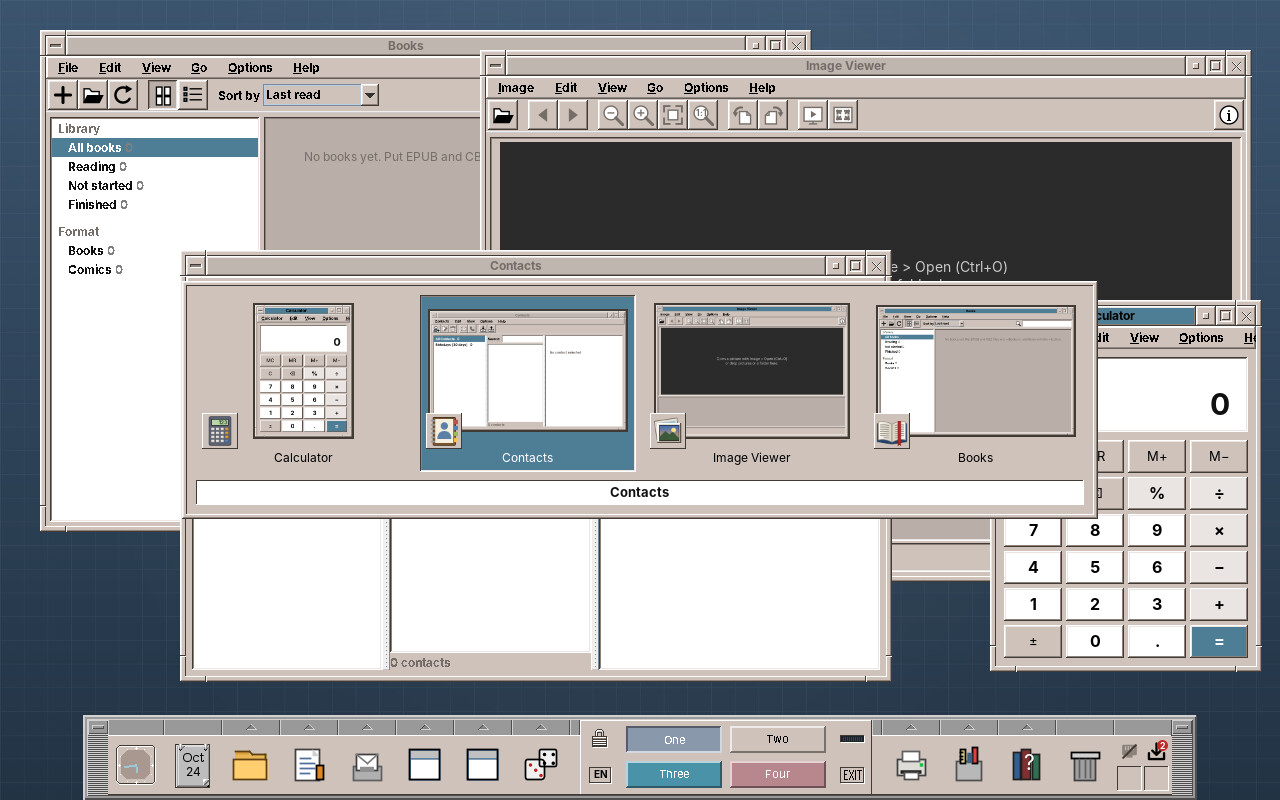
Hold Alt, press Tab, and a row of small pictures of the open windows comes up; let go of Alt, and the chosen window is in front. Everyone who has used Windows expects that, and CDE never had it. This chapter adds it to the window manager. It is a small feature, but it touches three things no other module of this part needs: a key that belongs to the whole desktop rather than to a window, pictures of windows that the X server does not keep, and a Swing window shown by the window manager itself.
What you will learn
- Taking a key for the whole desktop with a passive grab, and the keyboard with an active grab while the switcher is open.
- Ordering windows by when they were last active.
- Getting pictures of windows without a compositor: read the screen while a window is in full view.
- Reading an
XImageand the_NET_WM_ICONproperty through JNA. - Showing a Swing popup from the window manager without the window manager managing it.
What the switcher does
| Keys | What happens |
|---|---|
| ++alt+tab++ | Opens the switcher with the window that was active before selected |
| ++tab++ / ++shift+tab++, ++right++ / ++left++ (Alt held) | Next / previous window |
| Releasing ++alt++, or ++enter++ | Brings the selected window to the front, restoring it if it was minimized |
| ++esc++ | Closes the switcher; nothing changes |
| Pointing at a tile, clicking it | Selects it, picks it |
A quick ++alt+tab++, pressed and released at once, switches without showing anything: the two windows you work with take turns. The switcher shows the windows of the current workspace, minimized ones included, but not dialogs; a dialog comes to the front with its window.
Who does what
The switcher is part of the window manager. Three of its classes know neither X11 nor the window manager and are tested on their own; the X11 side sits next to the window manager in the package x11.
| Class | Package | What it does |
|---|---|---|
RecentWindows |
switcher |
The windows in the order they were last active |
SwitcherSelection |
switcher |
One round: the windows and which one is selected; moving wraps around |
PreviewArea |
switcher |
Which part of a window can be read from the screen, if any |
SwitcherPopup |
switcher |
The popup on the event dispatch thread: tiles, highlight, mouse |
SwitcherEntry |
switcher |
One window of a round: title, preview, icon, minimized |
WindowPreviews |
x11 |
Reads previews from the screen and icons from _NET_WM_ICON |
X11WindowManagerService |
x11 |
The keys, when to read a preview, opening and closing a round |
A key for the whole desktop
An X client gets the keys of the window that has the focus. A window manager that wants Alt+Tab whatever window is active asks the server for a passive grab: from now on, this key with these modifiers goes to the window manager, wherever the focus is. The screen lock's Super+L works the same way. The catch is in the modifiers: the server compares them exactly, and Num Lock and Caps Lock are modifiers too (Mod2Mask and LockMask). A grab for Alt alone does nothing while Num Lock is on, so the window manager grabs every combination:
        // Alt+Tab and Alt+Shift+Tab open the window switcher; once it is open the keyboard is grabbed, so
        // the further Tabs, the arrows, Esc and the release of Alt come here too.
        try {
            this.previews = new WindowPreviews(x11, display, rootWindow);
            this.tabKeycode = keycode(LibX11.XK_Tab);
            for (long sym : new long[]{LibX11.XK_Alt_L, LibX11.XK_Alt_R, LibX11.XK_Meta_L, LibX11.XK_Meta_R}) {
                int kc = keycode(sym);
                if (kc != 0) altKeycodes.add(kc);
            }
            this.escapeKeycode = keycode(LibX11.XK_Escape);
            this.returnKeycode = keycode(LibX11.XK_Return);
            this.leftKeycode = keycode(LibX11.XK_Left);
            this.rightKeycode = keycode(LibX11.XK_Right);
            if (tabKeycode != 0) {
                for (long shift : new long[]{0, LibX11.ShiftMask}) {
                    for (long lock : new long[]{0, LibX11.Mod2Mask, LibX11.LockMask, LibX11.Mod2Mask | LibX11.LockMask}) {
                        x11.XGrabKey(display, tabKeycode, new NativeLong(LibX11.Mod1Mask | shift | lock),
                                new NativeLong(rootWindow), 1, LibX11.GrabModeAsync, LibX11.GrabModeAsync);
                    }
                }
                LOGGER.fine(() -> "Registered the Alt+Tab window switcher (keycode=" + tabKeycode + ")");
            }
        } catch (Exception e) {
            LOGGER.warning(() -> "Failed to bind the Alt+Tab window switcher: " + e.getMessage());
        }
The passive grab brings the first Tab. Everything after it, the further Tabs, the arrows, Esc and above all the release of Alt, comes from the window the user typed into, unless the window manager takes the whole keyboard. That is an active grab, XGrabKeyboard, held from the first Tab to the release of Alt. With it, every key event goes to the window manager, without an event mask. The release of Alt is a KeyRelease of one of the keycodes of Alt_L, Alt_R, Meta_L or Meta_R. Do not test the modifier state of that event: it is the state before the event, so Alt is still in it.
Pitfall: a quick Alt+Tab is over before the grab
Someone who taps Alt+Tab may release Alt before the window manager has read the Tab and grabbed the keyboard. The release then went to the application, and the switcher would wait for a release that never comes. After the grab, the window manager therefore asks the server which modifiers are down right now (XQueryPointer returns them in its mask) and switches at once if Alt is up.
Most recently used first
Windows lists the windows in the order they were last active, so that one Alt+Tab goes back to the window before. RecentWindows is that order: touch moves a window to the front, the window manager calls it in focusClient, the one method every way of activating a window goes through. order takes the windows the switcher may show, in stacking order, and puts the recently active ones first; a window that was never active, mapped while the user was busy elsewhere, follows in stacking order. SwitcherSelection then starts on the second entry, or on the last for Alt+Shift+Tab.
Pictures without a compositor
Windows and GNOME draw their previews from the compositor: every window is drawn into an image of its own and the compositor puts the screen together, so it has a picture of every window, covered or not. amadeOS has no compositor. The X server draws windows straight onto the screen and keeps nothing of the parts that are covered. What a covered window looks like, nobody knows until it is uncovered and draws itself again.
So the window manager reads a window's picture while the window is in full view and keeps it. A window is in full view in a few moments the window manager knows about:
- when it loses the focus, before the new active window is raised over it;
- before a new window is mapped, which will usually cover the active one;
- just before it is minimized;
- when Alt+Tab opens, for every window that nothing covers.
Each of these calls capturePreview, which first asks PreviewArea whether the window is really in full view. A window is covered if any window stacked above it overlaps it, or one of the icons of minimized windows, which lie on top of everything. The part behind the Front Panel is cut off, except for a full-screen window, and so is anything outside the screen.
    /** Keeps a preview of the window for Alt+Tab, if nothing covers it right now. */
    private void capturePreview(long clientWin) {
        FrameWindow frame = clientToFrame.get(clientWin);
        if (previews == null || frame == null || !isShown(clientWin)) {
            return;
        }
        try {
            List<Rectangle> above = new java.util.ArrayList<>();
            boolean isAbove = false;
            for (WindowRecord rec : core.registry().snapshot()) {
                if (rec.id() == clientWin) {
                    isAbove = true;
                } else if (isAbove && isShown(rec.id())) {
                    above.add(bounds(clientToFrame.get(rec.id())));
                }
            }
            // Minimized windows' tiles lie on top of every window.
            for (DesktopIconTile tile : iconTiles) {
                if (onCurrentDesktop(tile.clientWin())) {
                    above.add(new Rectangle(tile.x(), tile.y(), DesktopIconTile.TILE_WIDTH, DesktopIconTile.TILE_HEIGHT));
                }
            }
            int usableHeight = frame.isFullScreen() ? screenHeight : screenHeight - dockMarginBottom;
            Rectangle area = PreviewArea.readable(bounds(frame), above, new Rectangle(0, 0, screenWidth, usableHeight));
            if (area != null) {
                previews.capture(clientWin, area);
            }
        } catch (RuntimeException e) {
            LOGGER.log(Level.FINE, "Cannot keep a preview of window " + clientWin, e);
        }
    }
During a round nothing is read: the popup is on the screen then, and it would end up in the pictures. A window that was never in full view has no preview; its tile shows the application's icon large instead. A minimized window keeps the picture from the moment before it was minimized, faded a little towards the panel colour.
Reading the screen
XGetImage copies a rectangle of a drawable from the server. Reading from the root window rather than the frame gives what is on the screen and never fails for a frame that is partly off the screen, which an XGetImage on the window itself does with BadMatch. The result is a C struct, XImage, which WindowPreviews reads by offset instead of declaring a JNA Structure for twenty fields it does not need:
    private BufferedImage readScreen(Rectangle area) {
        x11.XSync(display, 0);
        Pointer image = x11.XGetImage(display, new NativeLong(rootWindow), area.x, area.y, area.width, area.height,
                new NativeLong(-1L), LibX11.ZPixmap);
        if (image == null) {
            return null;
        }
        try {
            // struct XImage: width, height, xoffset, format, char *data, byte_order, bitmap_unit,
            // bitmap_bit_order, bitmap_pad, depth, bytes_per_line, bits_per_pixel, ...
            int dataOffset = 16;
            int intsAfterData = dataOffset + Native.POINTER_SIZE;
            Pointer data = image.getPointer(dataOffset);
            int bytesPerLine = image.getInt(intsAfterData + 5 * 4);
            int bitsPerPixel = image.getInt(intsAfterData + 6 * 4);
            if (data == null || bitsPerPixel != 32) {
                LOGGER.fine(() -> "No window preview: the screen has " + bitsPerPixel + " bits per pixel");
                return null;
            }
            BufferedImage shot = new BufferedImage(area.width, area.height, BufferedImage.TYPE_INT_RGB);
            int[] row = new int[area.width];
            for (int y = 0; y < area.height; y++) {
                data.read((long) y * bytesPerLine, row, 0, area.width);
                shot.setRGB(0, y, area.width, 1, row, 0, area.width);
            }
            return shot;
        } finally {
            x11.XDestroyImage(image);
        }
    }
At 24 or 32 bits a pixel is 32 bits in memory, 0x00RRGGBB on a little-endian machine, exactly what BufferedImage.TYPE_INT_RGB wants. The row length is bytes_per_line, which the server may pad; reading row by row respects it. On a 16-bit screen the window manager does without previews rather than converting.
Tip: scale down by halves
A window 1200 pixels wide becomes a preview of 196. One bilinear step from 1200 to 196 reads only a few source pixels for each target pixel, and text turns into noise. scaleDown halves the picture until the next half would be too small, then takes the last step. That is close to an area average and costs a few milliseconds. The previews are kept at twice the tile size, 392 by 264 at most, so a window costs about 400 KB.
The application's icon
EWMH has applications put their icons into the property _NET_WM_ICON: for each size, the width, the height and then width × height pixels as ARGB, all in one list of CARDINALs. Java sets it from setIconImages, and so do GTK and Qt. WindowPreviews.pickIcon walks the list and takes the smallest icon of at least 32 pixels, or the largest one if they are all smaller.
Pitfall: format 32 is a C long
A property of format 32 arrives as an array of C longs, eight bytes each on a 64-bit machine, even though each holds 32 bits. Reading it as ints gives every other value and garbage icons. WindowPreviews reads NativeLongs, as the window manager does for every other format-32 property.
The icons are read once per window and read again when the application changes the property (PropertyNotify). Programs that set none, xterm for example, get the generic window icon of the icon theme.
A popup the window manager does not manage
The popup is a JWindow of type Window.Type.POPUP, like the root menu and the window menu. On X11, Java makes a popup override-redirect: the window manager gets no MapRequest for it, so it does not frame it, and it stays above the other windows. setFocusableWindowState(false) keeps Java from giving it the focus; the keyboard stays with the window manager's grab anyway.
The window manager and the popup live on different threads and even on different X connections: the window manager's event loop with its own Display, the popup on the event dispatch thread with AWT's. SwitcherPopup takes the entries and the selected index and does all its Swing work in invokeLater; what the mouse does comes back through an Actions interface whose implementation hands over to the X thread with runOnEventThread, as the root menu does. The model, SwitcherSelection, is only ever touched on the X thread.
    /** Alt+Tab: grabs the keyboard and shows the popup with the window that was active before selected. */
    void openSwitcher(boolean backwards) {
        List<Long> candidates = switcherCandidates();
        if (candidates.isEmpty()) {
            return;
        }
        // Whatever is in full view right now gives a fresh picture, before the popup covers the screen.
        for (long win : candidates) capturePreview(win);
        List<SwitcherEntry> entries = new java.util.ArrayList<>();
        for (long win : recentWindows.order(candidates)) {
            FrameWindow frame = clientToFrame.get(win);
            entries.add(new SwitcherEntry(win, frame.title(), previews.preview(win), previews.icon(win), frame.isMinimized()));
        }
        switcher = new SwitcherSelection(entries, backwards);
        int grab = x11.XGrabKeyboard(display, new NativeLong(rootWindow), 0,
                LibX11.GrabModeAsync, LibX11.GrabModeAsync, new NativeLong(LibX11.CurrentTime));
        if (grab != LibX11.GrabSuccess) {
            LOGGER.fine(() -> "Alt+Tab: keyboard grab failed (" + grab + "), switching without the popup");
            commitSwitcher();
            return;
        }
        // A quick Alt+Tab may be over before the grab: then switch straight away, as Windows does.
        com.sun.jna.ptr.IntByReference mask = new com.sun.jna.ptr.IntByReference();
        x11.XQueryPointer(display, new NativeLong(rootWindow), new com.sun.jna.ptr.NativeLongByReference(),
                new com.sun.jna.ptr.NativeLongByReference(), new IntByReference(), new IntByReference(),
                new IntByReference(), new IntByReference(), mask);
        if ((mask.getValue() & (int) LibX11.Mod1Mask) == 0) {
            commitSwitcher();
            return;
        }
        switcherPopup.show(switcher.entries(), switcher.selectedIndex());
        LOGGER.fine(() -> "Alt+Tab: switcher open with " + entries.size() + " windows");
    }
On a narrow screen the tiles wrap into rows (SwitcherPopup.columns), so even twenty windows fit.
Testing
The ordering, the selection, the visibility rule and the icon choice are plain Java and have unit tests: RecentWindowsTest, SwitcherSelectionTest, PreviewAreaTest, WindowPreviewsTest. The integration test of the window manager starts Xvfb with two xmessage windows. No Alt key is held there, so openSwitcher takes the quick Alt+Tab path:
wm.focusClient(a);
wm.focusClient(b);
wm.openSwitcher(false);
assertTrue(wm.getFrameForClient(a).isActive(), "Alt+Tab brings back the window active before");
The rest is tested by hand under Xvfb, with the window manager, the Front Panel and a few applications, and xdotool holding Alt:
xdotool keydown alt; xdotool key Tab; sleep 1
import -window root alt-tab.png        # the popup with the previews
xdotool key Tab shift+Tab Escape; xdotool keyup alt
xdotool key alt+Tab                    # a quick one: back to the window before
Exercises
- All workspaces. Ctrl+Alt+Tab could show the windows of all four workspaces and switch to the workspace of the chosen one. Which windows can have previews then?
- Live previews. With the Composite extension,
XCompositeRedirectWindowwithCompositeRedirectAutomaticmakes the server keep every frame in a pixmap of its own while still drawing the screen as before. Read the previews from there, at Alt+Tab, and compare the memory it costs with the pictures read from the screen. - Close from the switcher. Windows closes the selected window with Delete while the switcher is open. Add it: what has to happen to the round when the window goes?
- Windows of one program. Alt+` (the key above Tab) could switch between the windows of the active program only. Which property tells you that two windows belong to the same program?
Summary
- A passive grab with every lock combination takes Alt+Tab for the desktop; an active keyboard grab gets the other keys and the release of Alt while the switcher is open.
- A quick Alt+Tab can end before the grab, so the window manager checks the modifiers after grabbing.
RecentWindowsgives the order Windows users expect;focusClientis the one place that touches it.- Without a compositor the server keeps no picture of covered windows. The window manager reads a window from the screen whenever it is in full view and keeps the picture.
XImageand_NET_WM_ICONare read through JNA; format-32 properties are C longs.- The popup is an override-redirect Swing window on the event dispatch thread; the window manager keeps the model and the keyboard.