64. Software
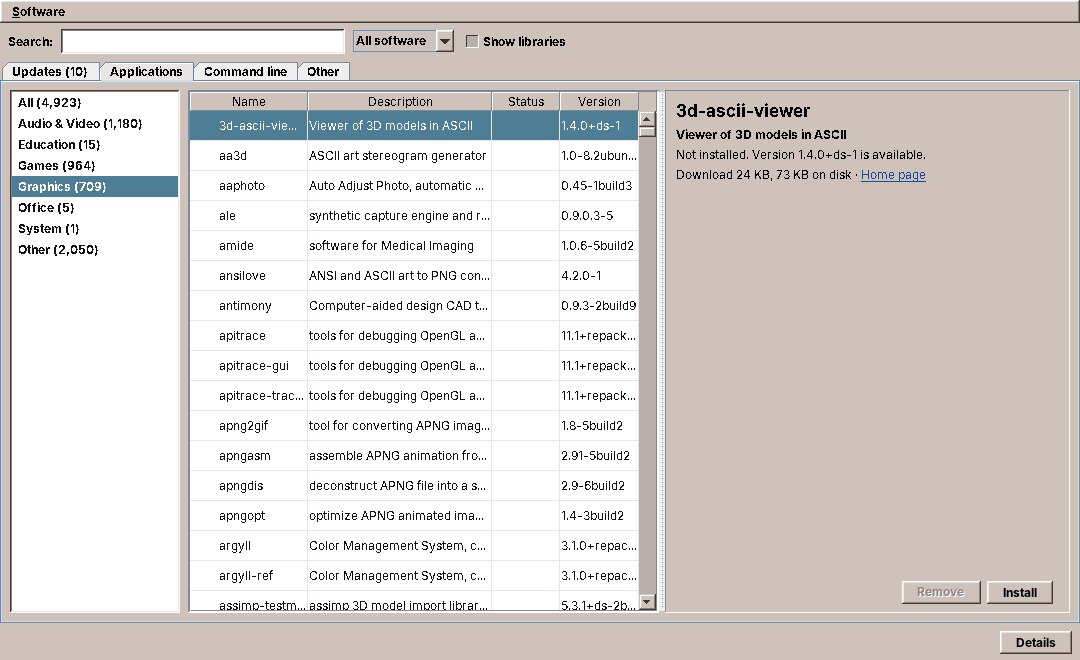
Software is the program that installs, updates and removes software on amadeOS. Its window has a tab for the waiting updates and tabs for everything the Debian repositories offer: applications, command-line programs and the rest. The Front Panel's updates cell uses the same code underneath. This chapter is about the part a desktop program rarely has: changing the system as root, safely, from a program that runs as the user. It shows the three layers that share the work, how they talk to each other, and how they are tested without touching the computer's packages.
What you will learn
- Splitting a program that needs root into the user's program, a library and a small privileged helper.
- Asking for the administrator's password with pkexec and polkit, and what the answers mean.
- Following a long operation: progress lines from apt, turned into a progress bar.
- Testing all of it, the root helper included, with a fake
apt-get. - Noticing changes that other programs make to the system.
Three layers
| Layer | Runs as | What it does |
|---|---|---|
software (package amadeos-software) |
the user | The window: tabs, search, details, confirmations, the progress bar |
packages (a library in the jars of software and panel-cde) |
the user | PackageService: reads what is installed and on offer, starts the helper and follows it |
/usr/libexec/amadeos-packages (package amadeos-packages) |
root, through pkexec | A bash script that runs apt-get and nothing else |
The rule is in the interface's first lines: PackageService is the one place in amadeOS that talks to apt. The panel's updates cell (chapter 63) and the Software window both use it, and no other module parses apt's output.
package eu.amadeos.system.packages;

import java.time.Instant;
import java.util.List;
import java.util.Optional;

/**
 * The installed and available software of the system, and the operations that change it. The one place in
 * amadeOS that talks to apt: the front panel's update cell, the update window and the app store use it, no
 * other module parses apt's output.
 * <p>
 * Reading needs no privileges. Changing goes through the helper {@code /usr/libexec/amadeos-packages}, which
 * runs as root through pkexec and asks for the administrator's password (refreshing the lists does not).
 * All calls block, some for minutes, so callers run them off the event dispatch thread.
 */
public interface PackageService {

    /** The upgrades a plain upgrade would install now, from the package lists last fetched. */
    List<Change> upgrades() throws PackageException;

    /** What installing the packages would change, dependencies included. */
    List<Change> simulateInstall(List<String> names) throws PackageException;

    /** What removing the packages would change, packages that depend on them included. */
    List<Change> simulateRemove(List<String> names) throws PackageException;

    /** The packages installed on this system. */
    List<InstalledPackage> installed() throws PackageException;

    /**
     * Every package the configured repositories offer, one entry per package and architecture, without long
     * descriptions (see {@link #details}). Tens of thousands of entries on Debian; takes a few seconds.
     */
    List<PackageInfo> available() throws PackageException;

    /**
     * Every package on offer or installed, sorted by name, each in its {@link Category}: the Software
     * program's catalog. Reads all package indexes; takes a few seconds.
     */
    List<CatalogEntry> catalog() throws PackageException;

    /** One package with its long description, or empty when no repository has it. */
    Optional<PackageInfo> details(String name) throws PackageException;

    /** Packages whose name or description contains all the words, as {@code apt-cache search} finds them. */
    List<SearchHit> search(String words) throws PackageException;

    /** Fetches the package lists again ({@code apt-get update}). */
    Result refresh(ProgressListener listener);

    /**
     * Upgrades the given packages, or all upgradable ones when the list is empty.
     *
     * @param securityOnly only upgrades that come from a security archive
     */
    Result upgrade(List<String> names, boolean securityOnly, ProgressListener listener);

    Result install(List<String> names, ProgressListener listener);

    /** Removes the packages; their configuration files stay, nothing is removed automatically. */
    Result remove(List<String> names, ProgressListener listener);

    /**
     * Calls {@code onChange} (on a background thread) after the installed packages or the package lists have
     * changed, once the change has settled, until the returned handle is closed. Covers changes made by this
     * service, by apt in a terminal, by unattended-upgrades and by Debian's daily list refresh.
     */
    AutoCloseable watch(Runnable onChange);

    /**
     * When the package lists were last fetched (by the daily timer, Check now or apt in a terminal); empty when
     * there are none yet, as on a freshly built image.
     */
    Optional<Instant> lastRefresh();

    /** Whether security updates are installed automatically (unattended-upgrades through Debian's timers). */
    boolean automaticSecurityUpdates() throws PackageException;

    /** Turns automatic security updates on (installing unattended-upgrades if needed) or off. */
    Result setAutomaticSecurityUpdates(boolean on, ProgressListener listener);

    /** A line of {@code apt-cache search}. */
    record SearchHit(String name, String summary) {
    }

    /** Reading the package database failed (apt or dpkg missing, broken lists, …). */
    final class PackageException extends Exception {
        public PackageException(String message) {
            super(message);
        }
    }
}
Every method blocks, some for minutes. The interface says so, and leaves the threads to the caller: the window runs them on the background executor, the panel on a thread of its own.
Reading needs no root
Most of what Software shows can be read by any user. The installed packages come from dpkg-query, the packages on offer from apt-cache, and what an installation would bring with it from a simulation: apt-get -s install gimp prints the packages it would install, upgrade and remove, without doing anything and without root.
Apt holds these command lines and the parsers for their output, as pure functions tested with real output pasted into the tests, as in System Information (chapter 61). AptPackageService runs them through a small CommandRunner interface of its own, so that tests answer with recorded output.
Some of that output is large, every package Debian offers with its fields, so it is handed over line by line instead of collected. And like every program the desktop runs, apt gets a time limit. Here the library had the bug System Information had (chapter 61): it read the output to its end and only then waited with its limit, so a command that hung without closing its output blocked for good. The output is now read on a thread of its own, and the limit covers the end of the program and of its output together:
    /**
     * Runs a read-only command and hands its output over line by line, on a thread of its own, so that the time
     * limit also holds for a command that hangs without printing or closing its output.
     */
    static void lines(List<String> command, Consumer<String> sink, Duration timeout)
            throws IOException, PackageException {
        ProcessBuilder builder = new ProcessBuilder(command);
        builder.environment().put("LC_ALL", "C.UTF-8");
        Process process = builder.start();
        process.getOutputStream().close();
        CompletableFuture<String> stderr = CompletableFuture.supplyAsync(() -> readAll(process.getErrorStream()));
        CompletableFuture<Void> stdout = CompletableFuture.runAsync(() -> {
            try (BufferedReader out = reader(process.getInputStream())) {
                String line;
                while ((line = out.readLine()) != null) sink.accept(line);
            } catch (IOException e) {
                throw new UncheckedIOException(e);
            }
        });
        long deadline = System.nanoTime() + timeout.toNanos();
        try {
            if (!process.waitFor(timeout.toNanos(), TimeUnit.NANOSECONDS)) {
                throw new TimeoutException();
            }
            stdout.get(Math.max(0, deadline - System.nanoTime()), TimeUnit.NANOSECONDS);
        } catch (TimeoutException e) {
            process.destroyForcibly();
            throw new PackageException(command.getFirst() + " did not answer");
        } catch (InterruptedException e) {
            Thread.currentThread().interrupt();
            process.destroyForcibly();
            throw new PackageException("interrupted");
        } catch (ExecutionException e) {
            process.destroyForcibly();
            if (e.getCause() instanceof UncheckedIOException io) throw io.getCause();
            if (e.getCause() instanceof RuntimeException r) throw r;
            throw new IOException(e.getCause());
        }
        if (process.exitValue() != 0) {
            throw new PackageException(errorMessage(stderr.join(), command.getFirst() + " failed"));
        }
    }
The test is the one that would have caught the bug, a program that prints one line and then hangs:
    @Test
    void theTimeLimitHoldsForACommandThatHangsWithoutClosingItsOutput() throws IOException {
        List<String> read = new ArrayList<>();
        long start = System.nanoTime();
        PackageService.PackageException e = assertThrows(PackageService.PackageException.class,
                () -> AptPackageService.lines(List.of("sh", "-c", "echo first; exec sleep 30"), read::add,
                        Duration.ofMillis(500)));
        assertEquals("sh did not answer", e.getMessage());
        assertEquals(List.of("first"), read);
        assertTrue(System.nanoTime() - start < Duration.ofSeconds(10).toNanos(), "stopped long before sleep ended");
    }
exec makes the shell become sleep, so stopping the program stops the sleep too. Otherwise the shell may run sleep as a child that keeps the output open after its parent is gone, which is the next exercise.
Changing needs root: the helper
Installing, upgrading and removing need root. The obvious ways are the wrong ones: running the whole Java program as root puts a Swing program with a web renderer and a YAML parser under root, and sudo in a terminal leaves the desktop out. amadeOS does it the way most Linux desktops do: a small program that only root may run does the change, and polkit decides who may start it.
The helper is a bash script with six commands:
#   refresh                          apt-get update (polkit: no password for the active local user)
#   upgrade [--security-only] [PKG…] all upgrades, only those from a security archive, or the given packages
#   install PKG…                     install packages (marked as installed by the user)
#   remove PKG…                      remove packages (configuration files stay, nothing is autoremoved)
#   check                            list the pending upgrades; read-only, needs no root
#   automatic-security on|off        install security updates automatically (unattended-upgrades) or not
It knows nothing of the desktop and nothing of Java. It checks its arguments, takes the dpkg lock, runs apt-get with the right options and reports in lines on standard output. Because pkexec lets any local program start it, it trusts no caller: a package name that starts with - would be an option to apt (-oDpkg::Pre-Invoke=... runs a command as root), so the script refuses anything that is not a package name. PackageService checks the names too, so that a bad name never even reaches the password dialog, and both checks have a test.
pkexec and polkit
PackageService starts the helper through pkexec, unless the program already runs as root:
    static List<String> defaultHelper() {
        String override = System.getenv(HELPER_VARIABLE);
        if (override != null && !override.isBlank()) return List.of(override.strip().split("\\s+"));
        return "root".equals(System.getProperty("user.name")) ? List.of(HELPER) : List.of("pkexec", HELPER);
    }
pkexec asks polkit whether the user may run the program. The answer is in the policy file the package installs, /usr/share/polkit-1/actions/eu.amadeos.packages.policy; without its descriptions and their translations, it says:
<action id="eu.amadeos.packages.manage">
  <defaults>
    <allow_any>no</allow_any>
    <allow_inactive>no</allow_inactive>
    <allow_active>auth_admin_keep</allow_active>
  </defaults>
  <annotate key="org.freedesktop.policykit.exec.path">/usr/libexec/amadeos-packages</annotate>
</action>
Only the user at the computer (allow_active) may do it, and only with an administrator's password (auth_admin), which polkit then remembers for a few minutes (_keep), so installing two programs in a row asks once. The password dialog itself is the polkit agent of the session, a Motif dialog in session. A rule in /usr/share/polkit-1/rules.d makes one exception: amadeos-packages refresh only fetches the package lists and changes no software, so the active local user may run it without a password. That is Check now in the panel's updates cell.
The environment variable AMADEOS_PACKAGES_HELPER replaces the helper command, for trying the desktop on a computer without the package. pkexec starts the helper with a clean environment, so the variables the tests use to fake apt-get cannot reach a real run.
Following the helper
An upgrade takes minutes, and the user wants to see it move. apt reports its progress in machine-readable lines when asked to (-o APT::Status-Fd=3): dlstatus: while it downloads, pmstatus: while dpkg installs, pmerror: when a package fails. The helper passes them on, adds its own lines starting with @@ (@@done, @@reboot-required, @@error locked ...), and sends apt's messages to standard error and its log file /var/log/amadeos-packages.log.
One pure function reads a line of standard output into a sealed type:
    public static Line parse(String line) {
        if (line.startsWith("@@")) {
            String body = line.substring(2);
            int space = body.indexOf(' ');
            String word = space < 0 ? body : body.substring(0, space);
            String rest = space < 0 ? "" : body.substring(space + 1);
            switch (word) {
                case "done" -> {
                    return new Done();
                }
                case "nothing" -> {
                    return new Nothing();
                }
                case "reboot-required" -> {
                    return new RebootRequired();
                }
                case "error" -> {
                    int idEnd = rest.indexOf(' ');
                    return idEnd < 0 ? new Error(rest, "") : new Error(rest.substring(0, idEnd), rest.substring(idEnd + 1));
                }
                default -> {
                    return new Text(line);
                }
            }
        }
        // TYPE:ITEM:PERCENT:MESSAGE; the message may contain colons.
        String[] f = line.split(":", 4);
        if (f.length == 4) {
            switch (f[0]) {
                case "dlstatus" -> {
                    return new Status(new Progress(Progress.Phase.DOWNLOAD, percent(f[2]), f[1], f[3]));
                }
                case "pmstatus" -> {
                    return new Status(new Progress(Progress.Phase.INSTALL, percent(f[2]), f[1], f[3]));
                }
                case "pmerror" -> {
                    return new Failure(f[1], f[3]);
                }
                default -> {
                }
            }
        }
        return new Text(line);
    }
runHelper starts the helper, reads apt's messages on a second thread and the status lines on its own, and hands both to a ProgressListener one call at a time. A switch over the sealed type makes the compiler check that every kind of line is handled:
    /**
     * Runs the helper and follows it: status lines become {@link Progress}, apt's messages (its standard error)
     * go to the listener line by line. The listener is called from this thread and a reader thread, one call
     * at a time.
     */
    private Result runHelper(List<String> args, ProgressListener listener) {
        List<String> command = new ArrayList<>(helper);
        command.addAll(args);
        LOGGER.info("Starting " + String.join(" ", command));
        Object lock = new Object();
        try {
            ProcessBuilder builder = new ProcessBuilder(command);
            builder.environment().putAll(helperEnvironment);
            Process process = builder.start();
            process.getOutputStream().close();
            CompletableFuture<Void> messages = CompletableFuture.runAsync(() -> forEachLine(process.getErrorStream(),
                    line -> {
                        synchronized (lock) {
                            listener.message(line);
                        }
                    }));
            boolean done = false;
            boolean reboot = false;
            String error = null;
            String errorId = null;
            try (BufferedReader out = reader(process.getInputStream())) {
                String line;
                while ((line = out.readLine()) != null) {
                    switch (HelperOutput.parse(line)) {
                        case HelperOutput.Status status -> {
                            synchronized (lock) {
                                listener.progress(status.progress());
                            }
                        }
                        case HelperOutput.Failure failure -> {
                            error = failure.item() + ": " + failure.message();
                            String text = "E: " + error;
                            synchronized (lock) {
                                listener.message(text);
                            }
                        }
                        case HelperOutput.Error e -> {
                            errorId = e.id();
                            error = e.message();
                        }
                        case HelperOutput.RebootRequired ignored -> reboot = true;
                        case HelperOutput.Done ignored -> done = true;
                        case HelperOutput.Nothing ignored -> {
                        }
                        case HelperOutput.Text text -> {
                            synchronized (lock) {
                                listener.message(text.text());
                            }
                        }
                    }
                }
            }
            int exit = process.waitFor();
            messages.join();
            if (exit == 0 && done) return new Result(Result.Status.DONE, "", reboot);
            if ("locked".equals(errorId) || exit == 3) {
                return new Result(Result.Status.LOCKED, error != null ? error : "another package operation is running",
                        false);
            }
            // pkexec's own codes: 126 when the authentication was dismissed, 127 when polkit refused it.
            if (exit == 126 || exit == 127) {
                return new Result(Result.Status.NOT_AUTHORIZED,
                        exit == 126 ? "authentication dismissed" : "not authorized", false);
            }
            return new Result(Result.Status.FAILED, error != null ? error : "exit code " + exit, reboot);
        } catch (IOException e) {
            LOGGER.log(Level.WARNING, "Cannot start " + command.getFirst(), e);
            return Result.failed(e.getMessage());
        } catch (InterruptedException e) {
            Thread.currentThread().interrupt();
            return Result.failed("interrupted");
        }
    }
The Result tells the caller how it ended, from the helper's own lines and the exit code:
| Status | When | What the user sees |
|---|---|---|
DONE |
exit code 0 and @@done |
"Installed", and a restart bar when an upgrade asked for one (@@reboot-required) |
LOCKED |
@@error locked or exit code 3 |
Another package operation is running: unattended-upgrades, or apt in a terminal. Try again later |
NOT_AUTHORIZED |
pkexec's exit code 126 (dialog closed) or 127 (refused) | Nothing in the panel, a short line in Software: closing the password dialog is a choice, not an error |
FAILED |
anything else | apt's last error, and the window opens the log |
Not CommandRunner
runHelper uses ProcessBuilder itself, not CommandRunner from amade-commons (chapter 47). CommandRunner.run returns what a program printed when it has ended; the helper's output must be read while it runs, line by line, to move the progress bar. start would fit, and the packages library predates the process package; moving it over is an exercise.
Tests with a fake apt
The helper is a script, and scripts break as easily as Java. The tests of AptPackageService run the real helper with bash, and replace only apt-get: a small script, written into a temporary directory, that prints recorded status lines and remembers its arguments. The helper takes the paths of apt-get, its log file and the reboot marker from environment variables that exist for this purpose:
    private AptPackageService service(String fail) {
        Map<String, String> env = new java.util.HashMap<>(Map.of(
                "AMADEOS_PACKAGES_APT_GET", dir.resolve("apt-get").toString(),
                "AMADEOS_PACKAGES_LOG", log.toString(),
                "AMADEOS_PACKAGES_REBOOT_FILE", rebootFile.toString()));
        if (fail != null) env.put("FAKE_APT_FAIL", fail);
        return new AptPackageService(List.of("bash", HELPER.toString()), env, command -> {
            throw new AssertionError("no read expected: " + command);
        });
    }
A test then installs a package and checks everything on the way: the progress the listener heard, apt's messages, the command line the helper built, and the log file:
    @Test
    void installReportsProgressAndMessages() throws IOException {
        Recorder recorder = new Recorder();
        Result result = service(null).install(List.of("distro-info-data"), recorder);

        assertEquals(new Result(Result.Status.DONE, "", false), result);
        assertEquals(15, recorder.progress.size());
        assertEquals(Progress.Phase.INSTALL, recorder.progress.getLast().phase());
        assertTrue(recorder.messages.contains("Setting up distro-info-data (2026.10.12) ..."));
        String call = aptCalls().getFirst();
        assertTrue(call.contains("APT::Status-Fd=3"), call);
        assertTrue(call.endsWith("-y install distro-info-data"), call);
        assertTrue(Files.readString(log).contains("Setting up distro-info-data"), "messages are logged");
    }
pkexec's answers need no polkit either. A command that exits with 126 is a dismissed password dialog:
    @Test
    void notAuthorizedWhenPkexecIsDismissed() {
        // pkexec exits with 126 when the user closes the password dialog.
        Result result = new AptPackageService(List.of("sh", "-c", "exit 126", "pkexec"), Map.of(), command -> "")
                .refresh(ProgressListener.NONE);
        assertEquals(Result.Status.NOT_AUTHORIZED, result.status());
    }
The same fake makes apt fail with a busy lock or an unknown package, so every row of the table above has a test, and none of them needs root, a network or Debian.
Knowing when something changed
Software is not the only program that changes packages. Debian fetches the package lists once a day, unattended-upgrades installs security updates in the background, and the user may run apt in a terminal. PackageService.watch calls back after any of these, so the panel's updates cell and the Software window always show the current state.
PackageWatcher watches the two directories where the state lives, /var/lib/dpkg (only its status file counts) and /var/lib/apt/lists, with Java's WatchService. An apt run writes these files many times within seconds, so the watcher waits until nothing has changed for five seconds and then calls back once:
WatchKey key = watcher.take();
if (!relevant(key)) continue;
// Wait until the changes have settled.
WatchKey next;
while ((next = watcher.poll(settleMillis, TimeUnit.MILLISECONDS)) != null) {
    relevant(next);
}
onChange.run();
The callback comes on the watcher's thread. The caller reads the new state on its own background thread and shows it on the EDT.
The window
Software is a tool program like System Information: AmadeApplication, a Guice module that binds PackageService to AptPackageService, texts in five languages. The panel starts it with --updates to open the Updates tab.
Every change asks first, with what it really does. Installing a package can bring dozens of others, and occasionally remove one; the window simulates first and shows the user what else changes before anything happens:
    /** Installs a package once the user has agreed to what else it brings (or removes). */
    void install(CatalogEntry entry) {
        background(() -> packages.simulateInstall(List.of(entry.name())), changes -> {
            String others = confirmation(entry.name(), changes, false);
            if (!others.isEmpty() && JOptionPane.showConfirmDialog(this,
                    others + "\n\n" + msg.format("confirm.install", entry.name()), getTitle(),
                    JOptionPane.OK_CANCEL_OPTION, JOptionPane.QUESTION_MESSAGE) != JOptionPane.OK_OPTION) {
                return;
            }
            perform(msg.format("progress.installing-package", entry.name()),
                    listener -> packages.install(List.of(entry.name()), listener),
                    msg.format("outcome.package-installed", entry.name()));
        }, error -> operation.end(msg.format("error.simulate", message(error))));
    }
perform runs every change the same way. The listener passes progress and messages to the EDT, the result comes back on the EDT, and afterwards the updates and the catalog are read again:
    /**
     * Runs one change through the helper: progress and apt's messages in the bar, the outcome in its status
     * line (and in a dialog when it failed), the updates and the catalog read again afterwards.
     */
    void perform(String title, Function<ProgressListener, Result> work, String doneText) {
        if (busy) return;
        setBusy(true);
        operation.begin(title);
        ProgressListener listener = new ProgressListener() {
            @Override
            public void progress(Progress progress) {
                edt.execute(() -> operation.progress(progress));
            }

            @Override
            public void message(String line) {
                edt.execute(() -> operation.message(line));
            }
        };
        background(() -> work.apply(listener), result -> finished(result, doneText),
                error -> finished(new Result(Result.Status.FAILED, message(error), false), doneText));
    }
background is the window's one helper for "work here, answer there", a CompletableFuture on the background executor that completes on the EdtExecutor from amade-commons (chapter 41):
    private <T> void background(Callable<T> work, Consumer<T> done, Consumer<Throwable> failed) {
        CompletableFuture.supplyAsync(() -> {
            try {
                return work.call();
            } catch (Exception e) {
                throw new CompletionException(e);
            }
        }, executor).whenCompleteAsync((result, error) -> {
            if (error == null) {
                done.accept(result);
            } else {
                failed.accept(error instanceof CompletionException && error.getCause() != null ? error.getCause() : error);
            }
        }, edt);
    }
Names, icons and screenshots: AppStream
A Debian package has a name and a one-line description written for administrators: gimp, "GNU Image Manipulation Program". The catalog tabs show applications the way people know them, with an icon, a description of several paragraphs and screenshots. That comes from AppStream, metadata that Debian's repositories publish beside the package lists. With the package appstream installed, apt fetches it into /var/lib/apt/lists, and Software reads it from there; an apt setting the package installs makes apt fetch the icons too.
Packages that the repositories do not describe, such as the amade applications or a .deb installed by hand, get what their installed desktop entry and metainfo file say. That is why each amade application ships a metainfo file with a description and screenshots (chapter 50): it is what Software shows for it.
Exercises
- CommandRunner for the helper. Replace the
ProcessBuilderinrunHelperwithCommandRunner.startfrom amade-commons, and let the tests pass aCommandRunnerinstead of a helper command line. Which tests become simpler? - Children that hold the output.
linesstops the program it started, but a child of that program that keeps the output open goes on running, and the reading thread waits for it.Process.descendants()lists the children; stop them too when the time is up, and write the test withsh -c 'sleep 30 & echo started'. - Remove what is no longer needed. Add the command
autoremoveto the helper and toPackageService, with a simulation first that lists what would go. What does the helper have to refuse?
Summary
- A program that changes the system as root is split in three: the user's window, a library that runs as the user, and a small helper that runs as root and trusts no caller.
- pkexec and a polkit policy decide who may run the helper; exit codes 126 and 127 mean the password dialog was closed or refused.
- apt's status lines and the helper's own
@@lines become progress and aResultthrough one pure parser and aswitchover a sealed type. - The tests run the real helper with a fake
apt-get, so the root part is tested without root. - A watcher on dpkg's and apt's directories notices changes made by any program, and calls back once they have settled.