35. Image Viewer
An image viewer looks like the simplest program on a desktop: read a file and draw it. Then the first photo from a phone lies on its side, a folder of 400 holiday pictures takes a minute to open, and a click on the map sends every place you have been to a server you never chose. amade-imageviewer handles all three. It is a program about pictures as files: the bytes the camera wrote around the pixels, the order of files in a folder, and what may leave the computer.
The program has about 4,800 lines of Java and 2,100 lines of tests. Nothing moves into amade-commons with it. It is the second program that writes into the trash, after Files, and the first that needs a library from outside to read pictures.
What you build
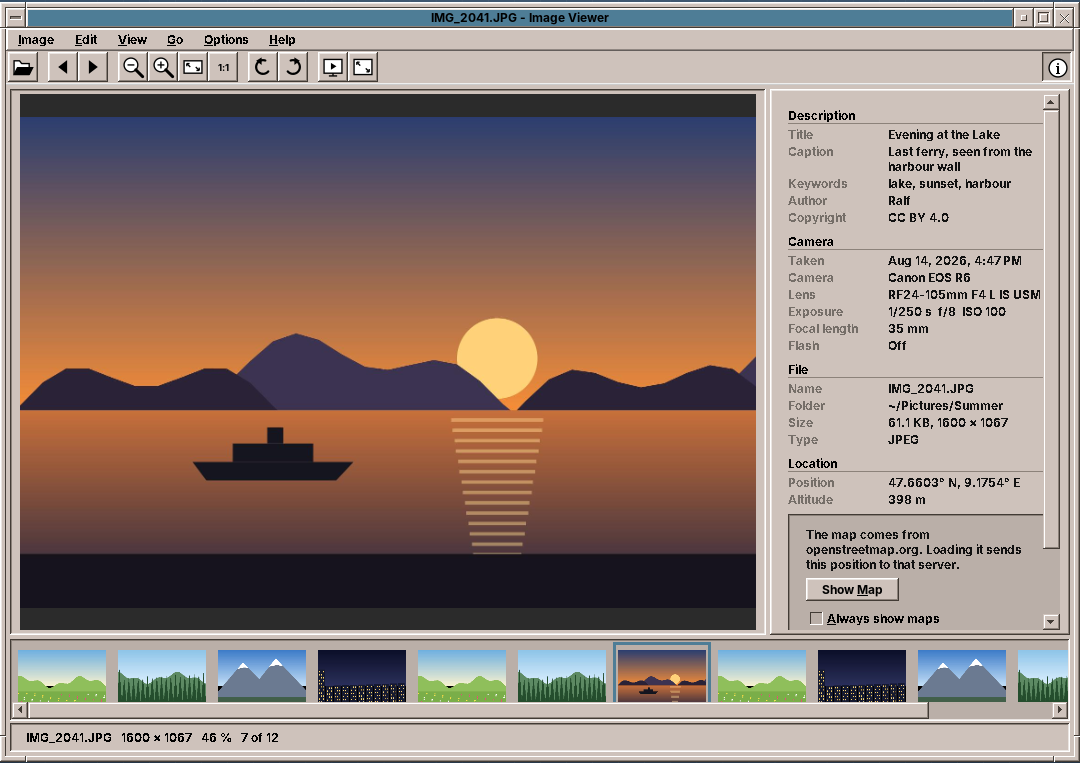
- A folder of pictures: JPEG, PNG, GIF, BMP, TIFF and WebP, in natural name order, with a film strip of thumbnails.
- Zoom: fit to the window, actual size, and zoom around the pointer; a zoomed picture is dragged.
- Orientation: pictures appear upright as the camera noted. Turns and flips are saved into the file, losslessly for JPEG.
- A sidebar with description, camera, file and location, read from XMP, IPTC and EXIF.
- A map from OpenStreetMap that loads only when the user allows it.
- Full screen and slideshow with a control bar that hides itself, pause, shuffle and loop.
- Trash, copy, print, and five languages.
What you will learn
- How EXIF orientation works, and why the eight orientations are a group of 2 × 2 matrices.
- How
jpegtranturns a JPEG without decoding it, and how to change one byte in a JPEG header in place. - How to read metadata from three standards that say the same thing, and which one to believe.
- How to load pictures in the background so the window never waits, and how to make thumbnails cheap with subsampling.
- How to draw a picture well at any size in Java2D.
- How to show a map from map tiles, and how to respect the user and the tile server while doing it.
- How to write a full-screen window with controls that come and go, and test a slideshow without waiting for it.
- Why a fat jar loses ImageIO plugins, and how to keep them.
The structure
| Package | Contents |
|---|---|
domain |
Album (the files of a folder and the current one), Orientation, Slideshow, Settings, PhotoInfo, GeoPosition, MapTiles, ZoomSteps, ImageFiles, TitleText |
metadata |
MetadataReader: from a file to a PhotoInfo |
repository |
ViewerPreferences (imageviewer.properties), TileStore (map tiles on disk) |
service |
ImageLoader, ImageTransforms, RotationSaver, ExifOrientation, Trash |
ui.main |
MainWindow, MainPresenter, MainMenuBar, ImageCanvas, FilmStrip, InfoSidebar with InfoRows and MapView, FullScreenWindow, PicturePrinter |
The presenter talks to the window through the MainView interface, as in every program of this book (chapter 10). New is how much it is given from outside: a Services record holds the loader, the metadata reader, the saver, the trash, two executors, a clock for the slideshow and a random generator. In the tests the executors run at once, the clock ticks by hand and the random generator has a seed, so the whole viewer runs without a display and without waiting.
A folder, in the right order
The user opens one picture and expects its neighbours. Album.open takes files or folders. For a single picture it takes all the pictures of its folder and starts at the one the user chose:
    /**
     * For one picture: its folder, at that picture. For a folder: its pictures, at the first. For several
     * paths: those pictures, at the first.
     */
    public static Album open(List<Path> paths) throws IOException {
        if (paths.size() == 1) {
            Path path = paths.getFirst().toAbsolutePath().normalize();
            if (Files.isDirectory(path)) return new Album(ImageFiles.inFolder(path), 0);
            List<Path> folder = path.getParent() == null ? List.of() : ImageFiles.inFolder(path.getParent());
            if (!folder.contains(path)) {
                List<Path> withFile = new ArrayList<>(folder);
                withFile.add(path);
                withFile.sort(ImageFiles.NATURAL);
                folder = withFile;
            }
            return new Album(folder, folder.indexOf(path));
        }
        List<Path> files = new ArrayList<>();
        for (Path path : paths) {
            Path p = path.toAbsolutePath().normalize();
            if (Files.isDirectory(p)) files.addAll(ImageFiles.inFolder(p));
            else files.add(p);
        }
        return new Album(files, 0);
    }
Sorting by name sounds trivial until a camera numbers its files: IMG_10 sorts before IMG_9 as text. People count, so the comparator does too. It reads a run of digits as one number, compares numbers by length first (after dropping leading zeros) and only then digit by digit, which works for numbers of any length without parsing them:
    static int compareNatural(String a, String b) {
        int i = 0, j = 0;
        while (i < a.length() && j < b.length()) {
            char ca = a.charAt(i), cb = b.charAt(j);
            if (Character.isDigit(ca) && Character.isDigit(cb)) {
                int si = i, sj = j;
                while (i < a.length() && Character.isDigit(a.charAt(i))) i++;
                while (j < b.length() && Character.isDigit(b.charAt(j))) j++;
                String na = a.substring(si, i).replaceFirst("^0+(?=.)", "");
                String nb = b.substring(sj, j).replaceFirst("^0+(?=.)", "");
                int byValue = na.length() != nb.length() ? Integer.compare(na.length(), nb.length()) : na.compareTo(nb);
                if (byValue != 0) return byValue;
            } else {
                int byLetter = Character.compare(Character.toLowerCase(ca), Character.toLowerCase(cb));
                if (byLetter != 0) return byLetter;
                i++;
                j++;
            }
        }
        return Integer.compare(a.length() - i, b.length() - j);
    }
Loading without waiting
A 24-megapixel JPEG takes a few hundred milliseconds to decode. The presenter never does it on the event dispatch thread. It asks the background executor, and when the picture is ready it checks that the user still wants it. In a fast flip through a folder most pictures are decoded and then not shown:
    private void showCurrent() {
        Optional<Path> current = album.current();
        if (current.isEmpty()) {
            shown = null;
            view.showNoPicture(msg.get("window.title"), msg.get("empty.hint"));
            return;
        }
        Path path = current.get();
        Picture cached = cache.get(path);
        if (cached != null) {
            display(cached);
        } else {
            load(path, true);
        }
    }

    /** Decodes in the background; shows the picture if it is still the current one when it is ready. */
    private void load(Path path, boolean show) {
        if (!loading.add(path)) return;
        services.background().execute(() -> {
            Picture picture = null;
            String error = null;
            try {
                long bytes = Files.size(path);
                picture = new Picture(path, services.loader().load(path), services.metadata().read(path), bytes);
            } catch (ImageLoader.UnsupportedFormatException e) {
                error = msg.get("error.format");
            } catch (IOException | RuntimeException | OutOfMemoryError e) {
                LOG.warn("Could not load {}", path, e);
                error = e instanceof OutOfMemoryError ? msg.get("error.memory") : e.getMessage();
            }
            Picture loaded = picture;
            String failure = error;
            services.ui().execute(() -> {
                loading.remove(path);
                if (loaded != null) remember(loaded);
                if (!path.equals(album.current().orElse(null))) return;
                if (loaded != null) {
                    display(loaded);
                } else if (show) {
                    shown = null;
                    view.showNoPicture(path.getFileName().toString(), msg.format("error.load",
                            path.getFileName(), failure));
                }
            });
        });
    }
Decoded pictures go into a small cache of the current picture and its neighbours, and after each picture the presenter loads both neighbours in advance, so the arrow key usually finds the next picture ready. OutOfMemoryError is caught on purpose: a 200-megapixel panorama should give a message, not end the program.
Thumbnails by subsampling
The film strip needs a picture of 88 pixels for each file. Decoding the whole file and scaling it down would take as long as showing every picture of the folder. ImageIO can do better: ImageReadParam.setSourceSubsampling makes the reader decode only every n-th pixel of every n-th row. For JPEG that skips most of the work:
    /**
     * A small picture for the film strip, at most {@code box} pixels wide and high, turned the way it is shown.
     * Only every n-th pixel of large pictures is read, which makes it quick even for 50 megapixels.
     */
    public BufferedImage thumbnail(Path file, int box, Orientation orientation) throws IOException {
        try (ImageInputStream in = ImageIO.createImageInputStream(file.toFile())) {
            ImageReader reader = reader(in, file);
            try {
                reader.setInput(in, true, true);
                int width = reader.getWidth(0), height = reader.getHeight(0);
                int step = Math.max(1, Math.min(width, height) / (box * 2));
                ImageReadParam param = reader.getDefaultReadParam();
                param.setSourceSubsampling(step, step, 0, 0);
                BufferedImage small = reader.read(0, param);
                return ImageTransforms.scaleToFit(ImageTransforms.apply(small, orientation), box);
            } finally {
                reader.dispose();
            }
        }
    }
The film strip is a JList whose cell renderer asks Thumbnails for each cell it paints, so only visible cells cost anything. A missing thumbnail is made on a background thread, and the list repaints when it is ready. The last 300 are kept, in a LinkedHashMap in access order.
Upright pictures
A camera does not turn the pixels when you hold it upright. It writes the picture as the sensor sees it and adds a note, the EXIF tag Orientation, with a value from 1 to 8. Value 6 means "turn a quarter clockwise to see it right". A viewer that ignores the tag shows every portrait photo on its side.
The eight values are all the ways to put a rectangle back onto its frame: four turns, each with or without a mirror. They form a group. Two of them in a row are again one of them, and each has an inverse. The viewer needs exactly that: the camera's orientation, followed by the user's turns. So Orientation is an enum of the eight, each a 2 × 2 matrix of 0, 1 and −1, and then multiplies matrices:
package eu.amadeos.apps.imageviewer.domain;

import java.util.List;
import java.util.Optional;

/**
 * How a picture is turned before it is shown: one of the eight ways to lay a rectangle onto its place, each a
 * mirror image (or not) followed by a number of quarter turns clockwise. EXIF calls them orientations 1 to 8;
 * the user's rotations and flips combine with them by {@link #then}.
 *
 * <p>Each orientation is a 2 × 2 matrix on screen coordinates (x to the right, y down).
 */
public enum Orientation {
    NORMAL(0, false, 1, null),
    MIRROR(0, true, 2, "-flip horizontal"),
    ROTATE_180(2, false, 3, "-rotate 180"),
    FLIP(2, true, 4, "-flip vertical"),
    TRANSPOSE(3, true, 5, "-transpose"),
    ROTATE_90(1, false, 6, "-rotate 90"),
    TRANSVERSE(1, true, 7, "-transverse"),
    ROTATE_270(3, false, 8, "-rotate 270");

    private final int turns;
    private final boolean mirrored;
    private final int exif;
    private final String jpegtran;

    Orientation(int turns, boolean mirrored, int exif, String jpegtran) {
        this.turns = turns;
        this.mirrored = mirrored;
        this.exif = exif;
        this.jpegtran = jpegtran;
    }

    /** Quarter turns clockwise, after the mirroring. */
    public int turns() {
        return turns;
    }

    /** Mirrored left to right before the turns. */
    public boolean mirrored() {
        return mirrored;
    }

    /** The EXIF orientation, 1 to 8. */
    public int exif() {
        return exif;
    }

    /** True if width and height change places. */
    public boolean swapsSides() {
        return turns % 2 == 1;
    }

    /** The options for {@code jpegtran} that turn the pixels this way; none for {@link #NORMAL}. */
    public List<String> jpegtranOptions() {
        return jpegtran == null ? List.of() : List.of(jpegtran.split(" "));
    }

    /** The orientation of an EXIF value; unknown values count as normal. */
    public static Orientation ofExif(int value) {
        for (Orientation o : values()) {
            if (o.exif == value) return o;
        }
        return NORMAL;
    }

    /** The matrix {a, b, c, d}: x' = a x + b y, y' = c x + d y. */
    public int[] matrix() {
        // mirror: x -> -x; quarter turn clockwise: (x, y) -> (-y, x)
        int a = mirrored ? -1 : 1, b = 0, c = 0, d = 1;
        for (int i = 0; i < turns; i++) {
            int na = -c, nb = -d, nc = a, nd = b;
            a = na;
            b = nb;
            c = nc;
            d = nd;
        }
        return new int[]{a, b, c, d};
    }

    /** This orientation followed by {@code next}. */
    public Orientation then(Orientation next) {
        int[] m = matrix();
        int[] n = next.matrix();
        int[] product = {
                n[0] * m[0] + n[1] * m[2], n[0] * m[1] + n[1] * m[3],
                n[2] * m[0] + n[3] * m[2], n[2] * m[1] + n[3] * m[3]};
        return ofMatrix(product).orElseThrow();
    }

    public Orientation rotateRight() {
        return then(ROTATE_90);
    }

    public Orientation rotateLeft() {
        return then(ROTATE_270);
    }

    /** Mirrored left to right, as seen on the screen. */
    public Orientation flipHorizontally() {
        return then(MIRROR);
    }

    /** Mirrored top to bottom, as seen on the screen. */
    public Orientation flipVertically() {
        return then(FLIP);
    }

    /** The orientation that undoes this one. */
    public Orientation inverse() {
        for (Orientation o : values()) {
            if (then(o) == NORMAL) return o;
        }
        throw new IllegalStateException();
    }

    private static Optional<Orientation> ofMatrix(int[] matrix) {
        for (Orientation o : values()) {
            if (java.util.Arrays.equals(o.matrix(), matrix)) return Optional.of(o);
        }
        return Optional.empty();
    }
}
There is no table of 64 combinations to get wrong. The tests check the group laws instead: four right turns are no turn, a mirror twice is no mirror, and every orientation has an inverse.
Drawing a turned picture is an AffineTransform from the same matrix, moved so that the turned picture starts at (0, 0):
    /**
     * Maps a picture of {@code width} × {@code height} pixels, turned by {@code orientation}, onto the rectangle
     * from (0, 0) that it covers afterwards (width and height swapped for quarter turns).
     */
    public static AffineTransform affine(Orientation orientation, int width, int height) {
        int[] m = orientation.matrix();
        double targetWidth = orientation.swapsSides() ? height : width;
        double targetHeight = orientation.swapsSides() ? width : height;
        double cx = width / 2.0, cy = height / 2.0;
        return new AffineTransform(m[0], m[2], m[1], m[3],
                targetWidth / 2 - (m[0] * cx + m[1] * cy),
                targetHeight / 2 - (m[2] * cx + m[3] * cy));
    }
Pitfall: the order of the matrix in AffineTransform
new AffineTransform(m00, m10, m01, m11, m02, m12) takes the matrix column by column, not row by row. The code above passes m[0], m[2], m[1], m[3] for a matrix stored as rows {a, b, c, d}. Pass it row by row and every quarter turn goes the wrong way, which a test with a picture that is red on the left and blue on the right finds at once.
Saving a turn without loss
Decoding a JPEG, turning the pixels and encoding it again costs quality each time. JPEG stores the picture in blocks of 8 × 8 pixels, compressed one by one, and a block can be turned or mirrored in its compressed form. The program jpegtran from libjpeg-turbo does exactly that. The orientation maps directly to its options (-rotate 90, -transpose and so on), and CommandRunner from amade-commons (chapter 47) runs it with a time limit:
    private boolean saveJpeg(Path file, Orientation total) throws IOException, InterruptedException {
        Path part = partFile(file);
        boolean trimmed = false;
        try {
            if (total != Orientation.NORMAL) {
                // -perfect refuses pictures whose edge blocks cannot be turned; then -trim drops those blocks.
                ProgramResult result = jpegtran(total, "-perfect", file, part);
                if (!result.succeeded()) {
                    result = jpegtran(total, "-trim", file, part);
                    if (!result.succeeded()) throw new IOException(result.failure("jpegtran"));
                    trimmed = true;
                }
            } else {
                Files.copy(file, part, StandardCopyOption.REPLACE_EXISTING);
            }
            byte[] jpeg = Files.readAllBytes(part);
            if (ExifOrientation.write(jpeg, 1)) Files.write(part, jpeg);
            Files.move(part, file, StandardCopyOption.REPLACE_EXISTING, StandardCopyOption.ATOMIC_MOVE);
            return trimmed;
        } finally {
            Files.deleteIfExists(part);
        }
    }

    private ProgramResult jpegtran(Orientation turn, String edges, Path in, Path out)
            throws IOException, InterruptedException {
        List<String> command = new ArrayList<>(List.of("jpegtran", "-copy", "all", edges));
        command.addAll(turn.jpegtranOptions());
        command.addAll(List.of("-outfile", out.toString(), in.toString()));
        try {
            return runner.run(command, Duration.ofSeconds(60));
        } catch (ProgramMissingException e) {
            throw new JpegtranMissingException();
        }
    }
Three details matter:
- The edges. If the width or height is not a multiple of the block size, the partial blocks at the edge cannot be turned.
-perfectthen fails rather than doing something lossy. The saver then tries-trim, which drops those few rows or columns, and the presenter tells the user. - The note.
jpegtran -copy allkeeps all metadata, including the old orientation tag. The pixels are upright now, so the tag must say 1, or other viewers turn the picture a second time. - Safety. The result is written to a
.partfile next to the original and moved over it atomically. If anything fails, the original is untouched.
The orientation tag is one 16-bit number in the TIFF structure inside the JPEG's APP1 segment. Rewriting the file with a metadata library for that would be a lot of risk for two bytes. ExifOrientation walks the JPEG segments, finds the TIFF header, reads its byte order (II for Intel, MM for Motorola) and changes the value in place:
    static Optional<Entry> find(byte[] jpeg) {
        if (jpeg.length < 4 || (jpeg[0] & 0xff) != 0xFF || (jpeg[1] & 0xff) != 0xD8) return Optional.empty();
        int pos = 2;
        while (pos + 4 <= jpeg.length && (jpeg[pos] & 0xff) == 0xFF) {
            int marker = jpeg[pos + 1] & 0xff;
            if (marker == 0xDA || marker == 0xD9) break; // the picture data begins: no more headers
            int length = u16(jpeg, pos + 2, false);
            int data = pos + 4;
            if (marker == 0xE1 && length >= 8 && data + 6 <= jpeg.length
                    && new String(jpeg, data, 6, java.nio.charset.StandardCharsets.ISO_8859_1).equals("Exif\0\0")) {
                return inTiff(jpeg, data + 6, Math.min(jpeg.length, pos + 2 + length));
            }
            pos += 2 + length;
        }
        return Optional.empty();
    }
The test runs the real jpegtran on a picture whose left half is red and right half blue, with orientation 6, and a turn right by the user: a half turn in all, so blue must now be on the left. Where jpegtran is not installed, the test skips itself instead of failing, so building the application never needs it; to really run it, install libjpeg-turbo-progs (CI does). The package of the application only recommends it: without it, turning a JPEG still works on screen, and saving the turn says that jpegtran is missing.
    @Test
    void jpegIsTurnedByJpegtranAndItsOrientationReset() throws Exception {
        assumeJpegtran();
        Path file = TestImages.jpeg(dir.resolve("b.jpg"), TestImages.halves(64, 32),
                new TestImages.Exif().camera("Canon", "EOS").orientation(6).build());
        boolean trimmed = new RotationSaver(CommandRunner.system(), loader)
                .save(file, Orientation.ROTATE_90, Orientation.ROTATE_90);
        assertFalse(trimmed);
        byte[] bytes = Files.readAllBytes(file);
        assertEquals(Optional.of(1), ExifOrientation.read(bytes));
        BufferedImage turned = ImageIO.read(file.toFile());
        // EXIF 6 and a turn right are a half turn: blue is now left.
        assertEquals(64, turned.getWidth());
        assertTrue(blue(turned.getRGB(8, 16)));
        assertTrue(red(turned.getRGB(56, 16)));
    }
PNG and BMP are lossless anyway; they are turned and written again with ImageIO. GIF, TIFF and WebP are not saved turned. GIF could lose its animation, and ImageIO has no WebP writer.
What the camera wrote
A photo can carry its description in three places:
- EXIF: the camera's technical data, with a few text fields.
- IPTC: the press agencies' fields from the 1990s, with caption, keywords and by-line.
- XMP: Adobe's XML packet, with Dublin Core titles in several languages.
Photo programs write one, two or all three, not always alike. metadata-extractor reads them all into directories of tags. MetadataReader decides which value counts: XMP first, because it is the newest and what photo programs edit, then IPTC, then EXIF.
    PhotoInfo of(Metadata metadata) {
        ExifIFD0Directory ifd0 = metadata.getFirstDirectoryOfType(ExifIFD0Directory.class);
        ExifSubIFDDirectory exif = metadata.getFirstDirectoryOfType(ExifSubIFDDirectory.class);
        IptcDirectory iptc = metadata.getFirstDirectoryOfType(IptcDirectory.class);
        XmpDirectory xmpDirectory = metadata.getFirstDirectoryOfType(XmpDirectory.class);
        XMPMeta xmp = xmpDirectory == null ? null : xmpDirectory.getXMPMeta();

        Optional<String> title = TitleText.first(Arrays.asList(
                localized(xmp, "title"),
                string(iptc, IptcDirectory.TAG_OBJECT_NAME),
                string(iptc, IptcDirectory.TAG_HEADLINE),
                description(ifd0, ExifDirectoryBase.TAG_WIN_TITLE)));
        Optional<String> caption = TitleText.first(Arrays.asList(
                localized(xmp, "description"),
                string(iptc, IptcDirectory.TAG_CAPTION),
                string(ifd0, ExifDirectoryBase.TAG_IMAGE_DESCRIPTION),
                description(ifd0, ExifDirectoryBase.TAG_WIN_COMMENT)))
                .filter(c -> !c.equals(title.orElse(null)));
        Optional<String> author = TitleText.first(Arrays.asList(
                arrayItems(xmp, "creator").stream().findFirst().orElse(null),
                string(iptc, IptcDirectory.TAG_BY_LINE),
                string(ifd0, ExifDirectoryBase.TAG_ARTIST),
                description(ifd0, ExifDirectoryBase.TAG_WIN_AUTHOR)));
        Optional<String> copyright = TitleText.first(Arrays.asList(
                localized(xmp, "rights"),
                string(iptc, IptcDirectory.TAG_COPYRIGHT_NOTICE),
                string(ifd0, ExifDirectoryBase.TAG_COPYRIGHT)));

        return new PhotoInfo(title, caption, keywords(xmp, iptc, ifd0), author, copyright,
                taken(exif, ifd0), camera(ifd0), TitleText.clean(string(exif, ExifDirectoryBase.TAG_LENS_MODEL)),
                exposure(exif), positive(exif, ExifDirectoryBase.TAG_FNUMBER),
                integer(exif, ExifDirectoryBase.TAG_ISO_EQUIVALENT), positive(exif, ExifDirectoryBase.TAG_FOCAL_LENGTH),
                integer(exif, ExifDirectoryBase.TAG_35MM_FILM_EQUIV_FOCAL_LENGTH).filter(f -> f > 0),
                flash(exif), orientation(ifd0), position(metadata), tags(metadata));
    }
TitleText.first takes the first value that is a real text. Many cameras fill the description with their own name, so a list of placeholders is ignored:
    private static final Set<String> PLACEHOLDERS = Set.of("olympus digital camera", "sony dsc", "digital camera",
            "default", "image", "picture", "photo", "untitled", "dcim", "exif_jpeg_picture", "exif_jpeg_422",
            "minolta digital camera", "konica minolta digital camera", "samsung digital camera",
            "kodak digital still camera", "sanyo digital camera", "camera", "hdr", "jpeg", "screenshot");
Numbers are stored as rationals and need care too. An exposure time of 1/250 s is the rational 1/250, but some cameras write 10/2500 and some 0.004. The reader writes short times as the photographer says them:
    /** "1/250" for short exposures, "2" or "2.5" for long ones (in seconds). */
    static Optional<String> exposure(ExifSubIFDDirectory exif) {
        Rational time = exif == null ? null : exif.getRational(ExifDirectoryBase.TAG_EXPOSURE_TIME);
        if (time == null || time.getNumerator() <= 0 || time.getDenominator() <= 0) return Optional.empty();
        double seconds = time.doubleValue();
        if (seconds < 0.5) return Optional.of("1/" + Math.round(1 / seconds));
        return Optional.of(String.valueOf(Math.round(seconds * 10) / 10.0).replaceFirst("\\.0$", ""));
    }
A GPS position of exactly 0° N, 0° E, a place in the Atlantic, is what some phones write when they have none, so it counts as no position.
InfoRows turns a PhotoInfo into the translated sections of the sidebar. It knows nothing of Swing, so most sidebar tests read its rows directly:
    public List<Section> sections(Shown shown) {
        PhotoInfo info = shown.picture().info();
        List<Section> sections = new ArrayList<>();
        List<Row> description = new ArrayList<>();
        add(description, "info.title", info.title());
        add(description, "info.caption", info.caption());
        if (!info.keywords().isEmpty()) add(description, "info.keywords", Optional.of(String.join(", ", info.keywords())));
        add(description, "info.author", info.author());
        add(description, "info.copyright", info.copyright());
        if (!description.isEmpty()) sections.add(new Section(msg.get("info.section.description"), description));

        List<Row> camera = new ArrayList<>();
        add(camera, "info.taken", info.taken().map(t ->
                t.format(DateTimeFormatter.ofLocalizedDateTime(FormatStyle.MEDIUM, FormatStyle.SHORT).withLocale(locale))));
        add(camera, "info.camera", info.camera());
        add(camera, "info.lens", info.lens());
        add(camera, "info.exposure", exposure(info));
        add(camera, "info.focal-length", focalLength(info));
        add(camera, "info.flash", info.flash().map(f -> msg.get(f ? "info.flash.on" : "info.flash.off")));
        if (!camera.isEmpty()) sections.add(new Section(msg.get("info.section.camera"), camera));

        Path path = shown.picture().path();
        List<Row> file = new ArrayList<>();
        add(file, "info.name", Optional.of(path.getFileName().toString()));
        add(file, "info.folder", Optional.ofNullable(path.getParent()).map(InfoRows::homeRelative));
        // Pixel counts as plain digits: "4000 × 3000", not "4,000 × 3,000".
        add(file, "info.size", Optional.of(msg.format("info.size.value", bytes(shown.picture().bytes()),
                String.valueOf(shown.width()), String.valueOf(shown.height()))));
        add(file, "info.type", Optional.of(type(path)));
        sections.add(new Section(msg.get("info.section.file"), file));

        info.position().ifPresent(position -> {
            List<Row> location = new ArrayList<>();
            location.add(new Row(msg.get("info.position"), position.displayText(locale)));
            position.altitude().ifPresent(a -> location.add(new Row(msg.get("info.altitude"),
                    NumberFormat.getIntegerInstance(locale).format(Math.round(a)) + " m")));
            sections.add(new Section(msg.get("info.section.location"), location));
        });
        return sections;
    }
Numbers that are not quantities
Messages.format formats numbers for the language, so 1600 becomes 1,600 in English and 1.600 in German. That is right for a file size, and wrong for a picture of 1600 × 1067 pixels, which reads like a decimal in German. Pixel counts are passed as strings.
Drawing a picture well
ImageCanvas keeps a scale and the picture point at the centre of the view. Zooming around the pointer means keeping the picture point under the pointer where it was:
    public void zoom(ZoomCommand command) {
        if (image == null) return;
        Point middle = new Point(getWidth() / 2, getHeight() / 2);
        switch (command) {
            case IN -> zoomAt(ZoomSteps.in(scale()), middle);
            case OUT -> zoomAt(ZoomSteps.out(scale()), middle);
            case ACTUAL -> zoomAt(1, middle);
            case FIT -> {
                fit = true;
                centreX = displayWidth() / 2.0;
                centreY = displayHeight() / 2.0;
                repaint();
                reportScale();
            }
        }
    }

    /** Zooms so that the picture point under {@code at} stays under it. */
    private void zoomAt(double newFactor, Point at) {
        double old = scale();
        double px = centreX + (at.x - getWidth() / 2.0) / old;
        double py = centreY + (at.y - getHeight() / 2.0) / old;
        fit = false;
        factor = Math.clamp(newFactor, ZoomSteps.MIN, ZoomSteps.MAX);
        centreX = px - (at.x - getWidth() / 2.0) / factor;
        centreY = py - (at.y - getHeight() / 2.0) / factor;
        clampCentre();
        repaint();
        reportScale();
    }
Scaling down is where Java2D needs help. Bilinear interpolation looks at four neighbouring pixels. Scaled to a fifth, a picture loses 21 of every 25 pixels unseen, and fine detail such as grass or text starts to shimmer. The canvas halves the picture step by step, each step averaging four pixels into one, and scales the rest bilinearly. That comes close to true averaging at a fraction of its cost:
    /** Halves the picture step by step, then scales the rest bilinearly: close to area averaging, but fast. */
    static BufferedImage smoothScale(BufferedImage source, double scale) {
        int targetW = Math.max(1, (int) Math.round(source.getWidth() * scale));
        int targetH = Math.max(1, (int) Math.round(source.getHeight() * scale));
        BufferedImage current = source;
        int w = source.getWidth(), h = source.getHeight();
        do {
            w = Math.max(targetW, w / 2);
            h = Math.max(targetH, h / 2);
            BufferedImage step = new BufferedImage(w, h, current.getColorModel().hasAlpha()
                    ? BufferedImage.TYPE_INT_ARGB : BufferedImage.TYPE_INT_RGB);
            Graphics2D g = step.createGraphics();
            g.setRenderingHint(RenderingHints.KEY_INTERPOLATION, RenderingHints.VALUE_INTERPOLATION_BILINEAR);
            g.drawImage(current, 0, 0, w, h, null);
            g.dispose();
            current = step;
        } while (w != targetW || h != targetH);
        return current;
    }
The smooth copy is computed once per size and kept. While the window is resized, the canvas draws the quick bilinear version and computes the good one when the size has settled for 150 milliseconds:
    @Override
    protected void paintComponent(Graphics g0) {
        Graphics2D g = (Graphics2D) g0.create();
        g.setColor(getBackground());
        g.fillRect(0, 0, getWidth(), getHeight());
        if (image == null) {
            paintMessage(g);
            g.dispose();
            return;
        }
        if (fit) clampCentre();
        double scale = scale();
        double x = getWidth() / 2.0 - centreX * scale;
        double y = getHeight() / 2.0 - centreY * scale;
        if (scale < 1) {
            BufferedImage small = scaledImage(scale);
            if (small != null) {
                g.drawImage(small, (int) Math.round(x), (int) Math.round(y), null);
            } else {
                // Resizing: a quick picture now, the good one when the size settles.
                g.setRenderingHint(RenderingHints.KEY_INTERPOLATION, RenderingHints.VALUE_INTERPOLATION_BILINEAR);
                drawTurned(g, x, y, scale);
                rescale.restart();
            }
        } else {
            // Enlarged: hard pixels from 200 % on, as image editors show them.
            g.setRenderingHint(RenderingHints.KEY_INTERPOLATION, scale >= 2
                    ? RenderingHints.VALUE_INTERPOLATION_NEAREST_NEIGHBOR : RenderingHints.VALUE_INTERPOLATION_BILINEAR);
            drawTurned(g, x, y, scale);
        }
        g.dispose();
        reportScale();
    }
From 200 % on, the canvas shows hard pixels (nearest neighbour), because someone who zooms that far wants to see the pixels.
The map
Tiles
OpenStreetMap serves its map as square pictures of 256 pixels, tiles. At zoom level z the world is 2^z × 2^z tiles in the Web Mercator projection. A position becomes a tile number, and the fraction is the place within the tile:
    /** The x of a longitude, in tiles (the fraction is the place within the tile). */
    public static double x(double longitude, int zoom) {
        return (longitude + 180) / 360 * (1 << zoom);
    }

    /** The y of a latitude, in tiles. */
    public static double y(double latitude, int zoom) {
        double lat = Math.toRadians(Math.clamp(latitude, -85.0511, 85.0511));
        return (1 - Math.log(Math.tan(lat) + 1 / Math.cos(lat)) / Math.PI) / 2 * (1 << zoom);
    }
MapView draws the tiles around the position and a marker on it. It asks for each missing tile once, on a background thread, and repaints when the tile arrives. A tile that failed is not asked for again while the map shows, so a missing network causes no stream of requests:
    @Override
    protected void paintComponent(Graphics g0) {
        Graphics2D g = (Graphics2D) g0.create();
        g.setColor(new Color(0xf2efe9));
        g.fillRect(0, 0, getWidth(), getHeight());
        if (position == null) {
            g.dispose();
            return;
        }
        double left = centreX - getWidth() / 2.0 / MapTiles.SIZE;
        double top = centreY - getHeight() / 2.0 / MapTiles.SIZE;
        int firstX = (int) Math.floor(left), firstY = (int) Math.floor(top);
        int lastX = (int) Math.floor(left + (double) getWidth() / MapTiles.SIZE);
        int lastY = (int) Math.floor(top + (double) getHeight() / MapTiles.SIZE);
        for (int ty = firstY; ty <= lastY; ty++) {
            for (int tx = firstX; tx <= lastX; tx++) {
                int px = (int) Math.round((tx - left) * MapTiles.SIZE);
                int py = (int) Math.round((ty - top) * MapTiles.SIZE);
                tile(zoom, tx, ty).ifPresent(image -> g.drawImage(image, px, py, null));
            }
        }
        g.setRenderingHint(RenderingHints.KEY_ANTIALIASING, RenderingHints.VALUE_ANTIALIAS_ON);
        double mx = (MapTiles.x(position.longitude(), zoom) - left) * MapTiles.SIZE;
        double my = (MapTiles.y(position.latitude(), zoom) - top) * MapTiles.SIZE;
        paintMarker(g, mx, my);
        paintCredit(g);
        g.dispose();
    }
Being a good guest
The tile servers of openstreetmap.org are run by volunteers and donations. Their usage policy asks programs to name themselves with a real User-Agent, to keep tiles for a while, not to open many connections, and to show the attribution. TileStore does all of it: it names the program and its version, allows two downloads at a time with a semaphore, keeps tiles for seven days in the cache directory, and falls back to an older tile on disk when the network fails:
    /** Downloads with Java's HTTP client, as {@code amade-imageviewer/<version>}. */
    public static Download http(String version) {
        HttpClient client = HttpClient.newBuilder()
                .connectTimeout(Duration.ofSeconds(10))
                .followRedirects(HttpClient.Redirect.NORMAL)
                .build();
        String agent = "amade-imageviewer/" + version + " (amadeOS; +https://github.com/datazuul/amade-imageviewer)";
        return uri -> {
            HttpRequest request = HttpRequest.newBuilder(uri)
                    .timeout(Duration.ofSeconds(20))
                    .header("User-Agent", agent)
                    .GET()
                    .build();
            HttpResponse<byte[]> response = client.send(request, HttpResponse.BodyHandlers.ofByteArray());
            if (response.statusCode() != 200) throw new IOException("HTTP " + response.statusCode() + " for " + uri);
            return response.body();
        };
    }
    /**
     * The tile: from disk if it is younger than a week, else downloaded and kept. If the download fails, an
     * older tile on disk is better than none. Blocks; call it off the event dispatch thread.
     */
    public Optional<BufferedImage> tile(int zoom, int x, int y) throws InterruptedException {
        if (!MapTiles.exists(zoom, x, y)) return Optional.empty();
        Path file = file(zoom, x, y);
        if (fresh(file)) {
            Optional<BufferedImage> image = read(file);
            if (image.isPresent()) return image;
        }
        connections.acquire();
        try {
            byte[] png = download.get(MapTiles.uri(zoom, x, y));
            BufferedImage image = ImageIO.read(new ByteArrayInputStream(png));
            if (image == null) throw new IOException("Not a picture: " + MapTiles.uri(zoom, x, y));
            store(file, png);
            return Optional.of(image);
        } catch (IOException e) {
            LOG.info("Map tile {}/{}/{} not loaded: {}", zoom, x, y, e.getMessage());
            return read(file);
        } finally {
            connections.release();
        }
    }
The download is an interface, so the test gives the store a fake one that records its calls, and a fixed clock:
    @Test
    void tilesAreDownloadedOnceAWeek() throws Exception {
        List<URI> asked = new ArrayList<>();
        byte[] png = png();
        Instant now = Instant.parse("2026-10-23T12:00:00Z");
        TileStore store = new TileStore(dir, uri -> {
            asked.add(uri);
            return png;
        }, Clock.fixed(now, ZoneOffset.UTC));
        assertTrue(store.tile(15, 17219, 11436).isPresent());
        assertTrue(store.tile(15, 17219, 11436).isPresent());
        assertEquals(List.of(URI.create("https://tile.openstreetmap.org/15/17219/11436.png")), asked);
        assertTrue(Files.exists(dir.resolve("15/17219/11436.png")));

        // Eight days later it is asked for again.
        Files.setLastModifiedTime(dir.resolve("15/17219/11436.png"), FileTime.from(now.minus(Duration.ofDays(8))));
        store.tile(15, 17219, 11436);
        assertEquals(2, asked.size());
    }
Asking first
Loading the tiles around a photo tells the server where the photo was taken. A folder of photos from home tells it where the user lives. That is not the viewer's decision. The sidebar shows the position as text and, instead of the map, a question that says what loading would send where:
    private JComponent mapQuestion() {
        JPanel panel = new JPanel(new BorderLayout(0, 6));
        panel.setName("info.map.question");
        AmadeUI.style(panel, (p, theme) -> p.setBackground(theme.sunkenBg()));
        panel.setBorder(BorderFactory.createCompoundBorder(AmadeUI.sunken(), BorderFactory.createEmptyBorder(8, 8, 8, 8)));
        panel.add(note(msg.get("info.map.privacy")), BorderLayout.NORTH);
        JPanel show = new JPanel(new FlowLayout(FlowLayout.LEFT, 0, 0));
        show.setOpaque(false);
        show.add(button("info.map.show", actions::showMap));
        panel.add(show, BorderLayout.CENTER);
        JCheckBox always = Mnemonics.apply(new JCheckBox(), msg.get("info.map.always"));
        always.setName("info.map.always");
        always.setOpaque(false);
        always.setFocusable(false);
        always.addActionListener(e -> actions.setAlwaysShowMaps(always.isSelected()));
        panel.add(always, BorderLayout.SOUTH);
        fixWidth(panel);
        return panel;
    }
Show Map allows the map for this one picture; Always show maps is a setting. Open in Browser and Copy work without any tile, so the user can always choose a different route. The presenter keeps the allowed pictures in a set, and the test makes sure the permission does not leak to the next picture:
    @Test
    void theMapLoadsOnlyWhenAllowed() throws Exception {
        start("b.jpg");
        assertFalse(view.shown.mapAllowed());
        edt(presenter::allowMap);
        assertTrue(view.shown.mapAllowed());
        // Only for this picture.
        edt(presenter::first);
        edt(presenter::next);
        assertTrue(view.shown.mapAllowed());
        edt(() -> presenter.select(2));
        assertFalse(view.shown.mapAllowed());
        edt(() -> presenter.setAlwaysShowMaps(true));
        assertTrue(view.shown.mapAllowed());
    }
The rule
A program of amadeOS does not contact a server the user did not ask for. The Mailer blocks pictures from the internet in mail for the same reason (chapter 22). When a feature needs the network, the user's click is the permission, and the text next to the button says what is sent where.
Full screen and slideshow
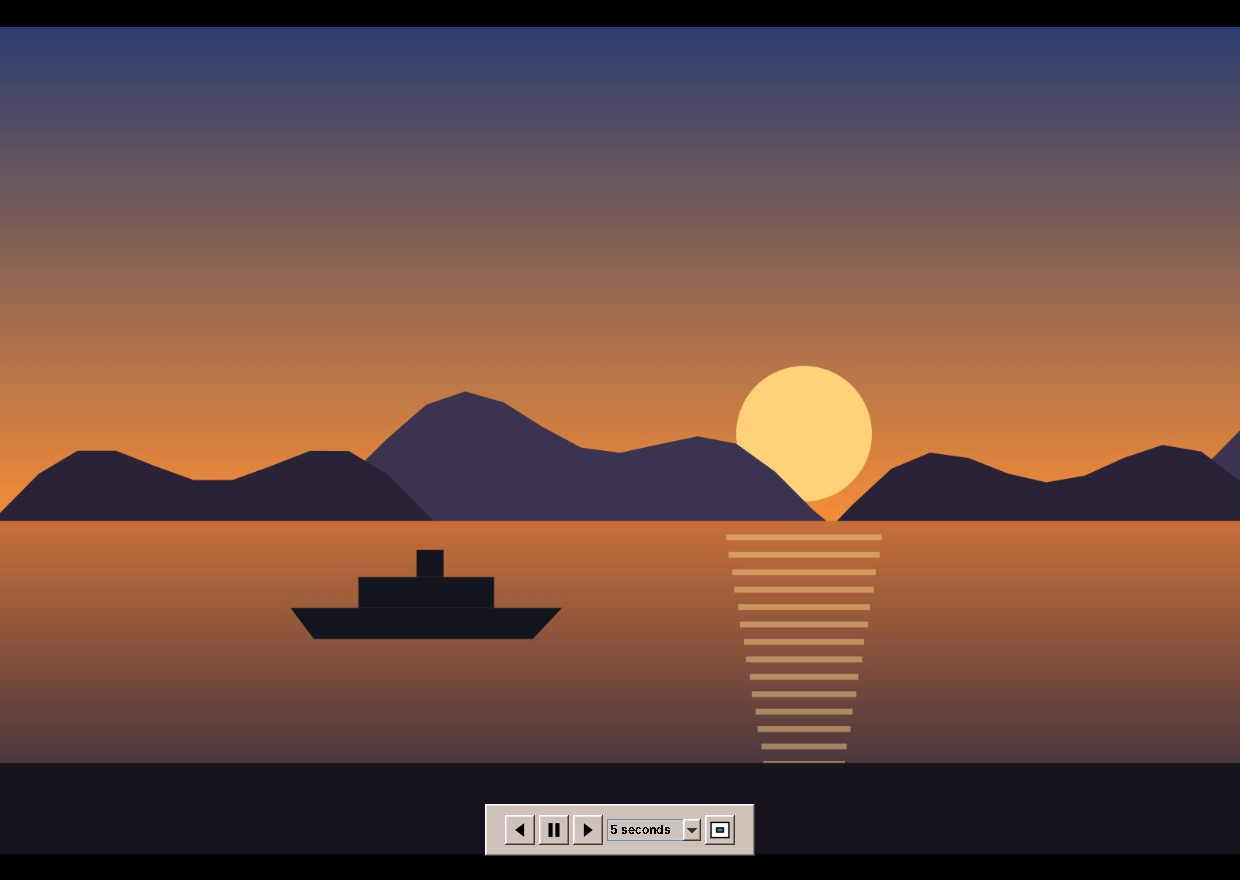
FullScreenWindow is a second, undecorated JFrame. Its picture is a second ImageCanvas, and its controls float above it in the frame's JLayeredPane: the control bar in the palette layer, the Pause sign in the popup layer. The window takes the screen with GraphicsDevice.setFullScreenWindow, which does not change the display mode. Where that is not supported, a borderless window covering the screen does the same:
    /** Covers the screen the main window is on. */
    public void open(GraphicsConfiguration screen) {
        device = screen.getDevice();
        Rectangle bounds = screen.getBounds();
        setBounds(bounds);
        if (device.isFullScreenSupported()) {
            // Only the window takes the screen; the display mode stays as it is.
            device.setFullScreenWindow(this);
        } else {
            setAlwaysOnTop(true);
            setVisible(true);
        }
        place();
        canvas.requestFocusInWindow();
        showControls();
    }

    public void close() {
        hide.stop();
        if (device != null && device.getFullScreenWindow() == this) device.setFullScreenWindow(null);
        setVisible(false);
        dispose();
    }
A mouse move shows the bar and restarts a two-second Swing timer that hides it, and the pointer with it, by setting a transparent cursor. If the pointer rests on the bar, the timer just starts again.
The slideshow itself is in the presenter, with the order in Slideshow, a class of the domain. Shuffled, it shows the current picture first and then all others in random order. Looped, it shuffles anew for every round, and makes sure the first picture of a new round is not the last of the old one:
    /** F5: from the shown picture, in full screen. In a running slideshow it pauses or goes on instead. */
    public void slideshow() {
        if (slideshow != null) {
            togglePause();
            return;
        }
        if (album.size() < 2) {
            view.beep();
            return;
        }
        slideshow = new Slideshow(album.size(), album.index(), settings.shuffle(), settings.loop(),
                services.random());
        if (!fullScreen) {
            fullScreen = true;
            fullScreenForSlideshow = true;
            view.showFullScreen(true);
        }
        services.ticker().start(settings.slideSeconds(), this::slideshowTick);
        view.showSlideshow(true, false);
    }

    void slideshowTick() {
        if (slideshow == null || slideshow.paused()) return;
        OptionalInt next = slideshow.advance();
        if (next.isEmpty()) {
            boolean leave = fullScreenForSlideshow;
            stopSlideshow();
            if (leave) setFullScreen(false);
            return;
        }
        if (album.select(next.getAsInt())) {
            view.showAlbum(album.files(), album.index());
            showCurrent();
        }
    }

    public void togglePause() {
        if (slideshow == null) return;
        slideshow.setPaused(!slideshow.paused());
        if (slideshow.paused()) services.ticker().stop();
        else services.ticker().start(settings.slideSeconds(), this::slideshowTick);
        view.showSlideshow(true, slideshow.paused());
    }

    /** The space bar: pause or go on in a slideshow, else the next picture. */
    public void space() {
        if (slideshow != null) togglePause();
        else next();
    }

    /** Esc ends the slideshow and the full screen. */
    public void escape() {
        stopSlideshow();
        setFullScreen(false);
    }

    private void stopSlideshow() {
        if (slideshow == null) return;
        slideshow = null;
        services.ticker().stop();
        view.showSlideshow(false, false);
    }
The clock is a Ticker interface: the window uses a javax.swing.Timer, the tests a FakeTicker that ticks when told. So a test of a slideshow of five seconds per picture runs in a millisecond:
    @Test
    void spacePausesAndGoesOn() throws Exception {
        edt(presenter::slideshow);
        edt(presenter::space);
        assertTrue(view.slideshowPaused);
        assertFalse(fixture.ticker.running());
        assertEquals("a.png", view.fileName());
        edt(presenter::space);
        assertFalse(view.slideshowPaused);
        assertTrue(fixture.ticker.running());
    }
The keys of the main window and the full-screen window are bound in one method, so both windows behave the same:
    /**
     * Keys that are not in the menus, and in full screen (which has no menu bar) the menu keys as well.
     */
    private void bindKeys(JRootPane root, boolean full) {
        Map<KeyStroke, Runnable> keys = new LinkedHashMap<>();
        keys.put(KeyStroke.getKeyStroke(KeyEvent.VK_SPACE, 0), presenter::space);
        keys.put(KeyStroke.getKeyStroke(KeyEvent.VK_ESCAPE, 0), presenter::escape);
        keys.put(KeyStroke.getKeyStroke(KeyEvent.VK_BACK_SPACE, 0), presenter::previous);
        keys.put(KeyStroke.getKeyStroke(KeyEvent.VK_PAGE_UP, 0), presenter::previous);
        keys.put(KeyStroke.getKeyStroke(KeyEvent.VK_PAGE_DOWN, 0), presenter::next);
        keys.put(KeyStroke.getKeyStroke(KeyEvent.VK_PLUS, 0), () -> presenter.zoom(ZoomCommand.IN));
        keys.put(KeyStroke.getKeyStroke(KeyEvent.VK_ADD, 0), () -> presenter.zoom(ZoomCommand.IN));
        keys.put(KeyStroke.getKeyStroke(KeyEvent.VK_EQUALS, 0), () -> presenter.zoom(ZoomCommand.IN));
        keys.put(KeyStroke.getKeyStroke(KeyEvent.VK_MINUS, 0), () -> presenter.zoom(ZoomCommand.OUT));
        keys.put(KeyStroke.getKeyStroke(KeyEvent.VK_SUBTRACT, 0), () -> presenter.zoom(ZoomCommand.OUT));
        keys.put(KeyStroke.getKeyStroke(KeyEvent.VK_ADD, InputEvent.CTRL_DOWN_MASK), () -> presenter.zoom(ZoomCommand.IN));
        keys.put(KeyStroke.getKeyStroke(KeyEvent.VK_EQUALS, InputEvent.CTRL_DOWN_MASK), () -> presenter.zoom(ZoomCommand.IN));
        keys.put(KeyStroke.getKeyStroke(KeyEvent.VK_SUBTRACT, InputEvent.CTRL_DOWN_MASK), () -> presenter.zoom(ZoomCommand.OUT));
        if (full) {
            keys.put(KeyStroke.getKeyStroke(KeyEvent.VK_LEFT, 0), presenter::previous);
            keys.put(KeyStroke.getKeyStroke(KeyEvent.VK_RIGHT, 0), presenter::next);
            keys.put(KeyStroke.getKeyStroke(KeyEvent.VK_HOME, 0), presenter::first);
            keys.put(KeyStroke.getKeyStroke(KeyEvent.VK_END, 0), presenter::last);
            keys.put(KeyStroke.getKeyStroke(KeyEvent.VK_F5, 0), presenter::slideshow);
            keys.put(KeyStroke.getKeyStroke(KeyEvent.VK_F11, 0), presenter::toggleFullScreen);
            keys.put(KeyStroke.getKeyStroke(KeyEvent.VK_PLUS, InputEvent.CTRL_DOWN_MASK), () -> presenter.zoom(ZoomCommand.IN));
            keys.put(KeyStroke.getKeyStroke(KeyEvent.VK_MINUS, InputEvent.CTRL_DOWN_MASK), () -> presenter.zoom(ZoomCommand.OUT));
            keys.put(KeyStroke.getKeyStroke(KeyEvent.VK_0, InputEvent.CTRL_DOWN_MASK), () -> presenter.zoom(ZoomCommand.FIT));
            keys.put(KeyStroke.getKeyStroke(KeyEvent.VK_1, InputEvent.CTRL_DOWN_MASK), () -> presenter.zoom(ZoomCommand.ACTUAL));
            keys.put(KeyStroke.getKeyStroke(KeyEvent.VK_L, InputEvent.CTRL_DOWN_MASK), presenter::rotateLeft);
            keys.put(KeyStroke.getKeyStroke(KeyEvent.VK_R, InputEvent.CTRL_DOWN_MASK), presenter::rotateRight);
            keys.put(KeyStroke.getKeyStroke(KeyEvent.VK_C, InputEvent.CTRL_DOWN_MASK), presenter::copyImage);
            keys.put(KeyStroke.getKeyStroke(KeyEvent.VK_Q, InputEvent.CTRL_DOWN_MASK), presenter::exit);
        }
        int i = 0;
        for (Map.Entry<KeyStroke, Runnable> key : keys.entrySet()) {
            String name = "key." + i++;
            root.getInputMap(JComponent.WHEN_IN_FOCUSED_WINDOW).put(key.getKey(), name);
            root.getActionMap().put(name, new AbstractAction() {
                @Override
                public void actionPerformed(ActionEvent e) {
                    key.getValue().run();
                }
            });
        }
    }
The trash
Move to Trash follows the freedesktop.org trash specification, like Files (chapter 20): the file goes to ~/.local/share/Trash/files, and a .trashinfo file in info records where it came from and when. Creating the info file first with CREATE_NEW reserves the name, so two programs that trash a file of the same name at the same moment do not overwrite each other:
    /** Moves the file to the trash; returns where it went. */
    public Path move(Path file) throws IOException {
        Path files = directory.resolve("files");
        Path info = directory.resolve("info");
        Files.createDirectories(files);
        Files.createDirectories(info);
        String name = file.getFileName().toString();
        int dot = name.lastIndexOf('.');
        String stem = dot > 0 ? name.substring(0, dot) : name;
        String ext = dot > 0 ? name.substring(dot) : "";
        for (int n = 1; ; n++) {
            String candidate = n == 1 ? name : stem + "." + n + ext;
            Path infoFile = info.resolve(candidate + ".trashinfo");
            try {
                // Creating the info file first reserves the name, as the specification asks.
                Files.writeString(infoFile, trashInfo(file), StandardCharsets.UTF_8, StandardOpenOption.CREATE_NEW,
                        StandardOpenOption.WRITE);
            } catch (FileAlreadyExistsException e) {
                continue;
            }
            Path target = files.resolve(candidate);
            try {
                Files.move(file, target);
                return target;
            } catch (IOException e) {
                Files.deleteIfExists(infoFile);
                throw e;
            }
        }
    }
A fat jar that lost its plugins
ImageIO finds readers for other formats through the service loader: a jar declares its readers in a file META-INF/services/javax.imageio.spi.ImageReaderSpi. The TwelveMonkeys WebP plugin and its JPEG plugin (which reads CMYK JPEGs that Java's own reader refuses) both have such a file, with the same name. The fat jar of every amade program (chapter 50) copies all dependency jars into one, with DuplicatesStrategy.EXCLUDE, so the first file wins and the second plugin silently disappears. WebP pictures then simply "cannot be read".
The build joins the service files before it builds the jar:
tasks.register('mergeServices') {
    inputs.files(configurations.runtimeClasspath)
    outputs.dir(mergedServices)
    doLast {
        def target = mergedServices.get().dir('META-INF/services').asFile
        delete(target)
        target.mkdirs()
        Map<String, Set<String>> services = [:].withDefault { new LinkedHashSet<String>() }
        configurations.runtimeClasspath.files.findAll { it.name.endsWith('.jar') }.each { jarFile ->
            zipTree(jarFile).matching { include 'META-INF/services/*' }.each { file ->
                file.readLines('UTF-8').collect { it.replaceAll('#.*', '').strip() }.findAll { it }
                        .each { services[file.name] << it }
            }
        }
        services.each { name, lines -> new File(target, name).text = lines.join('\n') + '\n' }
    }
}
The jar takes the joined files and excludes the dependencies' own. The CI build lists the service file in the finished jar and fails if either plugin is missing. A test that reads a WebP picture would not catch this, because the tests run with the separate jars on the class path, where the service loader finds both files.
What amade-commons gives Image Viewer
| Part | Since | Image Viewer uses it for |
|---|---|---|
AmadeApplication, AppInfo, CommonsModule, EdtExecutor |
chapter 10 | start-up and wiring, --version, file arguments and file:// URIs from the file manager |
Messages, Mnemonics, LocaleSettings, TranslationCheck |
chapter 10 | five languages, the menu letters, the language menu, the translation test |
AmadeUI, DesktopTheme |
chapter 10 | the Motif look, the sidebar's sunken panels |
DesktopLauncher |
chapter 11 | Open in Browser and the map's attribution link |
AppDirectories, PropertiesFile, XdgDirectories |
chapter 20 | imageviewer.properties, the tile cache, the trash in the data folder, the Pictures folder for Open |
PrintJobs, PaperSize |
chapter 23 | printing, across the page for wide pictures |
ToolIcon, StandardGlyph, ToolButtons, @Ui |
chapter 30 | the toolbar and the control bar; the slideshow and full-screen icons are its own glyphs |
CommandRunner, ProgramMissingException |
chapter 31 | jpegtran, and the message when it is not installed |
ImageSelection |
chapter 34 | Copy Image |
And what stays in Image Viewer
- Orientation, metadata and the tiles. No other program reads EXIF or shows maps yet. Image Scan turns pictures too, but it keeps every pixel in memory and has no orientation tag to respect.
- The trash. Files has the whole trash, with listing and restoring; Image Viewer only moves a file into it. It is the second program that writes into the trash, and the writing half is the next candidate for amade-commons. It stays here until the two can share one class without Files losing anything (see the exercises).
- The image canvas. Zoom and smooth scaling would suit Image Scan. They move when Image Scan is changed to use them.
Exercises
- Set as backdrop. Add Image → Set as Desktop Background for the current workspace. Settings keeps the backdrops per workspace (chapter 62); which file does it write, and how does the desktop notice the change?
- Animated GIFs. ImageIO reads every frame of a GIF with
ImageReader.read(i)and the delays from the metadata tree. Play them inImageCanvaswith a Swing timer. What does Save Rotation have to do with an animation, and why is it simpler to refuse? - The trash in commons. Move the writing half of the trash from Files and Image Viewer into amade-commons as
Trash.move. What must Files keep, and how do the two programs' tests show that nothing changed? - Faster folders. Open a folder of 2,000 pictures. Measure how long the film strip takes to fill, and where the time goes. Many JPEGs carry a thumbnail of 160 pixels in their EXIF data; metadata-extractor finds it as
ExifThumbnailDirectory. Use it when it is large enough. - Offline maps. The tile cache keeps tiles for a week. Add a setting that keeps them forever, and Load Map for This Folder, which fetches the tiles around all positions of the folder in advance. How many tiles is that at zoom 15 for a holiday of 50 km, and what does the usage policy say about it?
Summary
- Open the folder of a picture, not just the picture, and sort file names the way people count.
- Decode in the background, check that the picture is still wanted when it is ready, and read thumbnails with subsampling.
- EXIF orientation is one of eight elements of a group. Model them as matrices, and combinations and inverses come for free.
jpegtranturns JPEGs without loss. Reset the orientation tag afterwards, and write into a.partfile first.- Read metadata from XMP, IPTC and EXIF in that order, and throw away what cameras write as placeholders.
- Scale pictures down in halving steps; show hard pixels when zoomed far in.
- Map tiles are a shared resource. Name your program, cache, limit connections, show the attribution, and load nothing before the user allows it.
- Put the clock and the randomness of a slideshow behind interfaces, and the tests need no waiting.
- A fat jar keeps one of several service files with the same name. Join them, and check the finished jar.