30. Fractals
Every program so far has shown things that Swing knows how to draw: text, lists, tables, a page of a document. Fractals draws every pixel itself. A picture of the Mandelbrot set is a million small calculations, some of them thousands of steps long, and the user wants to click into it and see the next picture at once. So this chapter is about pictures and about speed: Java2D, all the processor cores, a calculation that can be thrown away halfway, and numbers more exact than double for the deep zooms.
amade-fractals is a fractal explorer: nine formulas, Julia sets from any point, smooth colouring with palettes that follow the desktop theme, zoom by click, frame or mouse wheel, and exports as large as a poster. It is about 4,800 lines of Java and 1,900 lines of tests. This chapter opens Part III, and it moves the toolbar into amade-commons: WritePad drew its toolbar icons in Java2D, Fractals does the same, and it is the second user.
What you build
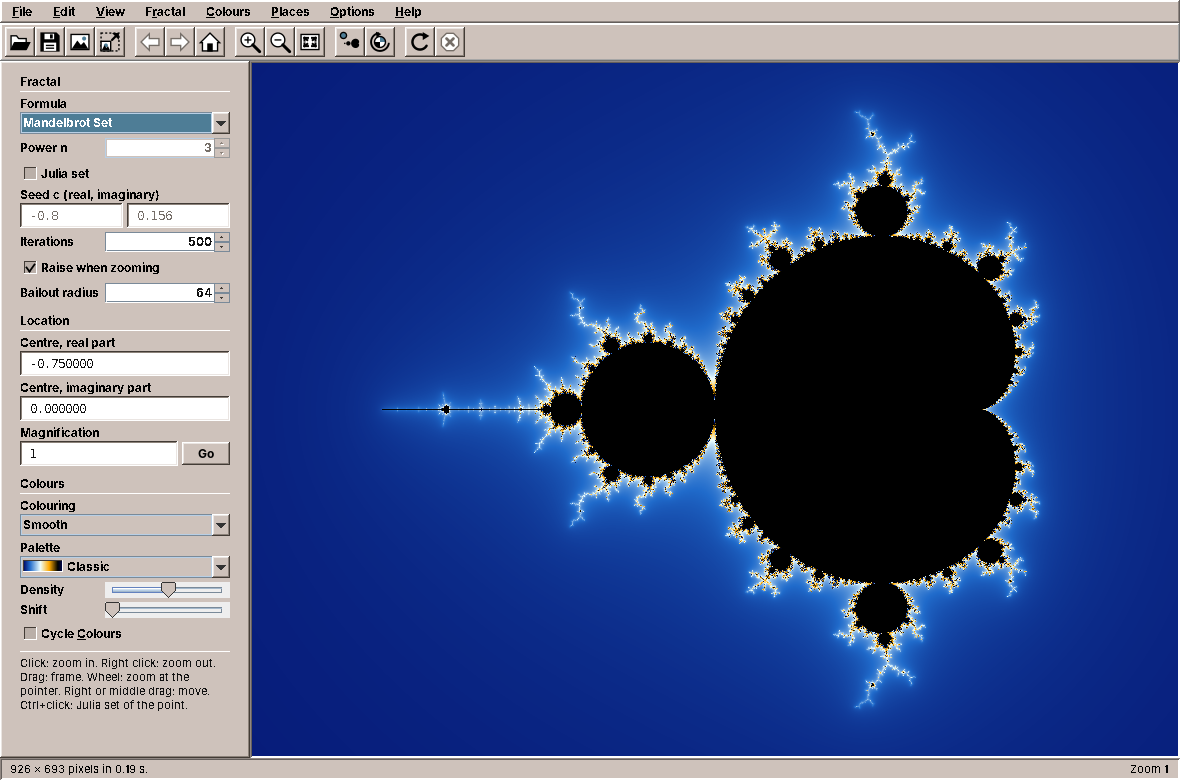
- Nine formulas: the Mandelbrot set and its powers, Burning Ship, Tricorn, Celtic, Buffalo, Phoenix, Magnet and Newton's method, each escape-time formula also as a Julia set.
- Navigation: click to zoom in, right click to zoom out, drag a frame, the mouse wheel at the pointer, drag to move; Back, Forward and Home.
- An answer at once: the old picture moves and scales with the gesture while the new one is calculated, and a coarse preview comes first.
- Deep zoom into the Mandelbrot set down to about 10⁻²⁹⁰, far below the precision of
double. - Colours that never calculate again: four colouring methods, eight palettes (one from the desktop theme), colour cycling.
- Exports up to 64 megapixels, calculated strip by strip.
- Parameter files (
.fractal) that keep a place with all its digits.
What you will learn
- How to keep a calculation's results apart from its colours, so that colours are cheap.
- How to keep a position exact with
BigDecimaland calculate the pixels indouble. - How to spread work over all cores when the pieces cost very different amounts.
- How to run a calculation in the background, cancel it, and report on the event dispatch thread, testably.
- How to make a gesture answer before its result is there.
- How perturbation lets
doublecalculate wheredoubleis not precise enough. - What moves into amade-commons: toolbar icons drawn in Java2D, the toolbar buttons and the
@Uiexecutor.
Values first, colours afterwards
The obvious design calculates a colour for each pixel. Fractals calculates values for each pixel and colours them in a second step:
    /** Stores the result for one pixel; {@code trap} is the smallest |z|² of the orbit. */
    public void set(int index, byte state, int n, double re, double im, double trapSquared) {
        states[index] = state;
        iterations[index] = n;
        lastRe[index] = (float) re;
        lastIm[index] = (float) im;
        trap[index] = (float) trapSquared;
    }
For every pixel, FractalData keeps how the orbit ended (inside, escaped, or converged to a root), after how many steps, where it was at the end, and how close it came to 0. That is 21 bytes per pixel, in five plain arrays rather than a million small objects. Everything the user can change about colours works from these values alone:
    /** Paints the data into a picture of the same size, type {@link BufferedImage#TYPE_INT_RGB}. */
    public static void colorize(FractalData data, ColorSettings colors, Gradient gradient, BufferedImage target) {
        if (target.getWidth() != data.width() || target.getHeight() != data.height()
                || target.getType() != BufferedImage.TYPE_INT_RGB) {
            throw new IllegalArgumentException("Picture does not match the data");
        }
        int[] pixels = ((DataBufferInt) target.getRaster().getDataBuffer()).getData();
        double logDegree = Math.log(data.settings().degree());
        double scale = colors.density() / ColorSettings.CYCLE;
        double offset = colors.offset();
        Coloring coloring = colors.coloring();
        for (int i = 0; i < pixels.length; i++) {
            pixels[i] = color(data, i, coloring, scale, offset, logDegree, gradient);
        }
    }
colorize writes straight into the int[] behind a TYPE_INT_RGB picture, one palette lookup per pixel: no setRGB calls, no colour objects. That is fast enough to run 25 times a second, which is what colour cycling does. A palette is a table of 1,024 colours, and moving through it is moving an offset.
The smooth colouring is where the stored last value pays off. The plain count of steps jumps from one band to the next; the continuous count interpolates between them from how far beyond the bailout the orbit got:
    /** n + 1 − log(log |z|) / log d: continuous where the plain count jumps. */
    static double smooth(int n, double re, double im, double logDegree) {
        double logModulus = 0.5 * Math.log(re * re + im * im);
        if (!(logModulus > 0)) return n;
        double value = n + 1 - Math.log(logModulus) / logDegree;
        return Double.isFinite(value) ? Math.max(0, value) : n;
    }
Tip: keep the expensive part and the cheap part apart
Whenever a program calculates something expensive and then shows it, ask what the user will change afterwards. If it only changes the showing, store the result of the calculation, not the picture. The same idea is in Calendar, which keeps the events and lays out the month again, and in WritePad, which keeps the document and lays out the pages again.
A position that stays exact
A double has about 16 significant digits. That is enough for a picture of the whole Mandelbrot set, and not enough for a picture a billion billion times smaller, where two neighbouring pixels differ in the twentieth digit. The region in view therefore keeps its centre as BigDecimal:
    /** Zooms by {@code factor} (greater than 1 zooms in) and keeps the point under the pointer in place. */
    public Region zoomAt(double x, double y, int width, int height, double factor) {
        double keep = 1 - 1 / factor;
        return moved(offsetRe(x, width, height) * keep, offsetIm(y, width, height) * keep, size / factor);
    }
Every gesture becomes an operation on the region: zoomAt keeps the point under the pointer where it is, frame fills the window with a rectangle, pan moves by pixels. The offsets are small, so they are calculated in double and added to the exact centre. Then the centre is rounded to the digits that the zoom needs, so that it does not collect the noise of binary fractions with every step:
    /** Enough digits for a picture of up to 10 000 pixels, without the noise of binary fractions. */
    private static BigDecimal round(BigDecimal value, double size) {
        BigDecimal rounded = value.setScale(decimals(size) + 4, RoundingMode.HALF_EVEN).stripTrailingZeros();
        return rounded.signum() == 0 ? BigDecimal.ZERO : rounded;
    }
The region has a height but no width. The width follows from the window, so the same region fits a small window, a full screen and a poster export. Parameter files store the centre with all its digits as text, so a place survives a round trip through a file or the clipboard exactly.
Rows to whichever core is free
Calculating the pixels is the easy part to parallelise: every pixel is independent. The hard part is that they cost very different amounts. A pixel far outside the set escapes after three steps; a pixel inside never escapes and runs to the maximum, 20,000 steps in a deep zoom. Cut the picture into four quarters for four cores, and the core that got the quarter with the set in it works while the others wait.
So the renderer does not divide the picture. It starts one task per core, and each task takes the next row that nobody has taken yet:
    private void run(RowTask rowTask, int rows, BooleanSupplier cancelled, Progress progress) {
        AtomicInteger next = new AtomicInteger();
        AtomicInteger done = new AtomicInteger();
        AtomicReference<Throwable> failure = new AtomicReference<>();
        int tasks = Math.min(parallelism, rows);
        CountDownLatch finished = new CountDownLatch(tasks);
        for (int t = 0; t < tasks; t++) {
            workers.execute(() -> {
                try {
                    int y;
                    while (failure.get() == null && !cancelled.getAsBoolean() && (y = next.getAndIncrement()) < rows) {
                        rowTask.row(y);
                        progress.rowsDone(done.incrementAndGet(), rows);
                    }
                } catch (Throwable e) {
                    failure.compareAndSet(null, e);
                } finally {
                    finished.countDown();
                }
            });
        }
        try {
            finished.await();
        } catch (InterruptedException e) {
            Thread.currentThread().interrupt();
            throw new CancellationException("Interrupted");
        }
        Throwable error = failure.get();
        if (error instanceof RuntimeException runtime) throw runtime;
        if (error instanceof Error fatal) throw fatal;
        if (error != null) throw new IllegalStateException(error);
        if (cancelled.getAsBoolean()) throw new CancellationException();
    }
An AtomicInteger is the whole scheduler: getAndIncrement hands out every row exactly once, however the tasks interleave. A row is small enough that the last ones finish at about the same time, and large enough that taking one costs nothing. The first failure is kept and thrown in the caller's thread, and the cancel check runs after every row and every pixel.
The workers are platform threads, one per core, a little below normal priority:
    /**
     * The calculation runs on one platform thread per core, a little below normal priority so that the
     * window stays responsive.
     */
    @Provides
    @Singleton
    Renderer renderer() {
        int cores = Math.max(1, Runtime.getRuntime().availableProcessors());
        return new Renderer(Executors.newFixedThreadPool(cores, workerThreads()), cores);
    }
Note: virtual threads are for waiting, not for calculating
amade-commons gives every program an executor on virtual threads (chapter 10), and Fractals uses it to run the render job. But the rows themselves go to platform threads. Virtual threads are cheap to have by the thousand because they give their carrier thread back while they wait for files or the network. A calculation never waits, so a virtual thread would hold its carrier anyway, and the lower priority, which keeps the window responsive while all cores are busy, is only available for platform threads.
In the background, on the EDT, and cancellable
RenderService connects the renderer to the window. It runs a calculation on the background executor, sends a coarse preview first when the picture is large, reports progress, and delivers the result on the event dispatch thread:
    private void run(Task task, FractalSettings settings, int width, int height, boolean preview, Listener listener) {
        long start = System.nanoTime();
        AtomicLong lastReport = new AtomicLong();
        try {
            boolean coarse = preview && (long) width * height > PREVIEW_ABOVE;
            double coarseShare = coarse ? 1.0 / (PREVIEW_DIVISOR * PREVIEW_DIVISOR + 1) : 0;
            if (coarse) {
                FractalData small = renderer.render(settings, Math.max(1, width / PREVIEW_DIVISOR),
                        Math.max(1, height / PREVIEW_DIVISOR), task::isCancelled,
                        (done, rows) -> report(task, listener, lastReport, coarseShare * done / rows));
                post(task, () -> listener.preview(small));
            }
            FractalData data = renderer.render(settings, width, height, task::isCancelled,
                    (done, rows) -> report(task, listener, lastReport,
                            coarseShare + (1 - coarseShare) * done / rows));
            Duration time = Duration.ofNanos(System.nanoTime() - start);
            post(task, () -> listener.done(data, time));
        } catch (CancellationException e) {
            // A newer picture is wanted; nothing to report.
        } catch (RuntimeException | OutOfMemoryError e) {
            LOG.warn("Rendering failed", e);
            post(task, () -> listener.failed(e));
        }
    }
A calculation that is no longer wanted is cancelled: the user zoomed again before it was done. The renderer notices the flag at the next row and throws, but results that were already on their way to the event dispatch thread could still arrive and show an old picture over a new one. So every report checks the flag again where it arrives:
    private void post(Task task, Runnable action) {
        ui.execute(() -> {
            if (!task.isCancelled()) action.run();
        });
    }
The check runs on the event dispatch thread, the same thread on which the presenter cancels. Between the check and the call nothing else can run there, so a cancelled task can never report.
Both executors are injected. The background executor is the one from CommonsModule; the other one is marked @Ui and runs on the event dispatch thread. In the tests both are a QueueExecutor, which runs nothing until asked, so a test can cancel a task exactly between its calculation and its report:
    @Test
    void cancelledTasksReportNothing() {
        QueueExecutor executor = new QueueExecutor();
        RenderService service = new RenderService(Renderer.direct(), executor, executor);
        List<String> events = new ArrayList<>();
        RenderService.Task task = service.render(SMALL, 600, 400, true, listener(events, new FractalData[1]));
        task.cancel();
        executor.runAll();
        assertEquals(List.of(), events);
    }
Every gesture answers at once
A deep zoom takes seconds. If a click showed nothing until then, the program would feel broken. Fractals answers every gesture at once with the picture it has: the canvas moves and scales the old picture the way the gesture moves the view, while the presenter calculates the new one.
    /** Moves point (x, y) to (toX, toY) and scales by {@code factor} around it. */
    static AffineTransform scaleAbout(double x, double y, double factor, double toX, double toY) {
        AffineTransform t = AffineTransform.getTranslateInstance(toX, toY);
        t.scale(factor, factor);
        t.translate(-x, -y);
        return t;
    }
A click zooms in two times around the point, so the canvas scales the old picture by 2 around that point. The transforms of several quick gestures are combined, so three fast clicks show the old picture eight times larger:
    private void transform(AffineTransform step) {
        AffineTransform combined = new AffineTransform(step);
        combined.concatenate(pending);
        pending = combined;
        repaint();
    }
The canvas only does this when the presenter accepted the gesture: listener.centerAt(...) returns false at the deepest zoom, and then nothing moves. When the new picture arrives, the transform ends:
    /** Shows a new picture, scaled to the window if smaller (a preview); a pending transform ends. */
    public void setPicture(BufferedImage newPicture) {
        picture = newPicture;
        pending = new AffineTransform();
        repaint();
    }
The coarse preview, a quarter of the size in each direction, costs a sixteenth of the full picture. The canvas stretches it over the window with bilinear interpolation, so it looks blurred rather than blocky, and the details follow.
A bug that only slow calculations found
While the screenshots for this chapter were taken, the deep zoom place never finished. The progress bar ran to 99 %, the picture appeared, and the calculation started again from 0 %, for ever. The cause was two pixels:
- While a calculation runs, the status bar shows a progress bar. The progress bar was 2 pixels taller than the text in the status bar, so the status bar grew and the canvas above it shrank by 2 pixels.
- A canvas of a new size needs a new picture, so after a short delay the window asks the presenter to calculate again.
- When the calculation ended, the progress bar was hidden, the canvas grew back, and step 2 started the next calculation, which showed the progress bar again.
A picture that took less than the resize delay never showed the loop: the canvas shrank and grew back before the delay ran out, and the presenter saw no change. Only calculations that took longer than the delay, a fifth of a second, ran into it, and every deep zoom does. The fix keeps the height in the status bar whether the progress bar is shown or not, with a strut, and a test makes sure it stays that way:
    /**
     * The progress bar must not change the height of the status bar: the canvas would change its height with
     * it, a new size means a new calculation, and a calculation that takes longer than the resize delay
     * would start the next one when it ends, for ever.
     */
    @Test
    void theProgressBarKeepsTheCanvasHeight() throws Exception {
        assumeFalse(GraphicsEnvironment.isHeadless(), "needs a display");
        OnEdt.run(() -> {
            MainWindow window = new MainWindow(MainPresenterTest.MSG, null);
            try {
                window.showZoom("Zoom 1.3 × 10²⁰");
                window.showStatus("Calculating with perturbation (deep zoom)...");
                int idle = window.statusBarPanel().getPreferredSize().height;
                window.showProgress(java.util.OptionalDouble.of(0.5));
                assertEquals(idle, window.statusBarPanel().getPreferredSize().height);
                window.hideProgress();
                assertEquals(idle, window.statusBarPanel().getPreferredSize().height);
            } finally {
                window.dispose();
            }
        });
    }
Pitfall: layouts that react to what they show
Whenever the size of a component starts work, and the work changes something that is laid out, check that the second does not change the first. Progress bars, status texts that get longer, scroll bars that appear: each of them can change the space the rest of the window gets. A loop like this one does not show in a test with a fast machine and a small picture; write the test for the sizes, not for the loop.
Deep zoom by perturbation
Below a pixel size of about 10⁻¹⁵, neighbouring pixels have the same double coordinates, and the picture turns into large flat blocks. The obvious cure is to calculate every pixel in BigDecimal, which is correct and a thousand times too slow.
Perturbation calculates only one orbit in BigDecimal, the reference at the centre of the picture: Z₀, Z₁, Z₂, ... Every pixel lies a tiny distance dc from the centre, and its orbit stays a tiny distance dz from the reference orbit. That distance follows from the formula z² + c:
The first part is the next value of the reference. The second part, (2Z + dz)·dz + dc, is the next distance, and it can be calculated in double, because a double with a tiny value is as precise as one with a large value: the exponent moves, the 16 digits stay.
    /** Calculates the pixel at distance {@code dcr + i·dci} from the centre. */
    void compute(double dcr, double dci, FractalData data, int index) {
        double dzr = 0;
        double dzi = 0;
        int m = 0;
        double trap = Double.MAX_VALUE;
        double zr = 0;
        double zi = 0;
        for (int n = 0; n < max; n++) {
            double ar = 2 * refRe[m] + dzr;
            double ai = 2 * refIm[m] + dzi;
            double t = ar * dzr - ai * dzi + dcr;
            dzi = ar * dzi + ai * dzr + dci;
            dzr = t;
            m++;
            zr = refRe[m] + dzr;
            zi = refIm[m] + dzi;
            double r2 = zr * zr + zi * zi;
            if (r2 < trap) trap = r2;
            if (r2 > bailout2) {
                data.set(index, FractalData.ESCAPED, n + 1, zr, zi, trap);
                return;
            }
            if (m == length - 1 || r2 < dzr * dzr + dzi * dzi) {
                dzr = zr;
                dzi = zi;
                m = 0;
            }
        }
        data.set(index, FractalData.INSIDE, max, zr, zi, trap);
    }
The last condition is the clever part, known as rebasing. When a pixel's orbit comes closer to 0 than to the reference (|Z + dz| < |dz|), the distance would grow large and lose its precision. Instead, the pixel jumps back to the start of the reference, because near 0 the reference's start is the better neighbour. Older programs needed a list of special cases and several references for this; with rebasing, one reference is enough.
A method like this is worth nothing without proof that it calculates the right thing. The test calculates a few pixels of the 10²⁰ zoom both ways, by perturbation and by plain iteration in BigDecimal, and compares the step counts:
    @Test
    void perturbationAgreesWithArbitraryPrecision() {
        FractalSettings deep = Place.DEEP_SEAHORSE.settings().withMaxIterations(20_000).withBailout(2);
        int w = 40;
        int h = 30;
        Perturbation perturbation = Perturbation.reference(deep, h, () -> false);
        assertTrue(perturbation.referenceLength() > 1000);
        FractalData data = new FractalData(deep, w, h);
        Region r = deep.region();
        int[][] pixels = {{0, 0}, {39, 29}, {13, 21}};
        for (int[] p : pixels) {
            double dRe = r.offsetRe(p[0] + 0.5, w, h);
            double dIm = r.offsetIm(p[1] + 0.5, w, h);
            int index = p[1] * w + p[0];
            perturbation.compute(dRe, dIm, data, index);
            int truth = iterate(r.re().add(new BigDecimal(dRe)), r.im().add(new BigDecimal(dIm)), 20_000, 2);
            assertTrue(Math.abs(truth - data.iterations(index)) <= 1,
                    () -> "pixel " + p[0] + "," + p[1] + ": " + data.iterations(index) + " instead of " + truth);
        }
    }
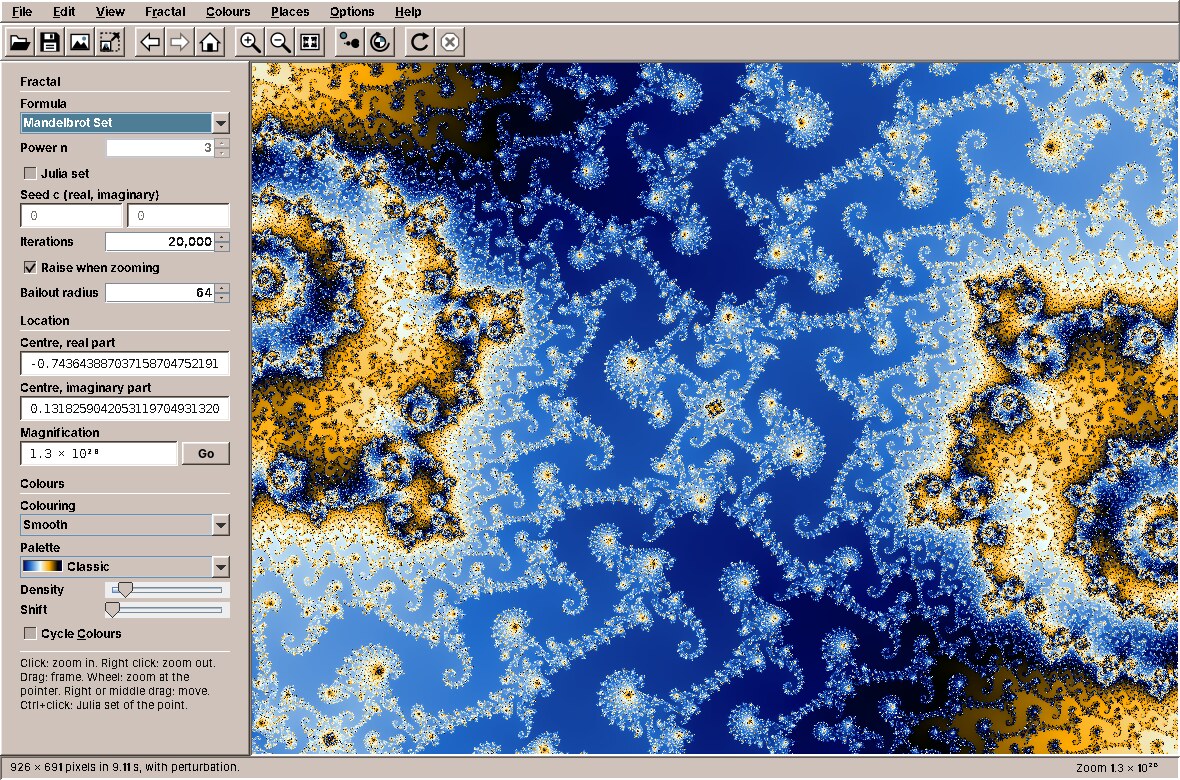
Perturbation ends where the exponent of double ends, at about 10⁻²⁹⁰. The other formulas have no perturbation, and they stop at the limit of double with a message, rather than showing blocks.
Exports in strips
An export of 8K is 33 million pixels. As FractalData that would be 700 MB, as an RGB picture 130 MB. Fractals calculates and colours 128 rows at a time, so it holds the finished picture and one strip of values:
                for (int top = 0; top < height; top += EXPORT_STRIP) {
                    int rows = Math.min(EXPORT_STRIP, height - top);
                    // The strip's own region: same pixel size, centred on the strip.
                    double shift = (height / 2.0 - (top + rows / 2.0)) * pixel;
                    Region strip = new Region(region.re(), region.im().add(new java.math.BigDecimal(shift)),
                            pixel * rows);
                    int done = top;
                    FractalData data = renderer.render(settings.withRegion(strip), width, rows, task::isCancelled,
                            (r, total) -> report(task, listener::progress, lastReport,
                                    (done + r) / (double) height));
                    BufferedImage part = Colorizer.image(data, colors, gradient);
                    image.getRaster().setDataElements(0, top, part.getRaster());
                }
Each strip gets a region of its own, with the same pixel size and its own centre, so the renderer does not need to know about strips at all. Then ImageFiles writes the picture with ImageIO into a temporary file and moves it over the target in one step. That makes five atomic writes in the applications, and the exercise from chapter 21 is still open.
The toolbar moves into amade-commons
Fractals has a toolbar of raised Motif buttons with icons drawn in Java2D, so that it needs no icon theme and every icon takes the colours of the desktop theme. WritePad has the same. When Fractals was written, its ToolIcon, ToolButtons and @Ui were copies of WritePad's, with other glyphs. Imagescan has a third copy.

What is the same in all three copies, and what is not?
| The same | Different |
|---|---|
| The icon: size 22, the 16-unit grid, antialiasing, the colours from the theme and the button | The glyphs: WritePad has bold, italic and alignment; Fractals has the Julia set and colour cycling; Imagescan has the scanner and cropping |
| The shapes several glyphs share: a sheet with a folded corner, a magnifier | |
| A dozen common glyphs: open, save, print, copy, undo, zoom, refresh | |
| The buttons: icon only, no focus, the Motif bevel | |
@Ui, a Guice binding annotation, and its binding to the EdtExecutor |
The common part moves; the glyphs that only one program needs stay in that program. To make that possible, the glyphs become an interface instead of an enum:
    /** Draws one icon on the 16-unit grid with the colours of the {@link Pen}. */
    @FunctionalInterface
    public interface Glyph {
        void paint(Pen pen);
    }
ToolIcon does what all copies did: it works out the colours, scales the graphics to the grid and hands them to the glyph, together with the colours, as a Pen:
    @Override
    public void paintIcon(Component c, Graphics g, int x, int y) {
        DesktopTheme theme = AmadeUI.theme();
        boolean enabled = c == null || c.isEnabled();
        Color ink = !enabled ? theme.textInactive()
                : c != null && c.getForeground() != null ? c.getForeground() : theme.textActive();
        Color light = enabled ? theme.selectionBackground() : theme.textInactive();
        Graphics2D g2 = (Graphics2D) g.create();
        try {
            g2.setRenderingHint(RenderingHints.KEY_ANTIALIASING, RenderingHints.VALUE_ANTIALIAS_ON);
            g2.setRenderingHint(RenderingHints.KEY_TEXT_ANTIALIASING, RenderingHints.VALUE_TEXT_ANTIALIAS_ON);
            g2.setRenderingHint(RenderingHints.KEY_STROKE_CONTROL, RenderingHints.VALUE_STROKE_PURE);
            g2.translate(x, y);
            g2.scale(size / 16.0, size / 16.0);
            g2.setStroke(Pen.THIN);
            glyph.paint(new Pen(g2, ink, theme.fieldBackground(), light, enabled));
        } finally {
            g2.dispose();
        }
    }
The Pen is a record of the graphics and the four things a glyph needs to know: ink for lines (the button's text colour, grey when disabled), paper for light areas, light for highlights (the selection colour) and whether the button is enabled. Its methods are the shapes that were in more than one copy: page, magnifier, line, triangle, fillAndDraw, bold and thin for the stroke, and mirror, which turns undo into redo and back into forward.
The common glyphs are an enum in amade-commons:
    @Override
    public void paint(ToolIcon.Pen pen) {
        switch (this) {
            case NEW -> pen.page(3.5, 1.5, 10, 13);
            case OPEN -> open(pen);
            case SAVE -> save(pen);
            case PRINT -> print(pen);
            case CUT -> cut(pen);
            case COPY -> {
                pen.page(1.5, 1.5, 8, 10);
                pen.page(6.5, 4.5, 8, 10);
            }
            case PASTE -> paste(pen);
            case UNDO -> undo(pen);
            case REDO -> {
                pen.mirror();
                undo(pen);
            }
            case FIND -> pen.magnifier(6.5, 6.5, 4.5);
            case ZOOM_IN -> {
                pen.magnifier(6.5, 6.5, 5);
                pen.line(4, 6.5, 9, 6.5);
                pen.line(6.5, 4, 6.5, 9);
            }
            case ZOOM_OUT -> {
                pen.magnifier(6.5, 6.5, 5);
                pen.line(4, 6.5, 9, 6.5);
            }
            case REFRESH -> refresh(pen);
            case EDIT -> edit(pen);
            case DELETE -> delete(pen);
            case IMPORT -> tray(pen, true);
            case EXPORT -> tray(pen, false);
            case MAIL -> mail(pen);
            case ZOOM_FIT -> zoomFit(pen);
            case ZOOM_ACTUAL -> {
                pen.magnifier(6.5, 6.5, 5);
                pen.g().setColor(pen.ink());
                pen.g().setFont(pen.g().getFont().deriveFont(Font.BOLD, 6f));
                pen.g().drawString("1:1", 3.2f, 8.6f);
            }
            case ROTATE_LEFT -> rotate(pen);
            case ROTATE_RIGHT -> {
                pen.mirror();
                rotate(pen);
            }
            case FULL_SCREEN -> fullScreen(pen);
            case LEAVE_FULL_SCREEN -> {
                pen.fillAndDraw(new Rectangle2D.Double(1.5, 2.5, 13, 11), pen.paper());
                pen.fillAndDraw(new Rectangle2D.Double(5.5, 6.5, 5, 3), pen.light());
            }
        }
    }
    /** A folder, its front flap open. */
    private static void open(ToolIcon.Pen pen) {
        Path2D back = new Path2D.Double();
        back.moveTo(1.5, 13.5);
        back.lineTo(1.5, 3.5);
        back.lineTo(5.5, 3.5);
        back.lineTo(7, 5.5);
        back.lineTo(12.5, 5.5);
        back.lineTo(12.5, 8.5);
        pen.fillAndDraw(back, pen.paper());
        Path2D front = new Path2D.Double();
        front.moveTo(1.5, 13.5);
        front.lineTo(4, 8.5);
        front.lineTo(15, 8.5);
        front.lineTo(12.5, 13.5);
        front.closePath();
        pen.fillAndDraw(front, pen.ink());
    }
A program's own glyphs are an enum of its own that implements ToolIcon.Glyph. Here is Fractals' Julia set, the Mandelbrot silhouette with a seed point in the selection colour:
    /** The Mandelbrot silhouette: cardioid and bulb, with the seed of a Julia set. */
    private static void julia(ToolIcon.Pen pen) {
        Path2D cardioid = new Path2D.Double();
        double a = 2.6;
        for (int i = 0; i <= 64; i++) {
            double t = 2 * Math.PI * i / 64;
            double r = a * (1 - Math.cos(t));
            double px = 14 + r * Math.cos(t);
            double py = 9 + r * Math.sin(t);
            if (i == 0) cardioid.moveTo(px, py);
            else cardioid.lineTo(px, py);
        }
        cardioid.closePath();
        pen.fill(cardioid, pen.ink());
        pen.fill(new Ellipse2D.Double(5.2, 7.4, 3.2, 3.2), pen.ink());
        pen.fill(new Ellipse2D.Double(3.6, 8.4, 1.2, 1.2), pen.ink());
        pen.fillAndDraw(new Ellipse2D.Double(1, 1, 4.5, 4.5), pen.light());
    }
The actions mix both kinds freely, because both are a Glyph:
        open = action("menu.file.open", StandardGlyph.OPEN, KeyEvent.VK_O, CTRL, presenter::openParameters);
        saveParameters = action("menu.file.save", StandardGlyph.SAVE, KeyEvent.VK_S, CTRL, presenter::saveParameters);
        saveImage = action("menu.file.save-image", FractalGlyph.PICTURE, KeyEvent.VK_S, CTRL | SHIFT,
                presenter::saveImage);
        exportImage = action("menu.file.export", FractalGlyph.EXPORT, KeyEvent.VK_E, CTRL, presenter::exportImage);
        exit = action("menu.file.exit", null, KeyEvent.VK_Q, CTRL, presenter::exit);
        back = action("menu.edit.back", FractalGlyph.BACK, KeyEvent.VK_Z, CTRL, presenter::goBack);
        forward = action("menu.edit.forward", FractalGlyph.FORWARD, KeyEvent.VK_Y, CTRL, presenter::goForward);
        copy = action("menu.edit.copy", StandardGlyph.COPY, KeyEvent.VK_C, CTRL, presenter::copy);
        copyParameters = action("menu.edit.copy-parameters", null, KeyEvent.VK_C, CTRL | SHIFT,
                presenter::copyParameters);
        home = action("menu.view.home", FractalGlyph.HOME, KeyEvent.VK_HOME, 0, presenter::home);
        zoomIn = action("menu.view.zoom-in", StandardGlyph.ZOOM_IN, KeyEvent.VK_PLUS, CTRL, presenter::zoomIn);
        zoomOut = action("menu.view.zoom-out", StandardGlyph.ZOOM_OUT, KeyEvent.VK_MINUS, CTRL, presenter::zoomOut);
        julia = action("menu.fractal.julia", FractalGlyph.JULIA, KeyEvent.VK_J, CTRL, presenter::toggleJulia);
        moreIterations = action("menu.fractal.more-iterations", null, KeyEvent.VK_I, CTRL,
                presenter::doubleIterations);
        fewerIterations = action("menu.fractal.fewer-iterations", null, KeyEvent.VK_I, CTRL | SHIFT,
                presenter::halveIterations);
        cycle = action("menu.colors.cycle", FractalGlyph.CYCLE, KeyEvent.VK_K, CTRL, presenter::toggleCycling);
        refresh = action("menu.view.refresh", StandardGlyph.REFRESH, KeyEvent.VK_F5, 0, presenter::refresh);
        stop = action("menu.view.stop", FractalGlyph.STOP, KeyEvent.VK_ESCAPE, 0, presenter::stop);
        fullScreen = action("menu.view.full-screen", FractalGlyph.FULL_SCREEN, KeyEvent.VK_F11, 0,
                presenter::toggleFullScreen);
        if (glyph != null) {
            action.putValue(Action.SMALL_ICON, new ToolIcon(glyph, 16));
            action.putValue(Action.LARGE_ICON_KEY, new ToolIcon(glyph));
        }
An interface also allows a glyph with state, which an enum constant cannot have. WritePad's text colour button shows the colour it will apply next, so its glyph is a record with a supplier:
/**
 * An "A" over a bar in the colour the button applies next. Not part of {@link WritepadGlyph}, because an
 * enum constant cannot hold the colour: the supplier is asked on every paint, so the button follows the
 * last chosen colour. Disabled, the bar is grey like the rest of the icon.
 */
public record TextColorGlyph(Supplier<Color> swatch) implements ToolIcon.Glyph {
    public TextColorGlyph {
        Objects.requireNonNull(swatch, "swatch");
    }

    @Override
    public void paint(ToolIcon.Pen pen) {
        pen.letter("A", new Font(Font.SERIF, Font.BOLD, 12), 10.5);
        pen.fillAndDraw(new Rectangle2D.Double(2.5, 11.5, 11, 3), pen.enabled() ? swatch.get() : pen.ink());
    }
}
In WritePad's copy this colour was a third constructor argument of ToolIcon that every other glyph ignored. Moving code into a library is a chance to find such special cases and give them a place of their own.
The buttons move unchanged:
    private static <B extends AbstractButton> B configure(B button, Action action) {
        button.setHideActionText(true);
        button.setFocusable(false);
        button.setMargin(new Insets(2, 2, 2, 2));
        // Not a UIResource, so the toolbar's look and feel does not swap in its flat rollover border.
        button.setBorder(BorderFactory.createCompoundBorder(new AmadeUI.MotifButtonBorder(2),
                BorderFactory.createEmptyBorder()));
        button.setName(String.valueOf(action.getValue(Action.ACTION_COMMAND_KEY)));
        return button;
    }
The @Ui executor
Every program that continues on the event dispatch thread after background work had the same annotation and the same three lines in its Guice module. The annotation moves into eu.amadeos.commons.app, and CommonsModule binds it:
    @Override
    protected void configure() {
        bind(AppInfo.class).toInstance(app);
        bind(XdgDirectories.class).toInstance(xdg);
        bind(AppDirectories.class).toInstance(AppDirectories.of(xdg, app.configName()));
        bind(ExecutorService.class).toInstance(executor);
        bind(EdtExecutor.class).toInstance(new EdtExecutor());
        bind(Executor.class).annotatedWith(Ui.class).to(EdtExecutor.class);
        bind(ThemeStore.class).toInstance(themes);
        bind(DesktopLauncher.class).toInstance(new DesktopLauncher());
        bind(PasswordStore.class).toInstance(new SecretToolPasswordStore(app.id()));
        bind(LocaleSettings.class).toInstance(locales);
        bind(LocaleStore.class).toInstance(locales.desktop());
        bind(Locale.class).toInstance(locales.locale());
        bind(ContactDirectory.class).toInstance(ContactDirectory.of(xdg));
    }
Presenters still take a plain Executor with @Ui in front, so the tests can keep passing a queueing or a direct executor. A new test in amade-commons checks that the binding really runs its tasks on the event dispatch thread.
Re-pinning the programs
- amade-commons gets
ToolIconwithGlyphandPen,StandardGlyph,ToolButtons,app/Ui, the binding inCommonsModule, and tests for all of them. - WritePad deletes its
ToolIcon,ToolButtonsandUi. Its own glyphs (preview, bold, italic, underline, strike-through, the four alignments, bullets, numbering) becomeWritepadGlyph, the colour buttonTextColorGlyph. The provider method for@UileavesWritepadModule. - Fractals does the same: its own glyphs become
FractalGlyph. - Both pin the new amade-commons commit, and all tests run, with the glyph tests now in the program that owns the glyphs.
- Imagescan keeps its copy until chapter 31, where it switches to the library like the other two.
What amade-commons gives Fractals
| Part | Since | Fractals uses it for |
|---|---|---|
AmadeApplication, CommonsModule, EdtExecutor |
chapter 10 | start-up, wiring, the background executor, the event dispatch thread |
Messages, Mnemonics, LocaleSettings, TranslationCheck |
chapter 10 | five languages, menu letters, the language setting |
AmadeUI, DesktopTheme |
chapter 10 | the theme's colours, and the Desktop Colours palette that follows Settings |
AppDirectories, PropertiesFile |
chapter 20 | the preferences: bars, automatic iterations, export size |
ToolIcon, StandardGlyph, ToolButtons, @Ui |
this chapter | the toolbar and the menus' icons; continuing on the event dispatch thread |
And what stays in Fractals
- Everything about fractals: formulas, regions, perturbation, colouring, palettes, places.
- The renderer and its worker pool. It is the only program that calculates on all cores. If a second one does,
Renderer.runwith its atomic row counter is a candidate for amade-commons. ImageFiles, which writes pictures atomically. Imagescan writes pictures too, so it is a candidate in chapter 31.
Exercises
- Blocks instead of rows. Change
Renderer.runto hand out blocks of 16 rows instead of one. Measure with the Deep Zoom place: when is it faster, and when slower? What would happen with blocks of a quarter of the picture? - A glyph of your own. Add a Places button to the toolbar with a glyph of a map pin. Use only the
Pen's methods and its colours, and check it in a dark theme. Where does the test for it go? - Distance estimation. Store a fourth value per pixel, the derivative of the orbit, and add a colouring method that draws the boundary of the set as thin lines. Which classes change? Which do not, and why?
- Progress you can trust. The progress bar counts rows, but rows cost very different amounts. Count iterations instead. Is the result worth the cost of counting?
- Zoom video. Export a sequence of pictures from the whole set down to a place, each 1.05 times deeper than the last. How do you keep memory and time in check, and how can the previous frame make the next one cheaper?
Summary
- Store what a calculation found, not what it looks like; then everything about colours is cheap, and colour cycling is a moving offset in a table.
- Keep exact values where they must be exact (the centre, in
BigDecimal) and fast values where they can be fast (the pixels, indouble). - Spread uneven work by handing out small pieces from an
AtomicInteger, not by dividing it up front. Calculate on platform threads; virtual threads are for waiting. - A cancelled task must not report: check the flag where the report arrives, on the event dispatch thread. Inject the executors, and a queueing executor makes the order testable.
- Answer a gesture at once with the picture you have, transformed, and replace it when the new one is there.
- Perturbation calculates one orbit exactly and every pixel as a small distance from it, in
double; rebasing keeps one reference enough. - When the size of a component starts work, make sure the work cannot change the size.
- Toolbar icons drawn in Java2D (
ToolIconwith itsGlyphinterface andPen,StandardGlyph), the toolbar buttons and the@Uiexecutor move into amade-commons, their second user after WritePad.