20. Files
Pad and Web read files the user picked. The File Manager is about the files themselves: it lists folders, copies and moves whole trees, puts things into the trash and gets them back. That brings three problems the first two programs did not have. Work can take minutes, and the user must see it progress and be able to stop it. Work can need an answer halfway through ("this file exists already, what now?"), while it runs on another thread. And mistakes destroy data, so every step must leave the disk in a state the user understands, even when it is cancelled or fails.
amade-files is also the first application in this book that remembers something between two runs: which folders were open and how the user likes to see them. And it is the first that exchanges data with other programs in both directions: files go to the clipboard and come from it, and they are dragged in and out of the window.
What you build
-
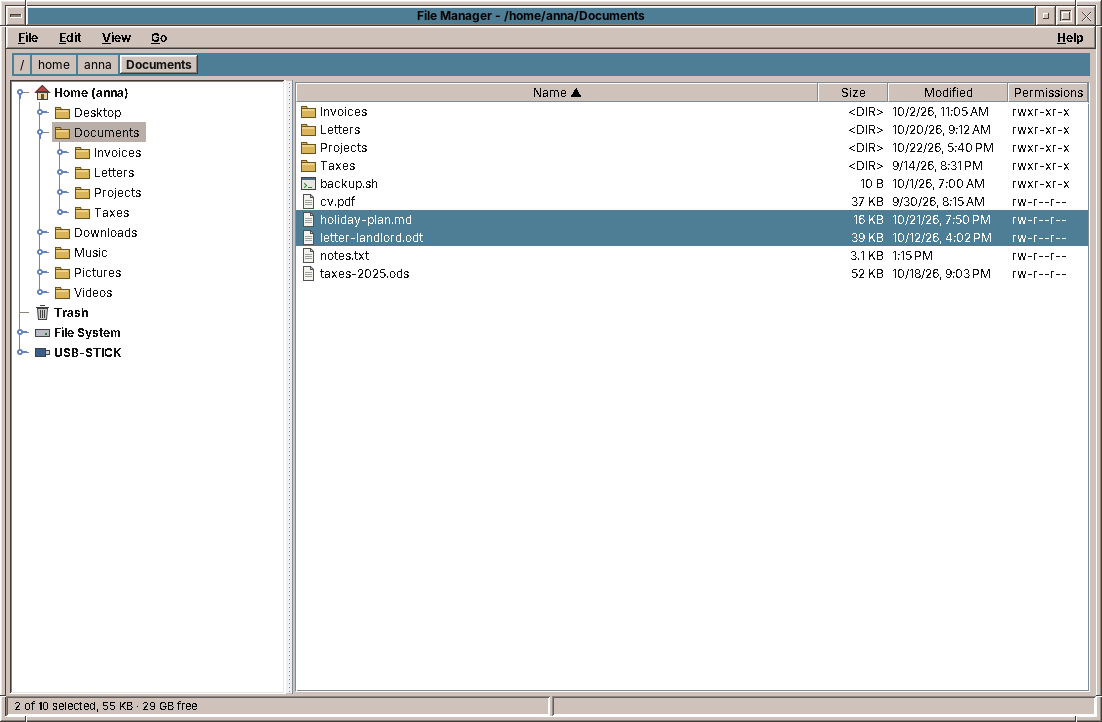
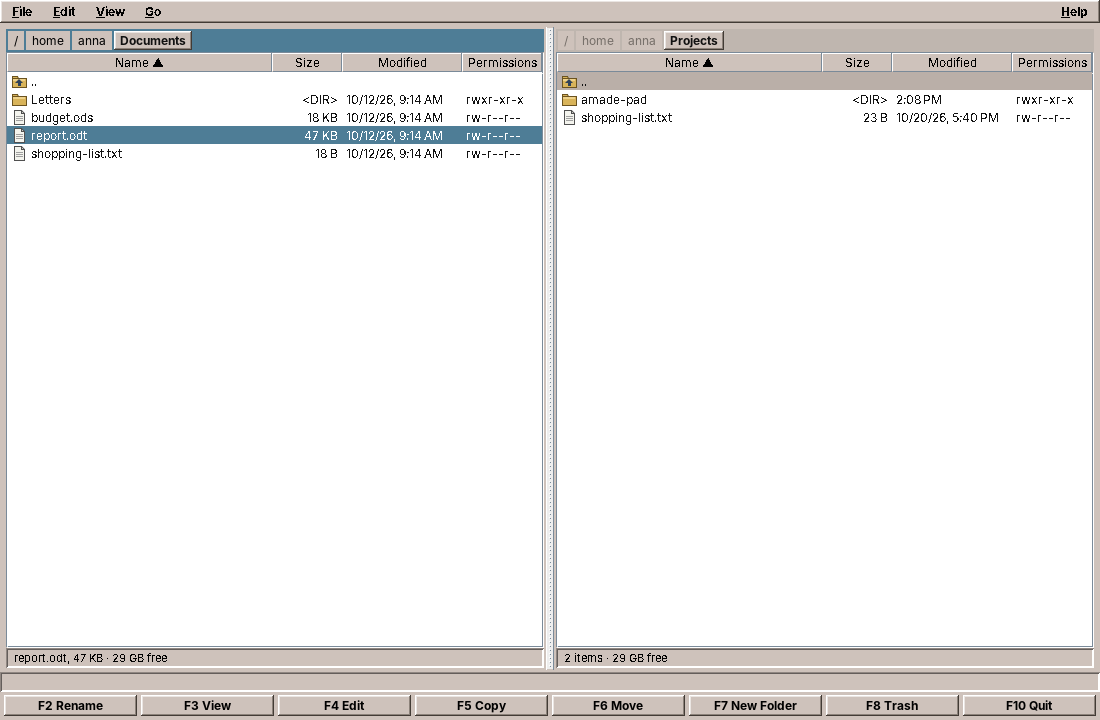
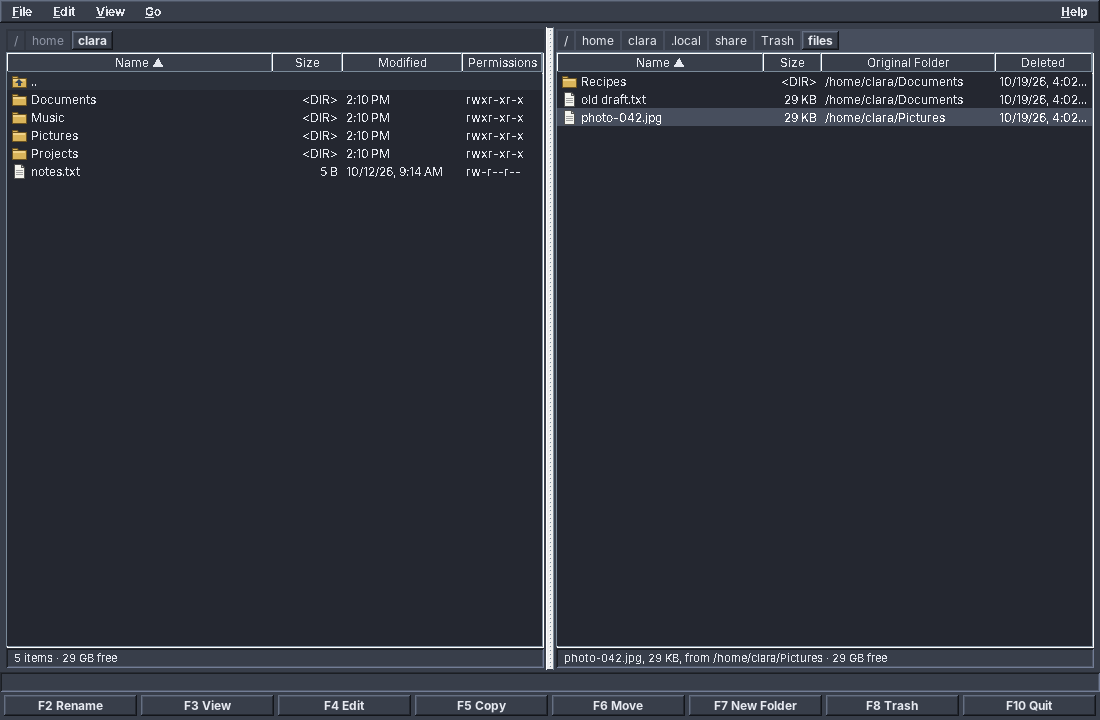
Two views of the same files. The tree view, the default, has a folder tree on the left (home, trash, the file system and USB sticks at the top) and the contents of the chosen folder on the right, as most file managers today have it. Its commands are on the right mouse button, in the Edit menu and in drag and drop. The two-panel view shows two folders side by side, with the row of function keys below, in the tradition of the two-panel file managers of the 1980s and 1990s. View → Tree (Ctrl+1) and View → Two Panels (Ctrl+2) switch.
-
The keyboard first in both views: Enter opens, Backspace goes up, Insert or Space marks lines; F2 renames, F3 views, F4 edits, F5 copies, F6 moves, F7 makes a folder, F8 moves to the trash.
- Cut, Copy and Paste of files, through the clipboard of the desktop: files copied here can be pasted in other file managers, and the other way round.
- Drag and drop: onto a folder in the tree or the table, from and to other programs. Without a key, files move on the same disk and are copied onto another one; Ctrl copies, Shift moves.
- A path bar with a button per folder; a click on its free space turns it into a text field, to type or paste a path, with Tab completing folder names.
- Copy and move of files and whole folders, with a progress window, Cancel, and a question when a file exists in the target.
- The trash, compatible with other Linux desktops: what amade-files trashes, they can restore, and the other way round. Inside the trash the panel shows where each file came from.
- Opening files: plain text goes to Pad, everything else to the application the desktop has for its type, with the busy cursor while it starts. Programs and launchers are not started without asking.
- Settings that survive: the view, hidden files on or off, one or two panels, and the folders of both panels.
The program is about 6,000 lines of Java and 1,500 lines of tests: the largest so far. Most of it is in two services, file operations and the trash, and in the Swing classes that make the tree and drag and drop work.
What you will learn
- How to show a folder in a
JTable, and how to take keys away from a component that has its own ideas about them. - How to save settings in a file the safe way, with what amade-commons provides.
- How to run an operation that takes minutes: progress, cancellation, and a worker thread that has to ask the user a question.
- How to copy a file so that a cancelled or failed copy never leaves a broken file behind.
- How the freedesktop.org trash works, and how to test code that depends on the clock.
- How a program starts another one, and how the window manager learns about it.
- How to build a
JTreethat reads its folders only when they are opened, and update it without closing what the user opened. - How files travel on the X11 clipboard and in drag and drop, in formats that other programs understand.
- How a
TransferHandlerdecides between copy and move, and what Swing does not tell it.
The packages
Files follows the structure of chapter 2:
| Package | Classes |
|---|---|
domain |
FileEntry (one line of a panel), FilePreferences, ViewMode, Place, ClipboardFiles, DropMode, Progress, Resolution, SortOrder, TrashInfo, Side |
repository |
PreferencesRepository |
service |
FileSystemService (list, create, rename, places), FileOperations (copy, move, delete), TrashService, Opener, FileUris, PathCompletion, Formats |
ui.main |
MainView, MainPresenter, MainWindow, MainMenuBar, ContextMenus, DropHint |
ui.panel, ui.dialogs |
FilePanel, FileTableModel, FolderTree, IconicPathBar, FileTransfer, FileDropHandler, ProgressDialog, ConflictDialog |
Unlike Web, Files has a presenter again, and it is the biggest class of the program. It has a lot to decide: what each panel shows, which lines a command acts on, where a drop goes, what to ask before deleting, what to say afterwards. MainPresenterTest checks all of it without a window, with the fake view of chapter 10.
Settings that survive
When the File Manager closes, it writes down five things: the view (tree or two panels), whether hidden files are shown, whether there are two panels, and the folder of each panel. They form a record, as everything in the domain does:
package eu.amadeos.apps.files.domain;

import java.nio.file.Path;
import java.util.Objects;

/**
 * Settings kept between sessions.
 *
 * @param showHidden show files whose name starts with a dot
 * @param twoPanels  in the two-panel view, show both panels; with one panel, Copy and Move ask for the target folder
 * @param viewMode   folder tree or two panels
 * @param leftDir    folder of the left panel (in the tree view: the shown folder) when the File Manager was closed,
 *                   null for the home folder
 * @param rightDir   folder of the right panel when the File Manager was closed, null for the home folder
 */
public record FilePreferences(boolean showHidden, boolean twoPanels, ViewMode viewMode, Path leftDir, Path rightDir) {
    public static final FilePreferences DEFAULTS = new FilePreferences(false, true, ViewMode.TREE, null, null);

    public FilePreferences {
        Objects.requireNonNull(viewMode, "viewMode");
    }

    public Path dir(Side side) {
        return side == Side.LEFT ? leftDir : rightDir;
    }

    public FilePreferences withDirs(Path left, Path right) {
        return new FilePreferences(showHidden, twoPanels, viewMode, left, right);
    }

    public FilePreferences withShowHidden(boolean value) {
        return new FilePreferences(value, twoPanels, viewMode, leftDir, rightDir);
    }

    public FilePreferences withTwoPanels(boolean value) {
        return new FilePreferences(showHidden, value, viewMode, leftDir, rightDir);
    }

    public FilePreferences withViewMode(ViewMode value) {
        return new FilePreferences(showHidden, twoPanels, value, leftDir, rightDir);
    }
}
A record cannot change, so changing one setting makes a new record with the with-er methods: preferences.withShowHidden(true). The presenter keeps the current record in a field and replaces it.
The repository turns the record into a file and back:
package eu.amadeos.apps.files.repository;

import com.google.inject.Inject;
import eu.amadeos.commons.config.AppDirectories;
import eu.amadeos.commons.config.PropertiesFile;
import eu.amadeos.apps.files.domain.FilePreferences;
import eu.amadeos.apps.files.domain.ViewMode;

import java.nio.file.InvalidPathException;
import java.nio.file.Path;
import java.util.Properties;

/**
 * Stores {@link FilePreferences} in {@code files.conf}.
 */
public class PreferencesRepository {
    static final String FILE_NAME = "files.conf";

    private final Path file;

    @Inject
    public PreferencesRepository(AppDirectories directories) {
        this(directories.configFile(FILE_NAME));
    }

    PreferencesRepository(Path file) {
        this.file = file;
    }

    public synchronized FilePreferences load() {
        Properties p = PropertiesFile.load(file);
        FilePreferences d = FilePreferences.DEFAULTS;
        return new FilePreferences(
                Boolean.parseBoolean(p.getProperty("view.showHidden", Boolean.toString(d.showHidden()))),
                Boolean.parseBoolean(p.getProperty("view.twoPanels", Boolean.toString(d.twoPanels()))),
                "panels".equals(p.getProperty("view.mode")) ? ViewMode.PANELS : ViewMode.TREE,
                path(p.getProperty("panel.left.dir")),
                path(p.getProperty("panel.right.dir")));
    }

    public synchronized void save(FilePreferences preferences) {
        Properties p = new Properties();
        p.setProperty("view.showHidden", Boolean.toString(preferences.showHidden()));
        p.setProperty("view.twoPanels", Boolean.toString(preferences.twoPanels()));
        p.setProperty("view.mode", preferences.viewMode() == ViewMode.PANELS ? "panels" : "tree");
        if (preferences.leftDir() != null) p.setProperty("panel.left.dir", preferences.leftDir().toString());
        if (preferences.rightDir() != null) p.setProperty("panel.right.dir", preferences.rightDir().toString());
        PropertiesFile.store(file, p, "amade-files preferences");
    }

    private static Path path(String value) {
        if (value == null || value.isBlank()) return null;
        try {
            Path path = Path.of(value.strip());
            return path.isAbsolute() ? path : null;
        } catch (InvalidPathException e) {
            return null;
        }
    }
}
Two parts of amade-commons do the work:
-
AppDirectoriesknows where the application keeps its files.CommonsModulebinds it for every application, built from theconfigNamein the application'sAppInfo("files"), so the file is~/.config/amadeos/files/files.conf. The XDG variables (XDG_CONFIG_HOME,XDG_CACHE_HOME) are respected.amade-commons · config/AppDirectories.javapackage eu.amadeos.commons.config; import java.nio.file.Path; /** * Where an application keeps its files. * * @param config settings, e.g. {@code ~/.config/amadeos/mail} * @param cache data that can be rebuilt, e.g. {@code ~/.cache/amadeos/mail} */ public record AppDirectories(Path config, Path cache) { public static AppDirectories of(XdgDirectories xdg, String name) { return new AppDirectories(xdg.appConfig(name), xdg.appCache(name)); } /** A file in the configuration directory. */ public Path configFile(String fileName) { return config.resolve(fileName); } } -
PropertiesFilereads and writes a.propertiesfile in UTF-8. Writing uses the pattern of chapter 10: a temporary file in the same folder, then an atomic rename, so a crash never leaves half a settings file. The file is readable by its owner only (rw-------), because some applications keep things there that are nobody else's business: Mail keeps its accounts in such a file, with servers and user names (the passwords go to the keyring, chapter 22).amade-commons · config/PropertiesFile.javapackage eu.amadeos.commons.config; import java.io.IOException; import java.io.Reader; import java.io.UncheckedIOException; import java.io.Writer; import java.nio.charset.StandardCharsets; import java.nio.file.AtomicMoveNotSupportedException; import java.nio.file.Files; import java.nio.file.Path; import java.nio.file.StandardCopyOption; import java.nio.file.attribute.PosixFilePermissions; import java.util.Properties; /** * Reads and atomically writes a UTF-8 properties file that only the owner may read. */ public final class PropertiesFile { private PropertiesFile() { } public static Properties load(Path file) { Properties properties = new Properties(); if (!Files.exists(file)) return properties; try (Reader reader = Files.newBufferedReader(file, StandardCharsets.UTF_8)) { properties.load(reader); return properties; } catch (IOException e) { throw new UncheckedIOException("Cannot read " + file, e); } } public static void store(Path file, Properties properties, String comment) { try { Files.createDirectories(file.getParent()); Path temp = Files.createTempFile(file.getParent(), file.getFileName().toString(), ".tmp"); try { restrictToOwner(temp); try (Writer writer = Files.newBufferedWriter(temp, StandardCharsets.UTF_8)) { properties.store(writer, comment); } try { Files.move(temp, file, StandardCopyOption.REPLACE_EXISTING, StandardCopyOption.ATOMIC_MOVE); } catch (AtomicMoveNotSupportedException e) { Files.move(temp, file, StandardCopyOption.REPLACE_EXISTING); } } finally { Files.deleteIfExists(temp); } } catch (IOException e) { throw new UncheckedIOException("Cannot write " + file, e); } } private static void restrictToOwner(Path file) throws IOException { try { Files.setPosixFilePermissions(file, PosixFilePermissions.fromString("rw-------")); } catch (UnsupportedOperationException e) { // Not a POSIX file system (e.g. tests on other platforms); nothing to restrict. } } }
Why a properties file and not JSON or XML? Settings are a handful of keys and values. A properties file is in the JDK, a user can read and fix it with a text editor, and a missing or unknown key is no error: load simply falls back to the default for each key it does not find. That makes new versions of the program easy, which add keys, and old versions, which ignore them.
Files is the first application in this book to use these two parts, but not their first user: they were in amade-commons already, and Calendar and Mail have a PreferencesRepository built the same way. Three programs with the same need is the reason the parts are in the library.
Pitfall: settings that stop the program
A settings file can be broken: a disk full while another program wrote it, an edit by hand. If reading it throws and the exception reaches main, the program does not start, and the user has no idea why. MainPresenter.start catches the error, logs it and goes on with the defaults; exit does the same when saving fails. Settings are a convenience, never a reason to stop.
A folder in a table
Each panel is a JTable over a FileTableModel, a list of FileEntry records. Reading a folder goes to the background, as everything that touches the disk does, and the presenter uses the generation counter you know from Web: a listing that arrives after the user went on to another folder is dropped.
    private void load(Side side, Path dir, String focusName) {
        PanelState panel = panels.get(side);
        int generation = ++panel.generation;
        Path folder = dir.toAbsolutePath().normalize();
        boolean showHidden = preferences.showHidden();
        async(() -> {
            // The trash shows everything that is in it, with where it came from; no parent line.
            boolean inTrash = trash.isTrashFiles(folder);
            List<FileEntry> entries = fileSystem.list(folder, showHidden || inTrash);
            if (inTrash) {
                entries = entries.stream().filter(e -> !e.isParent()).map(e -> e.withTrash(trash.info(e.path()))).toList();
            }
            return new Listing(entries, fileSystem.freeSpace(folder), inTrash);
        }, listing -> {
            if (generation != panel.generation) return;
            panel.dir = folder;
            panel.inTrash = listing.inTrash();
            panel.entries = listing.entries().stream().sorted(panel.sort.comparator()).toList();
            panel.free = listing.free();
            panel.selected = List.of();
            panel.current = null;
            view.setTrashView(side, panel.inTrash);
            show(side, focusName);
            updateStatus(side);
        }, error -> {
            if (generation != panel.generation) return;
            if (panel.dir != null && !Files.exists(folder)) {
                // The folder was trashed, renamed or unmounted while shown: its nearest existing parent.
                Path fallback = existingParent(folder);
                if (fallback != null) {
                    load(side, fallback, null);
                    return;
                }
            }
            view.showError(error);
            if (panel.dir == null) {
                // The start folder is gone: fall back to an existing parent or the home folder.
                Path fallback = existingParent(folder);
                if (fallback != null && !fallback.equals(folder)) load(side, fallback, null);
            }
        });
    }
Two details are new. The error handler falls back to an existing parent folder if the folder to show is gone, for example a USB stick that was removed since the last run. And the trash is just a folder for load: if TrashService recognises it, the entries get their origin, and the view switches the last two columns from Modified and Permissions to Original Folder and Deleted.
Keys the table wants for itself
JTable comes with key bindings: F2 starts editing a cell, Ctrl+A selects all rows, Enter moves to the next row, Tab to the next cell. A file manager needs every one of these keys for something else. Swing finds a key in the focused component's input map before it looks at the menu's accelerators, so the table must be told:
    private void installKeys() {
        InputMap keys = table.getInputMap(JComponent.WHEN_ANCESTOR_OF_FOCUSED_COMPONENT);
        ActionMap actions = table.getActionMap();
        bind(keys, actions, KeyStroke.getKeyStroke(KeyEvent.VK_ENTER, 0), "amade.open", () -> {
            FileEntry entry = current();
            if (entry != null && listener != null) listener.open(entry);
        });
        bind(keys, actions, KeyStroke.getKeyStroke(KeyEvent.VK_BACK_SPACE, 0), "amade.up", () -> {
            if (listener != null) listener.up();
        });
        bind(keys, actions, KeyStroke.getKeyStroke(KeyEvent.VK_TAB, 0), "amade.switch", () -> {
            if (listener != null) listener.switchPanel();
        });
        bind(keys, actions, KeyStroke.getKeyStroke(KeyEvent.VK_TAB, InputEvent.SHIFT_DOWN_MASK), "amade.switch", null);
        bind(keys, actions, KeyStroke.getKeyStroke(KeyEvent.VK_INSERT, 0), "amade.mark", this::markAndMoveDown);
        bind(keys, actions, KeyStroke.getKeyStroke(KeyEvent.VK_SPACE, 0), "amade.mark", null);
        bind(keys, actions, KeyStroke.getKeyStroke(KeyEvent.VK_HOME, 0), "amade.first", () -> moveTo(0));
        bind(keys, actions, KeyStroke.getKeyStroke(KeyEvent.VK_END, 0), "amade.last", () -> moveTo(model.getRowCount() - 1));
        // Leave these to the window's menu accelerators instead of the table's own bindings.
        for (KeyStroke key : List.of(KeyStroke.getKeyStroke(KeyEvent.VK_F2, 0),
                KeyStroke.getKeyStroke(KeyEvent.VK_A, InputEvent.CTRL_DOWN_MASK),
                // Cut, Copy and Paste are the window's, for files; the table's own would copy cell text.
                KeyStroke.getKeyStroke(KeyEvent.VK_X, InputEvent.CTRL_DOWN_MASK),
                KeyStroke.getKeyStroke(KeyEvent.VK_C, InputEvent.CTRL_DOWN_MASK),
                KeyStroke.getKeyStroke(KeyEvent.VK_V, InputEvent.CTRL_DOWN_MASK),
                KeyStroke.getKeyStroke(KeyEvent.VK_INSERT, InputEvent.CTRL_DOWN_MASK),
                KeyStroke.getKeyStroke(KeyEvent.VK_INSERT, InputEvent.SHIFT_DOWN_MASK),
                KeyStroke.getKeyStroke(KeyEvent.VK_DELETE, InputEvent.SHIFT_DOWN_MASK),
                KeyStroke.getKeyStroke(KeyEvent.VK_C, InputEvent.CTRL_DOWN_MASK | InputEvent.SHIFT_DOWN_MASK))) {
            keys.put(key, "none");
        }
    }
Binding a key to the action name "none", which no action map contains, removes the table's binding, and the key goes on to the menu bar, where F2 means Rename.
The marks (Insert, Space) are kept in the model, separate from the table's selection, which serves as the cursor. That is how two-panel file managers work: you mark ten files, move the cursor somewhere else to look, and the marks stay.
Two views, one presenter
The tree view looks like a different program, but it is not one. Its right side is the left FilePanel of the two-panel view, in explorer mode: no ".." line, a plain click selects one line and drops the marks, Ctrl+click and Shift+click add to them. The tree on the left is new. Switching the view only rearranges components in MainWindow and hides the function keys; the presenter keeps its two PanelStates and does not care where they are shown.
There is one new thing the presenter has to know. In the two-panel view, a command works on the marked lines or the line under the cursor. In the tree view, the user can also choose a folder in the tree and press F2 or Ctrl+C there. So the presenter remembers that folder while the tree has the focus, and every command asks one method what it works on:
    /**
     * The folder chosen in the tree while the tree has the focus; otherwise the marked lines, or the
     * line under the cursor; never the parent entry.
     */
    private List<FileEntry> targets(Side side) {
        if (treeTarget != null) return List.of(fileSystem.describe(treeTarget));
        PanelState panel = panels.get(side);
        List<FileEntry> marked = panel.selected.stream().filter(e -> !e.isParent()).toList();
        if (!marked.isEmpty()) return marked;
        return panel.current != null && !panel.current.isParent() ? List.of(panel.current) : List.of();
    }
Because all commands go through targets, Rename, Copy, Move to Trash and the others work in the tree without a line of extra code. Some folders in the tree must not be touched at all: Home, the trash, the file system and the mounted media are places, and the presenter refuses to rename, move or delete them, with a message instead of an error.
A tree of folders
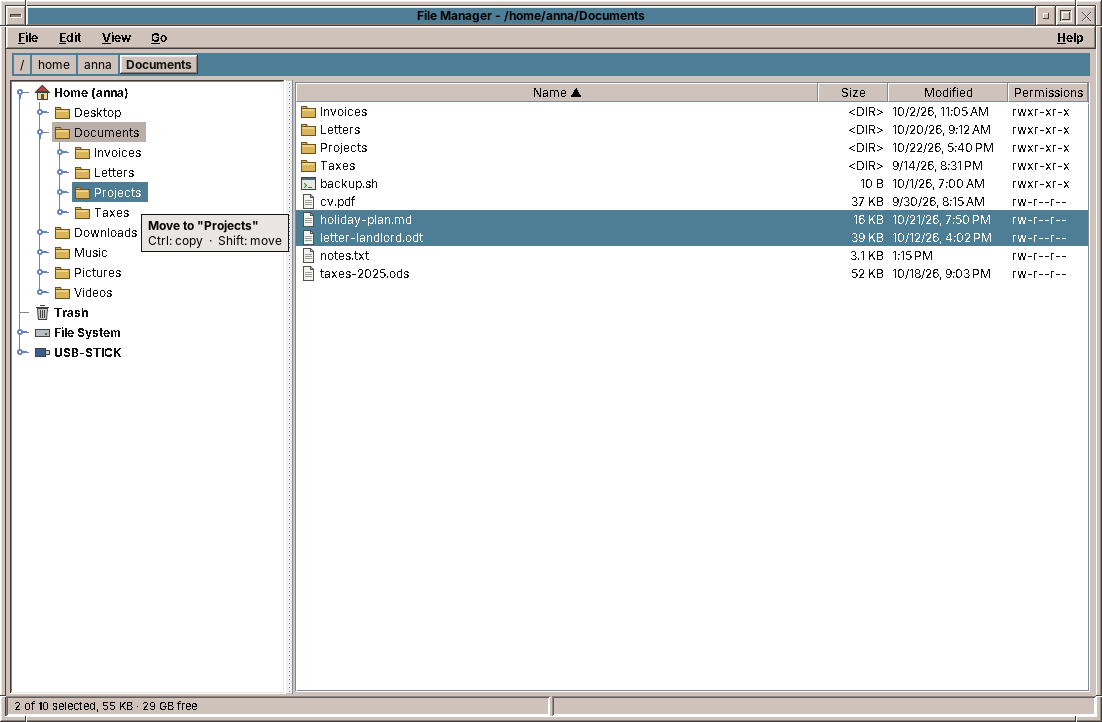
A folder tree cannot be read in one go: the file system has hundreds of thousands of folders, and a network share or a sleeping disk can take seconds to answer. So FolderTree reads a folder when it is opened for the first time, on a worker thread like every listing. Until then, the node has one child, a placeholder "…", so that JTree draws the handle that lets the user open it:
    /** One folder in the tree. */
    private static final class FolderNode extends DefaultMutableTreeNode {
        final Path path;
        final Place place;
        boolean loaded;
        boolean loading;

        FolderNode(Path path, Place place) {
            super(place != null ? place.name() : String.valueOf(path.getFileName()));
            this.path = path;
            this.place = place;
            // Until it is read, a folder shows that it may have sub-folders.
            if (place == null || place.kind() != Place.Kind.TRASH) add(new DefaultMutableTreeNode(LOADING));
            else loaded = true;
        }
    }
A TreeWillExpandListener asks the presenter for the sub-folders (expandFolder), which reads them in the background and answers with view.showFolders(dir, folders). The trash has no placeholder: it is a place for files, not for folders.
Reading a folder again, after a copy or when hidden files are switched on, is harder than reading it the first time. The easy way, removing all children and adding the new ones, closes every folder the user had opened below, and for a moment leaves the node without children, which makes JTree close the node itself. update changes only what changed, and it inserts before it removes:
    private void update(FolderNode node, List<Path> folders) {
        Map<Path, FolderNode> existing = new HashMap<>();
        for (int i = 0; i < node.getChildCount(); i++) {
            if (node.getChildAt(i) instanceof FolderNode child) existing.put(child.path, child);
        }
        List<FolderNode> wanted = new ArrayList<>();
        for (Path folder : folders) wanted.add(existing.getOrDefault(folder, new FolderNode(folder, null)));
        // New folders first and the old ones after: a folder that has no children for a moment would close.
        for (FolderNode child : wanted) {
            if (child.getParent() == null) model.insertNodeInto(child, node, node.getChildCount());
        }
        for (int i = node.getChildCount() - 1; i >= 0; i--) {
            if (!wanted.contains(node.getChildAt(i))) model.removeNodeFromParent((DefaultMutableTreeNode) node.getChildAt(i));
        }
        for (int i = 0; i < wanted.size(); i++) {
            FolderNode child = wanted.get(i);
            if (node.getIndex(child) != i) {
                model.removeNodeFromParent(child);
                model.insertNodeInto(child, node, i);
            }
        }
    }
Nodes that stay are the same objects, with their own children and their open or closed state. The model's insertNodeInto and removeNodeFromParent tell the tree exactly which rows changed, so it keeps the selection and the scroll position too.
The top level is updated the same way. MainWindow asks the presenter for the places every three seconds; the media come from /proc/self/mounts, everything mounted below /media, /run/media and /mnt. A USB stick appears in the tree a moment after it is plugged in, and disappears when it is removed, without a library that watches the hardware.
Pitfall: the tree and the table want the same keys
JTree has its own bindings for F2 (edit the node), Ctrl+C, Ctrl+X and Ctrl+V (Swing's own clipboard of nodes) and Ctrl+A. As in the table, FolderTree maps them to "none", so they reach the Edit menu, and Rename or Copy work on the folder the tree has chosen.
Files on the clipboard
Ctrl+C on a file does not copy the file. It puts its name on the clipboard, with the promise that a later Paste copies the file, wherever that is. On X11, the clipboard is not a store but a conversation: the program that copied keeps the data and answers when another program asks for it, in a format the other one names. For files, the Linux desktops agree on two formats:
text/uri-list, defined in RFC 2483: onefile:///home/anna/Documents/report.odtper line. Java offers a list ofFiles asDataFlavor.javaFileListFlavor, and AWT converts it to this format when another program asks.x-special/gnome-copied-files: the wordcopyorcut, then the same URIs. It is how the GTK file managers tell Cut from Copy, and the others read it too.
FileUris writes and reads both formats, and has its own tests, as a service without Swing. FileTransfer offers them, with the plain paths as text for programs like Pad that only take text. AWT knows nothing about the GNOME format, and by default it would announce a Java flavour under an encoded name that no other program asks for. One registration gives it the plain name:
    static {
        // Without this AWT would offer the flavour under an encoded name that no other program asks for.
        FlavorMap map = SystemFlavorMap.getDefaultFlavorMap();
        if (map instanceof SystemFlavorMap system && GNOME_COPIED_FILES != null) {
            system.addUnencodedNativeForFlavor(GNOME_COPIED_FILES, GNOME_NATIVE);
            system.addFlavorForUnencodedNative(GNOME_NATIVE, GNOME_COPIED_FILES);
        }
    }
Reading goes the other way round: the GNOME format first, because it knows Cut, then the Java file list, then any text/uri-list as text. Paste then goes through the same operation as F5 and F6, with progress, cancel and the conflict question:
    public void pasteInto(Path dir) {
        ClipboardFiles files = view.filesOnClipboard();
        if (files == null || files.paths().isEmpty()) {
            view.setStatus("There are no files on the clipboard.");
            return;
        }
        if (trash.isTrashFiles(dir)) {
            view.setStatus("Paste does not work in the trash; use Move to Trash.");
            return;
        }
        // Cut files are moved once; afterwards the clipboard no longer offers them.
        transferPaths(files.paths(), dir, files.cut(), () -> {
            if (files.cut()) edt.execute(() -> view.putFilesOnClipboard(new ClipboardFiles(List.of(), false)));
        });
    }
Cut files are pasted once: afterwards the presenter empties the clipboard, because the files are no longer where it says. Pasting into the folder the files came from makes copies beside them, report (2).odt, as the conflict rule Keep Both does.
To test this you need a second program on the clipboard. On any X11 desktop xclip is enough: copy a file in amade-files, then xclip -selection clipboard -t TARGETS -o lists the formats offered, and xclip -selection clipboard -t x-special/gnome-copied-files -o shows the text another file manager receives.
Drag and drop
Swing's drag and drop is built on one class, TransferHandler. A component that has one can be a drag source (createTransferable) and a drop target (canImport, importData). The table and the tree each need one, and the two differ only in where a drop goes and which files a drag takes along, so the common part is the abstract FileDropHandler, with dropTarget and dragged for the two subclasses. The transferable it creates is the same FileTransfer as the clipboard's, which is why files dragged into another program arrive there.
Copy or move?
Every file manager has the same rule, and users rely on it: without a key, files dragged onto a folder move when the folder is on the same disk, and are copied to another disk, such as a USB stick; Ctrl forces a copy and Shift a move. Swing has the idea, but not quite this rule: a drop target sees the user drop action, which is MOVE without a key, and it cannot tell Shift from no key at all. The drag source can: while the drag runs, AWT tells every DragSourceListener which modifier keys are held. FileDropHandler listens once, for the whole program, and turns the keys into a DropMode:
    static DropMode mode(TransferSupport support) {
        if (localDrag) {
            if ((dragModifiers & InputEvent.CTRL_DOWN_MASK) != 0) return DropMode.COPY;
            if ((dragModifiers & InputEvent.SHIFT_DOWN_MASK) != 0) return DropMode.MOVE;
            return DropMode.AUTO;
        }
        return support.isDrop() && support.getUserDropAction() == COPY ? DropMode.COPY : DropMode.AUTO;
    }
For files from another program there is no drag source in our process, so Ctrl is all we can know. AUTO then decides by the disk, just as for our own drags.
Asking before the drop
While the mouse moves, Swing calls canImport again and again. Its answer decides the mouse cursor, and here it also decides the hint next to the mouse: Move to "Projects", Copy to "USB-STICK", Move to Trash. The text comes from the presenter, which also says where a drop is not possible: a folder into itself, files back to where they are. canImport only asks and remembers:
    @Override
    public boolean canImport(TransferSupport support) {
        if (!support.isDrop() || listener == null || !FileTransfer.mayHoldFiles(support.getDataFlavors())) return false;
        hovering(support);
        Path target = dropTarget(support);
        if (target == null) {
            hint(support, null);
            return false;
        }
        DropMode mode = mode(support);
        String text = describe(support, target, mode);
        hint(support, text);
        if (text == null) return false;
        if (localDrag) {
            support.setDropAction(mode == DropMode.COPY || text.startsWith("Copy") ? COPY : MOVE);
        } else if ((support.getSourceDropActions() & COPY) != 0) {
            support.setDropAction(COPY);
        }
        return true;
    }
Two details matter here. The answer is cached per target and mode, because canImport comes many times a second and reading a transfer from another program goes through the X server. And a drop from another program is always reported as COPY, whatever we do with the files: a program that receives MOVE deletes its own copy after the drop, and if our move then failed or was cancelled, the files would be gone. The presenter does the move itself, with the same care as F6.
The presenter's side is short, because the operations are there already:
    /** Files dropped on a folder: moved or copied, or trashed when dropped on the trash. */
    public void drop(List<Path> sources, Path target, DropMode mode) {
        if (sources.isEmpty() || target == null || describeDrop(sources, target, mode) == null) return;
        if (sources.stream().anyMatch(this::isPlace)) {
            view.setStatus(placeName(sources.stream().filter(this::isPlace).findFirst().orElseThrow())
                    + " cannot be moved, renamed or deleted.");
            return;
        }
        if (trash.isTrashFiles(target)) {
            trashPaths(sources);
            return;
        }
        transferPaths(sources, target, dropMoves(sources, target, mode), () -> {
        });
    }

    /**
     * What dropping would do, shown next to the mouse while dragging: {@code Move to "Projekte"}; null
     * where the files cannot go (into themselves, or back where they are).
     *
     * @param sources the dragged files; empty while another program does not tell them yet
     */
    public String describeDrop(List<Path> sources, Path target, DropMode mode) {
        if (target == null) return null;
        for (Path source : sources) {
            if (target.startsWith(source) || isPlace(source)) return null;
        }
        if (trash.isTrashFiles(target)) {
            boolean fromTrash = sources.stream().anyMatch(p -> p.getParent() != null && trash.isTrashFiles(p.getParent()));
            return fromTrash ? null : "Move to Trash";
        }
        if (mode != DropMode.COPY && !sources.isEmpty() && sources.stream().allMatch(p -> target.equals(p.getParent()))) {
            return null;
        }
        boolean move = sources.isEmpty() ? mode == DropMode.MOVE : dropMoves(sources, target, mode);
        return (move ? "Move to \"" : "Copy to \"") + placeName(target) + "\"";
    }

    private boolean dropMoves(List<Path> sources, Path target, DropMode mode) {
        return mode == DropMode.MOVE || mode == DropMode.AUTO && fileSystem.sameFileSystem(sources.getFirst(), target);
    }
importData does not call drop directly but with SwingUtilities.invokeLater. The drop is still running when importData is called, and the operation may open a dialog, the conflict question: a modal dialog inside a drop blocks the drag of the other program until it is closed. After invokeLater, the drop is finished first.
Folders that open by themselves
To drag a file into a folder deep down in the tree, the user would have to open the folders first, and then find the file again. Other file managers open a closed folder when the mouse rests on it during a drag, and so does FolderTree: its drop handler restarts an 800 ms Timer whenever the row under the mouse changes, and when it fires, the row expands. Escape cancels the drag, as everywhere in AWT.
Pitfall: the hint must go when the drag leaves
TransferHandler tells a component when a drag comes in (canImport), but not when it leaves or is cancelled. Without care, the hint stays on the screen. FileDropHandler.install adds a DropTargetListener to the component's drop target, which does get dragExit and drop. The hint is drawn in the DRAG_LAYER of the window's JLayeredPane, above everything else, and that listener removes it.
Typing a path
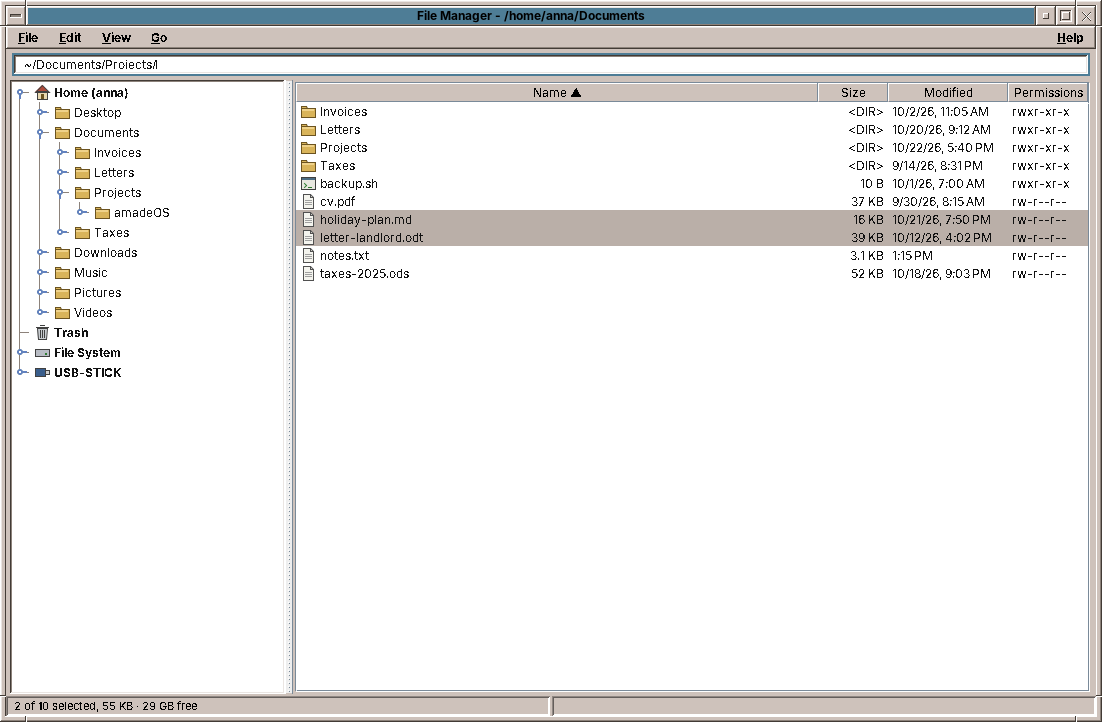
IconicPathBar has a button for each folder above the current one, as the CDE File Manager had. Sometimes a path is quicker to type, or comes from somewhere else, a mail or a terminal. A click on the free space of the bar, or Ctrl+L, replaces the buttons with a JTextField that holds the path, selected. Enter goes there, Escape goes back, and Tab completes the last folder name, as a shell does: PathCompletion.complete lists the folder, takes the folders whose name starts with what was typed, and completes as far as they agree. It knows ~ and paths relative to the shown folder, and shows hidden folders only after a dot was typed. Its context menu has Copy Path, which puts the path on the clipboard as text.
The text field takes Tab for itself with setFocusTraversalKeysEnabled(false), the same thing FolderTree does to make Tab go from the tree to the contents.
Long operations
Copying 20 GB of photos to a USB stick takes minutes. During that time the user wants to see how far it is, be able to stop it, and decide what happens when a file exists in the target. All of this crosses the line between the EDT and the worker thread, in both directions. The design starts with an interface the service talks to while it works:
package eu.amadeos.apps.files.service;

import eu.amadeos.apps.files.domain.Progress;
import eu.amadeos.apps.files.domain.Resolution;

import java.nio.file.Path;

/**
 * Follows a running operation. Called on the worker thread.
 */
public interface OperationListener {
    void progress(Progress progress);

    /** The target exists; may block while the user decides. */
    Resolution conflict(Path source, Path target);

    /** Checked between files and between blocks of large files. */
    boolean isCancelled();

    /** Never asks and never cancels; overwrites nothing. */
    OperationListener SKIP_CONFLICTS = new OperationListener() {
        @Override
        public void progress(Progress progress) {
        }

        @Override
        public Resolution conflict(Path source, Path target) {
            return Resolution.SKIP;
        }

        @Override
        public boolean isCancelled() {
            return false;
        }
    };
}
FileOperations knows nothing about windows: it calls progress now and then, conflict when a file is in the way, and asks isCancelled between files and between blocks of a large file. A test passes a listener that records; the presenter passes one that talks to the user.
Reporting, but not too often
A copy of many small files finishes thousands of files a second. If each one became a progress report, and each report a task on the EDT, the event queue would fill faster than the EDT can paint, and the window would freeze precisely while it is supposed to show progress. So the reports are throttled:
        void checkCancelled() {
            if (listener.isCancelled()) throw new OperationCancelledException();
        }

        /** Throttled to one report per 50 ms; the final report ({@code force}) always goes out. */
        void report(Path current, boolean force) {
            long now = System.nanoTime();
            if (!force && now - lastReport < REPORT_INTERVAL_NANOS) return;
            lastReport = now;
            listener.progress(new Progress(bytesDone, bytesTotal, filesDone, filesTotal, current));
        }
At most twenty reports a second reach the window, which is as fast as anyone can read. The last report always goes out, so the bar ends full. Each report is a Progress record, immutable, so it can cross to the EDT safely.
The dialog itself waits before it appears:
        showTimer = new Timer(DELAY_MILLIS, e -> {
            if (!closed) setVisible(true);
        });
        showTimer.setRepeats(false);
        showTimer.start();
Copying three small files takes a few milliseconds. A window that flashes up and vanishes in that time looks like an error. With a delay of 400 ms, quick operations show only the result in the status line, and slow ones get their progress window.
Cancelling
Java has no safe way to stop a thread from outside. Cancelling is a request: the Cancel button sets an AtomicBoolean, isCancelled reads it, and the service checks it at points where stopping is safe. When it finds the flag set, it throws OperationCancelledException, which unwinds the whole operation and ends in the presenter with "Copying cancelled." What was copied stays copied; what was not, is not. The interesting case is the file in the middle.
A copy that is never half a file
If a copy of a 4 GB video is cancelled at 60 %, the target folder must not contain a file with the right name and 2.4 GB of content: the user would find it a month later and think it is the video. copyContent writes into a hidden temporary file and gives it the real name only when it is complete:
        private void copyContent(Path source, Path destination, BasicFileAttributes attributes) {
            Path temp = destination.resolveSibling(".amade-files-" + HexFormat.of().formatHex(randomBytes()) + ".part");
            try {
                try (FileChannel in = FileChannel.open(source, StandardOpenOption.READ);
                     FileChannel out = FileChannel.open(temp, StandardOpenOption.CREATE_NEW, StandardOpenOption.WRITE)) {
                    long size = in.size();
                    long position = 0;
                    while (position < size) {
                        checkCancelled();
                        long copied = in.transferTo(position, Math.min(BLOCK, size - position), out);
                        if (copied <= 0) break; // the file shrank while copying
                        position += copied;
                        bytesDone += copied;
                        report(source, false);
                    }
                    // Files that grew while copying are copied completely.
                    long tail;
                    while ((tail = in.transferTo(position, BLOCK, out)) > 0) {
                        checkCancelled();
                        position += tail;
                    }
                }
                copyAttributes(source, temp, attributes);
                try {
                    Files.move(temp, destination, StandardCopyOption.REPLACE_EXISTING, StandardCopyOption.ATOMIC_MOVE);
                } catch (AtomicMoveNotSupportedException e) {
                    Files.move(temp, destination, StandardCopyOption.REPLACE_EXISTING);
                }
            } catch (IOException e) {
                deleteQuietly(temp);
                throw failure("copy", source, e);
            } catch (RuntimeException e) {
                deleteQuietly(temp);
                throw e;
            }
        }
FileChannel.transferTolets the operating system copy the bytes, often without them ever passing through Java. It copies in blocks of 4 MB, so cancellation and progress get a chance between blocks.CREATE_NEWfails if the temporary file exists; with a random name it never does, unless something is badly wrong.- The rename with
ATOMIC_MOVEalso replaces an existing file in one step. When the user chose Overwrite, the old file is there until the new one is complete, then the name points to the new one. There is no moment without either. - Every way out, an
IOExceptionor the cancellation (aRuntimeException), deletes the temporary file.
It is the same pattern Pad uses to save, and PropertiesFile to write settings: a careful program never writes over the only copy of something.
Moving has its own rule. Within one file system, a move is a rename, which takes no time even for a folder of 100,000 files, so FileOperations tries that first. Across file systems, it copies each file and deletes the source only after its copy is complete. A cancelled move leaves every file in exactly one complete place.
Asking a question from the worker
A file exists in the target. The service is on a worker thread, deep inside a folder tree; the dialog must open on the EDT. The worker has to wait for the answer, because what it does next depends on it. Here is the presenter's side:
    /**
     * Runs a long operation with a progress dialog. Only one runs at a time; afterwards both panels are
     * read again.
     */
    private void runOperation(String title, Function<OperationListener, Summary> work, Function<Summary, String> done) {
        if (busy) {
            view.showError("Another file operation is still running.");
            return;
        }
        busy = true;
        AtomicBoolean cancelled = new AtomicBoolean();
        ProgressView progress = view.showProgress(title, () -> cancelled.set(true));
        OperationListener listener = new OperationListener() {
            private Resolution forAll;

            @Override
            public void progress(Progress p) {
                edt.execute(() -> progress.update(p));
            }

            @Override
            public Resolution conflict(Path source, Path target) {
                if (forAll != null) return forAll;
                ConflictChoice choice = onEdtAndWait(() -> view.askConflict(fileSystem.describe(source),
                        fileSystem.describe(target)));
                if (choice == null) return Resolution.CANCEL;
                if (choice.all()) forAll = choice.resolution();
                return choice.resolution();
            }

            @Override
            public boolean isCancelled() {
                return cancelled.get();
            }
        };
        executor.execute(() -> {
            String message;
            String error = null;
            try {
                message = done.apply(work.apply(listener));
            } catch (OperationCancelledException e) {
                message = title + " cancelled.";
            } catch (FileOperationException e) {
                message = null;
                error = e.getMessage();
            } catch (RuntimeException e) {
                LOG.error("{} failed", title, e);
                message = null;
                error = title + " failed: " + e;
            }
            String finalMessage = message;
            String finalError = error;
            edt.execute(() -> {
                busy = false;
                progress.close();
                if (finalError != null) view.showError(finalError);
                else view.setStatus(finalMessage);
                refresh();
            });
        });
    }

    private <T> T onEdtAndWait(Supplier<T> question) {
        return CompletableFuture.supplyAsync(question, edt).join();
    }
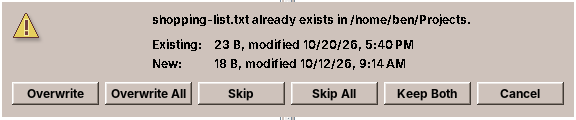
onEdtAndWait hands the question to the EDT with CompletableFuture.supplyAsync(question, edt) and blocks the worker in join() until the user answers. Meanwhile the EDT is free: it shows the dialog, and it paints and reacts as usual. Nothing on the EDT ever waits for the worker, only the other way round.
The listener also remembers Overwrite All and Skip All in forAll. That field lives in the anonymous class and is only touched by the worker thread, so it needs no synchronisation. The answers the user can give are a Resolution (OVERWRITE, SKIP, KEEP_BOTH, CANCEL), from the domain, so the service can act on them without knowing a dialog exists.
Pitfall: waiting for the EDT on the EDT
onEdtAndWait must only be called from a worker. Called on the EDT, it would put the question at the end of the EDT's queue and then block the EDT until the question is answered: the question never runs, and the program hangs for good. Swing's own SwingUtilities.invokeAndWait throws an Error in that case, which is at least a clear message. When you write a method that waits for the EDT, write down in its comment which thread may call it, as OperationListener does ("Called on the worker thread").
The presenter also allows only one operation at a time (busy). Two copies running into the same folder would ask about each other's half-finished files, and the user would not know which question belongs to which.
The trash
Deleting a file is the one operation a user cannot undo. So F8 does not delete: it moves the file to the trash, without asking, because that can be undone. Only Shift+F8 deletes for good, and it asks first. The confirmations follow a simple rule: ask before what cannot be undone, never before what can.
Linux desktops share one trash, described by the freedesktop.org Trash specification. It is a folder with two subfolders:
~/.local/share/Trash/
├── files/
│   └── report.odt                ← the trashed file itself
└── info/
    └── report.odt.trashinfo      ← where it came from and when
The .trashinfo file is three lines of text:
    private String trashInfo(String path) {
        return "[Trash Info]\nPath=" + encodePath(path) + "\nDeletionDate="
                + DELETION_DATE.format(LocalDateTime.now(clock).truncatedTo(ChronoUnit.SECONDS)) + "\n";
    }
Because every desktop follows the same specification, a file trashed in amade-files appears in the trash of any other desktop and of gio trash --list, and the other way round. Here is how a file gets in:
    /** @return the path of the file inside the trash */
    public Path trash(Path path) {
        Path file = path.toAbsolutePath().normalize();
        if (!Files.exists(file, LinkOption.NOFOLLOW_LINKS)) {
            throw new FileOperationException(file + " no longer exists.");
        }
        Location location = locate(file);
        String name = file.getFileName().toString();
        Path info = null;
        Path target = null;
        for (int n = 1; info == null; n++) {
            String candidate = n == 1 ? name : numbered(name, n);
            Path candidateInfo = location.info().resolve(candidate + ".trashinfo");
            try {
                Files.writeString(candidateInfo, trashInfo(location.relativePath(file)),
                        StandardCharsets.UTF_8, StandardOpenOption.CREATE_NEW, StandardOpenOption.WRITE);
                info = candidateInfo;
                target = location.files().resolve(candidate);
                if (Files.exists(target, LinkOption.NOFOLLOW_LINKS)) {
                    // A file without info (left by another program): keep looking.
                    Files.delete(info);
                    info = null;
                }
            } catch (FileAlreadyExistsException e) {
                // Name taken; try the next number.
            } catch (IOException e) {
                throw new TrashUnavailableException("Cannot write to the trash " + location.root() + ": "
                        + e.getMessage(), e);
            }
        }
        try {
            Files.move(file, target);
            return target;
        } catch (IOException e) {
            try {
                Files.deleteIfExists(info);
            } catch (IOException cleanup) {
                LOG.warn("Cannot remove {}", info, cleanup);
            }
            throw new FileOperationException("Cannot move " + file + " to the trash: " + e.getMessage(), e);
        }
    }
- The info file comes first, with
CREATE_NEW. Creating a file that must not exist is an atomic operation of the file system. If two programs trash areport.odtat the same moment, exactly one of them getsreport.odt.trashinfo, and the other getsFileAlreadyExistsExceptionand triesreport.2.odt. The info file reserves the name; only then is the file moved. - If the move fails, the info file is removed again, so the trash never lists a file that is not there.
- Every file system has its own trash. A file on a USB stick does not go to the home folder's trash: that would copy gigabytes, and the space would not be freed on the stick.
locatefinds the stick's own trash,.Trash-1000at its top (1000 being the user's id), and the path in the info file is then relative to the stick, so it stays right wherever the stick is mounted next time.
Restoring reads the info file and moves the file back, creating missing folders on the way. It refuses to overwrite a file that is there now: a restore must never destroy something new.
Testing with a clock
The deletion date in the info file comes from LocalDateTime.now(clock). The production constructor passes the system clock; the test constructor takes any Clock, and the test passes one that stands still:
    @Test
    void movesToTheHomeTrashWithInfo() throws IOException {
        Path file = Files.writeString(dir.resolve("my report.odt"), "r");

        Path trashed = trash.trash(file);

        assertFalse(Files.exists(file));
        assertEquals(trashDir.resolve("files/my report.odt"), trashed);
        assertEquals("r", Files.readString(trashed));
        assertEquals("[Trash Info]\nPath=" + TrashService.encodePath(file.toString())
                        + "\nDeletionDate=2026-10-13T18:15:30\n",
                Files.readString(trashDir.resolve("info/my report.odt.trashinfo")));
        assertTrue(Files.readString(trashDir.resolve("info/my report.odt.trashinfo")).contains("my%20report.odt"));
        assertEquals(trashDir.resolve("files"), trash.homeTrashFiles());
    }
setUp builds the service with Clock.fixed(Instant.parse("2026-10-13T18:15:30Z"), ZoneOffset.UTC) and a trash in the test's temporary folder, so the test can compare the whole info file, byte for byte. Any code that reads the time, in any application, can be tested like this: take a Clock in the constructor instead of calling now() yourself.
Opening files
Double-click a file, and it should open in the right program. Opener decides which:
    /** Plain text in the Text Editor, other files with their default application. */
    public void open(Path file) {
        Optional<Path> editor = findOnPath(EDITOR, searchPath);
        if (editor.isPresent() && isPlainText(file)) {
            start(editor.get(), file);
            return;
        }
        openWithDefault(file);
    }
Plain text goes to Pad, as the CDE File Manager opened text in its own editor. "Plain text" means: the file name suggests text/plain or nothing at all (log files, .bashrc, a README without extension), and the first 8 KB contain no NUL byte and hardly any control characters. HTML, SVG or CSV are text too, but they have a program of their own. Everything else goes to DesktopLauncher.open from chapter 11, which asks xdg-open.
Before any of this, the presenter checks whether the file could run a program:
    /** Executables and launchers (.desktop, .sh, .jar, …) are not opened without asking. */
    static boolean canRunProgram(FileEntry entry) {
        return entry.executable() || (entry.name().lastIndexOf('.') > 0 && DesktopLauncher.isRisky(entry.name()));
    }
An executable file, a shell script, a .desktop launcher: double-clicking it would run it. Mail never opens such files at all (chapter 11). A file manager must be able to, since starting programs is part of its job, but only after a question. DesktopLauncher.isRisky is the same list in both programs, kept in amade-commons, so the two cannot disagree about what is dangerous.
The busy cursor
Starting Pad takes a second or two: the JVM starts, Swing loads, the theme is read. Without a sign, the user double-clicks again and gets two editors. The front panel solves this for the programs it starts: the window manager shows a busy cursor until the new window appears. For a program started by another program, the window manager has to be told:
    private static void start(Path editor, Path file) {
        try {
            // The window manager shows the busy cursor until the editor's window appears.
            LaunchFeedback.announce();
            new ProcessBuilder(editor.toString(), file.toString())
                    .redirectInput(ProcessBuilder.Redirect.from(new File("/dev/null")))
                    .redirectOutput(ProcessBuilder.Redirect.DISCARD)
                    .redirectErrorStream(true)
                    .start();
        } catch (IOException e) {
            throw new FileOperationException("Cannot start the Text Editor: " + e.getMessage(), e);
        }
    }
LaunchFeedback is in amade-commons, and DesktopLauncher calls it too, so Web, Mail and Calendar get the busy cursor for every link they open. It sends one X11 message, _AMADEOS_LAUNCH, to the root window, where the amadeOS window manager listens. The window manager shows the busy cursor until the next new window, or for 20 seconds at most.
    /** Asks the window manager to show the busy cursor until the next new window. Never throws. */
    public static void announce() {
        if (unavailable) return;
        if (!LaunchFeedback.class.getModule().isNativeAccessEnabled()) {
            unavailable = true;
            LOG.debug("No launch feedback: native access is not enabled for this application");
            return;
        }
        try {
            send(xlib());
        } catch (Throwable e) {
            unavailable = true;
            LOG.debug("No launch feedback: X11 not available", e);
        }
    }
Java has no API for X11 messages, so LaunchFeedback calls five functions of the C library libX11 directly, through the foreign function and memory API that Java has had since version 22: it looks up XOpenDisplay, XSendEvent and the others, and fills the C structure of the event in a MemorySegment. No JNI, no C compiler, no native library of our own.
Calling C code can crash the JVM, so Java asks the application for permission: native access must be enabled, or the JDK prints a warning on the first call. An application allows it in its jar's manifest:
            // LaunchFeedback (amade-commons) talks to the X server through the foreign function API.
            'Enable-Native-Access': 'ALL-UNNAMED'
announce checks first whether the permission was given, and does nothing otherwise. A program that does not know about LaunchFeedback, or runs without X11, loses nothing but the cursor. Never throws is the contract: the busy cursor is a nicety, and a nicety must never stop a file from opening.
Testing
The service tests work in a temporary folder (JUnit's @TempDir) on the real file system: copying, merging folders, links copied as links, moving across file systems. Their listener answers conflicts from a list and records every report:
    /** Answers conflicts from a list and records progress. */
    private static final class Recorder implements OperationListener {
        final List<Resolution> answers = new ArrayList<>();
        final List<Path> conflicts = new ArrayList<>();
        final List<Progress> progress = new ArrayList<>();
        boolean cancelAfterFirstProgress;

        @Override
        public void progress(Progress p) {
            progress.add(p);
        }

        @Override
        public Resolution conflict(Path source, Path target) {
            conflicts.add(target);
            return answers.isEmpty() ? Resolution.CANCEL : answers.removeFirst();
        }

        @Override
        public boolean isCancelled() {
            return cancelAfterFirstProgress && !progress.isEmpty();
        }
    }
With it, the promise of the temporary file becomes a test: cancel after the first block of a 12 MB file, and the target folder must be empty, not even a .part file left.
    @Test
    void cancellingDuringACopyLeavesNoPartialFile() throws IOException {
        byte[] big = new byte[FileOperations.BLOCK * 3];
        Path file = Files.write(source.resolve("big.bin"), big);
        Recorder recorder = new Recorder();
        recorder.cancelAfterFirstProgress = true;
        // The first block reports progress (the throttle lets the first report through), then it is cancelled.
        assertThrows(OperationCancelledException.class, () -> operations.copy(List.of(file), target, recorder));
        assertEquals(List.of(), names(target));
    }
The presenter tests use the fake view of chapter 10 and an executor that runs tasks at once on the test's thread, both for the background and for the EDT. The whole copy with its conflict question then runs in a straight line, and the test can count the questions:
    @Test
    void conflictAnswerForAllIsAskedOnce() throws IOException {
        Files.writeString(other.resolve("a.txt"), "old a");
        Files.writeString(other.resolve("b.txt"), "old b");
        presenter.start(List.of());
        presenter.selectionChanged(Side.LEFT, List.of(entry(Side.LEFT, "a.txt"), entry(Side.LEFT, "b.txt")), null);
        view.answers.add(other.toString());
        view.conflicts.add(new ConflictChoice(Resolution.OVERWRITE, true));

        presenter.move();

        assertEquals(1, view.askedConflicts);
        assertEquals("a", Files.readString(other.resolve("a.txt")));
        assertEquals("bb", Files.readString(other.resolve("b.txt")));
        assertFalse(Files.exists(home.resolve("a.txt")));
    }
Two files exist in the target, the user answers Overwrite All once, and the second file is not asked about. The test checks the files on disk, not just what the view was told.
Drag and drop is hard to test with a mouse, but most of it is not in the mouse. The presenter decides what a drop does, and the test asks it, as the hint does, before dropping:
    @Test
    void droppingMovesOnTheSameFileSystemCopiesWithCtrlAndTrashesOnTheTrash() {
        presenter.start(List.of());
        Path a = home.resolve("a.txt");
        Path b = home.resolve("b.txt");
        Path docs = home.resolve("Docs");
        assertEquals("Move to \"Docs\"", presenter.describeDrop(List.of(a), docs, DropMode.AUTO));
        assertEquals("Copy to \"Docs\"", presenter.describeDrop(List.of(a), docs, DropMode.COPY));
        assertNull(presenter.describeDrop(List.of(a), home, DropMode.AUTO), "back where it is");
        assertNull(presenter.describeDrop(List.of(docs), docs.resolve("x"), DropMode.COPY), "into itself");
        assertEquals("Move to Trash", presenter.describeDrop(List.of(a), trash.ensureHomeTrash(), DropMode.AUTO));

        presenter.drop(List.of(a), docs, DropMode.AUTO);
        assertTrue(Files.exists(docs.resolve("a.txt")));
        assertFalse(Files.exists(a));

        presenter.drop(List.of(b), other, DropMode.COPY);
        assertTrue(Files.exists(other.resolve("b.txt")));
        assertTrue(Files.exists(b));

        presenter.drop(List.of(b), trash.homeTrashFiles(), DropMode.AUTO);
        assertFalse(Files.exists(b));
        assertTrue(Files.exists(trash.homeTrashFiles().resolve("b.txt")));
    }
What stays for a person to try is the Swing part: the hint, the keys, folders opening while dragging, and files dragged to and from another program.
What amade-commons gives Files
| Part | Since | Files uses it for |
|---|---|---|
AmadeApplication, CommonsModule, EdtExecutor |
chapter 10 | start-up, wiring, the two threads |
AmadeUI.style, AmadeUI.sunken |
chapter 10 | the panels' colours in every theme, the sunken border of the tables |
XdgDirectories, AppDirectories |
this chapter | the settings file; the home trash under $XDG_DATA_HOME |
PropertiesFile |
this chapter | reading and writing files.conf safely |
DesktopLauncher |
chapter 11 | opening files with their application; isRisky |
LaunchFeedback |
this chapter | the busy cursor while Pad starts |
And what stays in Files
The file operations and the trash are a large part of the program, and they are good, tested code. Do they belong in amade-commons? Not by the rule of chapter 1: no second program copies, moves or trashes files. When the front panel's Trash Can is clicked, it does not open a trash of its own: it starts amade-files trash:, and the File Manager shows the trash. One program that does a job well, and others that start it, is often better sharing than a library.
There is one thing Files does not do that Pad does: it speaks only English. Its texts are still in the Java code. That is a debt, and the first exercise pays it.
Exercises
- Five languages. Move the File Manager's texts into
messages.propertieswith translations, as in chapter 10, including the column titles and the buttons of the conflict dialog. Which texts contain numbers ("3 of 12 selected") and needMessageFormat? Add aTranslationChecktest. - Free space first. Before copying 20 GB to a stick with 8 GB free, warn the user instead of failing at 40 %.
FileOperationsalready measures the total; where does the check belong, and what if the target is on the same file system as the source? - Speed and time left. Show "12 MB/s, about 2 minutes left" in the progress window. Which class computes it, and how do you test it without waiting?
- Undo for Move. After a move, Edit → Undo moves the files back. What must the presenter remember, and what happens if a file was changed in the meantime?
- Ask on drop. Some file managers show a small menu when files are dropped with Alt held: Move Here, Copy Here, Link Here, Cancel. Add it. Which class knows that Alt was held, where does the menu open, and why must it open after the drop has ended?
- A watched folder. When another program creates a file in a shown folder, the panel should update by itself. Look at
java.nio.file.WatchService. Which thread waits for its events, and how do they reach the panel?
Summary
- Settings are a record in the domain and a properties file on disk.
AppDirectoriessays where,PropertiesFilewrites atomically and for the owner only, and a broken file never stops the program. - A component's input map can take keys away from the menu; mapping them to
"none"gives them back. - Long operations talk to a listener: progress throttled to what a person can read, cancellation as a flag checked at safe points, conflicts as a question the worker waits for while the EDT stays free.
- A copy goes into a temporary file and is renamed into place when complete, so no cancel or failure ever leaves half a file.
- The freedesktop.org trash is shared by all desktops; an info file created with
CREATE_NEWreserves the name, and each file system has its own trash. - Code that reads the time takes a
Clock, so tests can stop it. - A tree of folders reads each folder when it is opened, and updates its nodes in place, inserting before removing, so nothing the user opened closes.
- Files travel between programs as
text/uri-listandx-special/gnome-copied-files. Java offers the first by itself; the second needs a name in theSystemFlavorMap. - A
TransferHandlercannot see Shift; aDragSourceListenercan. Drops from other programs are reported as copies, so the other program never deletes anything. LaunchFeedbackcalls Xlib through the foreign function API to show the busy cursor; the application must allow native access in its manifest.- Code with one user stays with that user. Sometimes the best way to share a feature is to start the program that has it.
The next chapter keeps settings too, but its data is time itself: Calendar, with time zones, repeating appointments and the first printed page.