31. Imagescan
The programs so far have worked with files, the network and the screen. Imagescan works with a machine on the desk. It cannot talk to the scanner itself: on Linux it runs SANE's command line program scanimage and reads the picture from its output, on Windows it calls Windows Image Acquisition inside the process. So this chapter is about other programs: how to start one, read what it prints while it prints it, stop it when the user cancels, and never wait for it for ever.
amade-imagescan is a scanning program in the spirit of the classic preview-and-frame dialogs: a quick preview of the whole glass, a frame around the part you want, a scan of just that part at the chosen resolution. Then crop, turn, mirror, undo, save with the resolution in the file, and print at true size. It is about 5,000 lines of Java and 2,200 lines of tests. Imagescan is the third program that runs other programs, after WritePad (LibreOffice, chapter 23) and Audio (the sound server's tools; its chapter, 33, comes later), and the third with a toolbar drawn in Java2D. The command runner moves into amade-commons, and Imagescan's toolbar copy gives way to the one from chapter 30.
What you build
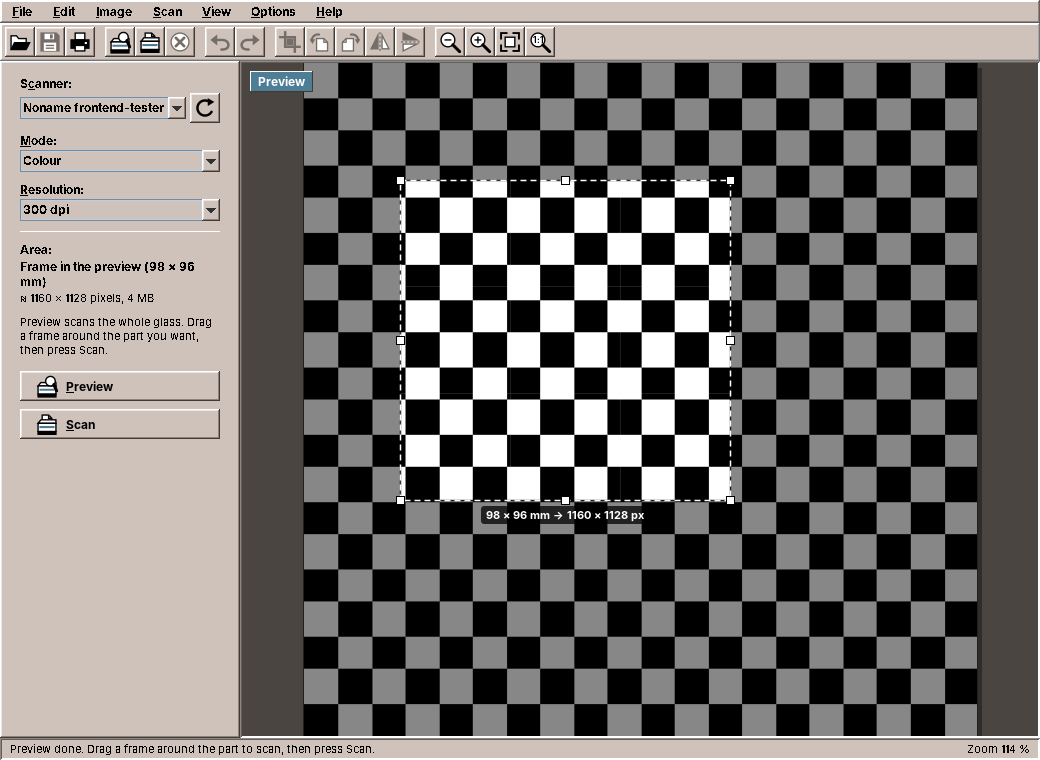
- Preview, frame, scan: Preview scans the whole glass at 75 dpi, you drag a frame with eight handles, and Scan scans only that part. The label at the frame says how large the result will be.
- Scanner, mode and resolution as the scanner offers them, with the area and the size of the result in the panel. Scans that would need more than 512 MB of memory are confirmed first.
- Progress and cancel: the status bar shows how far the scan is, and Cancel Scan stops the scanner.
- Editing that keeps every pixel: crop, quarter turns and mirroring, with undo and redo. Line art stays one bit per pixel, grey stays grey.
- Save as PNG, JPEG or TIFF with the resolution in the file; print at true size; copy to the clipboard.
- Two backends: SANE through
scanimageon Linux and amadeOS, Windows Image Acquisition over COM on Windows.
What you will learn
- How to put hardware behind an interface, so that the rest of the program does not know the platform.
- How to read a picture from another program's output while it arrives, and its progress from the error output at the same time.
- How to cancel work that runs in another process.
- How to work in two units, pixels on the screen and millimetres on the glass.
- How to edit images without changing their kind, and keep undo affordable when every step is a whole image.
- Why a time limit that comes after reading the output is no time limit, and how the shared
CommandRunnergets it right. - What moves into amade-commons:
CommandRunner,ProgramResult,ProgramMissingExceptionandFinishedProcess, and the toolbar for its third user.
Developing without a scanner
You do not need a scanner for this chapter. SANE comes with a test backend, a virtual scanner that delivers test pictures. It is switched off by default; switch it on in SANE's list of backends and choose a picture:
sudo apt install sane-utils
sudo sed -i 's/^#test$/test/' /etc/sane.d/dll.conf     # enable the test backend
sudo sed -i 's/^test-picture .*/test-picture "Grid"/; s/^mode Gray/mode Color/' /etc/sane.d/test.conf
scanimage -L                                           # device `test:0' is a Noname frontend-tester ...
The scanner is then Noname frontend-tester in Imagescan's list. The grid has squares of 10 mm, which makes it easy to check that a frame on the screen becomes the right millimetres on the glass. All screenshots in this chapter were taken with it. Tests do not even need SANE: they give the backend a fake process, as shown below.
One interface, two worlds
Everything the program needs from a scanner fits in three questions: which scanners are there, what can this one do, and scan, please.
/**
 * Talks to the scanners of the platform: SANE on Linux, WIA on Windows. All methods block and run on a
 * background thread.
 */
public interface ScannerBackend {
    /** Short name for messages and the log, e.g. "SANE". */
    String name();

    /**
     * The scanners connected now. Network scanners may take a few seconds to answer.
     *
     * @throws BackendMissingException if the scanning program is not installed
     */
    List<Scanner> listScanners() throws IOException, InterruptedException;

    /**
     * What the scanner can do. Backends that cannot ask the scanner return {@link ScannerOptions#FALLBACK}.
     */
    ScannerOptions options(Scanner scanner) throws IOException, InterruptedException;

    /**
     * Scans one image.
     *
     * @param options what {@link #options} returned for this scanner, to name the mode as the scanner does
     * @param monitor receives the progress and can cancel; the scan then ends with
     *                {@link java.util.concurrent.CancellationException}
     */
    BufferedImage scan(Scanner scanner, ScanSettings settings, ScannerOptions options, ScanMonitor monitor)
            throws IOException, InterruptedException;
}
All three block, and all three can take seconds: a network scanner may take a while to answer, and a scan of an A4 page at 600 dpi takes a minute. ScanService runs them on the background executor and hands out CompletableFutures, and the presenter continues on the event dispatch thread with whenCompleteAsync(..., ui), the pattern of the earlier chapters.
The two implementations could hardly be more different:
SaneBackendrunsscanimage, SANE's command line program. That needs no native library and no JNA, and every SANE driver works with it, including network scanners throughsane-airscan. The price is that the program speaks to the scanner through text and a pipe.WiaBackenduses Windows Image Acquisition, which ships with every Windows and bridges older TWAIN drivers itself. It calls the same automation objects a VBScript would use, but over COM inside the Java process, with JNA. A script started from Java would be simpler to write, and it is exactly what malware does, so Windows Defender stops it.
COM has one rule that matters for Java: it is set up per thread, and the objects it hands out belong to the thread that created them. A virtual thread can change its carrier thread at every blocking call, so ComWiaApi runs every COM call on one platform thread of its own:
    private <T> T onComThread(ComWork<T> work) throws IOException {
        Callable<T> task = () -> {
            initialize();
            try {
                return work.run();
            } catch (COMException e) {
                throw new IOException(describe(e), e);
            }
        };
        Future<T> result = com.submit(task);
        try {
            return result.get();
        } catch (InterruptedException e) {
            Thread.currentThread().interrupt();
            throw new IOException("Interrupted", e);
        } catch (ExecutionException e) {
            Throwable cause = e.getCause();
            if (cause instanceof IOException io) throw io;
            if (cause instanceof UnsatisfiedLinkError || cause instanceof NoClassDefFoundError) {
                throw new BackendMissingException("Windows Image Acquisition", cause);
            }
            throw new IOException(String.valueOf(cause), cause);
        }
    }
WiaApi is the interface between the backend and COM, so the tests of WiaBackend run on Linux with a fake. When the JNA classes for Windows are missing, every call ends with BackendMissingException, and the presenter shows the same kind of message as for a missing scanimage.
Asking scanimage
scanimage answers the first two questions on its standard output. The scanner list comes in a format the program chooses, with a tab between the fields, so names with spaces are no problem:
    @Override
    public List<Scanner> listScanners() throws IOException, InterruptedException {
        String format = String.join(SaneOptionParser.SEPARATOR, "%d", "%v", "%m", "%t") + "%n";
        ProgramResult result = runner.run(List.of(PROGRAM, "-f", format), LIST_TIMEOUT);
        if (!result.succeeded()) {
            throw new IOException(PROGRAM + " -f: " + errorText(result.stderrText(), result.exitCode()));
        }
        String list = result.stdoutText();
        List<Scanner> scanners = SaneOptionParser.parseDeviceList(list);
        if (scanners.isEmpty() && list.contains("device `")) {
            // A scanimage without -f printed the classic list instead.
            scanners = SaneOptionParser.parseLegacyList(list);
        }
        return scanners;
    }
runner.run(command, timeout) starts the program, collects both outputs and its exit code, and gives up after the time limit. It comes from amade-commons, and the section about it below explains why it is harder than it looks. Network scanners are found by asking the network, so the list may take many seconds; the limit is a minute.
scanimage -d <device> -A prints the options of one scanner as help text: the modes with the scanner's own names (Color, 24bit Color, Gray, Lineart), the resolutions as a list or a range, and the size of the glass. SaneOptionParser reads them into ScannerOptions. The scan command then uses the scanner's own words:
    /** The command line for a scan; public for tests. */
    public static List<String> scanCommand(Scanner scanner, ScanSettings settings, ScannerOptions options) {
        List<String> command = new ArrayList<>(List.of(PROGRAM, "-d", scanner.id(), "--format=pnm", "--progress"));
        ColorMode mode = settings.mode();
        String modeName = options.modeName(mode)
                .or(() -> options.colorModes().stream().findFirst().flatMap(options::modeName))
                .orElse(null);
        if (modeName != null) command.add("--mode=" + modeName);
        command.add("--resolution=" + options.nearestResolution(settings.resolution()));
        settings.area().filter(a -> options.hasGlassSize()).ifPresent(area -> {
            ScanArea a = area.clampTo(options.maxWidth(), options.maxHeight());
            command.addAll(List.of("-l", mm(a.left()), "-t", mm(a.top()), "-x", mm(a.width()), "-y", mm(a.height())));
        });
        return command;
    }
The area is given in millimetres, with Locale.ROOT, so that a German desktop does not write 20,3mm. Scanners whose options have no millimetre geometry scan the whole glass, and Imagescan cuts the frame out afterwards.
A picture through a pipe
The scan itself is different from the two questions. Its output is not text but a picture, many megabytes of it, and it arrives slowly, as fast as the scanner's light moves. scanimage --format=pnm writes it to standard output, and --progress writes lines such as Progress: 12.5% to standard error. Both have to be read at the same time: if nobody reads standard error, its pipe fills up after 64 KB, scanimage blocks writing to it, and the picture on standard output stops too.
So scan starts the process itself with runner.start(command) and reads the two streams on two threads:
    @Override
    public BufferedImage scan(Scanner scanner, ScanSettings settings, ScannerOptions options, ScanMonitor monitor)
            throws IOException, InterruptedException {
        monitor.checkCancelled();
        List<String> command = scanCommand(scanner, settings, options);
        LOG.info("Scanning: {}", String.join(" ", command));
        Process process = runner.start(command);
        monitor.onCancel(process::destroy);
        process.getOutputStream().close();
        monitor.progress(ScanMonitor.UNKNOWN);
        ByteArrayOutputStream errors = new ByteArrayOutputStream();
        Thread progressReader = Thread.ofVirtual().start(() -> readProgress(process.getErrorStream(), monitor, errors));
        BufferedImage image;
        try (InputStream out = new BufferedInputStream(process.getInputStream(), 1 << 16)) {
            image = PnmReader.read(out);
            // Some backends send more than one image; only the first is wanted.
            out.transferTo(java.io.OutputStream.nullOutputStream());
        } catch (IOException e) {
            if (monitor.isCancelled()) throw new CancellationException("Scan cancelled");
            int exit = finish(process);
            progressReader.join(TimeUnit.SECONDS.toMillis(5));
            String detail = errorText(errors.toString(StandardCharsets.UTF_8), exit);
            throw new IOException(detail.isBlank() ? e.getMessage() : detail, e);
        } catch (RuntimeException e) {
            process.destroyForcibly();
            throw e;
        }
        int exit = finish(process);
        progressReader.join(TimeUnit.SECONDS.toMillis(5));
        monitor.checkCancelled();
        if (exit != 0) throw new IOException(errorText(errors.toString(StandardCharsets.UTF_8), exit));
        monitor.progress(1);
        // Backends without millimetre geometry scan the whole glass; cut the area out afterwards.
        if (settings.area().isPresent() && !options.hasGlassSize()) {
            image = cropToArea(image, settings.area().get(), options.nearestResolution(settings.resolution()));
        }
        return image;
    }
The picture is decoded while it arrives, from a buffered stream, so no temporary file is needed and the memory holds the picture once. The error output goes to a virtual thread that splits it into lines. scanimage ends its progress lines with a carriage return, so that a terminal shows them in one place, which is why the reader splits at \r as well as at \n:
    /** Splits standard error at carriage returns and newlines: progress lines, everything else kept. */
    static void readProgress(InputStream err, ScanMonitor monitor, ByteArrayOutputStream other) {
        StringBuilder line = new StringBuilder();
        try (err) {
            int c;
            while ((c = err.read()) >= 0) {
                if (c == '\r' || c == '\n') {
                    handleLine(line.toString(), monitor, other);
                    line.setLength(0);
                } else {
                    line.append((char) c);
                }
            }
            handleLine(line.toString(), monitor, other);
        } catch (IOException e) {
            // The process was stopped.
        }
    }
Everything that is not progress is kept. When the scan fails, it is the message: "scanimage: open of device epson2:libusb:001:004 failed: Device busy" says more than any exit code.
The Java runtime cannot read PNM (the Netpbm formats PBM, PGM and PPM), so PnmReader does, in 170 lines. It creates the picture in the kind that fits: one bit per pixel for line art, one byte for grey, three for colour. The fast path for line art copies the bytes straight into the raster, with one surprise:
    private BufferedImage readBitmap(int width, int height) throws IOException {
        BufferedImage image = new BufferedImage(width, height, BufferedImage.TYPE_BYTE_BINARY);
        byte[] data = ((DataBufferByte) image.getRaster().getDataBuffer()).getData();
        int stride = (width + 7) / 8;
        // Same packing as TYPE_BYTE_BINARY, but in PBM 1 is black while index 1 of the image is white.
        readFully(data, stride * height);
        for (int i = 0; i < data.length; i++) data[i] = (byte) ~data[i];
        return image;
    }
In PBM a 1 bit is black; in Java's TYPE_BYTE_BINARY the colour at index 1 is white. The packing is the same, so one pass that inverts every byte turns the one into the other. The tests check colour, grey, 16-bit samples, line art and the plain text variants with small pictures of known pixels.
Cancelling a program
A scan can take minutes, and the user must be able to stop it. Stopping a thread from outside is not possible in Java, but here the work is done by another process, and a process can be stopped. ScanMonitor connects the two: the backend registers what cancelling means, and the button calls cancel:
    /** Runs the action on {@link #cancel}, or at once if the scan was already cancelled. */
    public void onCancel(Runnable action) {
        boolean now;
        synchronized (this) {
            now = cancelled;
            if (!now) cancelActions.add(action);
        }
        if (now) action.run();
    }

    public void cancel() {
        List<Runnable> actions;
        synchronized (this) {
            if (cancelled) return;
            cancelled = true;
            actions = List.copyOf(cancelActions);
            cancelActions.clear();
        }
        actions.forEach(Runnable::run);
    }
The race is the interesting part. The user may press Cancel Scan before the backend has started scanimage and registered its action. onCancel therefore runs the action at once when the scan was already cancelled. The lock covers only the flag and the list; the actions run outside it, so that a slow destroy cannot block the event dispatch thread on the lock.
When the process is destroyed, its standard output ends, PnmReader fails with an IOException, and scan turns that into a CancellationException because the monitor says it was cancelled. The presenter shows "Scan cancelled." and keeps the image it had. The test uses a fake process that delivers the start of a picture and then hangs until it is destroyed, exactly what a scanner in the middle of a page does:
    @Test
    void cancelStopsScanimage() throws Exception {
        FakeProcess process = FakeProcess.hanging("P6 100 100 255\n".getBytes());
        SaneBackend backend = backend(process);
        ScanMonitor monitor = ScanMonitor.silent();
        CompletableFuture<BufferedImage> scan = CompletableFuture.supplyAsync(() -> {
            try {
                return backend.scan(EPSON, ScanSettings.DEFAULT, OPTIONS, monitor);
            } catch (Exception e) {
                throw new java.util.concurrent.CompletionException(e);
            }
        });
        Thread.sleep(100);
        monitor.cancel();
        ExecutionException e = assertThrows(ExecutionException.class, () -> scan.get(5, TimeUnit.SECONDS));
        assertInstanceOf(CancellationException.class, e.getCause());
        assertTrue(process.isDestroyed());
    }
Pixels and millimetres
The preview is a picture of the whole glass at 75 dpi. The user draws the frame on it in screen pixels, CropSelection keeps it in pixels of the picture, and the scanner wants millimetres. The resolution of the preview connects the two:
    /**
     * The area a rectangle of pixels covers in an image scanned with the given resolution from the top left
     * corner of the glass (a preview).
     */
    public static ScanArea fromPixels(int x, int y, int width, int height, int dpi) {
        double mmPerPixel = MM_PER_INCH / dpi;
        return new ScanArea(x * mmPerPixel, y * mmPerPixel, width * mmPerPixel, height * mmPerPixel);
    }
    /** The frame in the preview as part of the glass; empty for the whole glass. */
    Optional<ScanArea> scanArea() {
        if (kind != ImageKind.PREVIEW || selection.isEmpty()) return Optional.empty();
        ScannedImage preview = history.current().orElseThrow();
        Rectangle r = selection.get();
        ScanArea area = ScanArea.fromPixels(r.x, r.y, r.width, r.height, preview.resolution());
        return Optional.of(options.hasGlassSize() ? area.clampTo(options.maxWidth(), options.maxHeight()) : area);
    }
Millimetres are the unit that does not change: the frame is the same part of the glass at 75 dpi in the preview and at 600 dpi in the scan. So the domain keeps areas in millimetres, as SANE does, and converts to pixels only where pixels are needed: for the frame on the screen, and for the estimate "≈ 1160 × 1128 pixels, 4 MB" in the panel. The estimate is also what decides whether a scan needs a confirmation. A whole glass at 1200 dpi in colour is about 400 MB, and the user should know before the program asks the Java heap for it.
Viewport does the same for zoom and scrolling: it knows where the picture sits in the panel and converts in both directions, and like CropSelection it has no Swing code, so its tests need no display.
Edits that keep every pixel
A scanned letter in line art is one bit per pixel: an A4 page at 300 dpi is 1 MB. Turn it with Graphics2D.rotate into a new RGB picture, and it is 26 MB, with grey edges where there were none. Imagescan's edits work on the raster instead and create the new picture with the same colour model:
    /** The part of the image inside the rectangle, cut down to the image. */
    public static BufferedImage crop(BufferedImage source, Rectangle area) {
        Rectangle r = area.intersection(new Rectangle(source.getWidth(), source.getHeight()));
        if (r.isEmpty()) throw new IllegalArgumentException("Crop area outside the image: " + area);
        BufferedImage target = blank(source, r.width, r.height);
        Raster part = source.getRaster().createChild(r.x, r.y, r.width, r.height, 0, 0, null);
        target.getRaster().setRect(part);
        return target;
    }
Cropping copies a child raster, a window onto the original, into a picture of the same kind. Turning and mirroring are one loop that moves every pixel to its new place, with two small functions for the new coordinates:
    /** A quarter turn to the right. */
    public static BufferedImage rotateClockwise(BufferedImage source) {
        int w = source.getWidth();
        int h = source.getHeight();
        return transform(source, h, w, (x, y) -> h - 1 - y, (x, y) -> x);
    }
    /** An empty image of the same kind (colour model, bit depth, palette). */
    static BufferedImage blank(BufferedImage source, int width, int height) {
        ColorModel model = source.getColorModel();
        WritableRaster raster = source.getRaster().createCompatibleWritableRaster(width, height);
        return new BufferedImage(model, raster, model.isAlphaPremultiplied(), null);
    }

    /** Where the source pixel (x, y) goes in the target. */
    private interface Coordinate {
        int of(int x, int y);
    }

    private static BufferedImage transform(BufferedImage source, int width, int height, Coordinate targetX,
                                           Coordinate targetY) {
        BufferedImage target = blank(source, width, height);
        Raster in = source.getRaster();
        WritableRaster out = target.getRaster();
        Object pixel = null;
        int w = source.getWidth();
        int h = source.getHeight();
        int minX = in.getMinX();
        int minY = in.getMinY();
        for (int y = 0; y < h; y++) {
            for (int x = 0; x < w; x++) {
                pixel = in.getDataElements(minX + x, minY + y, pixel);
                out.setDataElements(targetX.of(x, y), targetY.of(x, y), pixel);
            }
        }
        return target;
    }
getDataElements and setDataElements copy a pixel in whatever form the raster keeps it: a bit, a byte, three bytes. The loop does not need to know which, and a 1-bit picture comes out as a 1-bit picture. The source is never changed, which is what makes undo simple.
Undo with whole pictures
WritePad's undo (chapter 23) comes with Swing's text components and records each small edit. An image edit changes every pixel, so Imagescan keeps whole pictures:
    /** Records an edit: the old image can be brought back, what was undone before cannot be redone. */
    public void push(ScannedImage edited) {
        Objects.requireNonNull(edited, "edited");
        if (current != null && limit > 0) {
            undo.push(current);
            while (undo.size() > limit) undo.removeLast();
        }
        redo.clear();
        current = edited;
    }

    public boolean canUndo() {
        return !undo.isEmpty();
    }

    public boolean canRedo() {
        return !redo.isEmpty();
    }

    public Optional<ScannedImage> undo() {
        if (undo.isEmpty()) return Optional.empty();
        redo.push(current);
        current = undo.pop();
        return Optional.of(current);
    }
This is only affordable because the edits never change the pictures they get: a step in the history is a reference, not a copy. And it needs a limit: an A4 page at 600 dpi in colour is 100 MB, so only the last eight steps are kept, and the oldest falls off the end. A new scan or an opened file starts a new history.
The edits themselves run in the background, because turning 100 MB takes a noticeable moment, and the result becomes a step of the history on the event dispatch thread:
    /** Runs an edit in the background; the result becomes a new step of the history. */
    private void edit(UnaryOperator<BufferedImage> operation, String statusKey) {
        if (!editable() || busy || running != null) return;
        ScannedImage before = history.current().orElseThrow();
        busy = true;
        updateCommands();
        CompletableFuture.supplyAsync(() -> before.with(operation.apply(before.image())), background)
                .whenCompleteAsync((after, failure) -> {
                    busy = false;
                    if (failure != null) {
                        Throwable cause = ScanService.cause(failure);
                        LOG.warn("Edit failed", cause);
                        view.showError(msg.format("error.edit", message(cause)));
                    } else {
                        history.push(after);
                        modified = true;
                        selection = Optional.empty();
                        view.showImage(after, kind);
                        view.showStatus(describe(statusKey, after));
                        updateTitle();
                    }
                    updateCommands();
                }, ui);
    }
True size on paper
A scan knows its resolution, so it knows its size: 1160 pixels at 300 dpi are 98 mm. ScannedImage carries the resolution with the picture, ImageCodec writes it into the file (PNG pHYs, the JFIF density of JPEG, the resolution tags of TIFF), and printing uses it:
    /** Where the image goes on the page, in points. */
    public static Rectangle2D placement(ScannedImage scan, double x, double y, double width, double height) {
        double w;
        double h;
        if (scan.hasResolution()) {
            w = scan.width() * 72.0 / scan.resolution();
            h = scan.height() * 72.0 / scan.resolution();
        } else {
            // Only the proportions are known: fill the page.
            w = scan.width();
            h = scan.height();
        }
        double fit = Math.min(width / w, height / h);
        if (fit < 1 || !scan.hasResolution()) {
            w *= fit;
            h *= fit;
        }
        return new Rectangle2D.Double(x + (width - w) / 2, y + (height - h) / 2, w, h);
    }
A scanned A5 page prints as A5, centred; only a picture larger than the paper, or one without a resolution, is shrunk to fit. Imagescan does not use the printing of amade-commons (chapter 23): PrintJobs lays out documents of many pages on a paper the program chooses, while Imagescan prints one picture and lets the print dialog choose the paper. That is a Printable of 60 lines, and it stays in Imagescan.
The command runner moves into amade-commons
Three programs of the book run other programs, and each had its own code for it:
| Program | Runs | Its own code |
|---|---|---|
| WritePad (chapter 23) | soffice --convert-to |
ProcessBuilder with the output in a log file, waitFor with 120 s |
| Audio (chapter 33) | wpctl, pactl, eject |
A CommandRunner with String run(List<String>) and 3 s; eject with no limit at all |
| Imagescan | scanimage |
A CommandRunner with start, and ProcessOutput.run for short commands |
Two of them had the same bug. Here is the heart of Imagescan's ProcessOutput.run, and Audio's runner did the same:
byte[] out = process.getInputStream().readAllBytes();          // (1)
if (!process.waitFor(timeoutSeconds, TimeUnit.SECONDS)) {      // (2)
    process.destroyForcibly();
    throw new IOException(command.getFirst() + " did not finish within " + timeoutSeconds + " s");
}
It looks right: read the output, wait with a limit, stop the program if it takes too long. But readAllBytes (1) returns only when the output ends, and the output ends when the program ends. A program that hangs without printing, a network scanner that never answers, a sound server that is stuck, holds the caller at (1) for ever. The limit at (2) is checked after the program has already finished; it can never apply. In Audio, a stuck sound server would freeze the mixer's volume control; in Imagescan, a network scanner that never answers would leave the status line at "Looking for scanners..." for good.
The tests never showed it, because the fake processes of the tests finish at once. A test that shows it needs a real program that hangs, and sleep is one:
    /** A program that hangs without printing anything must not hang its caller: the limit holds. */
    @Test
    @EnabledOnOs({OS.LINUX, OS.MAC})
    void theTimeLimitHoldsForAProgramThatPrintsNothing() {
        long start = System.nanoTime();
        IOException e = assertThrows(IOException.class,
                () -> system.run(List.of("sleep", "30"), Duration.ofMillis(300)));
        assertTrue(e.getMessage().contains("did not finish"), e.getMessage());
        assertTrue(System.nanoTime() - start < Duration.ofSeconds(10).toNanos());
    }
With the old code, the call returns after 30 seconds without an exception, because sleep ended by itself, and the test fails. With the new one it passes after 300 milliseconds.
Pitfall: a time limit after a blocking read is no time limit
When you put a limit on something, check that nothing before the limit can block. readAllBytes, readLine and read on a process's stream all block until the program prints or ends. Read on other threads, and let the thread that holds the limit only wait.
CommandRunner in amade-commons
The new package eu.amadeos.commons.process keeps Imagescan's idea, a functional interface with one method, start, that tests can replace, and gives it the parts that are easy to get wrong:
    /**
     * Runs a command to its end and collects what it printed. Standard input is closed at once, both output
     * streams are read at the same time on virtual threads, so that a program that fills one of them does
     * not block, and the time limit holds even when the program hangs without printing anything.
     *
     * @throws ProgramMissingException if the program does not exist
     * @throws IOException             if it does not end within {@code timeout}; it is stopped then
     * @throws InterruptedException    if the calling thread is interrupted; the program is stopped then
     */
    default ProgramResult run(List<String> command, Duration timeout) throws IOException, InterruptedException {
        Process process = start(command);
        process.getOutputStream().close();
        ByteArrayOutputStream out = new ByteArrayOutputStream();
        ByteArrayOutputStream err = new ByteArrayOutputStream();
        Thread outReader = Thread.ofVirtual().start(() -> copy(process.getInputStream(), out));
        Thread errReader = Thread.ofVirtual().start(() -> copy(process.getErrorStream(), err));
        try {
            if (!process.waitFor(timeout.toMillis(), TimeUnit.MILLISECONDS)) {
                process.destroyForcibly();
                throw new IOException(command.getFirst() + " did not finish within " + timeout.toSeconds() + " s");
            }
            // The streams end with the process; a child that inherited them could keep them open, so the
            // readers get a moment, not for ever.
            outReader.join(Duration.ofSeconds(5));
            errReader.join(Duration.ofSeconds(5));
        } catch (InterruptedException e) {
            process.destroyForcibly();
            throw e;
        }
        synchronized (out) {
            synchronized (err) {
                return new ProgramResult(process.exitValue(), out.toByteArray(), err.toByteArray());
            }
        }
    }
- Standard input is closed at once, so a program that reads it sees its end instead of waiting.
- Both outputs are read on virtual threads, at the same time, so neither pipe fills up. Reading is waiting, which is what virtual threads are for (chapter 30).
- The calling thread only waits, with the limit. When it runs out, the program is stopped, its pipes close, and the readers end.
- The readers get five more seconds, not for ever: a child of the program may have inherited the pipes and keep them open.
- When the calling thread is interrupted, the program is stopped too, instead of running on without anyone waiting for it.
The result is a ProgramResult with the exit code and both outputs as bytes, because standard output may be a picture or text in any encoding. stdoutText() and stderrText() decode it as UTF-8 or in a given charset, and failure(program) makes the message "wpctl failed (exit code 1): Connection refused" from whatever the program said. For the common case, a short command whose output is text and whose failure is an error, output(command, timeout) does all of that and returns the text.
start stays for programs whose output is a stream, like the scan: runner.start(command) hands out the Process, and the caller reads it as it arrives.
A missing program is a message, not an error
The most common failure is that the program is not installed. Java reports it as an IOException with a message from the operating system, "Cannot run program "scanimage": error=2, No such file or directory", which no user should see. CommandRunner.system() turns it into a ProgramMissingException that knows which program is missing:
    /**
     * Turns the JDK's "Cannot run program" into a {@code ProgramMissingException}; other errors (no permission,
     * no memory for the process) stay as they are.
     */
    public static IOException check(String program, IOException e) {
        if (e instanceof ProgramMissingException) return e;
        String message = String.valueOf(e.getMessage());
        // "Cannot run program "x": error=2, No such file or directory" on Linux, "CreateProcess error=2" on Windows
        if (message.contains("error=2") || message.contains("No such file")) {
            return new ProgramMissingException(program, e);
        }
        return e;
    }
Other errors (no permission to run the program, no memory for a new process) stay as they are. Imagescan's presenter checks for a ProgramMissingException and says what to install:
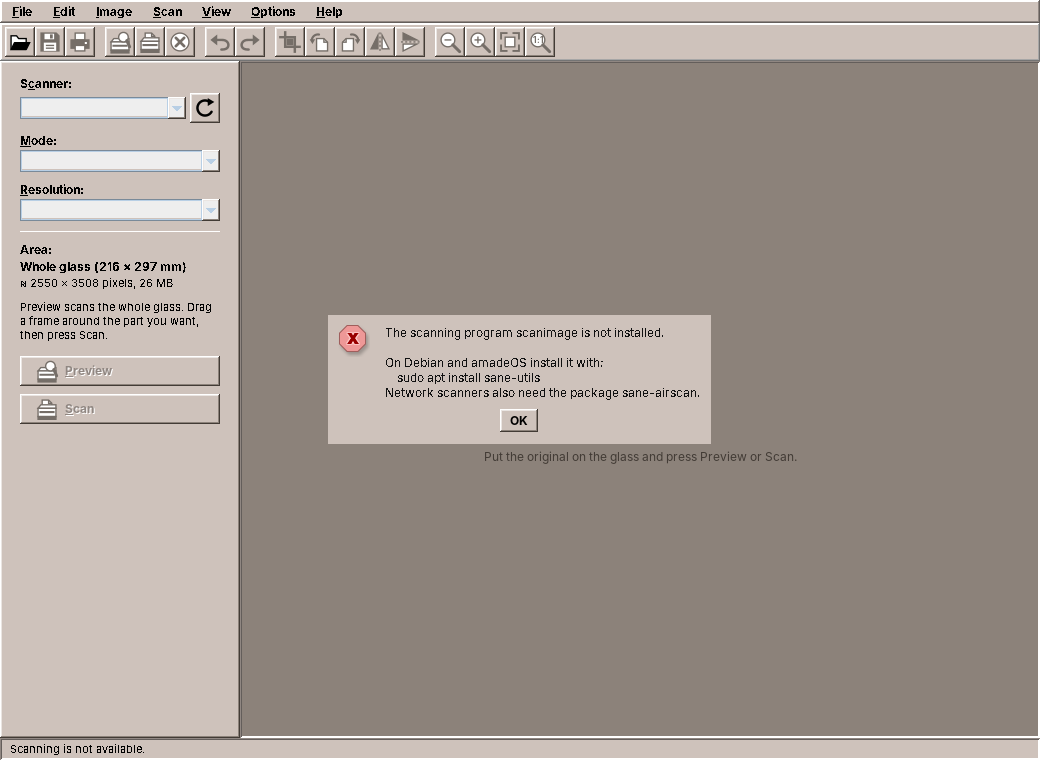
Imagescan's own BackendMissingException now extends ProgramMissingException, for the case where what is missing is not a program but a part of Windows. The test gives the backend what system() would throw:
    @Test
    void reportsAMissingScanimage() {
        SaneBackend backend = new SaneBackend(command -> {
            // what CommandRunner.system() makes of the JDK's error
            throw ProgramMissingException.check("scanimage",
                    new IOException("Cannot run program \"scanimage\": error=2, No such file or directory"));
        });
        ProgramMissingException e = assertThrows(ProgramMissingException.class, backend::listScanners);
        assertEquals("scanimage", e.program());
    }
Fakes for the tests
Because CommandRunner has one abstract method, a test answers with a lambda that returns a process. FinishedProcess is a process that has already ended with a given output, so the lambda is one line. Audio's sound server falls back from PipeWire's wpctl to PulseAudio's pactl when wpctl fails, and the test shows it with a wpctl that ends with an error:
    @Test
    void fallsBackToPactlWhenWpctlFails() {
        List<List<String>> commands = new ArrayList<>();
        SoundServer server = new SoundServer(cmd -> {
            commands.add(cmd);
            if (cmd.get(0).equals("wpctl")) return FinishedProcess.failing(1, "Could not connect to PipeWire");
            return FinishedProcess.printing(
                    "Volume: front-left: 26214 /  40% / -23.88 dB,   front-right: 26214 /  40% / -23.88 dB");
        });
        assertEquals(SoundServer.Backend.PACTL, server.backend());
        assertEquals(0.4, server.masterVolume().getAsDouble(), 1e-9);
        assertTrue(server.setMasterVolume(0.55));
        assertEquals(List.of("pactl", "set-sink-volume", "@DEFAULT_SINK@", "55%"), commands.get(commands.size() - 1));
        assertTrue(server.setMicrophoneVolume(0.2));
        assertEquals(List.of("pactl", "set-source-volume", "@DEFAULT_SOURCE@", "20%"), commands.get(commands.size() - 1));
        assertTrue(SoundServer.parsePactlVolume("garbage").isEmpty());
    }
In the sound server itself, every command is now one call:
    private String run(List<String> command) throws IOException {
        return runner.output(command, TIMEOUT);
    }
eject goes through the same runner with a limit of 30 seconds. WritePad's LibreOffice keeps its temporary folder and its profile of its own, and replaces the ProcessBuilder, the log file and the waitFor with one call. LibreOffice reports on either stream, so both go into the message when the conversion fails:
            List<String> command = List.of(soffice.toString(),
                    "-env:UserInstallation=" + work.resolve("profile").toUri(), "--headless", "--norestore",
                    "--nologo", "--convert-to", target, "--outdir", out.toString(), in.toString());
            ProgramResult run;
            try {
                run = runner.run(command, TIMEOUT);
            } catch (InterruptedException e) {
                Thread.currentThread().interrupt();
                throw new IOException("Interrupted while LibreOffice converted the document", e);
            }
That made the conversion testable without LibreOffice for the first time. The fake writes the file the real soffice would write, into the folder the command names:
    @Test
    void convertsInAProfileOfItsOwnAndCleansUp() throws IOException {
        List<List<String>> commands = new ArrayList<>();
        LibreOffice office = LibreOffice.at(SOFFICE, command -> {
            commands.add(command);
            Path outdir = Path.of(command.get(command.indexOf("--outdir") + 1));
            Files.writeString(outdir.resolve("document.docx"), "converted");
            return FinishedProcess.printing("convert document.doc -> document.docx using filter : MS Word 2007 XML");
        });

        byte[] docx = office.convert("old".getBytes(), "doc", "docx:MS Word 2007 XML");

        assertArrayEquals("converted".getBytes(), docx);
        List<String> command = commands.getFirst();
        assertEquals(SOFFICE.toString(), command.getFirst());
        assertTrue(command.get(1).startsWith("-env:UserInstallation=file:"));
        assertEquals("docx:MS Word 2007 XML", command.get(command.indexOf("--convert-to") + 1));
        Path input = Path.of(command.getLast());
        assertEquals("document.doc", input.getFileName().toString());
        assertFalse(Files.exists(input.getParent()), "the temporary folder is deleted");
    }
The toolbar's third user
Chapter 30 moved the toolbar into amade-commons from WritePad and Fractals and left Imagescan's copy for this chapter. Imagescan now draws its toolbar like the other two:

Open, save, print, undo, redo and the two magnifiers are StandardGlyphs. The rest is ImagescanGlyph, an enum of eleven glyphs that implements ToolIcon.Glyph. The scanner appears in three of them, so it is a method that draws it at a given place:
    /** A flatbed seen from the front: lid, glass with the light bar, base. */
    private static void scanner(ToolIcon.Pen pen, double x, double y) {
        Path2D lid = new Path2D.Double();
        lid.moveTo(x + 0.5, y + 2.5);
        lid.lineTo(x + 2.5, y);
        lid.lineTo(x + 13.5, y);
        lid.lineTo(x + 13.5, y + 2.5);
        lid.closePath();
        pen.fillAndDraw(lid, pen.paper());
        pen.fillAndDraw(new Rectangle2D.Double(x + 0.5, y + 2.5, 13, 6), pen.paper());
        pen.fill(new Rectangle2D.Double(x + 1.5, y + 4.5, 11, 1.5), pen.light());
        pen.fillAndDraw(new Rectangle2D.Double(x + 0.5, y + 8.5, 13, 2), pen.ink());
    }
Turn right is turn left with pen.mirror(), as redo is undo. The actions mix both kinds of glyph:
        crop = action("menu.image.crop", ImagescanGlyph.CROP, KeyEvent.VK_X, CTRL | SHIFT, presenter::crop);
        rotateLeft = action("menu.image.rotate-left", ImagescanGlyph.ROTATE_LEFT, KeyEvent.VK_L, CTRL,
                presenter::rotateLeft);
        rotateRight = action("menu.image.rotate-right", ImagescanGlyph.ROTATE_RIGHT, KeyEvent.VK_R, CTRL,
                presenter::rotateRight);
        rotate180 = action("menu.image.rotate-180", null, 0, 0, presenter::rotate180);
        flipHorizontal = action("menu.image.flip-horizontal", ImagescanGlyph.FLIP_HORIZONTAL, 0, 0,
                presenter::flipHorizontal);
        flipVertical = action("menu.image.flip-vertical", ImagescanGlyph.FLIP_VERTICAL, 0, 0, presenter::flipVertical);
        preview = action("menu.scan.preview", ImagescanGlyph.PREVIEW, KeyEvent.VK_F7, 0, presenter::preview);
        scan = action("menu.scan.scan", ImagescanGlyph.SCAN, KeyEvent.VK_F8, 0, presenter::scan);
        cancel = action("menu.scan.cancel", ImagescanGlyph.CANCEL, KeyEvent.VK_PERIOD, CTRL, presenter::cancelScan);
        refresh = action("menu.scan.refresh", StandardGlyph.REFRESH, KeyEvent.VK_F5, 0, presenter::refreshScanners);
        zoomIn = action("menu.view.zoom-in", StandardGlyph.ZOOM_IN, KeyEvent.VK_PLUS, CTRL, view::zoomIn);
Imagescan's ToolIcon, ToolButtons and Ui are deleted, and the provider method for @Ui leaves ImagescanModule, since CommonsModule binds it. The test that painted every glyph now loops over ImagescanGlyph.values(); the standard glyphs are tested in amade-commons.
Re-pinning the programs
- amade-commons gets the package
process(CommandRunner,ProgramResult,ProgramMissingException,FinishedProcess) and its tests, among them the one withsleep. - Imagescan deletes its
CommandRunnerandProcessOutput, and with them its copies ofToolIcon,ToolButtonsandUi.SaneBackendusesrunfor the list and the options, andstartfor the scan. Its ownFakeProcessstays for the scan tests, because it can hang until it is destroyed;FinishedProcesscannot. - Audio deletes its
CommandRunner;SoundServerandejectuse the one from amade-commons, and the tests answer withFinishedProcess. - WritePad's
LibreOfficeuses the runner and gets a test of its own. - All three pin the new amade-commons commit, and all their tests run.
What amade-commons gives Imagescan
| Part | Since | Imagescan uses it for |
|---|---|---|
AmadeApplication, AppInfo, CommonsModule, EdtExecutor |
chapter 10 | start-up, wiring, the background executor, the event dispatch thread |
Messages, Mnemonics, LocaleSettings, Language, TranslationCheck |
chapter 10 | five languages, menu letters, the language setting |
AmadeUI, DesktopTheme |
chapter 10 | the theme's colours, the label at the frame in the selection colour |
AppDirectories, PropertiesFile |
chapter 20 | the preferences: scanner, mode, resolution, bars |
ToolIcon, StandardGlyph, ToolButtons, @Ui |
chapter 30 | the toolbar and the menus' icons; continuing on the event dispatch thread |
CommandRunner, ProgramResult, ProgramMissingException, FinishedProcess |
this chapter | running scanimage; the message when it is missing; the tests |
And what stays in Imagescan
- Everything about scanners: the backends,
SaneOptionParser,PnmReader,ScanMonitor, and COM for WIA. - The image edits and their history. No other program edits pictures.
ImageHistoryis generic in all but its type; if a second program needs undo of whole states, it is a candidate. - The image view,
ViewportandCropSelection. Fractals' canvas zooms too, but into a calculation, not into a fixed picture, and shares no code with it. - Printing one picture at true size, as explained above.
ImageFiles, which writes pictures atomically and keeps the permissions of the file it replaces. That makes six atomic writes in the applications, and the first exercise of chapter 21 is still open.
Exercises
- Several pages into one PDF. Letters have more than one page. Add a Scan Next Page command that collects scans, and save them as one PDF. Which part of the program knows about pages: the presenter, a new service, the history?
- Find the hang yourself. Write a test for Audio's old runner (it is in the history of amade-audio) with a fake process whose standard output never ends. How long does the test take? Then write the same test for
CommandRunner.runwithFinishedProcess. Why canFinishedProcessnot show the bug, and what fake can? - Brightness and contrast. Add a dialog with two sliders and a preview. Where does the calculation go, and how do you keep a 1-bit picture 1-bit? (Hint: for line art, brightness is a threshold, and needs the grey scan.)
- A third backend. Write a backend for eSCL, the protocol of network scanners, over HTTP with
java.net.http, withoutscanimage. What changes outside the new class? - Cancel the scanner list. Searching for network scanners can take a minute. Give the list a Stop button. What would
runner.runneed for that, and is it better to changeCommandRunneror to usestart?
Summary
- Put the hardware behind an interface of a few blocking calls, run them in the background, and the rest of the program does not know the platform. COM wants all its calls on one platform thread.
- Read a program's standard output and standard error at the same time, or one pipe fills up and stops both. A picture can be decoded while it arrives.
- Cancelling another program means stopping its process. Register the stop action with a monitor that also runs it when the cancel came first.
- Keep areas in the unit that does not change (millimetres on the glass) and convert to pixels where pixels are needed.
- Edit pictures on the raster with the same colour model, never change the source, and undo is a list of references with a limit.
- A time limit after a blocking read is no time limit.
CommandRunner.runin amade-commons reads on virtual threads, waits with the limit, stops the program when it runs out, and reports a missing program asProgramMissingException. CommandRunnermoves into amade-commons from three programs (Imagescan, Audio, WritePad), and Imagescan becomes the third user of the toolbar from chapter 30.