36. PDF Viewer
A PDF file looks like a picture of paper, and a PDF viewer like an image viewer with more pages. Then the reader zooms to 400 % on a page of A3, scrolls through a manual of 600 pages while the sidebar draws thumbnails, searches all of them for a word, and clicks a link in the table of contents, all at once and in a library that is not thread-safe. amade-pdfviewer is a program about one shared resource: a document that only one thread may touch, and a window that must never wait for it.
The program has about 4,900 lines of Java and 1,600 lines of tests. Nothing moves into amade-commons with it. It is the first program of this book that reads a complex file format with a library from outside, Apache PDFBox, and the second, after Image Viewer (chapter 35), that shows something larger than its window.
What you build
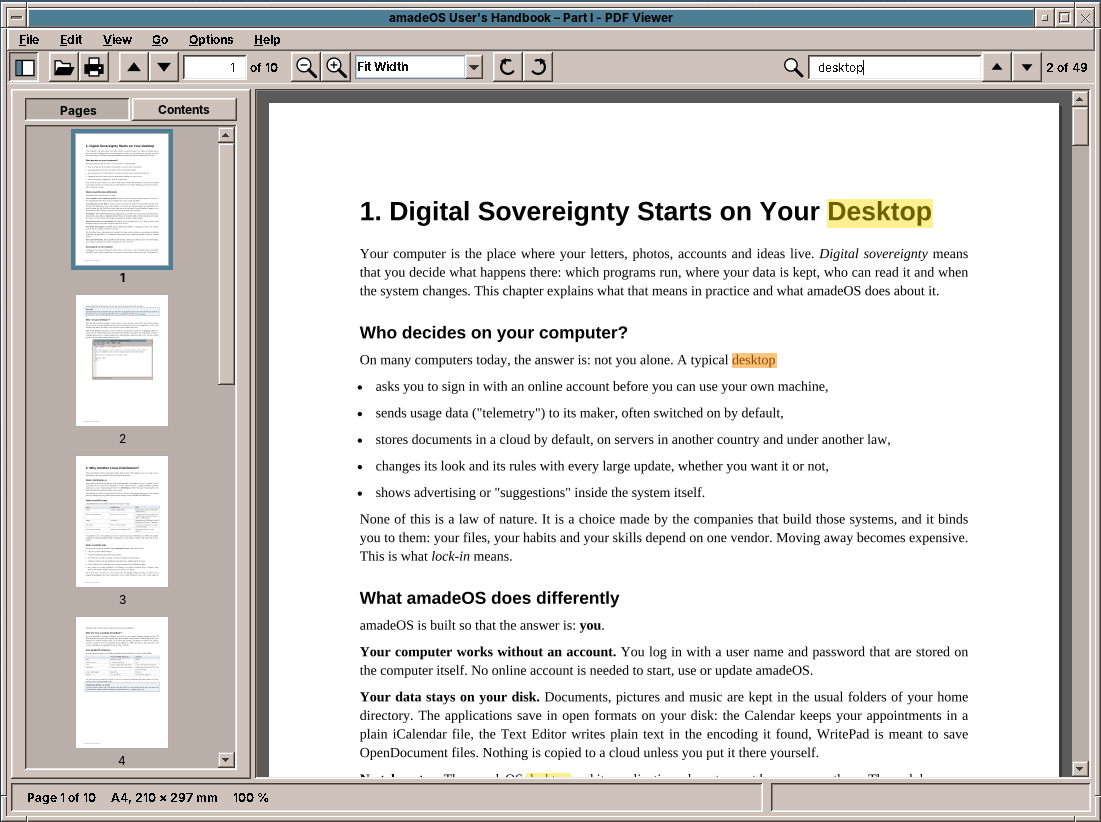
- Three views: continuous, single page, and two pages side by side like a book.
- Zoom from 10 % to 800 %, fit page and fit width, and zoom around the mouse pointer; turning by 90°.
- A sidebar with thumbnails of the pages or the table of contents of the document.
- Search over all pages with every hit marked, text selection and copying.
- Links inside the document and to the web, with Back and Forward.
- Printing, a presentation mode, the document's properties, password-protected files.
- The reading position of every document, and reloading when the file changes on disk.
What you will learn
- How to share a library that is not thread-safe: one thread, with priorities, and jobs that can be cancelled.
- How to draw pages larger than memory allows, in tiles, and what to show while they are drawn.
- How to get the text of a PDF with the place of every character, and build search and selection on it.
- How PDF coordinates, the page's own rotation and the user's rotation fit together.
- How to lay out pages in three views with one class, and how to fit them to a window without a scroll bar.
- How to follow a file that another program rewrites, and how to remember where the reader was.
- How to print with a library's own
Pageable, and why the dialog and the printing run on different threads.
The structure
| Package | Contents |
|---|---|
domain |
PdfDocument (the only class that uses PDFBox), DocumentThread, DocumentSession (pictures, thumbnails, texts and links of an open document), PageLayout, PageText, Zoom, Rotation, ViewMode, PageSize, Target, PageLink, OutlineEntry, SearchHit, DocumentProperties, PaperNames, Settings, ReadingPosition |
repository |
PdfViewerPreferences (pdfviewer.properties: view, zoom, sidebar, recent files), ReadingPositions |
ui.main |
MainWindow, MainPresenter, MainMenuBar, PageView, Sidebar, PresentationWindow, SearchState |
The presenter talks to the window through the MainView interface, as in every program of this book (chapter 10). The tests give it a FakeView and real PDF files, which TestPdfs writes with PDFBox at the start of each test: a few pages of text, a page with links, a turned page, a document with a password.
PDFBox, behind one class
Apache PDFBox reads PDF files, draws their pages with Java2D, and extracts their text. It is a library of the Apache Software Foundation, under the Apache License 2.0, and it is pure Java, so the program stays one jar without native code. The alternatives either need a native library (MuPDF, Poppler through JNA) or are not free.
Only PdfDocument imports PDFBox. Everything else sees page sizes, pictures, PageText, links and the outline, in types of the program. Opening reads a file of normal size into memory first:
    /**
     * Opens a PDF file. A file of normal size is read into memory first, so that it can be rewritten on the
     * disk (by LaTeX, say) while it is shown.
     *
     * @param password null or empty for none
     * @throws PasswordException the file needs a password, or this one is wrong
     * @throws IOException       the file cannot be read or is no PDF
     */
    public static PdfDocument open(Path file, String password) throws IOException, PasswordException {
        long size = Files.size(file);
        String pw = password == null ? "" : password;
        try {
            PDDocument document = size <= IN_MEMORY_LIMIT
                    ? Loader.loadPDF(Files.readAllBytes(file), pw)
                    : Loader.loadPDF(new RandomAccessReadBufferedFile(file), pw);
            if (document.getNumberOfPages() == 0) {
                document.close();
                throw new IOException("The document has no pages");
            }
            return new PdfDocument(file, document, size);
        } catch (InvalidPasswordException e) {
            throw new PasswordException(!pw.isEmpty());
        }
    }
Reading the whole file is not about speed. PDFBox reads the parts of a document when it needs them, long after opening. If it reads them from the file, and LaTeX writes the file again in the meantime, PDFBox finds half of an old document and half of a new one. With the bytes in memory, the open document stays whole until the viewer reloads it. Only files above 100 MB are read from the disk as they are needed.
A wrong password and a missing password are both an InvalidPasswordException in PDFBox. The viewer turns it into its own PasswordException, which says whether a password was given, so the dialog can say "wrong password" the second time.
One thread for the document
PDFBox is not thread-safe. Two threads that draw two pages of the same document at once can break each other's fonts and streams. The simple answer, a lock around every call, keeps the window correct but makes it wait: while the search reads page 412, a click on the scroll bar would wait for it.
So all work on the document runs on one thread, and the window never calls PDFBox itself. It asks for a page picture, gets null, draws a placeholder, and is called back when the picture is ready. The jobs have priorities:
    public enum Priority {
        /** Opening, closing, printing: before anything else. */
        DOCUMENT,
        /** Pages shown in the window. */
        VISIBLE,
        /** Text for selecting and links, of the pages in the window. */
        TEXT,
        /** Pages next to the window, rendered ahead. */
        AHEAD,
        THUMBNAIL,
        SEARCH
    }
DocumentThread is a ThreadPoolExecutor with one thread and a PriorityBlockingQueue. Each job knows its priority and a running number, so jobs of the same priority keep their order. The result goes to the UI executor, which is the event dispatch thread in the program and Runnable::run in tests. A job can be cancelled: a waiting one is taken out of the queue, a running one finishes, but its result is not passed on.
That makes scrolling cheap. When the user drags the scroll bar through 200 pages, the window asks for the pictures of the pages it passes. When the zoom changes, cancelRendering drops all waiting page pictures, because they are for a scale nobody wants any more. The test shows the order and the cancelling:
    @Test
    void visiblePagesBeforeSearchAndCancelledJobsDropped() throws Exception {
        List<String> done = new CopyOnWriteArrayList<>();
        try (DocumentThread thread = new DocumentThread(Runnable::run)) {
            CountDownLatch blocker = new CountDownLatch(1);
            thread.submit(Priority.DOCUMENT, () -> blocker.await(5, TimeUnit.SECONDS), r -> done.add("first"), e -> {
            });
            thread.submit(Priority.SEARCH, () -> "search", done::add, e -> {
            });
            thread.submit(Priority.THUMBNAIL, () -> "thumbnail", done::add, e -> {
            });
            thread.submit(Priority.VISIBLE, () -> "visible", done::add, e -> {
            });
            thread.submit(Priority.AHEAD, () -> "ahead", done::add, e -> {
            });
            thread.cancel(Priority.THUMBNAIL);
            blocker.countDown();
            thread.await();
            assertEquals(List.of("first", "visible", "ahead", "search"), done);
        }
    }
Pitfall: a test marker that a cancel removes
await() puts a marker job at the end of the queue and waits until it runs. The first version gave it the priority SEARCH, and a test that cleared the search cancelled all SEARCH jobs, the marker with them. The test then waited 30 seconds for a job that no longer existed. The marker now refuses to be cancelled.
Drawing pages
A picture of a page
PDFBox draws a page into any Graphics2D. Its scale 1 is one pixel per point, 72 dpi; the viewer's 100 % is the size on a screen of 96 dpi, so 100 % is a scale of 96/72. The page's own rotation, the /Rotate entry of the PDF, is applied by PDFBox. The user's rotation is a turn of the Graphics2D before it:
    /** A picture of the whole page as the document shows it. */
    public BufferedImage render(int page, double pixelsPerPoint) throws IOException {
        PageSize size = sizes.get(page);
        return render(page, pixelsPerPoint, Rotation.NONE, new Rectangle(0, 0,
                (int) Math.round(size.width() * pixelsPerPoint), (int) Math.round(size.height() * pixelsPerPoint)));
    }

    /**
     * A picture of part of the page, turned further by the user: {@code region} is in pixels of the turned page
     * at this scale. Large zooms render only the tiles in the window this way, not pictures of whole pages.
     */
    public BufferedImage render(int page, double pixelsPerPoint, Rotation turn, Rectangle region) throws IOException {
        BufferedImage image = new BufferedImage(Math.max(1, region.width), Math.max(1, region.height),
                BufferedImage.TYPE_INT_RGB);
        Graphics2D g = image.createGraphics();
        try {
            // PDFBox clears the page with the background colour first, which is black otherwise.
            g.setBackground(Color.WHITE);
            g.setColor(Color.WHITE);
            g.fillRect(0, 0, image.getWidth(), image.getHeight());
            g.translate(-region.x, -region.y);
            PageSize size = sizes.get(page);
            double w = size.width() * pixelsPerPoint;
            double h = size.height() * pixelsPerPoint;
            switch (turn) {
                case NONE -> {
                }
                case RIGHT -> {
                    g.translate(h, 0);
                    g.rotate(Math.PI / 2);
                }
                case HALF -> {
                    g.translate(w, h);
                    g.rotate(Math.PI);
                }
                case LEFT -> {
                    g.translate(0, w);
                    g.rotate(-Math.PI / 2);
                }
            }
            // PDFBox's scale 1 is 72 dpi, one pixel per point; it turns the page by its own /Rotate.
            renderer.renderPageToGraphics(page, g, (float) pixelsPerPoint);
        } finally {
            g.dispose();
        }
        return image;
    }
Pitfall: black pages
renderPageToGraphics starts with clearRect, which fills with the background colour of the Graphics2D. On a new BufferedImage that is black, and a white fillRect before it does not help. setBackground(Color.WHITE) does.
A page of A4 with text takes 20 to 45 ms at 100 % on a normal computer, the first page of a document up to 230 ms while PDFBox loads the fonts. PDFBox scans the system fonts once and keeps a list in a cache file, by default in the home folder; main moves it to the program's cache folder:
    public static void main(String[] args) {
        if (args.length > 0 && (args[0].equals("--version") || args[0].equals("-v"))) {
            System.out.println("amade-pdfviewer " + version());
            return;
        }
        // PDFBox keeps the list of system fonts it scanned in a cache file, by default in the home folder.
        if (System.getProperty("pdfbox.fontcache") == null) {
            System.setProperty("pdfbox.fontcache", XdgDirectories.system().appCache(APP.configName()).toString());
        }
        AmadeApplication.launch(APP, injector -> {
            MainWindow window = injector.getInstance(MainWindow.class);
            MainPresenter presenter = injector.getInstance(MainPresenter.class);
            window.bind(presenter);
            window.setVisible(true);
            presenter.start(List.of(args));
        }, new PdfViewerModule());
    }
Tiles
At 800 % a page of A4 is 6,350 × 8,980 pixels, 57 million pixels or 228 MB as an image, of which the window shows a fiftieth. So a page above 12 million pixels is drawn in tiles of 1024 × 1024, and the window asks only for the tiles it shows:
    /**
     * The parts to render a page of this size in pixels: the whole page while it is small enough, else a grid of
     * square tiles, of which the window only asks for those it shows.
     */
    public static List<Rectangle> tiles(Dimension page) {
        if ((long) page.width * page.height <= WHOLE_PAGE_PIXELS) {
            return List.of(new Rectangle(0, 0, page.width, page.height));
        }
        List<Rectangle> tiles = new ArrayList<>();
        for (int y = 0; y < page.height; y += TILE) {
            for (int x = 0; x < page.width; x += TILE) {
                tiles.add(new Rectangle(x, y, Math.min(TILE, page.width - x), Math.min(TILE, page.height - y)));
            }
        }
        return tiles;
    }
A tile is the same render call with a region: the Graphics2D is moved by the tile's corner, and PDFBox draws the whole page into it, of which only the tile lands in the picture. That costs nearly as much time as a whole page, but only the memory of the tile. The test makes sure a tile shows exactly what the whole picture shows at that place, also on a turned page:
    @Test
    void tilesMatchTheWholePicture() throws Exception {
        try (PdfDocument doc = PdfDocument.open(TestPdfs.rotated(dir, 0), null)) {
            BufferedImage whole = doc.render(0, 2, Rotation.RIGHT, new Rectangle(0, 0, 1684, 1191));
            BufferedImage tile = doc.render(0, 2, Rotation.RIGHT, new Rectangle(1024, 0, 660, 1024));
            int differences = 0;
            for (int y = 0; y < tile.getHeight(); y += 3) {
                for (int x = 0; x < tile.getWidth(); x += 3) {
                    if (Math.abs((whole.getRGB(1024 + x, y) & 0xff) - (tile.getRGB(x, y) & 0xff)) > 60) differences++;
                }
            }
            assertTrue(differences < 20, "differences: " + differences);
        }
    }
The finished tiles are kept in a LinkedHashMap in access order, up to 40 million pixels in all. When a new tile pushes the sum over the limit, the oldest go.
While a page is drawn
The window paints what it has. For each tile it asks the session; if the tile is not there yet, it draws the best picture of the page there is at any scale, stretched, or a white sheet:
    private void paintPage(Graphics2D g, int page, Rectangle r, Rectangle clip) {
        DocumentSession.Preview preview = null;
        boolean previewLoaded = false;
        for (Rectangle tile : DocumentSession.tiles(r.getSize())) {
            Rectangle onScreen = new Rectangle(r.x + tile.x, r.y + tile.y, tile.width, tile.height);
            if (!clip.intersects(onScreen)) continue;
            BufferedImage image = session.tile(page, layout.scale(), rotation, tile, Priority.VISIBLE);
            if (image != null) {
                g.drawImage(image, onScreen.x, onScreen.y, null);
                continue;
            }
            // Until the sharp picture is there: any picture of the page, stretched, or a white sheet.
            if (!previewLoaded) {
                preview = session.preview(page, rotation);
                previewLoaded = true;
            }
            Graphics2D t = (Graphics2D) g.create();
            t.clip(onScreen);
            t.setColor(Color.WHITE);
            t.fill(onScreen);
            if (preview != null) t.drawImage(preview.image(), r.x, r.y, r.width, r.height, null);
            t.dispose();
        }
        session.text(page);
    }
The preview is the last whole picture of the page, or its thumbnail. When the user zooms in, the page first grows blurred and becomes sharp a moment later, instead of turning white. The last line asks for the text of the page, which the selection and the links need, at the priority TEXT, after the pictures.
Laying out pages
PageLayout places the pages for one of the three views. It is a class of the domain without Swing: the sizes of the pages, the view, the scale and the size of the window go in, and a rectangle for each page comes out. Continuous puts one page per row, two pages puts two, and single page only the current one. In two pages the first page stands alone on the right, as page 1 of a book does, so that even pages are on the left.
Fit page and fit width compute the scale from the row of the current page:
    /**
     * Pixels per point for the zoom: fixed zooms multiply the 96 dpi size; the fits use the row of the current
     * page and the window's visible area.
     */
    public static double scale(Zoom zoom, List<PageSize> sizes, ViewMode mode, int current, Dimension viewport) {
        if (!zoom.fits() || sizes.isEmpty()) return zoom.factor() * PIXELS_PER_POINT;
        int[] row = rowOf(rows(sizes.size(), mode), Math.clamp(current, 0, sizes.size() - 1));
        double width = 0;
        double height = 0;
        for (int page : row) {
            width += sizes.get(page).width();
            height = Math.max(height, sizes.get(page).height());
        }
        // A page alone in two pages (the first, or the last) keeps the place of two, so the zoom does not jump.
        int places = mode == ViewMode.TWO_PAGES ? 2 : row.length;
        if (places > row.length) width *= places;
        double gaps = (places - 1) * GAP;
        // One pixel less per page, because the page sizes are rounded: a fitted row never needs a scroll bar.
        double byWidth = (viewport.width - 2 * MARGIN - gaps - places) / width;
        double byHeight = (viewport.height - 2 * MARGIN - 1) / height;
        double fit = zoom.kind() == Zoom.Kind.FIT_WIDTH ? byWidth : Math.min(byWidth, byHeight);
        return Math.clamp(fit, Zoom.MIN * PIXELS_PER_POINT, Zoom.MAX * PIXELS_PER_POINT);
    }
Two details came from trying it:
- A page alone keeps the room of two. In two pages the first row has one page. Fitting that one page to the width made it twice as large as the pairs after it, and the zoom jumped when the reader reached page 2.
- One pixel per page. The page sizes in pixels are rounded. A row that fits exactly could become one pixel wider than the window, and a horizontal scroll bar appears for one pixel. The fit leaves a pixel per page.
The window lays out again whenever the zoom, the view, the rotation or its size changes:
    /** Lays the pages out for the size of the window, e.g. after zooming or when the window was resized. */
    void relayout() {
        Dimension viewport = viewportSize();
        if (session == null) {
            layout = null;
            setPreferredSize(viewport);
            setSize(viewport);
        } else {
            List<PageSize> sizes = session.sizes(rotation);
            double scale = PageLayout.scale(zoom, sizes, mode, current, viewport);
            if (layout != null && layout.scale() != scale) session.cancelRendering();
            layout = PageLayout.of(sizes, mode, scale, current, viewport);
            // Sized at once, so that scrolling to a page works before the next validation.
            setPreferredSize(layout.size());
            setSize(layout.size());
        }
        revalidate();
        repaint();
    }
Which page is the current one, for the page box in the toolbar and the reading position, is the first page that fills at least half of the window, else the one that shows most:
    /**
     * The page the reader is at when the view shows {@code visible}: the first page that fills at least half
     * of the visible height, else the one that takes most of it.
     */
    public int currentPage(Rectangle visible, int fallback) {
        int best = -1;
        int bestHeight = 0;
        for (int i = 0; i < pages.length; i++) {
            if (pages[i] == null) continue;
            Rectangle shown = pages[i].intersection(visible);
            if (shown.isEmpty()) continue;
            if (shown.height * 2 >= visible.height) return firstOfRow(i);
            if (shown.height > bestHeight) {
                best = i;
                bestHeight = shown.height;
            }
        }
        return best < 0 ? fallback : firstOfRow(best);
    }
Text with a place
Every character in a box
Search and selection need more than the text of a page. They need to know where each character is, to mark a hit and to find the character under the mouse. PDFBox's PDFTextStripper sorts the text of a page into reading order and calls writeString with the characters and their positions. The viewer overrides it and builds a PageText: the text as a string, and for each character its box in points, from the top left of the page:
    /** The text of the page with the box of every character. */
    public PageText text(int page) throws IOException {
        PageText.Builder builder = new PageText.Builder();
        PDFTextStripper stripper = new PDFTextStripper() {
            @Override
            protected void writeString(String text, List<TextPosition> positions) {
                for (TextPosition p : positions) {
                    String unicode = p.getUnicode();
                    if (unicode == null || unicode.isEmpty()) continue;
                    // The font size gives a box from above the capitals to below the descenders; the glyph height
                    // that PDFBox estimates is often too small to point at.
                    double size = Math.abs(p.getFontSizeInPt());
                    double top;
                    double height;
                    if (size > 0 && size < 500) {
                        top = p.getY() - size * 0.8;
                        height = size * 1.05;
                    } else {
                        top = p.getY() - p.getHeight();
                        height = p.getHeight();
                    }
                    // A ligature like "fi" is one glyph for several characters: share its width.
                    double width = p.getWidth() / unicode.length();
                    for (int i = 0; i < unicode.length(); i++) {
                        char c = unicode.charAt(i);
                        if (Character.isWhitespace(c)) builder.separator(' ');
                        else builder.add(c, p.getX() + i * width, top, width, height);
                    }
                }
            }

            @Override
            protected void writeWordSeparator() {
                builder.separator(' ');
            }

            @Override
            protected void writeLineSeparator() {
                builder.separator('\n');
            }
        };
        stripper.setStartPage(page + 1);
        stripper.setEndPage(page + 1);
        stripper.getText(document);
        return builder.build();
    }
The height of a glyph that PDFBox estimates is often too small to point at, so the box goes from above the capitals to below the descenders, from the font size. On a page turned by half, the font size is negative, hence Math.abs. Spaces and line breaks have no box; they are separators in the text, and only one at a time.
Search
The search finds a phrase across line breaks: "free software" is found when "free" ends one line and "software" begins the next. Each space of the query becomes \s+, and the words are quoted, so a dot or a bracket in the query means itself:
    /**
     * Where the query occurs, ignoring case; a space in the query stands for any spaces and line breaks, so a
     * phrase is found across lines.
     */
    public List<int[]> find(String query) {
        Pattern pattern = pattern(query);
        if (pattern == null) return List.of();
        List<int[]> found = new ArrayList<>();
        Matcher m = pattern.matcher(text);
        while (m.find()) {
            if (m.end() > m.start()) found.add(new int[]{m.start(), m.end()});
        }
        return found;
    }

    static Pattern pattern(String query) {
        String[] words = query == null ? new String[0] : query.strip().split("\\s+");
        if (words.length == 0 || words[0].isEmpty()) return null;
        StringBuilder regex = new StringBuilder();
        for (String word : words) {
            if (!regex.isEmpty()) regex.append("\\s+");
            regex.append(Pattern.quote(word));
        }
        return Pattern.compile(regex.toString(), Pattern.CASE_INSENSITIVE | Pattern.UNICODE_CASE);
    }
Reading the text of 600 pages takes several seconds. The presenter searches one page per job at the lowest priority, starting at the current page, and adds the hits as they come. Between two pages, the pictures the window asks for come first, so scrolling stays smooth during a search. A new search counts up a generation number; the results of an older one are dropped when they arrive:
    /**
     * Enter in the search field: a new text starts a search from the current page on; the same text again
     * goes to its next (or previous) hit.
     */
    public void search(String text, boolean backwards) {
        if (session == null) return;
        String query = text == null ? "" : text.strip();
        if (query.isEmpty()) {
            clearSearch();
            return;
        }
        if (query.equals(search.query())) {
            if (!search.hits().isEmpty()) step(backwards);
            else if (!search.running()) view.beep();
            return;
        }
        startSearch(query, backwards, true);
    }

    private void startSearch(String query, boolean backwards, boolean jump) {
        int generation = ++searchGeneration;
        search = new SearchState(query, List.of(), Optional.empty(), true, 0);
        searchJump = jump;
        searchBackwards = backwards;
        thread.cancel(Priority.SEARCH);
        view.showSearch(search);
        int count = session.pageCount();
        List<Integer> order = new ArrayList<>();
        for (int i = 0; i < count; i++) order.add(backwards ? Math.floorMod(page - i, count) : (page + i) % count);
        searchPage(generation, order, 0);
    }

    /** One page at a time, so that rendering in between stays quick. */
    private void searchPage(int generation, List<Integer> order, int index) {
        if (generation != searchGeneration) return;
        if (index >= order.size()) {
            search = new SearchState(search.query(), search.hits(), search.current(), false, order.size());
            if (search.hits().isEmpty()) view.beep();
            view.showSearch(search);
            return;
        }
        int searched = order.get(index);
        DocumentSession current = session;
        String query = search.query();
        current.thread().submit(Priority.SEARCH, () -> {
            PageText text = current.loadText(searched);
            List<SearchHit> found = new ArrayList<>();
            for (int[] range : text.find(query)) found.add(new SearchHit(searched, range[0], range[1]));
            return found;
        }, found -> {
            if (generation != searchGeneration || current != session) return;
            List<SearchHit> hits = new ArrayList<>(search.hits());
            hits.addAll(found);
            hits.sort(Comparator.comparingInt(SearchHit::page).thenComparingInt(SearchHit::start));
            Optional<SearchHit> shown = search.current();
            if (searchJump && !found.isEmpty()) {
                shown = Optional.of(searchBackwards ? found.getLast() : found.getFirst());
                searchJump = false;
            }
            search = new SearchState(query, hits, shown, true, index + 1);
            view.showSearch(search);
            if (shown.isPresent() && found.contains(shown.get())) show(shown.get());
            searchPage(generation, order, index + 1);
        }, failure -> searchPage(generation, order, index + 1));
    }

    private void step(boolean backwards) {
        List<SearchHit> hits = search.hits();
        int index = search.current().map(hits::indexOf).orElse(-1);
        int next = index < 0 ? (backwards ? hits.size() - 1 : 0)
                : Math.floorMod(index + (backwards ? -1 : 1), hits.size());
        SearchHit hit = hits.get(next);
        search = new SearchState(search.query(), hits, Optional.of(hit), search.running(), search.searched());
        view.showSearch(search);
        show(hit);
    }
The search job calls loadText of the session directly, because it already runs on the document thread. The texts are kept in a ConcurrentHashMap, since the window reads them on the event dispatch thread:
    /** Reads the text of the page; only on the document thread, e.g. by the search. */
    public PageText loadText(int page) throws IOException {
        PageText text = texts.get(page);
        if (text != null) return text;
        try {
            text = document.text(page);
        } catch (IOException | RuntimeException e) {
            LOG.warn("Text of page {} could not be read: {}", page + 1, e.toString());
            text = PageText.EMPTY;
        }
        texts.put(page, text);
        return text;
    }
Selecting
A selection is two carets, the places between two characters where the drag began and where it is now. caretAt finds the caret nearest to the mouse. Being on the same line counts a thousand times more than being near horizontally, so a drag to the right of a line ends at the end of that line, not at the start of the next:
    /**
     * The position between two characters nearest to a point, for selecting with the mouse: in the
     * character under the point, else the nearest character on the same line, else the nearest one at all;
     * before it when the point is in its left half. -1 when the page has no text.
     */
    public int caretAt(Point2D p) {
        int best = -1;
        double bestDistance = Double.MAX_VALUE;
        for (int i = 0; i < text.length(); i++) {
            int b = i * 4;
            if (boxes[b + 2] <= 0) continue;
            double left = boxes[b];
            double top = boxes[b + 1];
            double right = left + boxes[b + 2];
            double bottom = top + boxes[b + 3];
            double dx = p.getX() < left ? left - p.getX() : Math.max(0, p.getX() - right);
            double dy = p.getY() < top ? top - p.getY() : Math.max(0, p.getY() - bottom);
            // Being on the line weighs more than being near it horizontally.
            double distance = dy * 1000 + dx;
            if (distance < bestDistance) {
                bestDistance = distance;
                best = i;
            }
        }
        if (best < 0) return -1;
        int b = best * 4;
        return p.getX() > boxes[b] + boxes[b + 2] / 2 ? best + 1 : best;
    }
The marking joins the boxes of the selected characters into one rectangle per line:
    /** The boxes of the characters from {@code start} to {@code end}, joined into one rectangle per line. */
    public List<Rectangle2D> areas(int start, int end) {
        int from = Math.clamp(Math.min(start, end), 0, text.length());
        int to = Math.clamp(Math.max(start, end), 0, text.length());
        List<Rectangle2D> areas = new ArrayList<>();
        Rectangle2D line = null;
        for (int i = from; i < to; i++) {
            int b = i * 4;
            if (boxes[b + 2] <= 0 || boxes[b + 3] <= 0) continue;
            Rectangle2D box = box(i);
            if (line != null && sameLine(line, box) && box.getX() >= line.getX() - 1) {
                line = line.createUnion(box);
            } else {
                if (line != null) areas.add(line);
                line = box;
            }
        }
        if (line != null) areas.add(line);
        return areas;
    }
A selection can span pages. Copy joins the text of all pages from the first caret to the second:
    /** The selected text of all selected pages, a line break between two pages. */
    String selectedText() {
        if (session == null || anchor == null || end == null) return "";
        Caret from = before(anchor, end) ? anchor : end;
        Caret to = from == anchor ? end : anchor;
        StringBuilder text = new StringBuilder();
        for (int page = from.page(); page <= to.page(); page++) {
            PageText pageText = session.textIfLoaded(page);
            if (pageText == null) continue;
            int start = page == from.page() ? from.index() : 0;
            int stop = page == to.page() ? to.index() : pageText.length();
            if (!text.isEmpty()) text.append('\n');
            text.append(pageText.text(start, stop));
        }
        return text.toString().strip();
    }
Scans have no text
A PDF made by a scanner usually holds one picture per page and no text at all. Search finds nothing and the mouse selects nothing, which is correct. Recognising the text (OCR) is a job for the program that scans.
Coordinates and rotation
Three coordinate systems meet on a page:
- PDF space: points, from the bottom left of the page's box, upwards.
- The page as shown: points, from the top left, after the page's own
/Rotate. - The window: pixels, after the user's rotation and the scale.
The text from PDFBox is already in the page as shown. Links are not: their rectangles are in PDF space, and the page's own rotation must be applied to them. Rotation does both turns, the page's and the user's, with the same method:
    /**
     * A rectangle on a page of the given (unturned) size, origin top left, as it lies after the page is turned.
     */
    public Rectangle2D apply(Rectangle2D r, PageSize size) {
        double w = size.width();
        double h = size.height();
        return switch (this) {
            case NONE -> new Rectangle2D.Double(r.getX(), r.getY(), r.getWidth(), r.getHeight());
            case RIGHT -> new Rectangle2D.Double(h - r.getMaxY(), r.getX(), r.getHeight(), r.getWidth());
            case HALF -> new Rectangle2D.Double(w - r.getMaxX(), h - r.getMaxY(), r.getWidth(), r.getHeight());
            case LEFT -> new Rectangle2D.Double(r.getY(), w - r.getMaxX(), r.getHeight(), r.getWidth());
        };
    }
A turn to the right moves the top left corner of a rectangle to the right edge: its new x is the height of the page minus its bottom. The opposite method, unapply, turns a mouse position back, so the selection and the links work in the page's own coordinates and only the drawing knows about the user's rotation. The tests check that unapply after apply gives the same point for all four turns.
Links and the table of contents
A link in a PDF is an annotation with a rectangle and an action: a web address, or a destination in the document. A destination is a page with a position, given directly or by a name that the document's catalogue resolves:
    /** The links of the page that lead somewhere this viewer can go. */
    public List<PageLink> links(int page) throws IOException {
        PDPage p = document.getPage(page);
        PDRectangle crop = p.getCropBox();
        PageSize unturned = new PageSize(crop.getWidth(), crop.getHeight());
        Rotation rotation = Rotation.of(p.getRotation());
        List<PageLink> links = new ArrayList<>();
        for (PDAnnotation annotation : p.getAnnotations()) {
            if (!(annotation instanceof PDAnnotationLink link) || link.getRectangle() == null) continue;
            PDRectangle r = link.getRectangle();
            // PDF coordinates start at the bottom left; ours at the top left of the crop box.
            Rectangle2D area = rotation.apply(new Rectangle2D.Double(r.getLowerLeftX() - crop.getLowerLeftX(),
                    crop.getUpperRightY() - r.getUpperRightY(), r.getWidth(), r.getHeight()), unturned);
            PDAction action = link.getAction();
            if (action instanceof PDActionURI uri && uri.getURI() != null && !uri.getURI().isBlank()) {
                links.add(PageLink.to(area, uri.getURI().strip()));
            } else {
                PDDestination destination = action instanceof PDActionGoTo goTo ? goTo.getDestination()
                        : action == null ? link.getDestination() : null;
                target(destination).ifPresent(t -> links.add(PageLink.to(area, t)));
            }
        }
        return links;
    }
    private Optional<Target> target(PDDestination destination) throws IOException {
        if (destination instanceof PDNamedDestination named) {
            destination = document.getDocumentCatalog().findNamedDestinationPage(named);
        }
        if (!(destination instanceof PDPageDestination pageDestination)) return Optional.empty();
        int page = pageDestination.retrievePageNumber();
        if (page < 0 || page >= sizes.size()) return Optional.empty();
        int top = switch (pageDestination) {
            case PDPageXYZDestination xyz -> xyz.getTop();
            case PDPageFitWidthDestination fitH -> fitH.getTop();
            default -> -1;
        };
        PDPage p = document.getPage(page);
        if (top < 0 || p.getRotation() % 360 != 0) return Optional.of(Target.page(page));
        double fromTop = p.getCropBox().getUpperRightY() - top;
        return Optional.of(new Target(page, Math.clamp(fromTop, 0, sizes.get(page).height())));
    }
The table of contents in the sidebar is the document's outline, a tree of titles with the same destinations, read at opening into OutlineEntry records. A click on a link or a title goes through follow, which remembers where the reader was, so Back returns there. Web addresses go to the browser through DesktopLauncher (chapter 11):
    /** A link was clicked: inside the document it jumps there (Back returns), else the address is opened. */
    public void follow(PageLink link) {
        if (link.target().isPresent()) {
            follow(link.target().get());
        } else {
            link.uri().ifPresent(this::browse);
        }
    }

    public void follow(Target target) {
        if (session == null || target.page() < 0 || target.page() >= session.pageCount()) return;
        remember();
        goTo(target.page());
        if (target.hasTop()) view.scrollTo(target.page(), target.top(), true);
    }

    private void browse(String uri) {
        try {
            launcher.browse(uri);
        } catch (IOException | RuntimeException e) {
            view.showError(msg.format("error.link", uri, reason(e)));
        }
    }
The window shows a hand over a link and the address in the status bar, so the reader sees where a link leads before clicking it.
Opening, again and again
Asking for the password
Opening runs on the document thread at the priority DOCUMENT. When the file needs a password, the failure comes back to the presenter, which asks and tries again, as long as the user gives one:
    public void open(Path newFile) {
        EdtExecutor.requireEdt();
        Path absolute = newFile.toAbsolutePath().normalize();
        if (!Files.isRegularFile(absolute)) {
            view.showError(msg.format("error.not-found", absolute.toString()));
            return;
        }
        load(absolute, null, false);
    }

    private record Loaded(PdfDocument document, List<OutlineEntry> outline) {
    }

    /** Opens the file on the document thread; asks for a password as long as one is needed and given. */
    private void load(Path target, String pw, boolean reload) {
        thread.submit(Priority.DOCUMENT, () -> {
            PdfDocument document = PdfDocument.open(target, pw);
            return new Loaded(document, document.outline());
        }, loaded -> opened(loaded, pw, reload), failure -> {
            if (failure instanceof PasswordException e) {
                view.askPassword(target.getFileName().toString(), e.wrong())
                        .ifPresent(given -> load(target, given, reload));
            } else if (reload) {
                retryReload(failure);
            } else {
                LOG.warn("{} cannot be opened", target, failure);
                view.showError(msg.format("error.open", target.getFileName().toString(), reason(failure)));
            }
        });
    }
The password is kept in memory while the document is open, for reloading, and never written anywhere.
Following the file
Someone who writes a paper in LaTeX has the PDF open beside the editor and compiles every few minutes. The viewer watches the file with ConfigWatcher from amade-commons (chapter 44), the same class that follows the desktop theme. A compiler writes a file in several steps, deleting, creating, writing, so the viewer waits until the file has been quiet for 700 ms. If the file cannot be read yet, it tries again up to four times:
    /** File → Reload, and after the file changed on the disk: the same page, zoom and search. */
    public void reload() {
        if (file == null) return;
        if (!Files.isRegularFile(file)) {
            // Deleted and not yet written again: try again in a moment.
            retryReload(new IOException("missing"));
            return;
        }
        load(file, password, true);
    }

    private void retryReload(Throwable failure) {
        if (++reloadAttempts > RELOAD_ATTEMPTS) {
            LOG.warn("{} could not be reloaded", file, failure);
            reloadAttempts = 0;
            return;
        }
        if (watchFiles) scheduleReload(1000);
    }

    private void watch(Path watched) {
        if (!watchFiles || watcher != null || watched.getParent() == null) return;
        watcher = new ConfigWatcher(watched.getParent(), Set.of(watched.getFileName().toString()), "pdf-reload",
                () -> javax.swing.SwingUtilities.invokeLater(() -> scheduleReload(RELOAD_DELAY_MILLIS)));
        if (!watcher.start()) watcher = null;
    }

    private void scheduleReload(int delay) {
        if (reloadTimer == null) {
            reloadTimer = new Timer(delay, e -> reload());
            reloadTimer.setRepeats(false);
        }
        reloadTimer.setInitialDelay(delay);
        reloadTimer.restart();
    }
Reloading keeps the page, the zoom and the search, which runs again on the new text:
    @Test
    void reloadKeepsPageZoomAndSearch() throws Exception {
        Path file = TestPdfs.pages(dir, "doc.pdf", 5);
        open(file);
        OnEdt.run(() -> presenter.search("Page 2", false));
        settle();
        OnEdt.run(() -> {
            presenter.goTo(4);
            presenter.setZoom(Zoom.FIT_PAGE);
        });
        TestPdfs.pages(dir, "doc.pdf", 3);
        OnEdt.run(presenter::reload);
        settle();
        assertEquals(3, view.session.pageCount());
        assertEquals(2, view.page);
        assertEquals(Zoom.FIT_PAGE, view.zoom);
        assertEquals("Reloaded: the file was changed.", view.status);
        assertEquals(1, view.search.hits().size());
    }
Where the reader was
ReadingPositions keeps the page, the place on it, the zoom and the rotation of the last 300 documents, one line per file:
    /** The position saved for the file; page 1 of a document opened for the first time is empty. */
    public Optional<ReadingPosition> get(Path document) {
        String value = properties.getProperty(key(document));
        if (value == null) return Optional.empty();
        String[] parts = value.split(";");
        if (parts.length < 5) return Optional.empty();
        try {
            Optional<Zoom> zoom = Zoom.parse(parts[2]);
            if (zoom.isEmpty()) return Optional.empty();
            return Optional.of(new ReadingPosition(Integer.parseInt(parts[0]), Double.parseDouble(parts[1]),
                    zoom.get(), Rotation.of(Integer.parseInt(parts[3]))));
        } catch (NumberFormatException e) {
            return Optional.empty();
        }
    }
The file belongs in ~/.local/state by the XDG specification, which is for state that is not worth backing up. amade-commons does not know that folder yet, so the positions are in the configuration folder for now (see the exercises).
The title
The window shows the document's title, when it has a real one. Many programs write their own name, the file name or "Untitled" into the title field; those are ignored and the file name is shown:
    /**
     * The title worth showing in the window title, or empty: many programs write their own name, a file name
     * or "Untitled" into the title field.
     */
    public Optional<String> shownTitle() {
        String t = title == null ? "" : title.strip();
        String lower = t.toLowerCase(Locale.ROOT);
        if (t.isEmpty() || lower.startsWith("untitled") || lower.startsWith("microsoft word - ")
                || lower.matches(".*\\.(pdf|docx?|odt|tex|dvi|ps|indd|qxd|rtf|txt)$")) {
            return Optional.empty();
        }
        return Optional.of(t);
    }
Printing
PDFBox brings a Pageable that turns and fits every page to the paper. The viewer wraps it, because the print dialog asks for the number of pages on the event dispatch thread, and PDFBox must not be asked there:
    /**
     * The pages for printing, each turned and shrunk to fit the paper. The print dialog may ask for the number
     * of pages on the UI thread, so that comes from the page sizes read at opening; PDFBox itself is only asked
     * while printing, on the document thread.
     */
    public Pageable pageable() {
        return new Pageable() {
            private PDFPageable pages;

            private synchronized PDFPageable pages() {
                if (pages == null) pages = new PDFPageable(document);
                return pages;
            }

            @Override
            public int getNumberOfPages() {
                return sizes.size();
            }

            @Override
            public PageFormat getPageFormat(int pageIndex) {
                return pages().getPageFormat(pageIndex);
            }

            @Override
            public Printable getPrintable(int pageIndex) {
                return pages().getPrintable(pageIndex);
            }
        };
    }
The dialog then runs on the event dispatch thread, as Swing needs it, and the printing itself on the document thread, as PDFBox needs it:
    public void print() {
        if (session == null) return;
        String jobName = file.getFileName().toString();
        PrinterJob job = PrinterJob.getPrinterJob();
        job.setJobName(jobName);
        Pageable pages = session.document().pageable();
        job.setPageable(pages);
        PrintRequestAttributeSet attributes = new HashPrintRequestAttributeSet();
        attributes.add(new JobName(jobName, null));
        if (!view.printDialog(job, attributes)) return;
        view.showStatus(msg.get("status.printing"));
        DocumentSession printed = session;
        // PDFBox renders the pages for the printer: on the document thread, never next to the window's pictures.
        thread.submit(Priority.DOCUMENT, () -> {
            if (printed.closed()) throw new IOException("closed");
            job.print(attributes);
            return true;
        }, done -> view.showStatus(msg.get("status.printed")), failure -> {
            LOG.warn("Printing {} failed", jobName, failure);
            view.showStatus("");
            view.showError(msg.format("error.print", reason(failure)));
        });
    }
That is why the viewer does not use PrintJobs.printWithDialog from amade-commons (chapter 46): it shows the dialog and prints in one call, on one thread.
The window
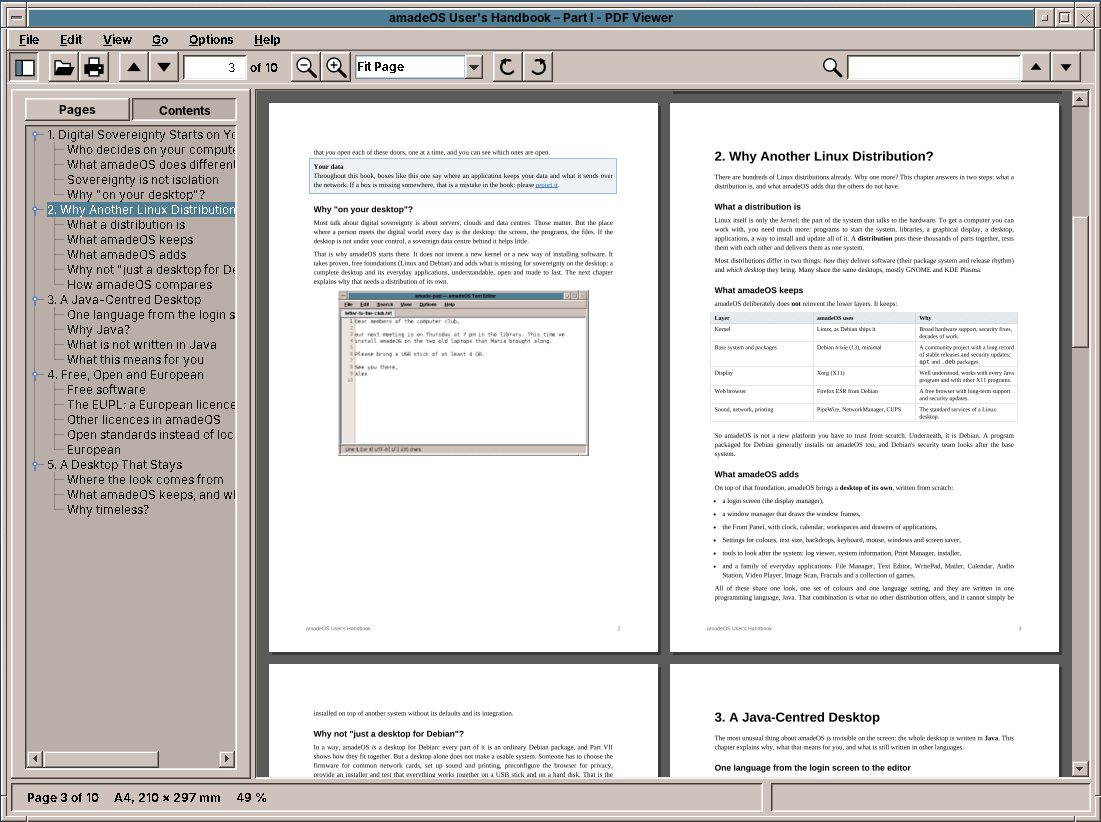
The keys for reading scroll the pages while they have the focus; with the cursor in the search field, the same keys edit the text:
    /** Keys for reading: they scroll the pages while the pages (not a text field) have the focus. */
    private void keys() {
        bind(KeyEvent.VK_DOWN, 0, () -> pages.scrollBy(0, 48));
        bind(KeyEvent.VK_UP, 0, () -> pages.scrollBy(0, -48));
        bind(KeyEvent.VK_RIGHT, 0, () -> sideways(true));
        bind(KeyEvent.VK_LEFT, 0, () -> sideways(false));
        bind(KeyEvent.VK_PAGE_DOWN, 0, () -> pageDown(true));
        bind(KeyEvent.VK_PAGE_UP, 0, () -> pageDown(false));
        bind(KeyEvent.VK_SPACE, 0, () -> pageDown(true));
        bind(KeyEvent.VK_SPACE, InputEvent.SHIFT_DOWN_MASK, () -> pageDown(false));
        bind(KeyEvent.VK_BACK_SPACE, 0, () -> pageDown(false));
        bind(KeyEvent.VK_HOME, 0, presenter::first);
        bind(KeyEvent.VK_END, 0, presenter::last);
        bind(KeyEvent.VK_ESCAPE, 0, () -> {
            pages.clearSelection();
            searchField.setText("");
            presenter.clearSearch();
        });
        // Ctrl with + and - as they are typed on different keyboards, beside the menu's Ctrl+Plus.
        JComponent root = getRootPane();
        for (int code : new int[]{KeyEvent.VK_EQUALS, KeyEvent.VK_ADD}) {
            for (int modifiers : new int[]{InputEvent.CTRL_DOWN_MASK, InputEvent.CTRL_DOWN_MASK | InputEvent.SHIFT_DOWN_MASK}) {
                global(root, code, modifiers, "zoom-in", presenter::zoomIn);
            }
        }
        global(root, KeyEvent.VK_SUBTRACT, InputEvent.CTRL_DOWN_MASK, "zoom-out", presenter::zoomOut);
        global(root, KeyEvent.VK_NUMPAD0, InputEvent.CTRL_DOWN_MASK, "actual-size", () -> presenter.setZoom(Zoom.of(1)));
    }
A file dropped from a file manager arrives as a list of files from Java programs, and as text/uri-list from the X11 file managers:
    /** Files dropped from a file manager: as a file list, or as {@code text/uri-list} under X11. */
    private final class FileDrop extends TransferHandler {
        private static final DataFlavor URI_LIST = uriList();

        private static DataFlavor uriList() {
            try {
                return new DataFlavor("text/uri-list;class=java.lang.String");
            } catch (ClassNotFoundException e) {
                throw new IllegalStateException(e);
            }
        }

        @Override
        public boolean canImport(TransferSupport support) {
            return support.isDataFlavorSupported(DataFlavor.javaFileListFlavor) || support.isDataFlavorSupported(URI_LIST);
        }

        @Override
        public boolean importData(TransferSupport support) {
            try {
                Transferable t = support.getTransferable();
                Path dropped = null;
                if (t.isDataFlavorSupported(DataFlavor.javaFileListFlavor)) {
                    List<?> files = (List<?>) t.getTransferData(DataFlavor.javaFileListFlavor);
                    if (!files.isEmpty() && files.getFirst() instanceof File f) dropped = f.toPath();
                } else {
                    for (String line : ((String) t.getTransferData(URI_LIST)).split("\r?\n")) {
                        if (line.startsWith("file:")) {
                            dropped = Path.of(URI.create(line.strip()));
                            break;
                        }
                    }
                }
                if (dropped == null) return false;
                presenter.open(dropped);
                return true;
            } catch (Exception e) {
                return false;
            }
        }
    }
The presentation mode is a second, undecorated window on the whole screen, with GraphicsDevice.setFullScreenWindow as in Image Viewer. It draws one page at the size of the screen, from the same session, so the pictures it needs are drawn on the same document thread.
What amade-commons gives PDF Viewer
| Part | Since | PDF Viewer uses it for |
|---|---|---|
AmadeApplication, AppInfo, CommonsModule, EdtExecutor |
chapter 10 | start-up and wiring, --version, file arguments and file:// URIs, the UI executor of the document thread |
Messages, Mnemonics, LocaleSettings, TranslationCheck |
chapter 10 | five languages, the menu letters, the language menu, the translation test |
AmadeUI, DesktopTheme |
chapter 10 | the Motif look, the colours of the sidebar and the properties dialog |
DesktopLauncher |
chapter 11 | web links in the document |
AppDirectories, PropertiesFile, XdgDirectories |
chapter 20 | pdfviewer.properties, positions.properties, PDFBox's font cache in the cache folder |
ConfigWatcher |
chapter 10 | reloading the document when the file changes |
ToolIcon, StandardGlyph, ToolButtons, @Ui |
chapter 30 | the toolbar; the sidebar, rotation and page glyphs are its own |
And what stays in PDF Viewer
- PDFBox and everything around it. No other program reads PDF. If WritePad or Image Scan one day write PDF files, they will use PDFBox's writing side, which has little in common with the viewer's.
DocumentThread. A single thread with priorities and cancellable jobs is a general idea, and Image Viewer also loads its pictures in the background. But it has no library to protect and nothing to cancel by priority, so the two do not share a class yet. It moves when a second program needs exactly this.- Printing.
PrintJobscould be split into the dialog and the printing (see the exercises). Until then the viewer usesPrinterJobdirectly.
Exercises
- A state folder. Add
XdgDirectories.stateHome()to amade-commons ($XDG_STATE_HOME, by default~/.local/state) and movepositions.propertiesthere. What must the viewer do on the first start after the update, so that nobody loses their positions? - Printing in two steps. Split
PrintJobs.printWithDialoginto a method that shows the dialog and one that prints, and use them in PDF Viewer. Which of Calendar and WritePad would print on a background thread too, and why does that matter for a document of 300 pages? - Night mode. Add View → Night Mode, which shows light text on dark pages. Inverting the picture also inverts photos; how do you keep their colours? (Hint: invert the lightness, not the colour.)
- Search as you type. Start the search after each letter, 300 ms after the last one. What does the generation number protect against now, and what happens to the hits found so far when a letter is added?
- Thumbnails ahead. The sidebar asks for thumbnails as it shows them. Let the document thread draw all thumbnails at the lowest priority after opening, and measure what that does to the time until the first page appears for a document of 600 pages.
Summary
- Keep a library that is not thread-safe behind one class and one thread. Give the jobs priorities, and let the window drop the jobs it no longer needs.
- The window never waits: it asks, draws what it has, and is called back.
- Draw large pages in tiles, keep pictures within a pixel budget, and show a stretched picture until the sharp one is ready.
- Get the text with the box of every character, and search, selection and copying are all built on one
PageText. - Separate the three coordinate systems, and turn points back rather than drawing turned text.
- Read a document into memory when another program may rewrite its file, and wait until the file is quiet before reloading.
- Run the print dialog where Swing wants it and the printing where the library wants it.