25. Contacts
An address book looks like the simplest program in this part: a list of names and a form. The difficult part is not on the screen. The addresses a user brings come from a phone, from Google, from Outlook and from Thunderbird, each in its own format and encoding, and the addresses the program writes should be readable by the next program the user tries, and by a phone that synchronises them. amade-contacts is a chapter about data that belongs to the user: open formats, files that other programs may change at any time, and the duty to keep what you do not understand.
The program has about 5,200 lines of Java and 1,800 lines of tests. Its toolbar made the shared glyphs grow: five programs had drawn their own Export, Turn and Full Screen, and they now share them in StandardGlyph (chapter 46). And its address books go into amade-commons as a read-only ContactDirectory, from which the Mailer completes addresses and the Calendar shows birthdays (below).
What you build
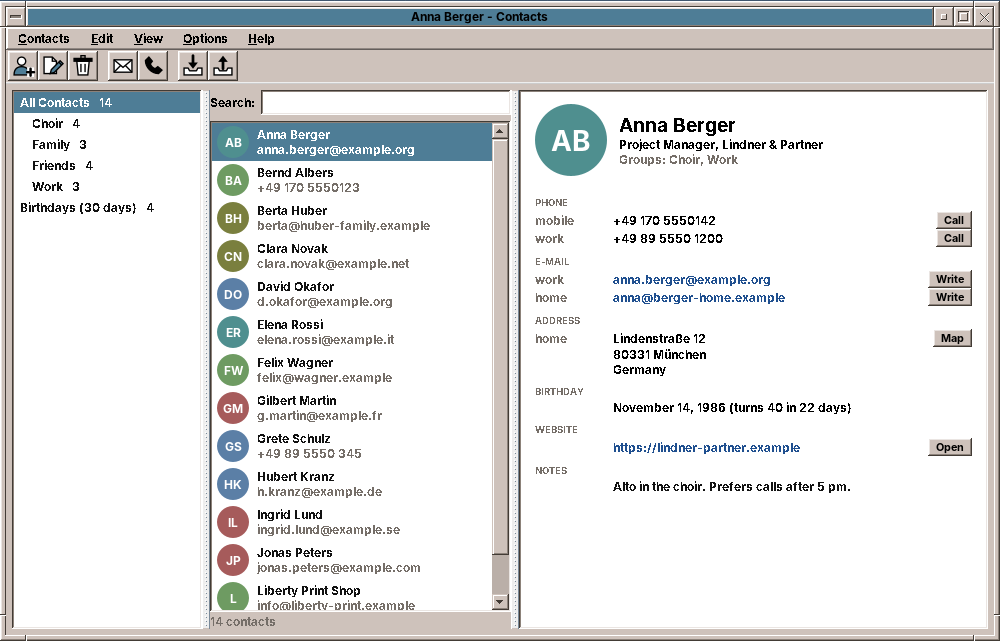
- Three columns: all contacts, the groups and the coming birthdays on the left; the list with photos or initials in the middle; the card of one contact on the right, with Call, Write, Map and Open next to the numbers and addresses.
- A search over everything on the card, that finds
+49 170 555 0123when you type5550123and Weiß when you typeweiss. - An editor with as many phone numbers, e-mail and postal addresses and websites as a person has, birthdays with or without the year, groups and a photo.
- Import of vCard 2.1, 3.0 and 4.0, CSV from Google and Outlook and other tables, and LDIF from Thunderbird; contacts that are already known are merged.
- Export in the same formats, and the contacts on the clipboard as text for a mail or as vCards for another program.
What you will learn
- Why one file per record in an open format beats a database for personal data, and how to write such files safely.
- How to read and write vCards with a library, and how to keep the properties your program does not know.
- How to guess the encoding of a file and the meaning of the columns of a table that another program exported.
- How to merge imported records with known ones without overwriting anything.
- How a program hands a mail, a phone call or a map to other programs with a URI.
- A pitfall of Swing tables that only shows when the dialog is built in a test.
The structure
| Package | Contents |
|---|---|
domain |
Contact, Name, Entry and Kind (a phone number or e-mail address and whether it is mobile, home, work, fax or other), PostalAddress, Birthday, Photo, Source (what the left column lists), StoredContact, Settings |
io |
VCards (vCard to Contact and back), CsvTable, ColumnMapping, CsvContacts, Ldif, TextFiles, FileFormat, ImportFile, Exports |
repository |
AddressBooks (the folders and files), ContactsPreferences |
service |
ContactImport (adding and merging) |
ui.main |
MainWindow, MainPresenter, MainMenuBar, ContactCard, Avatar, ContactsGlyph |
ui.editor |
ContactEditor and its rows, Photos |
ui.transfer |
ImportDialog, ExportDialog |
Contact is a record of plain values. It knows nothing about vCards: io converts in both directions, so the domain and the presenter tests never see a file format.
One file per contact
Where do the contacts go? A database such as SQLite would be fast and easy to query. But the user cannot read it, no other program understands it, a synchronisation tool cannot work with it, and one broken write can damage all records at once. An address book has a few hundred records, small enough to read completely at the start.
So amade-contacts uses the layout that the synchronisation tool vdirsyncer and the address book khard use, a vdir: a folder per address book, one vCard file per contact, and a file displayname with the name of the book.
The folder is in the XDG data directory, not in the configuration directory, because contacts are data that the user would back up and take along:
    /** The address books in {@code ~/.local/share/amadeos/contacts}, one folder each, one vCard file per contact. */
    @Provides
    @Singleton
    AddressBooks addressBooks(XdgDirectories xdg, Messages msg) {
        return new AddressBooks(contactsFolder(xdg), Clock.systemDefaultZone(), msg.get("book.default"));
    }

    public static Path contactsFolder(XdgDirectories xdg) {
        return xdg.dataHome().resolve("amadeos").resolve("contacts");
    }
With this layout, vdirsyncer can already keep the folder in step with a CardDAV server today, without a line of network code in the program. And other programs may change the files while the address book runs. AddressBooks.reload() therefore reads the folders again whenever the window becomes active, and parses only the files whose modification time changed:
                for (Path file : vcfFiles(book)) {
                    Card known = byFile.get(file);
                    FileTime modified = Files.getLastModifiedTime(file);
                    Card card = known != null && known.modified().equals(modified) ? known : read(id, file, modified);
                    if (card == null) continue;
                    Card clash = fresh.putIfAbsent(card.contact().uid(), card);
                    if (clash != null) LOG.warn("{} and {} have the same UID; only the first is shown", clash.file(), file);
                }
Writing a file safely
Files.writeString truncates the file and then writes. A crash, a full disk or a power cut in between leaves an empty or half contact. The safe way is to write a temporary file in the same folder and then rename it over the old one. A rename within one file system is atomic: whoever reads the file sees the old or the new version, never a mix.
    static void writeAtomically(Path file, String text) throws IOException {
        Files.createDirectories(file.getParent());
        Path temp = file.resolveSibling("." + file.getFileName() + ".tmp");
        Files.writeString(temp, text, StandardCharsets.UTF_8);
        try {
            Files.move(temp, file, StandardCopyOption.REPLACE_EXISTING, StandardCopyOption.ATOMIC_MOVE);
        } catch (AtomicMoveNotSupportedException e) {
            Files.move(temp, file, StandardCopyOption.REPLACE_EXISTING);
        }
    }
The temporary file starts with a dot and ends with .tmp, so it does not match *.vcf, and a reload in that moment does not take it for a contact. It must be in the same folder: a temporary file in /tmp may be on another file system, and a "move" from there is a copy and a delete, which is exactly the half-written state we wanted to avoid. If the file system cannot rename atomically, which some network shares cannot, the fallback still replaces the file in one step.
vCard
vCard is the format every address program speaks. It exists in three versions that are all in use: 2.1 from old phones and Outlook, with quoted-printable text; 3.0 from Apple and most programs of the 2000s; and 4.0 (RFC 6350), the current standard. They differ in details that matter: how a type is written (TEL;CELL, TEL;TYPE=CELL, TEL;TYPE=cell), how a birthday without a year looks (--1114 in 4.0; Apple writes the year 1604), how a photo is embedded.
Writing a parser for this is a project of its own. amade-contacts uses ez-vcard (BSD licence), which reads all three versions and writes each. It also brings support for HTML and JSON vCards, which the program does not need, so the build leaves those libraries out:
implementation('com.googlecode.ez-vcard:ez-vcard:0.12.2') {
    exclude group: 'org.jsoup'                      // hCard in HTML
    exclude group: 'com.fasterxml.jackson.core'     // jCard in JSON
}
Pitfall: a dependency you excluded can still be needed
The first build also left out FreeMarker, the template library ez-vcard uses for hCard output. Everything compiled, and reading the first vCard failed with NoClassDefFoundError: freemarker/template/TemplateException: the reader class mentions that exception type, and the JVM needs the class when it loads the reader. Exclude a transitive dependency only when a test reads and writes through the library with the jar as it will be shipped.
amade-contacts writes vCard 4.0 and reads everything. Export also offers 3.0, for older phones.
Keeping what you do not understand
A vCard from an iPhone has properties amade-contacts does not show: instant-messaging addresses (IMPP), phonetic names, Apple's own X-ABLabel lines. If the program wrote a fresh vCard from its Contact record on every save, editing the phone number on the computer would delete them, and the user would only notice on the phone, weeks later.
So AddressBooks keeps the parsed VCard of every file next to the Contact, and saving changes only what the user changed:
    public static VCard update(VCard card, Contact contact, Instant now) {
        Contact before = toContact(card);
        if (card.getUid() == null || !contact.uid().equals(before.uid())) card.setUid(new Uid(contact.uid()));
        if (!contact.name().equals(before.name())) {
            card.removeProperties(StructuredName.class);
            if (!contact.name().isBlank()) card.setStructuredName(structuredName(contact.name()));
        }
        String fn = contact.label();
        if (card.getFormattedName() == null || !fn.equals(before.label())) {
            card.removeProperties(FormattedName.class);
            card.setFormattedName(fn);
        }
update turns the stored card into a Contact first, the state before the edit, and compares field by field. A name that did not change keeps its property as it was, with all its parameters; the phone numbers are replaced only if the list differs. Every other property of the file is not touched at all. The test writes a card like a phone would, edits it, and looks into the file:
    @Test
    void anEditKeepsTheFileAndForeignProperties() throws Exception {
        Path book = Files.createDirectories(root.resolve("personal"));
        Path file = book.resolve("from-phone.vcf");
        Files.writeString(file, "BEGIN:VCARD\r\nVERSION:3.0\r\nUID:abc-1\r\nFN:Bernd Albers\r\nN:Albers;Bernd;;;\r\n"
                + "TEL;TYPE=CELL:+49 170 5550123\r\nX-PHONETIC-FIRST-NAME:Bernd\r\nEND:VCARD\r\n", StandardCharsets.UTF_8);
        AddressBooks books = books();
        Contact bernd = books.find("abc-1").orElseThrow().contact();
        Contact changed = new Contact(bernd.uid(), bernd.name(), bernd.displayName(), "", "Albers GmbH", "", bernd.phones(),
                List.of(new Entry(Kind.WORK, "bernd@albers.example")), null, null, null, null, "", null);
        books.save("personal", changed);
        String text = Files.readString(file);
        assertTrue(text.contains("VERSION:4.0"), text);
        assertTrue(text.contains("X-PHONETIC-FIRST-NAME:Bernd"), text);
        assertTrue(text.contains("ORG:Albers GmbH"), text);
        try (var list = Files.list(book)) {
            assertEquals(1, list.filter(p -> p.toString().endsWith(".vcf")).count(), "no second file");
        }
    }
The same idea decides the formatted name FN, which vCard 4.0 requires. Most cards have FN:Anna Berger and N:Berger;Anna;;;. If toContact took FN as the display name, the editor would show "Anna Berger" in the display-name field, and changing the first name to Anne would leave the display name at Anna. So an FN that only repeats the name stays out of displayName, and the editor keeps it following the name.
The save method itself puts the parts together: the stored card or the imported one as the start, update, and the atomic write:
    public synchronized StoredContact save(String book, Contact contact, VCard imported) {
        Card known = cards.get(contact.uid());
        String bookId = known != null ? known.book() : book;
        if (!bookNames.containsKey(bookId)) throw new IllegalArgumentException("No address book " + bookId);
        VCard vcard = known != null ? new VCard(known.vcard()) : imported != null ? new VCard(imported) : new VCard();
        VCards.update(vcard, contact, clock.instant());
        Path file = known != null ? known.file() : root.resolve(bookId).resolve(fileName(contact.uid()));
        String text = VCards.write(List.of(vcard), VCardVersion.V4_0);
        try {
            writeAtomically(file, text);
            Card card = new Card(bookId, file, Files.getLastModifiedTime(file), vcard, VCards.toContact(vcard));
            cards.put(contact.uid(), card);
            return new StoredContact(bookId, card.contact());
        } catch (IOException e) {
            throw new UncheckedIOException(e);
        }
    }
Reading what other programs export
The encoding
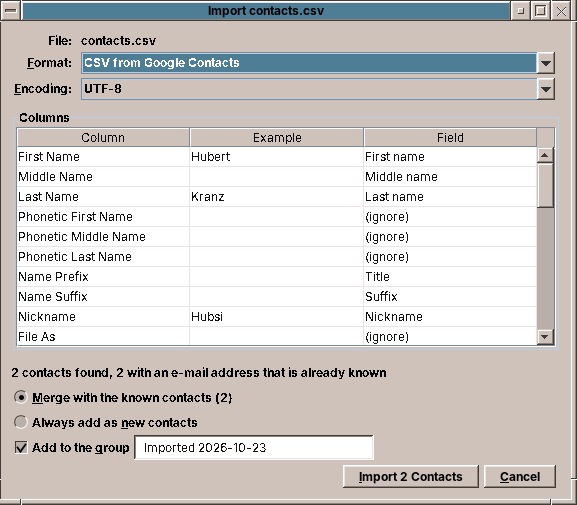
A vCard from a phone is UTF-8. A CSV file from a German Outlook is Windows-1252, and Jürgen read as UTF-8 becomes J�rgen. A file does not say its encoding, but the bytes give it away: a byte order mark is certain, and a text in another encoding is almost never valid UTF-8, because UTF-8 requires every byte above 127 to be part of a strict pattern.
    public static Charset detect(byte[] bytes) {
        if (startsWith(bytes, 0xEF, 0xBB, 0xBF)) return StandardCharsets.UTF_8;
        if (startsWith(bytes, 0xFE, 0xFF) || startsWith(bytes, 0xFF, 0xFE)) return StandardCharsets.UTF_16;
        try {
            StandardCharsets.UTF_8.newDecoder().onMalformedInput(CodingErrorAction.REPORT)
                    .onUnmappableCharacter(CodingErrorAction.REPORT).decode(ByteBuffer.wrap(bytes));
            return StandardCharsets.UTF_8;
        } catch (CharacterCodingException e) {
            return WINDOWS_1252;
        }
    }
Windows-1252 is the right guess for the users of the five languages amadeOS speaks. The import dialog shows the guess and offers the others, and the preview is read again when the user picks one.
Tip: make test files the way the other program makes them
The test file for the German Outlook export was first written by a script that wrote the header in UTF-8 and the rows in Windows-1252. The detection rightly answered Windows-1252, the header became Telefon geschäftlich, and the column was not recognised as a work phone. The bug was in the test file, and only file and a hex dump showed it. Write test files with the bytes of the real program, and check them before you trust a failing test.
The columns
Google, Outlook and every spreadsheet name their columns differently, in the language of the user: Business Phone, Telefon geschäftlich, Téléphone bureau, or in Google's export Phone 1 - Label and Phone 1 - Value with the kind in a cell of its own. ColumnMapping.guess reads each title as a list of folded words (lower case, without accents) and decides first the field and then the kind:
        Kind kind = Kind.OTHER;
        if (field.hasKind()) {
            if (field == Field.PHONE && any(words, "mobile", "mobil", "mobiltelefon", "handy", "cell", "cellular",
                    "portable", "cellulare", "movil")) kind = Kind.MOBILE;
            else if (field == Field.PHONE && any(words, "fax", "telefax")) kind = Kind.FAX;
            else if (anyIn(words, WORK) || words.stream().anyMatch(w -> w.contains("geschaft"))) kind = Kind.WORK;
            else if (anyIn(words, HOME)) kind = Kind.HOME;
            if (group.isEmpty()) group = field.isAddress() ? kind.name() : header;
        }
The guess is a suggestion, not a decision. The import dialog shows every column with an example value from the file and the field it will fill, and the user can change it. The guess only has to be good enough that for the exports of the big programs nobody has to.
Merging
A user who imports their phone's contacts after the Google export has most people twice. ContactImport looks for a known contact with one of the imported e-mail addresses and merges the two:
    public static Result apply(AddressBooks books, List<Imported> imported, Options options) {
        int added = 0, merged = 0;
        List<String> uids = new ArrayList<>();
        for (Imported item : imported) {
            Contact contact = item.contact();
            if (options.group().isPresent()) {
                TreeSet<String> groups = new TreeSet<>(contact.groups());
                groups.add(options.group().get());
                contact = contact.withGroups(groups);
            }
            Optional<StoredContact> same = options.merge() ? match(books.contacts(), contact) : Optional.empty();
            if (same.isPresent()) {
                StoredContact saved = books.save(same.get().book(), same.get().contact().mergedWith(contact));
                uids.add(saved.uid());
                merged++;
            } else {
                if (books.find(contact.uid()).isPresent()) contact = contact.withUid(Contact.newUid());
                StoredContact saved = books.save(options.book(), contact, item.vcard());
                uids.add(saved.uid());
                added++;
            }
        }
        return new Result(added, merged, uids);
    }
Contact.mergedWith adds what the known contact lacks: further phone numbers (compared by their digits, so 089 555-0123 and 089 5550123 count as one), addresses, websites and groups, and the name, birthday or photo if the known one has none. It never replaces a value. An imported vCard that is not merged keeps all its properties, because save starts from it.
Pitfall: \"if empty\" is not the same as \"unknown\"
The first version took the imported display name when the known contact had none. A table with the column Name and the line Anna B. then turned the known Anna Berger into Anna B., because she had a name but no separate display name. The presenter test that imports a table into the fixture's address book caught it. A display name is only taken when the known contact has no name at all.
Search
The search runs through everything on the card on every keystroke. For a few hundred contacts that is fast enough without an index, and it keeps the code simple:
    public boolean matches(String query) {
        String q = fold(query);
        if (q.isBlank()) return true;
        StringBuilder text = new StringBuilder();
        for (String s : List.of(label(), name.full(), nickname, organization, jobTitle, note)) text.append(s).append('\n');
        emails.forEach(e -> text.append(e.value()).append('\n'));
        addresses.forEach(a -> text.append(a.oneLine()).append('\n'));
        groups.forEach(g -> text.append(g).append('\n'));
        String haystack = fold(text.toString());
        StringBuilder digits = new StringBuilder();
        phones.forEach(p -> digits.append(digitsOf(p.value())).append('\n'));
        for (String word : q.strip().split("\\s+")) {
            String wordDigits = digitsOf(word);
            boolean phone = wordDigits.length() >= 3 && wordDigits.length() >= word.replaceAll("[\\s()+/.-]", "").length();
            if (!haystack.contains(word) && !(phone && digits.toString().contains(wordDigits))) return false;
        }
        return true;
    }
Two rules make it find what people type. Text is folded, lower case and without accents, with ß as ss, so weiss finds Weiß and muller finds Müller. A word that is mostly digits is also compared with the digits of the phone numbers, because nobody remembers whether the number was saved as 0170/555 0123 or +49 170 5550123. Several words must all match, in any order.
Handing over to other programs
An address book is the start of something else: a mail, a call, a visit. amade-contacts does none of these itself. It builds a URI and gives it to DesktopLauncher (chapter 11), which asks the desktop which program handles it:
mailto:opens the Mailer with the recipients filled in.tel:goes to a program for calls if one is installed. If none is,browsethrows, and the presenter copies the number instead and says so.- An
https://www.openstreetmap.org/search?query=…link shows the address on a map in the browser.
A mailto URI with several recipients needs care: the names may contain commas, quotes and umlauts. Each recipient is written as an RFC 5322 mailbox, Anna Berger <anna@example.org>, with quotes where the name needs them, and then percent-encoded:
    static String mailbox(String name, String address) {
        if (name.isBlank() || name.equalsIgnoreCase(address)) return address;
        String n = name.matches("[\\p{L}\\p{N} .'-]*") ? name : "\"" + name.replace("\\", "\\\\").replace("\"", "\\\"") + "\"";
        return n + " <" + address + ">";
    }
The way back works through the desktop entry. Its MimeType=text/vcard;text/x-vcard;text/directory; line makes the File Manager open .vcf files in Contacts, and Exec=/usr/bin/amade-contacts %F hands them over as arguments, which the program imports. Categories=Office;ContactManagement; puts it into two drawers of the Front Panel, Text & Office and Mail & Internet, because a drawer takes every program with one of its categories.
The window
The window is three lists and a card, built as in the earlier chapters: a presenter behind a MainView interface, a menu bar and a toolbar that share their actions. The toolbar takes Edit, Delete, Mail, Import and Export from StandardGlyph; only New Contact (a person with a plus) and Call (a handset) are its own:
    @Override
    public void paint(ToolIcon.Pen pen) {
        switch (this) {
            case NEW_CONTACT -> {
                person(pen);
                pen.fill(new Rectangle2D.Double(11, 9, 5, 7), pen.paper());
                pen.bold(1.8f);
                pen.line(13.5, 10, 13.5, 15);
                pen.line(11, 12.5, 16, 12.5);
                pen.thin();
            }
            case CALL -> handset(pen);
        }
    }
A contact without a photo gets its initials in a circle. The colour comes from the hash of the UID, so it stays the same when the contact is renamed, and from a small palette of muted colours that work with every theme.
Pitfall: a JTable asks its model at once
The import dialog has a table of columns whose model translates its column titles with the dialog's Messages. The table was a field: private final JTable table = new JTable(columns);. Field initialisers run before the constructor's body, so the JTable constructor asked the model for its column names while msg was still null. The program never showed the dialog with a CSV file during development, and the first test that built the dialog failed with a NullPointerException. Create Swing components that call back into your object in the constructor, after the fields they need.
Contacts in other programs
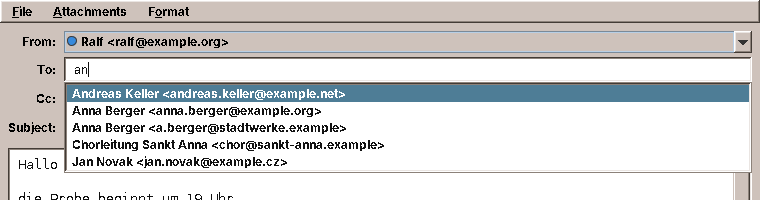
An address book earns its keep when the other programs use it. The Mailer completes addresses from it while you type, and the Calendar shows the birthdays. Both read the same folder Contacts writes, through a small ContactDirectory in amade-commons:
Reading without the library
The Mailer and the Calendar need three things from a card: the name, the e-mail addresses and the birthday, plus the groups to put a whole group into To. ez-vcard would bring them all, at the price of a library in two more programs. ContactDirectory reads them with under 300 lines of its own instead: it unfolds the lines, drops group prefixes such as item1.EMAIL, unescapes \, and \n, decodes vCard 2.1's QUOTED-PRINTABLE and skips every property it does not know. It never writes. Contacts stays the only program that changes a contact, so there is one place that has to get the full format right.
The directory is asked on every key press, so it must be cheap. It looks at the folder again at most every two seconds and reads only the files whose modification time changed, the same rule AddressBooks.reload follows (above):
    private void rescan() {
        Map<Path, CachedFile> seen = new LinkedHashMap<>();
        for (Path file : vcardFiles()) {
            try {
                FileTime modified = Files.getLastModifiedTime(file);
                CachedFile cached = files.get(file);
                if (cached == null || !cached.modified().equals(modified)) {
                    cached = new CachedFile(modified, read(file));
                }
                seen.put(file, cached);
            } catch (IOException e) {
                LOG.debug("Cannot read {}: {}", file, e.toString());
            }
        }
        files.clear();
        files.putAll(seen);
        List<ContactCard> all = new ArrayList<>();
        for (CachedFile f : seen.values()) all.addAll(f.cards());
        all.sort(Comparator.comparing((ContactCard c) -> fold(c.label())).thenComparing(ContactCard::uid));
        contacts = List.copyOf(all);
    }
Completing an address
What the user typed is matched against the start of every word of the name, the nickname and the address, folded as in the search of Contacts, so mull finds Müller and firma finds a.berger@firma.example. Whole-name matches come first, then word matches, then addresses, and groups after the people. A group becomes one suggestion that puts in the preferred address of every member:
    /**
     * Suggestions for what was typed into an address field: contacts whose name, nickname or address has a word
     * starting with {@code typed} (ignoring case and accents, so "mull" finds "Müller"), and groups whose name starts
     * with it. Contacts whose whole name starts with it come first, groups after the people.
     *
     * @param limit at most this many suggestions
     */
    public List<Recipient> complete(String typed, int limit) {
        String needle = fold(typed.strip());
        if (needle.isEmpty() || limit <= 0) return List.of();
        record Scored(int score, Recipient recipient) {
        }
        List<Scored> found = new ArrayList<>();
        Map<String, List<ContactCard>> groups = new TreeMap<>(String.CASE_INSENSITIVE_ORDER);
        for (ContactCard c : contacts()) {
            for (String g : c.groups()) groups.computeIfAbsent(g, k -> new ArrayList<>()).add(c);
            for (ContactCard.Email e : c.emails()) {
                int score = score(needle, c, e.address());
                if (score >= 0) {
                    found.add(new Scored(score, new Recipient(c.name(), e.address(),
                            List.of(Recipient.mailbox(c.name(), e.address())), false)));
                }
            }
        }
        groups.forEach((group, members) -> {
            if (!fold(group).startsWith(needle)) return;
            Set<String> mailboxes = new LinkedHashSet<>();
            for (ContactCard m : members) m.email().ifPresent(a -> mailboxes.add(Recipient.mailbox(m.name(), a)));
            if (mailboxes.size() > 0) {
                found.add(new Scored(3, new Recipient(group, String.valueOf(mailboxes.size()), List.copyOf(mailboxes), true)));
            }
        });
        // Stable sort: within a score, the contacts stay in name order and a contact's preferred address first.
        found.sort(Comparator.comparingInt(Scored::score));
        Set<String> addresses = new LinkedHashSet<>();
        List<Recipient> result = new ArrayList<>();
        for (Scored s : found) {
            if (result.size() >= limit) break;
            if (s.recipient().group() || addresses.add(s.recipient().address().toLowerCase(Locale.ROOT))) {
                result.add(s.recipient());
            }
        }
        return result;
    }
AddressCompletion is the Swing half. It listens to the field, finds the address under the caret between the commas, asks for suggestions and shows them in a popup under that address. Up and Down choose, Enter or Tab takes one, Escape closes the list. The popup is not focusable, so the caret stays in the field and the user simply goes on typing. A comma inside a quoted name is not a separator:
    /** Where the address under the caret starts and ends: between the commas (or semicolons) around it. */
    record Token(int start, int end, String text) {
    }

    static Token token(String text, int caret) {
        int start = 0;
        boolean quoted = false;
        for (int i = 0; i < caret; i++) {
            char c = text.charAt(i);
            if (c == '"') quoted = !quoted;
            else if ((c == ',' || c == ';') && !quoted) start = i + 1;
        }
        int end = caret;
        while (end < text.length() && text.charAt(end) != ',' && text.charAt(end) != ';') end++;
        return new Token(start, end, text.substring(start, caret).strip());
    }
CommonsModule binds a ContactDirectory for every program (chapter 41), so the Mailer only has to ask for it and install the completion on its three address fields:
for (JTextField field : List.of(to, cc, bcc)) AddressCompletion.install(field, contacts, locale);
The completion leaves Anna Berger <anna@example.org>, in the field, with a comma for the next address. Jakarta Mail's InternetAddress.parse skips the empty address after the last comma, and a test in the Mailer makes sure it stays that way.
Test: names, words, addresses and groups
    @Test
    void completesNamesWordsAddressesAndGroups() throws IOException {
        write("personal", "a.vcf", card("a", "FN:Anna Berger", "EMAIL;PREF=1:anna@example.org",
                "EMAIL:a.berger@firma.example", "CATEGORIES:Chor"));
        write("personal", "b.vcf", card("b", "FN:Jörg Müller", "NICKNAME:Mulle", "EMAIL:joerg@example.de",
                "CATEGORIES:Chor"));
        write("personal", "c.vcf", card("c", "FN:Hannah Arendt", "EMAIL:hannah@example.org"));
        write("personal", "d.vcf", card("d", "FN:Ohne Adresse"));
        ContactDirectory directory = new ContactDirectory(root, new TestClock());

        assertEquals(List.of("Anna Berger <anna@example.org>", "Anna Berger <a.berger@firma.example>"),
                texts(directory.complete("an", 8)), "the preferred address first");
        assertEquals(List.of("Hannah Arendt <hannah@example.org>"), texts(directory.complete("ar", 8)));
        assertEquals(List.of("Jörg Müller <joerg@example.de>"), texts(directory.complete("mull", 8)));
        assertEquals(List.of("Anna Berger <a.berger@firma.example>"), texts(directory.complete("firma", 8)));
        assertEquals(List.of(), directory.complete("ohne", 8), "a contact without an address is no recipient");

        Recipient choir = directory.complete("cho", 8).getFirst();
        assertTrue(choir.group());
        assertEquals("Chor", choir.name());
        assertEquals("Anna Berger <anna@example.org>, Jörg Müller <joerg@example.de>", choir.text());

        assertEquals(1, directory.complete("a", 1).size());
        assertEquals(List.of(), directory.complete("  ", 8));
    }
Birthdays in the calendar
ContactDirectory.birthdays(from, to) lists the birthdays in a range of days, with the age when the year is known. A birthday on 29 February is on 28 February in other years, and nobody has a birthday before they were born:
    /** A contact's birthday on one day. */
    public record BirthdayOn(ContactCard contact, LocalDate date) {
        /** The age reached that day, if the contact's year of birth is known. */
        public java.util.Optional<Integer> age() {
            return contact.birthday().ageIn(date.getYear());
        }
    }

    /** The birthdays from {@code from} to {@code to} (inclusive), by date, then by name. */
    public List<BirthdayOn> birthdays(LocalDate from, LocalDate to) {
        List<BirthdayOn> result = new ArrayList<>();
        if (to.isBefore(from)) return result;
        for (ContactCard c : contacts()) {
            if (c.birthday() == null) continue;
            for (int year = from.getYear(); year <= to.getYear(); year++) {
                LocalDate day = c.birthday().on(year);
                if (day.isBefore(from) || day.isAfter(to)) continue;
                if (c.birthday().hasYear() && year < c.birthday().year()) continue;
                result.add(new BirthdayOn(c, day));
            }
        }
        result.sort(Comparator.comparing(BirthdayOn::date)); // stable: name order within a day
        return result;
    }
The Calendar turns them into day notes, appointments without a time. They must look like appointments to the views, the lists, Find and printing, and must not become part of the calendar file. So CalendarService keeps them out of its map and adds them only when it answers occurrencesBetween (chapter 21). Their UIDs start with a prefix no iCalendar program uses, which is how the presenter recognises them:
    /**
     * Shows the birthdays {@code source} finds between two days (inclusive), each as a day note with the text
     * {@code text} makes; a null source shows none.
     */
    public void showBirthdays(BiFunction<LocalDate, LocalDate, List<ContactDirectory.BirthdayOn>> source,
                              Function<ContactDirectory.BirthdayOn, String> text) {
        this.birthdays = source;
        this.birthdayText = text;
    }

    /** The UID prefix of the birthdays of the contact with {@code contactUid}; the year follows it. */
    public static String birthdayUidOf(String contactUid) {
        return BIRTHDAY_UID + contactUid + "/";
    }

    /** True for a birthday from the address books, which is not in the calendar and cannot be changed in it. */
    public static boolean isBirthday(Appointment appointment) {
        return appointment.uid().startsWith(BIRTHDAY_UID);
    }

    private List<Occurrence> birthdaysBetween(LocalDate from, LocalDate to) {
        if (birthdays == null) return List.of();
        List<Occurrence> result = new ArrayList<>();
        for (ContactDirectory.BirthdayOn b : birthdays.apply(from, to)) {
            Appointment note = new Appointment(birthdayUidOf(b.contact().uid()) + b.date().getYear(), b.date(),
                    null, null, birthdayText.apply(b), List.of(), Repeat.ONCE,
                    Privacy.TIME_AND_TEXT);
            result.add(new Occurrence(note, b.date()));
        }
        return result;
    }
    /** Day notes for the birthdays in the address books of amade-contacts, unless the Display Settings say no. */
    private void showBirthdays() {
        if (!preferences.birthdays() || contacts == null) {
            calendar.showBirthdays(null, null);
            return;
        }
        calendar.showBirthdays(contacts::birthdays, b -> b.age()
                .map(age -> tr("birthday.title-age", b.contact().label(), age))
                .orElseGet(() -> tr("birthday.title", b.contact().label())));
    }
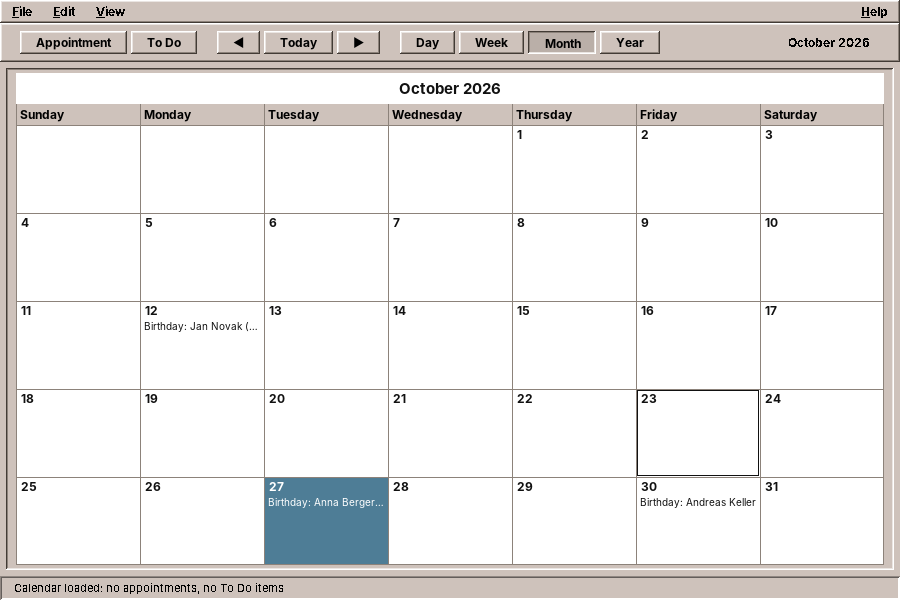
A birthday cannot be edited in the Calendar. A double-click says where it comes from and offers to open Contacts; the Appointment Editor leaves birthdays out of its list of the day, and the presenter ignores a change or a delete of one. Display Settings can hide them.
Test: birthdays are day notes that cannot be edited
    @Test
    void birthdaysFromTheAddressBooksAreDayNotesThatCannotBeEdited() throws IOException {
        start();
        LocalDate day = NOW.toLocalDate().plusDays(1);
        List<Occurrence> onDay = calendar.occurrencesOn(day);
        assertEquals(1, onDay.size());
        Appointment birthday = onDay.getFirst().appointment();
        assertEquals("Birthday: Anna Berger (40)", birthday.summary());
        assertFalse(birthday.hasTime());
        assertTrue(CalendarService.isBirthday(birthday));
        assertEquals(1, calendar.appointmentCount(), "only the meeting: birthdays are not part of the calendar");

        presenter.editAppointment(onDay.getFirst());
        verify(view).offerContacts(contains("Anna Berger"));
        verify(view, never()).openAppointmentEditor(any(), any(), any());

        presenter.deleteAppointment(birthday, day, eu.amadeos.apps.calendar.domain.EditScope.ALL);
        assertEquals(1, calendar.occurrencesOn(day).size());
        verify(repository, never()).save(any());
    }
Tip: user.home is not $HOME
XdgDirectories.system() takes the home folder from the Java property user.home, which the JVM reads from the user database, not from the HOME variable. A screenshot or test that sets HOME=/tmp/demo still sees the real address books. Pass -Duser.home=/tmp/demo too, or build an XdgDirectories with the folder you want.
What amade-commons gives Contacts
| Part | Since | Contacts uses it for |
|---|---|---|
AmadeApplication, AppInfo, CommonsModule, EdtExecutor |
chapter 10 | start-up and wiring |
Messages, Mnemonics, LocaleSettings, TranslationCheck |
chapter 10 | five languages, the menu letters, the language menu, the translation test |
AmadeUI, DesktopTheme |
chapter 10 | the Motif look, the colours of the card and the avatars |
DesktopLauncher |
chapter 11 | mailto:, tel:, the map and websites |
XdgDirectories, AppDirectories, PropertiesFile |
chapter 20 | the contacts folder, contacts.properties |
DateChooser |
chapter 21 | the birthday in the editor |
ToolIcon, StandardGlyph, ToolButtons |
chapter 30 | the toolbar; Edit, Delete, Import, Export and Mail are new in StandardGlyph |
ContactDirectory, AddressCompletion, Recipient |
this chapter | not used by Contacts itself: they give its address books to the Mailer and the Calendar |
And what stays in Contacts
- vCard reading and writing. ez-vcard is a dependency of this program only. The Mailer and the Calendar need much less, read only, and get it from
ContactDirectorywith its own small reader (above). - CSV and LDIF import. No other program imports address tables.
- Merging. It depends on what a contact is.
Exercises
- Add a contact from the Mailer. Start
amade-contacts --add "Anna Berger <anna@example.org>"and open the editor with that name and address filled in, or the existing contact if the address is known. Where in the start-up does the argument go, and what should happen if Contacts is already running? - Duplicates without an import. Add Contacts → Find Duplicates… that lists pairs with the same e-mail address or the same phone digits and merges a pair on request. Which contact keeps its UID and file, and what happens to the other file?
- Address labels. Print the selected contacts' postal addresses on a sheet of labels, 3 × 8 on A4, with
PrintJobs(chapter 46). How do you print the address in the order the country uses? - A second address book. The repository already reads every folder as an address book. Add Contacts → New Address Book… and a way to move contacts between books. Why must moving be a write of the new file followed by a delete of the old one, and not the other way round?
- Recently used addresses. The Mailer could also suggest addresses it sent to that are not in the address book. Where would you keep them, how would you rank them against contacts, and how does the user turn such an address into a contact?
- Watch the folder. Replace the reload on window activation with a
WatchServiceon the folders. What happens when vdirsyncer writes fifty files in one second?
Summary
- Keep personal data in open formats, one file per record, in the XDG data directory. Other programs, backups and synchronisation tools then work with it for free.
- Write files through a temporary file in the same folder and an atomic rename.
- Reload what other programs changed, by modification time, when the window becomes active.
- When you edit a record that another program wrote, change only what the user changed and keep every property you do not understand.
- Guess the encoding from the bytes: a byte order mark, valid UTF-8, else the Windows code page; and let the user override it.
- Guess the meaning of columns from their folded words, and show the guess so the user can correct it.
- Merge imported records by a strong key such as the e-mail address, add what is missing, and never overwrite.
- Hand mails, calls and maps to other programs with URIs, and have a fallback when no program takes them.
- Let other programs read your data through a small read-only view in the shared library, and keep the writing in one program.
- Show data that belongs to another program, such as birthdays, next to your own without saving it, and say where to change it.