21. Calendar
A calendar looks like a simple program: a grid of days with some text in it. The difficulty is hidden in the data. "Every second Tuesday" has to be turned into dates. "Every 31st" meets February. One meeting of a weekly series moves to Thursday, and the series must not move with it. A colleague sends an invitation in another time zone. And everything has to be stored in a file that other calendar programs can read.
amade-calendar is modelled on the CDE Calendar (dtcm): four views, an Appointment Editor with More options, reminders, and printed pages. This chapter follows the data from the record in memory to the file on disk and the sheet of paper, and adds two parts of amade-commons for dialogs: a date chooser and a language chooser.
What you build
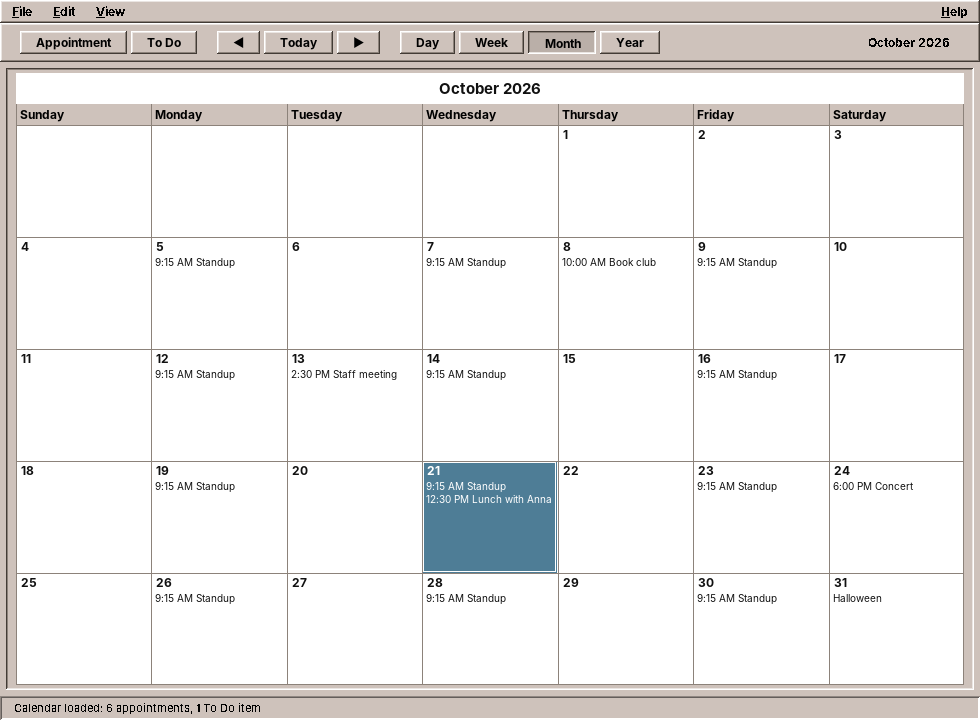
- Day, Week, Month and Year views, drawn with Java2D in the colours of the theme.
- The Appointment Editor: date, start, end, text; behind More the repeat ("Occurs"), reminders and privacy.
- Repeating appointments: daily, weekly on chosen days, monthly by date or by weekday ("second Tuesday"), yearly, every n days, weeks or months; for a number of times or for ever.
- Changing one occurrence of a series, this one and the following ones, or all of them, as dtcm asked.
- Reminders: a beep, a flashing window, a popup or a mail, some minutes before.
- One iCalendar file that other programs can read, and import of
.icsfiles and dtcm text. - Printing of the day, week, month and year, and of appointment and To Do lists.
- Options: defaults for new appointments, the date format, the printer, the language.
The program is about 7,000 lines of Java and 1,700 lines of tests, a big step up from Files. Most of the size is in the editor dialog, the four views and the printed pages; the core of this chapter, the domain and its services, is about a fifth of it.
What you will learn
- How to model dates and times with
java.time, and when a time needs no time zone. - How to turn a repeat rule into dates, including the dates that do not exist.
- How to change one occurrence of a series without changing the others.
- How to read and write iCalendar, and keep what you do not understand.
- How to save in the background so that the newest state always wins.
- How to check reminders with a Swing
Timer, and test them with a clock you control. - How to print with
java.awt.print, and test printing without a printer.
Time without a time zone
Java has two date libraries. The old one, java.util.Date and Calendar, has mutable objects, months counted from 0 and a time zone hidden inside every value. Do not use it in new code. The new one, java.time (Java 8 and later), separates what the old one mixed up:
| Class | Holds | Example |
|---|---|---|
LocalDate |
A day | 2026-10-21 |
LocalTime |
A time of day | 09:15 |
LocalDateTime |
Both, on no particular clock | 2026-10-21T09:15 |
ZonedDateTime |
Both, in a time zone | 2026-10-21T09:15+02:00[Europe/Berlin] |
Instant |
A moment, the same everywhere | 2026-10-21T07:15:00Z |
Duration |
A length of time | 15 minutes |
Which one is right for an appointment? dtcm stored local wall-clock times: "dentist at 9:15" means 9:15 wherever you are. iCalendar calls these floating times. amade-calendar does the same, so an appointment is a LocalDate with an optional LocalTime:
/**
 * An appointment as the CDE Appointment Editor edits it. Times are local wall-clock times without a
 * zone, as in dtcm ("floating" in iCalendar).
 *
 * @param uid       iCalendar UID, unique in the calendar
 * @param date      the (first) day
 * @param start     start time, null for an appointment without a time (a day note such as "Halloween")
 * @param end       end time, null if the appointment has no duration; ignored when {@code start} is null
 * @param what      description; the first line is the summary shown in the views
 * @param reminders reminders before the start
 * @param repeat    how it repeats, {@link Repeat#ONCE} if it does not
 * @param privacy   what others may see
 * @param extra        iCalendar properties the editor does not know, kept for other programs
 * @param days         how many days an appointment without a time spans (a holiday week); 1 for the rest
 * @param excluded     days on which a repeating appointment does not take place ({@code EXDATE})
 * @param recurrenceId for an exception of a series: the day of the occurrence it replaces; the exception
 *                     shares the UID of the series ({@code RECURRENCE-ID}); null for a series or a
 *                     one-time appointment
 */
public record Appointment(String uid, LocalDate date, LocalTime start, LocalTime end, String what,
                          List<Reminder> reminders, Repeat repeat, Privacy privacy, List<String> extra, int days,
                          Set<LocalDate> excluded, LocalDate recurrenceId) {

    public Appointment {
        Objects.requireNonNull(uid, "uid");
        Objects.requireNonNull(date, "date");
        what = what == null ? "" : what.strip();
        if (start == null) end = null;
        if (end != null && !end.isAfter(start)) end = null;
        reminders = reminders == null ? List.of() : List.copyOf(reminders);
        repeat = repeat == null ? Repeat.ONCE : repeat;
        privacy = privacy == null ? Privacy.TIME_AND_TEXT : privacy;
        extra = extra == null ? List.of() : List.copyOf(extra);
        days = start != null ? 1 : Math.max(1, days);
        excluded = excluded == null || excluded.isEmpty() ? Set.of() : Set.copyOf(excluded);
        if (recurrenceId != null) repeat = Repeat.ONCE;
    }
Notice what the record says by its types and its compact constructor:
start == nullis an appointment without a time, a note on a day such as "Halloween". It cannot have an end, so the constructor clearsend.- An end that is not after the start is no end.
- The lists and the set are copied with
List.copyOfandSet.copyOf: the record cannot be changed through a list someone else still holds. excludedandrecurrenceIdbelong to repeating appointments; we come back to them below.
The constructor normalises instead of throwing: a record that exists is always valid, whatever the editor or a file handed it. Code that uses an Appointment never has to check whether end makes sense.
Note: floating times and travel
Floating times are simple, and they are what a personal calendar needs most: lunch is at 12:30 on holiday too. They are wrong for a video call with someone in another zone, which should move when you travel. A calendar for teams would store such appointments as ZonedDateTime. amade-calendar converts zoned times from other programs to the local zone when it reads them (see below), and the exercises ask how to keep the zone instead.
Repeating appointments
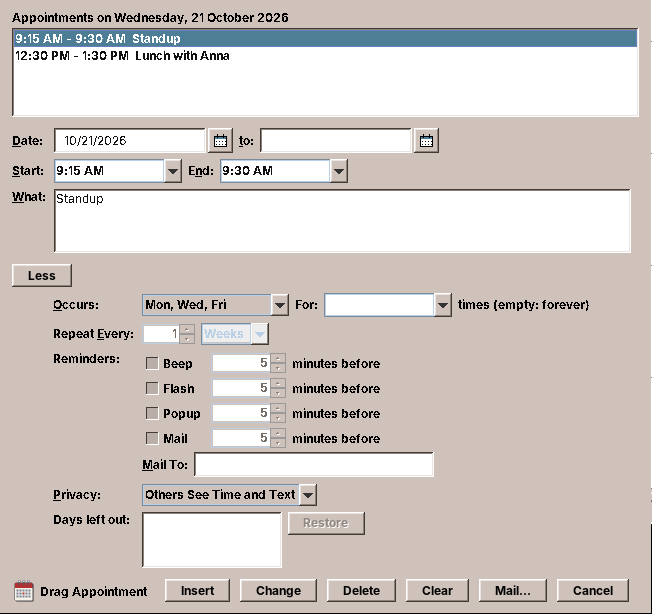
A repeat is another record, the part of the iCalendar RRULE that dtcm's Occurs menu can express:
public record Repeat(Frequency frequency, int interval, Set<DayOfWeek> byDay,
                     boolean byWeekdayOfMonth, int count, LocalDate until)
The calendar never stores the dates of a series, only the rule. To show October, the views ask: on which days between October 1 and October 31 does this appointment take place?
    /**
     * The dates on which an appointment first held on {@code first} takes place within {@code from}
     * to {@code to} (both inclusive), in order.
     */
    public List<LocalDate> occurrences(LocalDate first, LocalDate from, LocalDate to) {
        List<LocalDate> result = new ArrayList<>();
        if (to.isBefore(from)) return result;
        if (frequency == Frequency.NONE) {
            if (!first.isBefore(from) && !first.isAfter(to)) result.add(first);
            return result;
        }
        LocalDate lastDate = until != null && until.isBefore(to) ? until : to;
        int produced = 0;
        int steps = 0;
        if (frequency == Frequency.WEEKLY && !byDay.isEmpty()) {
            // Walk the weeks (interval weeks apart), the chosen weekdays inside each week.
            DayOfWeek weekStart = DayOfWeek.MONDAY;
            LocalDate week = first.with(java.time.temporal.TemporalAdjusters.previousOrSame(weekStart));
            while (!week.isAfter(lastDate) && steps++ < MAX_STEPS) {
                for (int d = 0; d < 7; d++) {
                    LocalDate date = week.plusDays(d);
                    if (!byDay.contains(date.getDayOfWeek()) || date.isBefore(first)) continue;
                    if (date.isAfter(lastDate)) return result;
                    produced++;
                    if (!date.isBefore(from)) result.add(date);
                    if (count > 0 && produced >= count) return result;
                }
                week = week.plusWeeks(interval);
            }
            return result;
        }
        for (int n = 0; steps++ < MAX_STEPS; n++) {
            LocalDate date = nth(first, n);
            if (date == null) {
                // A month or year without this day (31st, 29 February): skipped, as dtcm did.
                if (nthBase(first, n).isAfter(lastDate)) return result;
                continue;
            }
            if (date.isAfter(lastDate)) return result;
            produced++;
            if (!date.isBefore(from)) result.add(date);
            if (count > 0 && produced >= count) return result;
        }
        return result;
    }
The loop walks the series from its first date, counts each occurrence (for count), and keeps those in the range. Two details make it robust:
MAX_STEPS. A rule with a bug in it, or from a broken file, must never make the program loop for ever. 100,000 steps are 270 years of a daily appointment.- Dates that do not exist. The nth repetition comes from
nth, which returnsnullwhen the period has no such day:
    /** The nth repetition (0 = the first date itself), null if that period has no such day. */
    private LocalDate nth(LocalDate first, int n) {
        switch (frequency) {
            case DAILY:
                return first.plusDays((long) n * interval);
            case WEEKLY:
                return first.plusWeeks((long) n * interval);
            case MONTHLY: {
                LocalDate month = first.withDayOfMonth(1).plusMonths((long) n * interval);
                if (byWeekdayOfMonth) {
                    int ordinal = (first.getDayOfMonth() - 1) / 7 + 1;
                    LocalDate date = month.with(java.time.temporal.TemporalAdjusters
                            .dayOfWeekInMonth(ordinal, first.getDayOfWeek()));
                    return date.getMonth() == month.getMonth() ? date : null;
                }
                return first.getDayOfMonth() <= month.lengthOfMonth() ? month.withDayOfMonth(first.getDayOfMonth()) : null;
            }
            case YEARLY: {
                LocalDate year = first.withDayOfYear(1).plusYears((long) n * interval);
                if (first.getMonthValue() == 2 && first.getDayOfMonth() == 29 && !year.isLeapYear()) return null;
                return year.withMonth(first.getMonthValue()).withDayOfMonth(first.getDayOfMonth());
            }
            default:
                return first;
        }
    }
"Monthly on the 31st" has no date in February, April, June, September and November. Should it move to the 30th, or the last day of the month? dtcm skipped those months, and so does amade-calendar; iCalendar says the same. Note first.withDayOfMonth(1).plusMonths(n): adding months to January 31 itself would give February 28 in java.time, which silently clamps, and from then on the series would be on the 28th. Always compute the nth date from the first one, never from the previous one.
The tests check exactly these edges:
    @Test
    void monthlyByDateSkipsMonthsWithoutTheDay() {
        LocalDate jan31 = LocalDate.of(2026, 1, 31);
        Repeat r = RepeatPreset.MONTHLY_BY_DATE.toRepeat(0, 1, RepeatPreset.Unit.DAYS);
        assertEquals(List.of(jan31, LocalDate.of(2026, 3, 31), LocalDate.of(2026, 5, 31)),
                r.occurrences(jan31, jan31, LocalDate.of(2026, 6, 15)));
    }

    @Test
    void monthlyByWeekdayKeepsTheSecondTuesday() {
        Repeat r = RepeatPreset.MONTHLY_BY_WEEKDAY.toRepeat(0, 1, RepeatPreset.Unit.DAYS);
        assertEquals(List.of(FIRST, LocalDate.of(2026, 11, 10), LocalDate.of(2026, 12, 8)),
                r.occurrences(FIRST, FIRST, LocalDate.of(2026, 12, 31)));
        assertEquals(RepeatPreset.MONTHLY_BY_WEEKDAY, RepeatPreset.of(r));
    }

    @Test
    void yearlyOnLeapDayOnlyInLeapYears() {
        LocalDate leap = LocalDate.of(2024, 2, 29);
        Repeat r = RepeatPreset.YEARLY.toRepeat(0, 1, RepeatPreset.Unit.DAYS);
        assertEquals(List.of(leap, LocalDate.of(2028, 2, 29)), r.occurrences(leap, leap, LocalDate.of(2029, 1, 1)));
    }
Tip: test the calendar's corners
Date code is right on 364 days and wrong on one. When you write it, test the 29th of February, the 31st, the last week of a month (is there a fifth Tuesday?), the change to and from daylight saving time, and a year that starts on a Sunday. The domain has no Swing, so each test runs in a millisecond.
All occurrences of a period
CalendarService holds the appointments in memory and answers the views' questions. Here it turns rules into the list a view draws:
    /** All occurrences from {@code from} to {@code to} (inclusive), in {@link Occurrence#ORDER}. */
    public List<Occurrence> occurrencesBetween(LocalDate from, LocalDate to) {
        List<Occurrence> result = new ArrayList<>();
        Map<String, java.util.Set<LocalDate>> replaced = new java.util.HashMap<>();
        for (Appointment a : appointments.values()) {
            if (a.isException()) replaced.computeIfAbsent(a.uid(), k -> new java.util.HashSet<>()).add(a.recurrenceId());
        }
        for (Appointment a : appointments.values()) {
            java.util.Set<LocalDate> skip = a.isException() ? java.util.Set.of() : replaced.getOrDefault(a.uid(), java.util.Set.of());
            // A multi-day appointment is on every day of its span; look back far enough for its first day.
            LocalDate lookBack = from.minusDays(a.days() - 1L);
            for (LocalDate date : a.repeat().occurrences(a.date(), lookBack, to)) {
                if (a.excluded().contains(date) || skip.contains(date)) continue;
                for (int d = 0; d < a.days(); d++) {
                    LocalDate day = date.plusDays(d);
                    if (!day.isBefore(from) && !day.isAfter(to)) result.add(new Occurrence(a, day));
                }
            }
        }
        result.addAll(birthdaysBetween(from, to));
        result.sort(Occurrence.ORDER);
        return result;
    }
An Occurrence is a small record of an appointment and one date. The days a series leaves out (excluded) and the days with an exception (below) are skipped; an appointment that spans several days is put on each of them. Then the list is sorted with one Comparator: day, then appointments without a time first, then start time.
Changing one occurrence
The weekly team meeting moves to Thursday this week only. The user opens it, changes the day and presses Change. Like dtcm, the editor asks: This One, Forward (this one and the following) or All? The answer is an EditScope, and CalendarService.change carries it out:
    /**
     * Applies the edited fields to the occurrence of {@code series} on {@code day} as the scope says.
     * {@code edited} carries the new date, times, text, reminders, repeat, privacy and, for
     * {@link EditScope#ALL}, the days the series leaves out; for {@link EditScope#THIS_ONE} its repeat
     * is ignored.
     */
    public void change(Appointment series, LocalDate day, Appointment edited, EditScope scope) {
        if (series.isException()) {
            appointments.put(series.key(), edited.asExceptionOf(series.uid(), series.recurrenceId()));
            return;
        }
        if (!series.repeat().repeats()) {
            Appointment changed = edited.withUid(series.uid());
            appointments.put(changed.key(), changed);
            return;
        }
        switch (scope) {
            case THIS_ONE -> appointments.put(series.uid() + "#" + day, edited.asExceptionOf(series.uid(), day));
            case FORWARD -> {
                if (day.equals(series.date())) {
                    removeAppointment(series.uid());
                    Appointment changed = edited.withUid(series.uid());
                    appointments.put(changed.key(), changed);
                } else {
                    appointments.put(series.uid(), series.withRepeat(series.repeat().withUntil(day.minusDays(1)).withCount(0)));
                    appointments.values().removeIf(a -> a.isException() && a.uid().equals(series.uid()) && !a.recurrenceId().isBefore(day));
                    Appointment rest = edited.withUid(Appointment.newUid());
                    appointments.put(rest.key(), rest);
                }
            }
            case ALL -> {
                // The series keeps its first day; the fields move with it.
                Appointment changed = edited.withUid(series.uid()).withDate(series.date().plusDays(
                        java.time.temporal.ChronoUnit.DAYS.between(day, edited.date())));
                appointments.put(changed.key(), changed);
            }
        }
    }
- This One makes an exception: a one-time appointment with the UID of the series and a
recurrenceId, the day of the occurrence it replaces. The series stays as it is;occurrencesBetweenskips its occurrence on that day because an exception exists for it. This is exactly how iCalendar stores it (RECURRENCE-ID), so other programs understand it. - Forward ends the series the day before (
until) and starts a new one with a new UID. Exceptions after the split belong to the old series and are removed. - All changes the series, and moves its first day by as many days as the user moved this occurrence.
Each case is a few lines on immutable records: withRepeat, withExcluded, asExceptionOf make new appointments, and put replaces the old one under its key. The test reads like the story above:
    @Test
    void thisOneBecomesAnException() {
        service.put(daily);
        service.change(daily, MON.plusDays(2), edited("Standup moved", MON.plusDays(2), LocalTime.of(11, 0)), EditScope.THIS_ONE);
        assertEquals(List.of("12:Standup@09:00", "13:Standup@09:00", "14:Standup moved@11:00", "15:Standup@09:00",
                "16:Standup@09:00", "17:Standup@09:00", "18:Standup@09:00"), week());
        assertEquals(1, service.exceptionsOf("s").size());
        assertEquals(2, service.data().appointments().size());
        // The exception can move to another day; the original day stays empty.
        Appointment exception = service.exceptionsOf("s").get(MON.plusDays(2));
        service.change(exception, MON.plusDays(2), edited("Standup moved", MON.plusDays(3), LocalTime.of(12, 0)), EditScope.ALL);
        assertEquals(List.of("12:Standup@09:00", "13:Standup@09:00", "15:Standup@09:00", "15:Standup moved@12:00",
                "16:Standup@09:00", "17:Standup@09:00", "18:Standup@09:00"), week());
        // Deleting the exception deletes that occurrence of the series.
        service.delete(service.exceptionsOf("s").get(MON.plusDays(2)), MON.plusDays(3), EditScope.ALL);
        assertEquals(6, week().size());
        assertTrue(service.appointment("s").orElseThrow().excluded().contains(MON.plusDays(2)));
    }
iCalendar
Where should a calendar keep its data? A database would be fast, but only this program could read it. amade-calendar keeps one text file in the format every calendar program speaks, iCalendar (RFC 5545):
BEGIN:VCALENDAR
VERSION:2.0
PRODID:-//datazuul//amade-calendar//EN
BEGIN:VEVENT
UID:a1
DTSTART:20261005T091500
DTEND:20261005T093000
RRULE:FREQ=WEEKLY;BYDAY=MO,WE,FR
SUMMARY:Standup
END:VEVENT
END:VCALENDAR
A calendar of a person holds a few thousand appointments at most, a few hundred kilobytes. Reading the whole file at start-up and writing the whole file after each change takes milliseconds. A database would solve a problem the program does not have.
IcsCodec reads and writes the format without a library. The format is simple, with a few traps, and the codec is 560 lines including everything the editor can express. Two of the traps:
Long lines are folded. A line may be at most 75 octets long; longer lines continue on the next line, which starts with a space. Octets, not characters: "ü" is two octets in UTF-8, "€" three. A writer that counts characters produces lines that are too long for strict readers; a writer that cuts at byte 75 can cut a character in half. The codec counts the bytes of each character and folds between characters:
    /** Folds at 75 octets and joins with CRLF, as the specification asks. */
    static String fold(List<String> lines) {
        StringBuilder out = new StringBuilder();
        for (String line : lines) {
            byte[] bytes = line.getBytes(StandardCharsets.UTF_8);
            if (bytes.length <= 75) {
                out.append(line).append("\r\n");
                continue;
            }
            int width = 0;
            StringBuilder current = new StringBuilder();
            for (int i = 0; i < line.length(); ) {
                int cp = line.codePointAt(i);
                String ch = new String(Character.toChars(cp));
                int len = ch.getBytes(StandardCharsets.UTF_8).length;
                if (width + len > 75) {
                    out.append(current).append("\r\n ");
                    current.setLength(0);
                    width = 1;
                }
                current.append(ch);
                width += len;
                i += Character.charCount(cp);
            }
            out.append(current).append("\r\n");
        }
        return out.toString();
    }
What the program does not understand, it keeps. Another program may have written attendees, categories, a location or whole components (time zone definitions, journal entries) into the file. If amade-calendar dropped them on its next save, using two calendar programs on one file would destroy data. So every property the codec does not know goes into the appointment's extra list as a raw line, every unknown component into CalendarData.extra, and both are written back unchanged.
The round-trip test writes appointments, checks some lines of the text and reads it back; what comes back must equal what went in:
    @Test
    void appointmentSurvivesTheRoundTrip() {
        Appointment untimed = new Appointment("h@amade-calendar", LocalDate.of(2026, 10, 31), null, null, "Halloween",
                List.of(), Repeat.ONCE, Privacy.TIME_AND_TEXT);
        Appointment startOnly = new Appointment("t@amade-calendar", DAY, LocalTime.of(18, 0), null, "Trick-or-treating",
                List.of(), RepeatPreset.MONTHLY_BY_WEEKDAY.toRepeat(0, 1, RepeatPreset.Unit.DAYS), Privacy.NOTHING);
        CalendarData data = new CalendarData(List.of(meeting(), untimed, startOnly), List.of(), List.of());
        String ics = IcsCodec.write(data);
        assertTrue(ics.startsWith("BEGIN:VCALENDAR\r\nVERSION:2.0\r\n"), ics);
        assertTrue(ics.contains("DTSTART:20261013T143000\r\n"));
        assertTrue(ics.contains("DTSTART;VALUE=DATE:20261031\r\n"));
        assertTrue(ics.contains("RRULE:FREQ=WEEKLY;COUNT=10\r\n"));
        assertTrue(ics.contains("RRULE:FREQ=MONTHLY;BYDAY=2TU\r\n"));
        assertTrue(ics.contains("SUMMARY:Staff meeting\r\n"));
        assertTrue(ics.contains("DESCRIPTION:Staff meeting\\nMonet conference room\\; bring the list\\, please\r\n"));
        assertTrue(ics.contains("CLASS:CONFIDENTIAL\r\n"));
        assertTrue(ics.contains("ATTENDEE:mailto:kent@dailyplanet\r\n"));
        assertTrue(ics.contains("TRIGGER:-PT1H\r\n"));

        CalendarData back = IcsCodec.read(ics);
        assertEquals(data.appointments(), back.appointments());
        assertEquals(data.toDos(), back.toDos());
    }
assertEquals on records compares all fields, so one line catches any field that does not survive.
Reading what others wrote
Other programs write times in UTC (20261012T070000Z) or with a time zone (DTSTART;TZID=Europe/Berlin:20261012T090000). amade-calendar converts both to the local wall-clock time of the computer:
    static LocalDateTime parseDateTime(Property p) {
        String v = p.value.strip();
        try {
            if (isDate(p)) return LocalDate.parse(v, DATE).atStartOfDay();
            boolean utc = v.endsWith("Z");
            LocalDateTime local = LocalDateTime.parse(utc ? v.substring(0, v.length() - 1) : v, DATE_TIME);
            if (utc) {
                return local.atZone(ZoneOffset.UTC).withZoneSameInstant(java.time.ZoneId.systemDefault()).toLocalDateTime();
            }
            String tzid = p.param("TZID");
            if (tzid != null) {
                try {
                    return local.atZone(java.time.ZoneId.of(tzid)).withZoneSameInstant(java.time.ZoneId.systemDefault())
                            .toLocalDateTime();
                } catch (java.time.DateTimeException ignored) {
                    // unknown zone: take the wall-clock time as it is
                }
            }
            return local;
        } catch (DateTimeParseException e) {
            return null;
        }
    }
withZoneSameInstant is the key method: the same moment, seen from another zone. 9:00 in Berlin is 8:00 in London. An unknown zone name is no reason to lose the appointment; its time is taken as it is.
The file
The calendar lives in ~/.local/share/amadeos/calendar/calendar.ics. That is the XDG data directory, not the config directory: the calendar is the user's data, not a setting, and backup tools treat the two differently. AppDirectories has only config and cache, so the repository takes XdgDirectories and builds the path itself:
package eu.amadeos.apps.calendar.repository;

import com.google.inject.Inject;
import eu.amadeos.apps.calendar.domain.CalendarData;
import eu.amadeos.commons.config.XdgDirectories;

import java.io.IOException;
import java.nio.charset.StandardCharsets;
import java.nio.file.AtomicMoveNotSupportedException;
import java.nio.file.Files;
import java.nio.file.Path;
import java.nio.file.StandardCopyOption;
import java.nio.file.attribute.PosixFilePermissions;

/**
 * The user's calendar as one iCalendar file, {@code ~/.local/share/amadeos/calendar/calendar.ics},
 * written atomically and readable only by the owner.
 */
public class IcsCalendarRepository implements CalendarRepository {
    public static final String FILE_NAME = "calendar.ics";

    private final Path file;

    @Inject
    public IcsCalendarRepository(XdgDirectories xdg) {
        this(xdg.dataHome().resolve("amadeos").resolve("calendar").resolve(FILE_NAME));
    }

    public IcsCalendarRepository(Path file) {
        this.file = file;
    }

    @Override
    public synchronized CalendarData load() throws IOException {
        if (!Files.exists(file)) return CalendarData.EMPTY;
        return IcsCodec.read(Files.readString(file, StandardCharsets.UTF_8));
    }

    @Override
    public synchronized void save(CalendarData data) throws IOException {
        Files.createDirectories(file.getParent());
        Path temp = Files.createTempFile(file.getParent(), FILE_NAME, ".tmp");
        try {
            try {
                Files.setPosixFilePermissions(temp, PosixFilePermissions.fromString("rw-------"));
            } catch (UnsupportedOperationException ignored) {
                // not a POSIX file system
            }
            Files.writeString(temp, IcsCodec.write(data), StandardCharsets.UTF_8);
            try {
                Files.move(temp, file, StandardCopyOption.REPLACE_EXISTING, StandardCopyOption.ATOMIC_MOVE);
            } catch (AtomicMoveNotSupportedException e) {
                Files.move(temp, file, StandardCopyOption.REPLACE_EXISTING);
            }
        } finally {
            Files.deleteIfExists(temp);
        }
    }

    @Override
    public String location() {
        return file.toString();
    }
}
The save method should look familiar: temporary file, owner-only permissions, atomic rename. It is PropertiesFile.store from chapter 20, written out a second time. We come back to that at the end of the chapter.
Saving in the background, in order
Every change in the editor saves the whole calendar. Writing takes a few milliseconds, which is too long for the EDT if the disk is slow or a network folder. So the presenter takes a snapshot on the EDT and writes it on a background thread:
    /**
     * Writes a snapshot of the calendar in the background. Saves run one after the other in the order
     * of the changes: two tasks started side by side could finish in either order.
     */
    private void save() {
        CalendarData data = calendar.data();
        saving = saving.thenRunAsync(() -> {
            try {
                repository.save(data);
            } catch (IOException | RuntimeException e) {
                LOG.error("Cannot save the calendar", e);
                javax.swing.SwingUtilities.invokeLater(() ->
                        view.showError(tr("error.save", repository.location(), e.getMessage())));
            }
        }, executor);
    }
calendar.data() makes an immutable CalendarData on the EDT. The background thread writes that snapshot, while the user goes on changing the calendar in memory.
Look at saving.thenRunAsync. The first version of this method, written while the program was young, simply did executor.execute(...). With the virtual-thread executor of amade-commons, every task gets its own thread, and two threads started one after the other can run in either order. Insert an appointment and quickly delete another: two saves start, and if the first one, the older state, happens to finish last, the file holds the calendar without the deletion. The synchronized on IcsCalendarRepository.save does not help. It makes sure the two writes do not mix, not which one comes last.
The bug was found while this chapter was written. The fix chains the saves: each one starts when the previous one has finished, so they finish in the order of the changes. Exiting waits for the chain, with a limit of five seconds:
    public void exit() {
        view.dispose();
        try {
            // Saves still to come are queued behind the running one; shutting down first would drop them.
            saving.get(5, TimeUnit.SECONDS);
        } catch (TimeoutException | ExecutionException e) {
            LOG.warn("The calendar may not be saved completely", e);
        } catch (InterruptedException e) {
            Thread.currentThread().interrupt();
        }
        executor.shutdown();
        try {
            if (!executor.awaitTermination(5, TimeUnit.SECONDS)) executor.shutdownNow();
        } catch (InterruptedException e) {
            Thread.currentThread().interrupt();
        }
        System.exit(0);
    }
A race like this does not show up in a test that runs tasks at once. The test for it uses an executor that only queues tasks, so the test decides when each one runs:
    @Test
    void savesRunOneAfterTheOtherInTheOrderOfTheChanges() throws IOException {
        // An executor that only queues: the test decides when each task runs.
        java.util.ArrayDeque<Runnable> queued = new java.util.ArrayDeque<>();
        java.util.concurrent.Executor queue = queued::add;
        MainPresenter slow = new MainPresenter(view, calendar, repository, preferences, new QueueExecutorService(queue),
                Locale.US, desktop, contacts, printer, () -> NOW);
        when(preferences.load()).thenReturn(CalendarPreferences.defaultsFor(Locale.US));
        when(repository.load()).thenReturn(CalendarData.EMPTY);
        slow.start();

        slow.insertToDo(new ToDoItem("a", NOW.toLocalDate(), "First", false));
        slow.insertToDo(new ToDoItem("b", NOW.toLocalDate(), "Second", false));

        // The second save waits for the first instead of racing it.
        assertEquals(1, queued.size());
        queued.poll().run();
        assertEquals(1, queued.size());
        queued.poll().run();
        var order = inOrder(repository);
        order.verify(repository).save(argThat(d -> d.toDos().size() == 1));
        order.verify(repository).save(argThat(d -> d.toDos().size() == 2));
    }
With the old save, both tasks are in the queue at once, and the test fails on its first assertion.
Pitfall: \"background\" is not \"in order\"
An executor with many threads promises that your tasks run, not in which order they finish. Whenever later work depends on earlier work, as a newer file version on an older one, put the tasks in a chain (thenRunAsync), or use an executor with a single thread for them. Files of chapter 20 avoids the problem differently: it allows only one file operation at a time.
Reminders
Five minutes before the meeting, the window flashes. Something has to look at the clock regularly. The main window starts a Swing Timer that calls the presenter every 30 seconds:
A Swing Timer fires on the EDT, so the presenter can talk to the view directly. (java.util.Timer fires on a thread of its own, and every view call would need invokeLater.) The presenter asks a small service which reminders became due since the last check:
package eu.amadeos.apps.calendar.service;

import eu.amadeos.apps.calendar.domain.Occurrence;
import eu.amadeos.apps.calendar.domain.Reminder;

import java.time.LocalDateTime;
import java.util.ArrayList;
import java.util.HashSet;
import java.util.List;
import java.util.Set;

/**
 * Finds the reminders that became due since the last check. Each reminder of each occurrence fires
 * once; reminders that were due before the program started are not caught up on, as in dtcm.
 */
public final class ReminderCheck {
    /** A reminder that is due now. */
    public record Due(Occurrence occurrence, Reminder reminder) {
    }

    private final CalendarService calendar;
    private LocalDateTime lastCheck;
    private final Set<String> fired = new HashSet<>();

    public ReminderCheck(CalendarService calendar, LocalDateTime start) {
        this.calendar = calendar;
        this.lastCheck = start;
    }

    /** The reminders due between the previous call and {@code now}, oldest first. */
    public List<Due> check(LocalDateTime now) {
        List<Due> due = new ArrayList<>();
        if (!now.isAfter(lastCheck)) return due;
        LocalDateTime from = lastCheck;
        // An occurrence can be reminded at most one day ahead of its start (the editor's limit), so
        // yesterday to tomorrow covers every reminder that can be due now.
        for (Occurrence o : calendar.occurrencesBetween(from.toLocalDate().minusDays(1), now.toLocalDate().plusDays(2))) {
            for (Reminder r : o.appointment().reminders()) {
                LocalDateTime at = o.start().minus(r.before());
                if (at.isAfter(from) && !at.isAfter(now)) {
                    String key = o.appointment().uid() + "|" + o.date() + "|" + r.type() + "|" + r.before();
                    if (fired.add(key)) due.add(new Due(o, r));
                }
            }
        }
        lastCheck = now;
        due.sort((a, b) -> a.occurrence().start().compareTo(b.occurrence().start()));
        return due;
    }
}
- The window between two checks is what counts, not "now" exactly: a check that comes late, because the computer was busy, still finds the reminder.
- Each reminder fires once. The
firedset remembers it; a reminder is identified by the appointment, the day, the type and the lead time. - No catching up. Reminders that were due before the program started are not shown, as in dtcm: ten popups for yesterday's meetings help nobody.
The time comes from outside: check(now) takes it as a parameter, and the presenter gets a Supplier<LocalDateTime> in its constructor, LocalDateTime::now in the program and a fixed value in the tests. That is the Clock idea of chapter 20 again.
Drawing the views
The four views are components that paint themselves. There are no JLabels per day: Month view paints a grid with drawString and fillRect, Week view paints columns and shaded hours. Painting is faster than hundreds of components, and the layout is exactly the one dtcm had.
The colours come from the theme at the moment of painting, as Pad's line number margin does (chapter 10): each paintComponent starts with AmadeUI.theme() and uses fieldBackground(), selectionBackground() and the other colours of the palette. When the user picks another theme, amade-commons repaints all windows, and the views are in the new colours without any code of their own.
Typing and picking dates
Every date field accepts what the user types in the order and separator of the Date Format options (10/21/2026, 21.10.2026 or 2026-10-21), and leniently: one-digit days and months, a two-digit year. Next to it is a small button with a calendar icon that opens a date chooser:
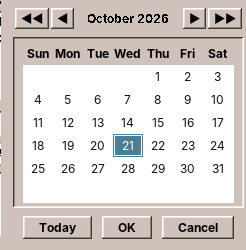
The chooser is a part of amade-commons. Calendar's DateField is a text field plus the button:
    public DateField(DateFormats formats) {
        super(new BorderLayout(2, 0));
        this.formats = formats;
        setOpaque(false);
        choose = DateChooser.button(() -> date().orElse(null), this::setDate, () -> this.formats.locale());
        add(text, BorderLayout.CENTER);
        add(choose, BorderLayout.EAST);
    }
    /**
     * A small button with a calendar icon that opens the chooser on the current date of a field and
     * hands the chosen date back.
     */
    public static JButton button(Supplier<LocalDate> current, Consumer<LocalDate> chosen, Supplier<Locale> locale) {
        JButton button = new JButton(new CalendarIcon());
        button.setMargin(new Insets(1, 3, 1, 3));
        button.setFocusable(false);
        button.setToolTipText(Messages.commons(locale.get()).get("date.choose"));
        button.addActionListener(e -> {
            LocalDate start = current.get();
            choose(button, start == null ? LocalDate.now() : start, locale.get()).ifPresent(chosen);
        });
        return button;
    }
button takes three functions instead of a field: where the current date comes from, where the chosen one goes, and the locale. The chooser knows nothing about Calendar's DateField, its date format or its options, so any program with any kind of date field can use it. The chooser shows month names and weekdays in the locale's language, starts the week on the locale's first day, and brings its own texts ("Today", "OK") from amade-commons' translations.
Options and the language
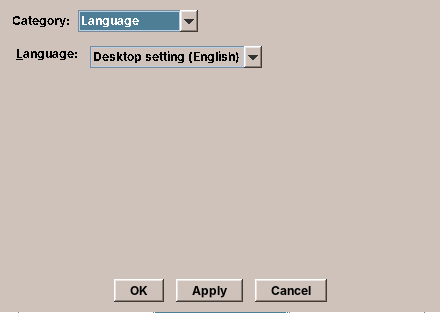
File → Options opens a dialog with five pages: editor defaults, display settings, date format, printer settings and language. The first four are Calendar's own CalendarPreferences, a record saved with PropertiesFile as in chapter 20. The fifth is the same in every program with an options dialog, so it comes from amade-commons:
    private void applyLanguage() {
        if (language.selectedLanguage().equals(locales.applicationLanguage())) return;
        try {
            locales.setApplicationLanguage(language.selectedLanguage());
        } catch (IOException e) {
            JOptionPane.showMessageDialog(this, e.getMessage(), getTitle(), JOptionPane.ERROR_MESSAGE);
            return;
        }
        if (locales.restartRequired()) {
            JOptionPane.showMessageDialog(this, Messages.commons(Texts.messages().locale())
                    .format("language.restart", tr("app.title")), getTitle(), JOptionPane.INFORMATION_MESSAGE);
        }
    }
LanguageChooser is a combo box: "Desktop setting (English)" first, then the five languages, each under its own name ("Deutsch", "Français"), so a user who chose a language they cannot read can still find their own. LocaleSettings stores the choice for this application and says whether a restart is needed: the texts are loaded at start-up, and Swing has no way to rebuild every open window in another language.
The texts of the chooser and of the restart message come from Messages.commons(locale), a translation file inside amade-commons. A shared component that shows text must bring its translations along; otherwise every application would have to translate "Desktop setting" again.
Pad changes its language in a menu (chapter 10). Calendar and Mail have options dialogs, and both use LanguageChooser.
Printing
dtcm printed what you saw, a day, a week, a month or a year, on paper. amade-calendar does too:
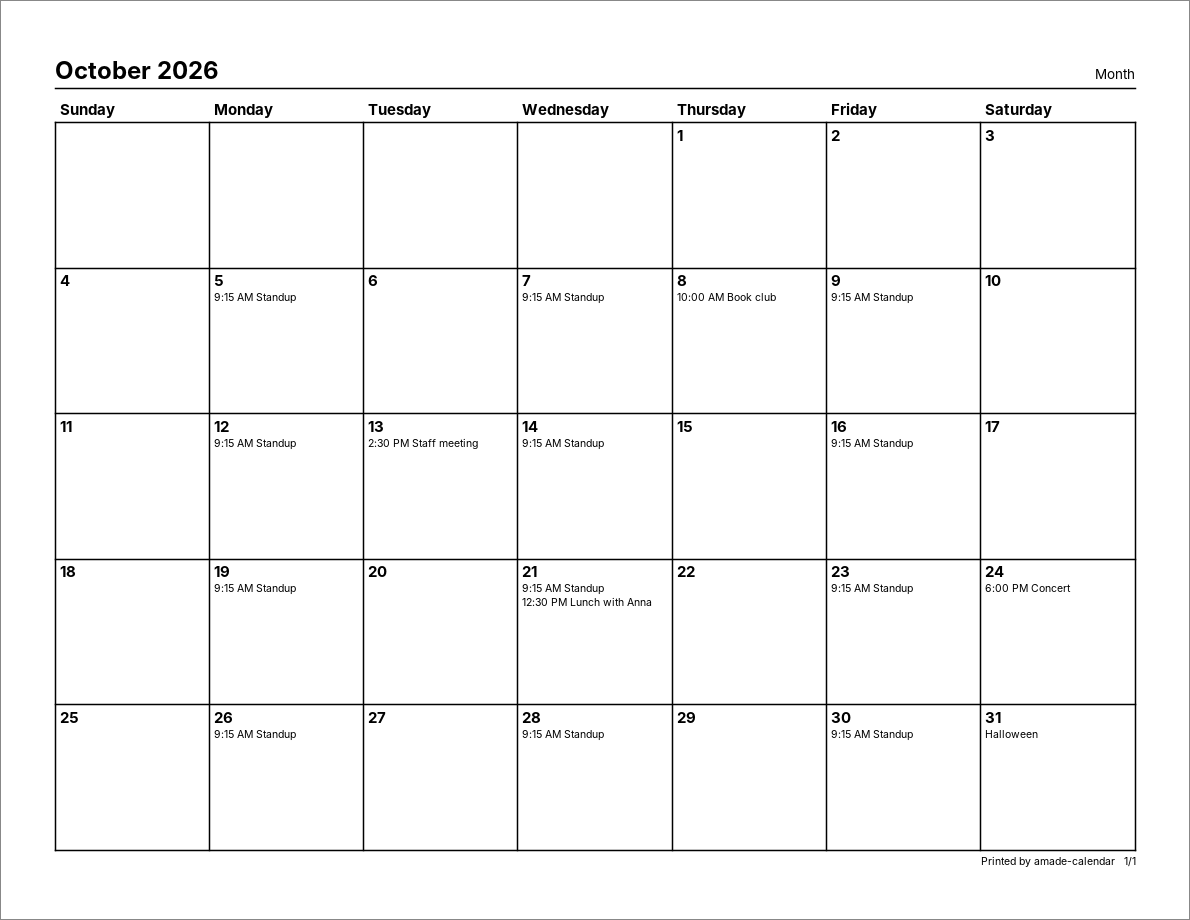
Java's printing API (java.awt.print) asks for two things. A Printable paints one page into a Graphics2D, just as paintComponent paints a component; the printer driver turns the drawing into whatever the printer needs. A Pageable says how many pages there are and in which format each one is. ReportPages is both:
/**
 * The pages of a print job, painted in black on white: one page per day, week, month or year of the
 * range, or the Appointment List and To Do List broken into pages of rows. The pages are built when
 * the object is created, so the page count is known before printing starts.
 */
public final class ReportPages implements Pageable, Printable {
    /** Texts the pages need, in the user's language. */
    public interface Labels {
        String reportTitle(ReportType type);

        String footer();

        String busy();

        String column(String id);
    }

    private static final double MARGIN = 36; // half an inch
    private static final double ROW = 12;

    private final PrintRequest request;
    private final CalendarService calendar;
    private final DateFormats formats;
    private final Labels labels;
    private final PageFormat format;
    private final List<Page> pages = new ArrayList<>();

    private interface Page {
        void paint(Graphics2D g, double width, double height);
    }

    public ReportPages(PrintRequest request, CalendarService calendar, DateFormats formats, Labels labels, PaperSize paper) {
        this.request = request;
        this.calendar = calendar;
        this.formats = formats;
        this.labels = labels;
        format = PrintJobs.pageFormat(paper, request.type().landscape(), MARGIN);
        build();
    }
The pages are built in the constructor, so the page count is known before printing starts and can be shown ("Printing 3 pages"). The page size comes from the locale: Letter in the United States, Canada and Mexico, A4 elsewhere. Pages are drawn in points (1/72 inch), in black on white whatever the theme, with their own fonts.
How do the pages get to the printer? Like dtcm, amade-calendar asks the JDK to write PostScript into a file and hands the file to the system's print command lp, with the printer name, the number of copies and the options the user typed (-o sides=two-sided-long-edge):
    public Outcome print(Pageable pages, PrintSettings settings, Path fileTarget, String jobName)
            throws IOException, PrinterException {
        if (settings.destination() == PrintSettings.Destination.FILE) {
            if (fileTarget.getParent() != null) Files.createDirectories(fileTarget.getParent());
            PrintJobs.writePostScript(pages, fileTarget, jobName);
            return new Outcome(fileTarget, "");
        }
        Path temp = Files.createTempFile("amade-calendar-", ".ps");
        try {
            PrintJobs.writePostScript(pages, temp, jobName);
            List<String> lp = new ArrayList<>(List.of("lp", "-t", jobName));
            if (!settings.printerName().isEmpty()) lp.addAll(List.of("-d", settings.printerName()));
            if (settings.copies() > 1) lp.addAll(List.of("-n", Integer.toString(settings.copies())));
            if (!settings.options().isEmpty()) lp.addAll(List.of(settings.options().trim().split("\\s+")));
            lp.add(temp.toAbsolutePath().toString());
            return new Outcome(null, command.run(lp));
        } finally {
            Files.deleteIfExists(temp);
        }
    }
The Destination attribute makes PrinterJob write into a file instead of printing. Going through lp instead of the JDK's own printing gives the user every option of the print system, and the same "Print to File" that dtcm had.
Testing printing without a printer
No test machine has a printer. Two tests make printing testable anyway. The first paints every report into a BufferedImage and counts dark pixels: a page that paints nothing, or throws, fails.
    @Test
    void everyReportPaintsSomething() {
        fill();
        for (ReportType type : ReportType.values()) {
            ReportPages pages = pages(type, DAY, DAY.plusDays(3), false);
            BufferedImage image = new BufferedImage(600, 800, BufferedImage.TYPE_INT_RGB);
            Graphics2D g = image.createGraphics();
            g.setColor(Color.WHITE);
            g.fillRect(0, 0, 600, 800);
            PageFormat format = pages.getPageFormat(0);
            assertEquals(java.awt.print.Printable.PAGE_EXISTS, pages.print(g, format, 0), type.name());
            assertEquals(java.awt.print.Printable.NO_SUCH_PAGE, pages.print(g, format, pages.getNumberOfPages()));
            int dark = 0;
            for (int y = 0; y < 800; y += 2) for (int x = 0; x < 600; x += 2) if ((image.getRGB(x, y) & 0xff) < 128) dark++;
            assertTrue(dark > 200, type + " painted " + dark + " dark pixels");
            g.dispose();
        }
    }
The second replaces the lp command. CalendarPrinter takes a Command in its constructor, a function from the command line to its output, and the test passes one that records the command line and checks that the PostScript file exists while "lp" runs:
    @Test
    void printerGetsLpWithOptionsAndTheTempFileIsRemoved() throws Exception {
        List<List<String>> commands = new ArrayList<>();
        Path[] seen = new Path[1];
        CalendarPrinter printer = new CalendarPrinter(command -> {
            commands.add(command);
            seen[0] = Path.of(command.getLast());
            assertTrue(Files.size(seen[0]) > 0, "the PostScript exists while lp runs");
            return "request id is Laser-7 (1 file(s))";
        });
        CalendarPrinter.Outcome outcome = printer.print(ONE_PAGE, new PrintSettings(PrintSettings.Destination.PRINTER,
                "Laser", "-o nobanner -o sides=two-sided-long-edge", "x.ps", 1, 2, false), Path.of("unused"), "Test job");
        assertEquals("request id is Laser-7 (1 file(s))", outcome.output());
        assertNull(outcome.file());
        assertEquals(List.of("lp", "-t", "Test job", "-d", "Laser", "-n", "2", "-o", "nobanner", "-o",
                "sides=two-sided-long-edge", seen[0].toString()), commands.getFirst());
        assertFalse(Files.exists(seen[0]));
    }
That is the same idea as the fake view: whatever leaves the program, a window, a process, a printer, goes through an interface the test can replace.
Calendar is the first application that prints. WritePad is the second, and in chapter 23 the parts both need move into amade-commons.
Texts in five languages
Calendar has its texts in five languages, like Pad. It reads them through a small class of its own:
package eu.amadeos.apps.calendar.i18n;

import eu.amadeos.commons.i18n.Messages;

import java.util.Locale;

/**
 * The texts of the Calendar in the language {@code AmadeApplication} chose (the default locale), from
 * {@code eu.amadeos.apps.calendar.messages*.properties}. Loaded on first use.
 */
public final class Texts {
    /** Base name of the text files. */
    public static final String BUNDLE = "eu.amadeos.apps.calendar.messages";
    private static volatile Messages messages;

    private Texts() {
    }

    public static Messages messages() {
        Messages m = messages;
        if (m == null || !m.locale().equals(Locale.getDefault())) {
            m = Messages.load(Texts.class, BUNDLE, Locale.getDefault());
            messages = m;
        }
        return m;
    }

    /** The text for the key. */
    public static String tr(String key) {
        return messages().get(key);
    }

    /** The text with {@code {0}}, {@code {1}}, ... filled in. */
    public static String tr(String key, Object... arguments) {
        return messages().format(key, arguments);
    }
}
With a static import, a text is tr("status.loaded", 6, 1) anywhere in the program, in dialogs too, without passing a Messages object through every constructor. Pad gets its Messages through Guice instead (chapter 10); for a program with dozens of dialogs, the static helper is easier.
Look at it closely: apart from the name of the bundle, nothing in it is about Calendar. Mail, Audio and Video have the same class, line for line. Four copies of one class is a clear case for amade-commons, and it moves there in the next chapter.
What amade-commons gives Calendar
| Part | Since | Calendar uses it for |
|---|---|---|
AmadeApplication, CommonsModule, EdtExecutor |
chapter 10 | start-up, wiring, the two threads |
Messages, Mnemonics, LocaleSettings |
chapter 10 | five languages, menu letters, the language setting |
AmadeUI, DesktopTheme |
chapter 10 | the theme's colours in the painted views |
DesktopLauncher |
chapter 11 | mailing an appointment through the user's mail program |
AppDirectories, PropertiesFile, XdgDirectories |
chapter 20 | the options file; the calendar in the data directory |
DateChooser |
this chapter | the button next to every date field |
LanguageChooser |
this chapter | the language page of the options |
ContactDirectory, AddressCompletion |
chapter 25 | birthdays as day notes; completing the Mail To address (how) |
The third atomic write
IcsCalendarRepository.save and PropertiesFile.store are the same twenty lines: temporary file, permissions, write, atomic rename with a fallback. Pad has a third version, which also keeps the permissions of the file it replaces. That is three users of one idea, and the rule of chapter 1 says it belongs in amade-commons. Is it the same thing, though? Pad must keep the permissions of an existing file, Calendar and PropertiesFile make files private. A shared method would need an option for that, and options are how a helper grows into a framework. The first exercise asks you to decide.
Exercises
- One atomic write. Design
AtomicFiles.write(Path, byte[], ...)for amade-commons thatPropertiesFile, Calendar and Pad could all use. What does it need to know about permissions? Write its tests first, then decide whether the three programs are better off with it. - Appointments with a zone. Keep the
TZIDof an imported appointment and show it at the right local time wherever the computer is. Which record gets a new field, what doesoccurrencesBetweenreturn, and what happens to an appointment at 2:30 on the night the clocks go forward? - The fifth Friday. Add "last Friday of the month" to the repeats (
BYDAY=-1FR). Write the tests for a month with four and with five Fridays first. - Catch up on reminders. Offer to show the reminders that were missed while the computer was asleep, in one window. How does
ReminderChecknotice a jump of the clock? - Print preview. Show the pages in a window before printing.
ReportPagesalready paints into anyGraphics2D; which class draws them, and at what scale?
Summary
java.timeseparates dates, times, zones and moments; an appointment with floating local times is aLocalDateand aLocalTime.- A record that normalises its fields in the compact constructor is always valid, whatever it was built from.
- A repeat is a rule, not a list of dates. Compute the nth date from the first, skip dates that do not exist, and limit every loop.
- One occurrence of a series is changed by an exception that shares the series' UID, as iCalendar does it.
- iCalendar folds lines at 75 octets, not characters; a program that shares a file keeps what it does not understand.
- Background saves must finish in the order of the changes: chain them.
- A Swing
Timerruns on the EDT; a clock passed in from outside makes time-dependent code testable. - Printing is painting into a
Graphics2D, page by page; a replaceable command and an image make it testable without a printer. DateChooserandLanguageChoosercome from amade-commons with their own translations. Printing moves in with WritePad, and theTextshelper with Mail, next.