61. System Information
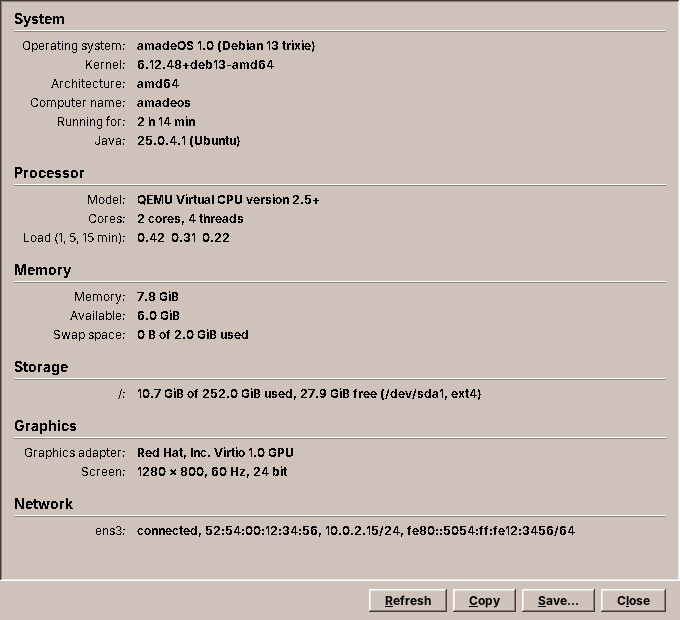
The smallest tool program of the desktop shows what is inside the computer: the operating system, processor, memory, disks, graphics, network and battery, on one page that can be copied or saved as text. It sits in the Front Panel's Tools drawer as Hardware & System Info. It is small enough to read in one sitting, and it has every part a desktop module needs, so this chapter goes through it from main to the Debian package. At the end it gets one improvement: the command it runs gets a time limit that holds.
What you will learn
- The parts of a tool program, from the start-up to the desktop entry.
- Reading Linux's own files (
/proc,/etc/os-release) so that tests need no real system. - Keeping the sources of information behind an interface.
- Using
CommandRunnerfrom amade-commons in a program that runs another one.
Start-up and wiring
A tool program starts like every application of this book (chapter 41):
package eu.amadeos.system.sysinfo.bootstrap;

import eu.amadeos.commons.app.AmadeApplication;
import eu.amadeos.commons.app.AppInfo;
import eu.amadeos.system.sysinfo.ui.MainWindow;

public final class AmadeSysinfoApplication {
    public static final AppInfo APP = new AppInfo("amadeos-sysinfo", "System Information", "sysinfo");

    private AmadeSysinfoApplication() {
    }

    public static void main(String[] args) {
        AmadeApplication.launch(APP, injector -> {
            MainWindow window = injector.getInstance(MainWindow.class);
            window.setVisible(true);
            window.load();
        }, new SysinfoModule());
    }
}
The AppInfo names it amadeos-sysinfo for the system, System Information for people and sysinfo for its directory below ~/.config/amadeos. The module binds the texts and the one service the window needs:
package eu.amadeos.system.sysinfo.bootstrap;

import com.google.inject.AbstractModule;
import com.google.inject.Provides;
import com.google.inject.Singleton;
import eu.amadeos.commons.i18n.Messages;
import eu.amadeos.commons.process.CommandRunner;
import eu.amadeos.system.sysinfo.service.LocalSources;
import eu.amadeos.system.sysinfo.service.SystemProbe;

import java.nio.file.Path;
import java.util.Locale;

/** amadeos-sysinfo bindings; the executor, theme and language come from the CommonsModule. */
public final class SysinfoModule extends AbstractModule {
    /** The texts, {@code messages.properties} and its translations. */
    public static final String MESSAGES = "eu.amadeos.system.sysinfo.messages";

    @Provides
    @Singleton
    Messages messages(Locale locale) {
        return Messages.load(SysinfoModule.class, MESSAGES, locale);
    }

    @Provides
    @Singleton
    SystemProbe probe(Messages msg) {
        return new SystemProbe(Path.of("/"), new LocalSources(CommandRunner.system()), msg);
    }
}
The background executor, the EdtExecutor, the theme and the language come from CommonsModule. The window asks for them in its constructor.
The report
What the page shows is a record of sections and items, with every text already translated:
package eu.amadeos.system.sysinfo.domain;

import java.util.List;

/** The information shown on the page: titled sections of labelled values, all texts already translated. */
public record Report(List<Section> sections) {
    public Report {
        sections = List.copyOf(sections);
    }

    public record Section(String title, List<Item> items) {
        public Section {
            items = List.copyOf(items);
        }
    }

    public record Item(String label, String value) {
    }

    /** The report as plain text, for the clipboard and text files: a heading per section, aligned values. */
    public String toText(String heading) {
        int width = sections.stream().flatMap(s -> s.items().stream())
                .mapToInt(i -> i.label().length()).max().orElse(0);
        StringBuilder text = new StringBuilder(heading).append('\n').append("=".repeat(heading.length())).append('\n');
        for (Section section : sections) {
            text.append('\n').append(section.title()).append('\n')
                    .append("-".repeat(section.title().length())).append('\n');
            for (Item item : section.items()) {
                text.append(item.label()).append(':')
                        .append(" ".repeat(width - item.label().length() + 2))
                        .append(item.value()).append('\n');
            }
        }
        return text.toString();
    }
}
The window draws it as a column of headings and aligned label and value pairs, and toText turns the same record into plain text for Copy and Save…. One record, two views: the text cannot say something the page does not.
Linux's own files
Most of the information is in files. Linux describes itself in /proc (the processor, the memory, the mounted disks, the time since boot) and the distribution in /etc/os-release. These are text files with simple formats, and SystemFiles has a parser for each, as pure functions from text to values:
    /** {@code /proc/meminfo}: the sizes in bytes, by name (MemTotal, MemAvailable, SwapTotal, ...). */
    public static Map<String, Long> parseMeminfo(String text) {
        Map<String, Long> values = new LinkedHashMap<>();
        for (String line : text.split("\n")) {
            int colon = line.indexOf(':');
            if (colon < 1) continue;
            String[] parts = line.substring(colon + 1).trim().split("\\s+");
            try {
                long value = Long.parseLong(parts[0]);
                if (parts.length > 1 && parts[1].equalsIgnoreCase("kB")) value *= 1024;
                values.put(line.substring(0, colon).trim(), value);
            } catch (NumberFormatException ignored) {
                // not a number: skip the line
            }
        }
        return values;
    }
Pure functions are easy to test with the text of a real file pasted into the test, including the odd ones: a virtual machine that leaves out the core ids, a mount point with a blank in it (/media/user/My\040Disk), a live system whose root is an overlay.
SystemProbe puts the parsed values into the report. It reads the files below a root directory, / on a real computer and a temporary folder in tests, so a test writes etc/os-release and proc/meminfo and checks the page that results:
    private Section memory() {
        List<Item> items = new ArrayList<>();
        Map<String, Long> mem = SystemFiles.parseMeminfo(read("proc/meminfo").orElse(""));
        long total = mem.getOrDefault("MemTotal", 0L);
        items.add(item("label.memory", total > 0 ? bytes(total) : msg.get("value.unknown")));
        if (mem.containsKey("MemAvailable")) items.add(item("label.available", bytes(mem.get("MemAvailable"))));
        long swap = mem.getOrDefault("SwapTotal", 0L);
        items.add(item("label.swap", swap > 0
                ? msg.format("value.used", bytes(swap - mem.getOrDefault("SwapFree", 0L)), bytes(swap))
                : msg.get("value.none")));
        return new Section(msg.get("section.memory"), items);
    }
Every value has a fallback. A file that is missing or unreadable gives unknown or leaves a line out, never an exception: System Information runs in containers, virtual machines and on hardware nobody tested, and a half-filled page is still useful.
Sources that are not files
Three things do not come from files: the graphics card (from the command lspci), the network interfaces (from the JDK) and the screens (from AWT). They are behind an interface:
    /** What does not come from files. */
    public interface Sources {
        /** The output of a command, empty if it is not installed or fails. */
        Optional<String> run(List<String> command);

        List<Interface> interfaces();

        /** The screens, e.g. "1920 × 1080". */
        List<String> screens();
    }
LocalSources is the real one. Tests use an anonymous class that returns a graphics card, an interface and a screen, so the whole report is tested without lspci, a network or a display.
The window
The window collects the report on the background executor and shows it on the EDT, with Refresh off meanwhile (chapter 41):
    /** Collects the report in the background and shows it. */
    public void load() {
        EdtExecutor.requireEdt();
        status.setText(msg.get("status.collecting"));
        refresh.setEnabled(false);
        CompletableFuture.supplyAsync(probe::report, executor).whenCompleteAsync((result, error) -> {
            refresh.setEnabled(true);
            if (error != null) {
                LOG.error("Collecting the system information failed", error);
                status.setText(msg.format("error.collect", error.getMessage()));
                return;
            }
            show(result);
            status.setText(" ");
        }, edt);
    }
There is no presenter here. The window has one action that does work, and that action is the four lines above. When a window grows a second or third action with logic of its own, that is the moment to move them into a presenter and test it, as chapter 11 discusses for Web.
A time limit that holds
lspci usually answers in a fraction of a second. LocalSources gave it five seconds, but its old code read the output first and only then waited with the time limit:
Process process = new ProcessBuilder(command).redirectError(ProcessBuilder.Redirect.DISCARD).start();
byte[] output = process.getInputStream().readAllBytes();      // waits for the end of the output
if (!process.waitFor(5, TimeUnit.SECONDS)) { ... }            // too late
readAllBytes returns when the program closes its output, which is when it ends. A lspci that hangs without printing anything, on a broken PCI bus or a slow virtual machine, keeps the page at Collecting the information… forever, and the time limit is never reached. It is the bug chapter 31 found in Audio's runner, and the reason CommandRunner in amade-commons reads and waits at the same time. System Information becomes its next user:
    @Override
    public Optional<String> run(List<String> command) {
        try {
            return Optional.of(runner.output(command, TIME_LIMIT));
        } catch (ProgramMissingException e) {
            LOG.debug("{} is not installed", e.program());
        } catch (IOException e) {
            LOG.debug("{} gave no answer: {}", command.getFirst(), e.getMessage());
        }
        return Optional.empty();
    }
output gives the standard output of a program that succeeded and throws an IOException with the program's own message otherwise. A program that is not installed is a ProgramMissingException. For System Information each of these means the same thing, no answer, so run turns all of them into an empty Optional and the page leaves the graphics line out. The module passes CommandRunner.system(), and the test answers with FinishedProcess:
    @Test
    void aCommandThatIsMissingOrFailsGivesNoAnswer() {
        CommandRunner runner = command -> switch (command.getFirst()) {
            case "lspci" -> FinishedProcess.printing("00:02.0 \"VGA compatible controller\" \"Red Hat, Inc.\" \"Virtio GPU\"\n");
            case "broken" -> FinishedProcess.failing(1, "no such device");
            default -> throw new ProgramMissingException(command.getFirst(), new IOException("error=2"));
        };
        LocalSources sources = new LocalSources(runner);

        assertEquals(Optional.of("00:02.0 \"VGA compatible controller\" \"Red Hat, Inc.\" \"Virtio GPU\"\n"),
                sources.run(List.of("lspci", "-mm")));
        assertEquals(Optional.empty(), sources.run(List.of("broken")));
        assertEquals(Optional.empty(), sources.run(List.of("not-installed")));
    }
Using CommandRunner needed a newer amade-commons than the repository had. Its build.gradle pinned a commit from before the process package, so the pin moved to the current one for all modules at once. They all compile against it, because the 26 commits in between added packages and changed none of the theme, look and settings classes the desktop modules use.
Five languages
The texts are in sysinfo/src/main/resources/eu/amadeos/system/sysinfo/messages*.properties, in the five languages, with the buttons' menu letters marked by &. Sizes are formatted in the user's locale and in binary units (7,8 GiB in German), and TranslationCheck keeps the translations complete (chapter 43).
The package
A module's build.gradle gives the main class and the debian block. Everything else, the fat jar, the launcher in /usr/bin and the package, comes from the repository's shared build:
application {
    mainClass = 'eu.amadeos.system.sysinfo.bootstrap.AmadeSysinfoApplication'
}

debian = [
    section    : 'utils',
    // lspci names the graphics card; without it that line is left out.
    recommends : ['pciutils'],
    // Renamed from amade-sysinfo when the system packages became amadeos-*.
    conflicts  : ['amade-sysinfo'],
    replaces   : ['amade-sysinfo'],
    summary    : 'Hardware and system information for amadeOS',
    description: '''Shows the operating system, processor, memory, storage, graphics, network
interfaces and battery of the computer on one page, and copies or saves them
as text. Part of the amadeOS desktop.'''
]
recommends installs pciutils with it when apt installs recommended packages, which Debian does by default; without lspci the graphics line is simply missing. conflicts and replaces take over from the package's old name.
The desktop entry puts it into the Front Panel. Categories=System;Monitor; sends it to the Tools drawer, where the panel also has a fixed entry for it (chapter 63):
[Desktop Entry]
Type=Application
Version=1.0
Name=amadeOS System Information
Name[de]=amadeOS Systeminformationen
Name[fr]=amadeOS Informations système
Name[es]=amadeOS Información del sistema
Name[it]=amadeOS Informazioni di sistema
GenericName=System Information
GenericName[de]=Systeminformationen
GenericName[fr]=Informations système
GenericName[es]=Información del sistema
GenericName[it]=Informazioni di sistema
Comment=Show the hardware and the operating system of this computer
Comment[de]=Hardware und Betriebssystem dieses Computers anzeigen
Comment[fr]=Afficher le matériel et le système d'exploitation de cet ordinateur
Comment[es]=Mostrar el hardware y el sistema operativo de este equipo
Comment[it]=Mostrare l'hardware e il sistema operativo di questo computer
Icon=computer
Exec=/usr/bin/amadeos-sysinfo
Terminal=false
Categories=System;Monitor;
Keywords=hardware;system;cpu;memory;disk;network;battery;
StartupNotify=true
Exercises
- Sound cards. Add a section with the sound cards from
/proc/asound/cards. Write the parser inSystemFilesfirst, with the text of a real file in its test. - Temperatures. Read
/sys/class/thermal/thermal_zone*/temp(millidegrees). Where does the formatting go, and what does the page show in a virtual machine that has no thermal zones? - A slow source. Make the test's
lspcisleep for ten seconds through aCommandRunnerthat returns a process which never ends. What does the page show after five seconds?
Summary
- A tool program is an application:
AmadeApplication, a Guice module, the background executor and the EDT, texts in five languages, a Debian package and a desktop entry. - Linux's own files are parsed by pure functions, read below a root directory that tests replace.
- Sources that are not files sit behind an interface, so the whole report is tested without the hardware.
- System Information now runs
lspcithroughCommandRunner, whose time limit holds even for a program that prints nothing.