37. Books
An e-book is a website in a ZIP file. An EPUB holds XHTML chapters, CSS, pictures and fonts, and a reader could simply show each chapter in an HTML component and let it scroll. That would be a web page, not a book. A book has pages that you turn, text set flush on both sides with words divided at the line end, a page number, a running head and a picture that the text flows around. amade-books sets all of that itself. It is the program of this book that does the most typography, and the one where Java's text layout shows both its strength and its oddities.
The program has about 8,600 lines of Java and 2,200 lines of tests. Nothing moves into amade-commons with it. It reads two formats, EPUB 2 and 3 for books and CBZ for comics, keeps a library of both, and remembers for every book where the reader stopped.
What you build
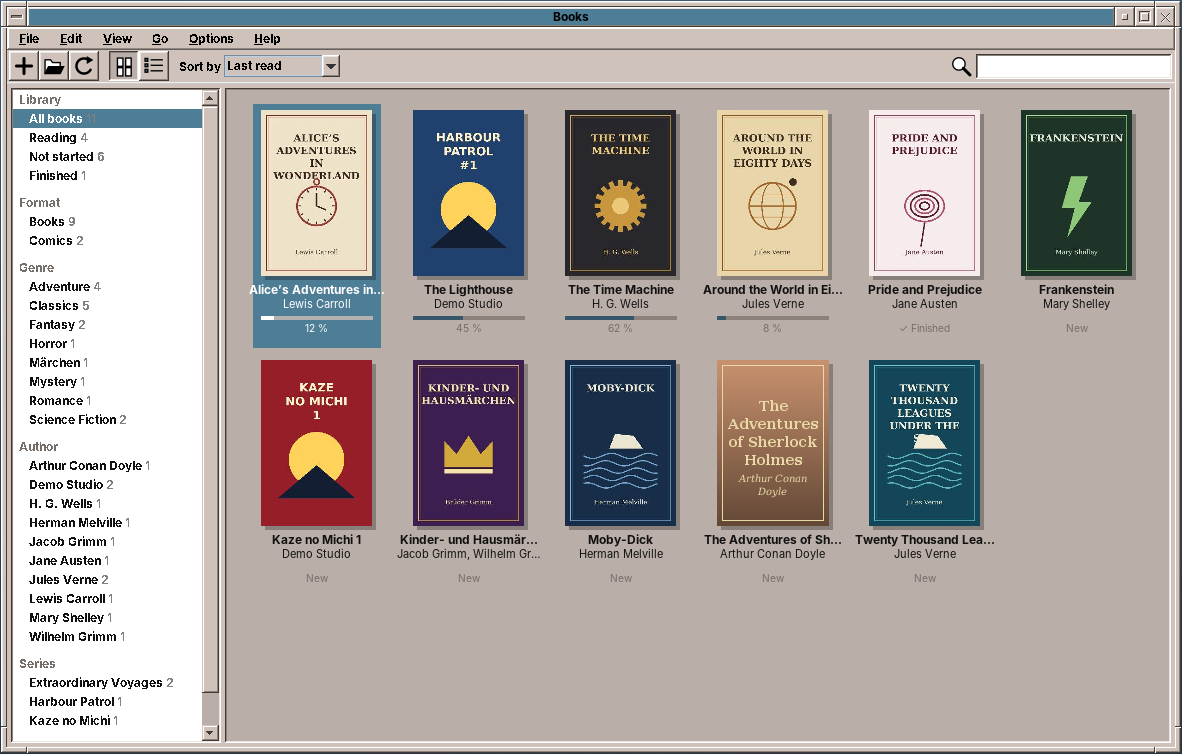
- A bookshelf of every EPUB and CBZ under
~/Booksand other folders, as covers or a table. Shelves by format, genre, author, series and the reader's own collections, five sort orders, and a search as you type. - A book reader that sets the text on pages, one or two side by side, with running heads, page numbers, justification, hyphenation, pictures with text flowing around them, and captions.
- Contents, bookmarks, search, links and footnotes, with Back and Forward.
- The appearance: font, size, line spacing, margins, justify, hyphenate, and paper, sepia and night colours.
- A comic reader with fit to page, width or height, zoom, double pages, and right to left for manga.
- Full screen, a progress bar with a mark per chapter, and the reading position, bookmarks and collections of every book.
What you will learn
- How an EPUB is put together, and how to read it with jsoup without a web engine.
- How to turn HTML and a subset of CSS into blocks of styled text, and keep one offset per character through all of it.
- How to set text into lines with
LineBreakMeasurer, justify it withTextLayout, and divide words with Liang's patterns from the system's hyphenation dictionaries. - How to place pictures, floats and captions on pages, and what to do with a picture that does not fit.
- How to keep the reader's place when the font, the size or the window changes.
- Where
TextLayoutjustifies the wrong gaps and breaks a word in the wrong place, and how to work around it. - How to show a comic two pages at a time, and when a page stands alone.
Why it sets the text itself
The first decision was how to show an EPUB at all. There were four ways:
| Way | For | Against |
|---|---|---|
JEditorPane with HTML |
in the JDK | HTML 3.2 and a little CSS 1; no pages, no hyphenation, no justification worth the name |
| A web engine (JavaFX WebView, JCEF) | full HTML and CSS | a second toolkit or a native Chromium of 100 MB; pages only through CSS columns and JavaScript |
| A library such as Flying Saucer or OpenHTMLtoPDF | CSS 2.1 in Java | made for printing to PDF; no interaction, no reflow when the font changes |
| An own typesetter | pages, justification, hyphenation, offsets for everything | only the CSS that books use |
Books use little of CSS: fonts, sizes, emphasis, margins, indents, alignment, page breaks, and pictures that float. They use it much more simply than websites do. What a reader needs from the program, on the other hand, goes beyond a browser: pages that turn, a position that survives a change of the font, search hits and bookmarks as places in the text. An own typesetter gives exactly that, in pure Java and one jar. The price is that tables, vertical writing and complex layouts are not supported (see the exercises).
The structure
| Package | Contents |
|---|---|
domain.epub |
EpubBook (the container, the package document, the contents), EpubSession (an open book: chapter texts, layouts, fonts, progress, links, search), TocEntry, ZipPaths |
domain.layout |
Css, Style, ChapterParser, Block, ChapterText, Typesetter, ChapterLayout, Page, PageGeometry, Appearance, Hyphenator, Hyphenators |
domain.comic |
ComicBook, ComicSession, Spreads, NaturalOrder |
domain.library |
LibraryScanner, LibraryEntry, Shelf, ShelfFilter, SortOrder, BookState, Bookmark |
repository |
BooksPreferences (books.properties), ReadingStates (library.json), LibraryCache (the scanned shelf and the covers) |
ui.main |
MainWindow, MainPresenter, MainMenuBar, LibraryPanel, CoverGrid, PageView, ComicView, ReaderSidebar, AppearancePanel, ProgressStrip |
The presenter talks to the window through MainView, as in every program of this book (chapter 10). It gets two executors: one background thread for opening books, scanning, setting chapters and decoding comic pages, and the event dispatch thread for the results:
    /**
     * One background thread opens books, scans the library, sets chapters and decodes comic pages, so the work
     * is done in the order it was asked for; the results come back on the Swing thread.
     */
    @Provides
    @Singleton
    MainPresenter presenter(MainWindow window, Messages msg, LocaleSettings locales, BooksPreferences preferences,
                            ReadingStates states, LibraryCache cache, Hyphenators hyphenators, DesktopLauncher launcher,
                            EdtExecutor edt) {
        var background = Executors.newSingleThreadExecutor(r -> {
            Thread t = new Thread(r, "books-background");
            t.setDaemon(true);
            return t;
        });
        return new MainPresenter(window, msg, locales, preferences, states, cache, hyphenators, launcher, background, edt,
                System::currentTimeMillis, () -> System.exit(0));
    }
One thread keeps the work in the order it was asked for: a book opened after a scan is shown after the scan's results, not before. The tests pass Runnable::run for both executors, so everything happens at once and in order. Each open and each search counts up a generation number, and a result for an older generation is dropped, as in Image Viewer and PDF Viewer.
Reading an EPUB
The container
An EPUB is a ZIP archive. META-INF/container.xml names the package document (content.opf), which has three parts: the metadata (title, authors, language, series, subjects), the manifest of every file with its media type, and the spine, the chapters in reading order. EpubBook.open reads the three with jsoup's XML parser:
    /** Reads the container, the package document and the table of contents. */
    public static EpubBook open(Path file) throws IOException {
        ZipFile zip;
        try {
            zip = new ZipFile(file.toFile());
        } catch (IOException e) {
            throw new EpubException("Not a ZIP archive: " + file.getFileName(), e);
        }
        try {
            String opfPath = packagePath(zip);
            Document opf = Jsoup.parse(text(zip, opfPath), "", Parser.xmlParser());
            Element metadata = first(opf, "metadata");
            Map<String, Element> manifest = new LinkedHashMap<>();
            Map<String, String> mediaTypes = new HashMap<>();
            for (Element item : byName(opf, "item")) {
                manifest.put(item.attr("id"), item);
                mediaTypes.put(ZipPaths.resolve(opfPath, item.attr("href")), item.attr("media-type"));
            }
            List<String> spine = new ArrayList<>();
            Element spineElement = first(opf, "spine");
            if (spineElement != null) {
                for (Element ref : byName(spineElement, "itemref")) {
                    Element item = manifest.get(ref.attr("idref"));
                    if (item != null && entry(zip, ZipPaths.resolve(opfPath, item.attr("href"))) != null) {
                        spine.add(ZipPaths.resolve(opfPath, item.attr("href")));
                    }
                }
            }
            if (spine.isEmpty()) throw new EpubException("The book has no reading order: " + file.getFileName());
            BookInfo info = info(file, metadata);
            List<TocEntry> toc = toc(zip, opfPath, manifest, spineElement, spine);
            Optional<String> cover = cover(opfPath, metadata, manifest).filter(path -> entry(zip, path) != null);
            return new EpubBook(file, zip, info, spine, toc, cover, mediaTypes);
        } catch (IOException | RuntimeException e) {
            zip.close();
            if (e instanceof EpubException epub) throw epub;
            throw new EpubException("Cannot read the book " + file.getFileName() + ": " + e.getMessage(), e);
        }
    }
All paths in an EPUB are relative to the file that names them, so ZipPaths.resolve turns ../Images/cover.jpg in OEBPS/Text/ch1.xhtml into OEBPS/Images/cover.jpg. A chapter whose file is missing is left out of the spine instead of failing the whole book.
The contents
EPUB 3 has a navigation document, an XHTML file with a <nav epub:type="toc"> and nested <ol> lists. EPUB 2 has the NCX, an XML file of navPoints. Many books carry both, some neither:
    /** The EPUB 3 navigation document's {@code toc} nav, else the EPUB 2 NCX, else one entry per chapter file. */
    private static List<TocEntry> toc(ZipFile zip, String opfPath, Map<String, Element> manifest, Element spineElement,
                                      List<String> spine) throws IOException {
        List<TocEntry> entries = new ArrayList<>();
        for (Element item : manifest.values()) {
            if (!item.attr("properties").contains("nav")) continue;
            String navPath = ZipPaths.resolve(opfPath, item.attr("href"));
            if (entry(zip, navPath) == null) continue;
            Document nav = Jsoup.parse(text(zip, navPath), "", Parser.xmlParser());
            Element tocNav = null;
            for (Element n : byName(nav, "nav")) {
                if (n.attr("epub:type").contains("toc") || n.attr("role").equals("doc-toc")) tocNav = n;
            }
            if (tocNav == null) tocNav = byName(nav, "nav").stream().findFirst().orElse(null);
            Element list = tocNav == null ? null : byName(tocNav, "ol").stream().findFirst().orElse(null);
            if (list != null) navList(list, 0, navPath, spine, entries);
            if (!entries.isEmpty()) return entries;
        }
        String ncxId = spineElement == null ? "" : spineElement.attr("toc");
        Element ncxItem = manifest.get(ncxId);
        if (ncxItem == null) {
            ncxItem = manifest.values().stream().filter(i -> i.attr("media-type").equals("application/x-dtbncx+xml"))
                    .findFirst().orElse(null);
        }
        if (ncxItem != null) {
            String ncxPath = ZipPaths.resolve(opfPath, ncxItem.attr("href"));
            if (entry(zip, ncxPath) != null) {
                Document ncx = Jsoup.parse(text(zip, ncxPath), "", Parser.xmlParser());
                Element navMap = first(ncx, "navMap");
                if (navMap != null) ncxPoints(navMap, 0, ncxPath, spine, entries);
            }
        }
        if (entries.isEmpty()) {
            for (int i = 0; i < spine.size(); i++) {
                entries.add(new TocEntry(BookInfo.fallbackTitle(Path.of(spine.get(i))), i, "", 0));
            }
        }
        return entries;
    }
Each entry is turned into a chapter number and an anchor at once, so a click in the sidebar knows where to go without reading the chapter.
The series is one of the things books state in several ways. EPUB 3 uses belongs-to-collection with a group-position, and Calibre, which made many of the EPUBs on people's disks, writes calibre:series and calibre:series_index. EpubBook reads both.
From HTML to blocks
A subset of CSS
Css reads the style sheets of a chapter: the <link>ed files and <style> elements, plus the style attribute. It understands selectors by element, class and id, joined as descendants and children; a rule with pseudo-classes, attributes or siblings in its selector is skipped. The properties it knows are the ones books use: font-*, text-align, text-indent, margin, padding, float, width, display, page-break-* and break-*, vertical-align, text-transform, font-variant: small-caps and @font-face. Rules apply in the order they appear, so the later one wins, and the style attribute last of all:
    /** The declarations that apply to the element, the winning value of each property. */
    public Map<String, String> declared(Element element) {
        Map<String, String> result = new HashMap<>();
        for (Rule rule : rules) {
            if (rule.selector().matches(element)) result.putAll(expand(rule.declarations()));
        }
        String inline = element.attr("style");
        if (!inline.isEmpty()) result.putAll(expand(declarations(inline)));
        return result;
    }

    /** The computed style of the element, inheriting from its parent's. */
    public Style style(Element element, Style parent) {
        return parent.child(declared(element), element.tagName().toLowerCase(Locale.ROOT));
    }
This is not the CSS cascade: there is no specificity and no !important. For books that is close enough. Their style sheets have few rules, and where two rules meet, the later one is nearly always the more specific one too. Sizes in em and % are kept relative to the reader's size, and sizes in px and pt are converted to em. A book that sets its text at 12pt therefore grows when the reader makes the text bigger.
Walking the chapter
ChapterParser walks the XHTML of a chapter with the computed style of each element. It turns it into a list of Blocks: Text (a paragraph or a heading, with styled runs), Image and Rule:
    private void walk(Element parent, Style parentStyle, String link, boolean noteRef) {
        for (Node node : parent.childNodes()) {
            if (node instanceof TextNode t) {
                append(t.getWholeText(), parentStyle, link, noteRef);
            } else if (node instanceof Element e) {
                element(e, parentStyle, link, noteRef);
            }
        }
    }

    private void element(Element e, Style parentStyle, String link, boolean noteRef) {
        String tag = Css.localName(e).toLowerCase(Locale.ROOT);
        if (isFootnote(e)) {
            if (!e.id().isEmpty()) footnotes.put(e.id(), e.text());
            return;
        }
        Style style = css.style(e, parentStyle);
        if (style.hidden()) return;
        if (!e.id().isEmpty()) anchors.putIfAbsent(e.id(), plain.length() + text.length());
        if (tag.equals("a") && !e.attr("name").isEmpty()) anchors.putIfAbsent(e.attr("name"), plain.length() + text.length());
        String lang = e.hasAttr("xml:lang") ? e.attr("xml:lang") : e.attr("lang");
        if (!lang.isEmpty()) languages.push(lang);
        try {
            switch (tag) {
                case "br" -> {
                    text.append('\n');
                    addRun(1, style, link, noteRef);
                    lastSpace = true;
                }
                case "img" -> image(e.hasAttr("src") ? e.attr("src") : e.attr("xlink:href"), e.attr("alt"), box(e, style));
                case "image" -> image(e.hasAttr("xlink:href") ? e.attr("xlink:href") : e.attr("href"), "", box(e, style));
                case "hr" -> {
                    flush();
                    pendingSpace = Math.max(pendingSpace, style.marginTop());
                    blocks.add(new Block.Rule(plain.length(), pendingSpace, takeBreak(style)));
                    plain.append(OBJECT).append('\n');
                    pendingSpace = style.marginBottom();
                }
                case "svg" -> walk(e, style, link, noteRef);
                default -> {
                    String childLink = link;
                    boolean childNote = noteRef;
                    if (tag.equals("a") && !e.attr("href").isEmpty()) {
                        String href = e.attr("href");
                        childLink = ZipPaths.external(href) ? href
                                : ZipPaths.resolve(path, href) + (ZipPaths.fragment(href).isEmpty() ? "" : "#" + ZipPaths.fragment(href));
                        childNote = e.attr("epub:type").contains("noteref") || e.attr("role").equals("doc-noteref");
                    }
                    if (tag.equals("td") || tag.equals("th")) cell(e, style, childLink, childNote);
                    else if (style.block()) block(e, tag, style, childLink, childNote);
                    else walk(e, style, childLink, childNote);
                }
            }
        } finally {
            if (!lang.isEmpty()) languages.pop();
        }
    }
Four things happen on the way:
- Anchors: each
idremembers the offset where its element begins, so a link toch2.xhtml#note3finds its place. - Links go down to the text runs as a resolved path, or as the address of a web page. A link marked as a note reference (
epub:type="noteref") remembers that too. - Footnotes (
<aside epub:type="footnote">) are taken out of the flow and kept by their id, for the popup. - The language of each element (
langandxml:lang) goes with the text, so a German quotation in an English book is hyphenated as German.
White space is collapsed as a browser does, and the soft hyphens that some books put in every word are dropped, because the hyphenator finds the places itself:
private void append(String raw, Style style, String link, boolean noteRef) {
if (style.preformatted()) {
String t = raw.replace("\r\n", "\n").replace('\t', ' ');
text.append(t);
addRun(t.length(), style, link, noteRef);
lastSpace = t.endsWith("\n");
return;
}
StringBuilder out = new StringBuilder();
for (int i = 0; i < raw.length(); i++) {
char c = raw.charAt(i);
if (c == ' ' || c == '\n' || c == '\r' || c == '\t' || c == '\f') {
if (!lastSpace) {
out.append(' ');
lastSpace = true;
}
} else if (c == '') {
// soft hyphens of the book: the hyphenator finds the places itself
} else {
out.append(c);
lastSpace = false;
}
}
if (out.isEmpty()) return;
text.append(out);
addRun(out.length(), style, link, noteRef);
}
One offset for everything
The result of the parser, ChapterText, has the blocks and the plain text of the chapter: every character of every block, in order. A picture or a rule is one object character. Every place in the book is a Position: a chapter and an offset into that plain text. That includes the reading position, a bookmark, a search hit, the start of a page and an anchor. Nothing refers to pages, because pages change with the font and the window. Offsets do not.
Setting the text
Pages
PageGeometry decides from the size of the reading area and the appearance whether one or two pages fit, and how wide the text column is. A page is never wider than 40 em, because longer lines are hard to read. The margins are a share of the page width, and the bands above and below the text hold the running head and the page number:
    public static PageGeometry of(int areaWidth, int areaHeight, boolean twoPages, Appearance appearance) {
        double em = appearance.size();
        int columns = twoPages && areaWidth / 2.0 >= MIN_TWO_PAGE_EM * em ? 2 : 1;
        int pageWidth = (int) Math.min(areaWidth / (double) columns, MAX_PAGE_EM * em);
        int left = (areaWidth - columns * pageWidth) / 2;
        int inset = (int) Math.max(em, Math.round(pageWidth * appearance.margin()));
        int top = (int) Math.round(2.6 * em);
        int bottom = (int) Math.round(2.8 * em);
        return new PageGeometry(columns, pageWidth, left, inset, top, Math.max(40, pageWidth - 2 * inset),
                Math.max(40, areaHeight - top - bottom));
    }
Typesetter then sets one chapter into pages of the text area. It returns a ChapterLayout: a list of Pages, each with its lines (a TextLayout with its place and its range of offsets), its pictures and its rules. EpubSession keeps the last layouts by chapter, appearance and size, so turning back and forth does not set a chapter again.
Fonts and styles
Each paragraph becomes an AttributedString. The reader's font family and size are combined with what the book says: italics, bold, relative sizes, superscripts and small capitals:
    /**
     * The paragraph's text with fonts: the reader's family and size, the book's emphasis, sizes, small capitals
     * and superscripts. Small capitals become capitals at 80 %; the characters keep their places so offsets stay
     * the same.
     */
    AttributedString attributed(Block.Text block) {
        String text = block.text();
        char[] shown = text.toCharArray();
        for (StyledRun run : block.runs()) {
            if (run.style().uppercase() || run.style().smallCaps()) {
                for (int i = run.start(); i < run.end(); i++) {
                    char upper = Character.toUpperCase(shown[i]);
                    if (Character.toString(upper).length() == 1) shown[i] = upper;
                }
            }
        }
        AttributedString as = new AttributedString(new String(shown));
        as.addAttribute(TextAttribute.KERNING, TextAttribute.KERNING_ON);
        as.addAttribute(TextAttribute.LIGATURES, TextAttribute.LIGATURES_ON);
        float base = appearance.size();
        for (StyledRun run : block.runs()) {
            RunStyle s = run.style();
            float size = (float) (base * s.fontSize());
            Font bookFont = appearance.publisherFont() ? bookFont(s) : null;
            int i = run.start();
            while (i < run.end()) {
                boolean lower = s.smallCaps() && Character.isLowerCase(text.charAt(i));
                int j = i + 1;
                while (j < run.end() && (s.smallCaps() && Character.isLowerCase(text.charAt(j))) == lower) j++;
                float charSize = lower ? size * 0.8f : size;
                if (bookFont != null) {
                    as.addAttribute(TextAttribute.FONT, bookFont.deriveFont(style(s), charSize), i, j);
                } else {
                    as.addAttribute(TextAttribute.FAMILY, s.monospace() ? Font.MONOSPACED : family(), i, j);
                    as.addAttribute(TextAttribute.SIZE, charSize, i, j);
                    if (s.italic()) as.addAttribute(TextAttribute.POSTURE, TextAttribute.POSTURE_OBLIQUE, i, j);
                    if (s.bold()) as.addAttribute(TextAttribute.WEIGHT, TextAttribute.WEIGHT_BOLD, i, j);
                }
                if (s.verticalAlign() != 0) {
                    as.addAttribute(TextAttribute.SUPERSCRIPT, s.verticalAlign() > 0
                            ? TextAttribute.SUPERSCRIPT_SUPER : TextAttribute.SUPERSCRIPT_SUB, i, j);
                }
                i = j;
            }
        }
        return as;
    }
Small capitals are capitals at 80 % of the size. The characters are replaced one for one, so the offsets stay the same. With Publisher's font, the fonts of the book's @font-face rules are loaded with Font.createFont:
    /** The fonts of the book's {@code @font-face} rules that Java can read, by family (and |b, |i for styles). */
    synchronized Map<String, Font> fonts() {
        if (fonts != null) return fonts;
        Map<String, Font> loaded = new HashMap<>();
        for (String sheetPath : book.resources("text/css")) {
            try {
                Css css = new Css().add(sheet(sheetPath), url -> ZipPaths.resolve(sheetPath, url));
                for (Css.FontFace face : css.fontFaces()) {
                    Optional<byte[]> bytes = book.resource(face.src());
                    if (bytes.isEmpty()) continue;
                    try {
                        Font font = Font.createFont(Font.TRUETYPE_FONT, new ByteArrayInputStream(bytes.get()));
                        String key = face.family() + (face.bold() ? "|b" : "") + (face.italic() ? "|i" : "");
                        loaded.putIfAbsent(key, font);
                        loaded.putIfAbsent(face.family(), font);
                    } catch (FontFormatException e) {
                        // WOFF and obfuscated fonts cannot be read; the reader's font stands in
                    }
                }
            } catch (IOException e) {
                throw new UncheckedIOException(e);
            }
        }
        fonts = Map.copyOf(loaded);
        return fonts;
    }
Java reads TrueType and OpenType. It does not read WOFF, or fonts that the publisher obfuscated, as the EPUB specification allows. The reader's font stands in for those.
Lines
A paragraph is broken into lines with LineBreakMeasurer, the JDK's line breaker. It knows the width of every glyph, kerning, and where a line may break in many scripts. The typesetter asks it for the next line of the width that is left, and checks each line against the bottom of the page:
        private void text(Block.Text block) {
            AttributedString attributed = attributed(block);
            AttributedCharacterIterator it = attributed.getIterator();
            int n = block.length();
            if (n == 0) return;
            LineBreakMeasurer measurer = new LineBreakMeasurer(it, FRC);
            Optional<Hyphenator> hyphenator = appearance.hyphenate() && !block.preformatted()
                    ? hyphenators.forLanguage(block.language()) : Optional.empty();
            String text = block.text();
            float left = (float) (block.left() * em);
            float right = (float) (block.right() * em);
            float lineHeight = (float) (em * block.fontSize() * 1.2 * appearance.lineSpacing());
            float spaceBefore = (float) (block.spaceBefore() * em);
            if (block.keepWithNext() && !empty && y + spaceBefore + lineHeight + 2.2f * em * appearance.lineSpacing() > height) {
                newPage();
            }
            space(block.spaceBefore());
            int pos = 0;
            int lineNumber = 0;
            int linesOnPage = 0;
            while (pos < n) {
                int limit = text.indexOf('\n', pos);
                if (limit < 0) limit = n;
                if (limit == pos) {
                    // an empty line from <br/><br/>
                    y += lineHeight;
                    pos++;
                    continue;
                }
                float indent = lineNumber == 0 ? (float) (block.indent() * em) : 0;
                Placed line = null;
                while (line == null) {
                    float[] e = edges(y, y + lineHeight, left, right);
                    float available = Math.max(em * 2, e[1] - e[0] - indent);
                    Placed measured = line(block, attributed, measurer, hyphenator, pos, limit, available);
                    float h = (measured.layout.getAscent() + measured.layout.getDescent()) * (float) appearance.lineSpacing();
                    boolean last = measured.end >= n;
                    boolean orphan = lineNumber == 0 && !last && y + 2 * h > height;
                    if (!empty && (y + h > height || orphan)) {
                        boolean widow = last && linesOnPage >= 3;
                        newPage();
                        linesOnPage = 0;
                        if (widow) moveLastLineFromPreviousPage();
                        continue;
                    }
                    line = measured;
                    float x = e[0] + indent;
                    TextLayout layout = line.layout;
                    if (!last && line.end < limit && justified(block)) {
                        layout = justify(attributed, pos, line.end, line.hyphen ? "-" : null, available);
                    }
                    float visible = layout.getVisibleAdvance();
                    if (block.align().equals("center")) x += (available - visible) / 2;
                    else if (block.align().equals("right")) x += available - visible;
                    float baseline = y + layout.getAscent() + (h - layout.getAscent() - layout.getDescent()) / 2;
                    lines.add(new Page.Line(layout, x, baseline, block.offset() + pos, block.offset() + line.end, line.hyphen));
                    y += h;
                    empty = false;
                    linesOnPage++;
                }
                pos = line.end;
                if (pos < n && pos == limit) pos++;
                lineNumber++;
            }
        }
Three rules of typesetting are in this loop:
- Keep with next: a heading does not stand alone at the bottom of a page. If the heading and two more lines do not fit, it starts the next page.
- Orphans: the first line of a paragraph does not stand alone at the bottom of a page.
- Widows: the last line of a paragraph does not stand alone at the top of a page. The line before it comes along.
The width a line may take comes from edges, which knows the floats on the page (see below).
Hyphenation
LineBreakMeasurer breaks only between words. When the next word does not fit, the typesetter asks the hyphenator for the places where that word may be divided, and tries them from the last to the first:
    /**
     * The next line from {@code pos}: as many words as fit, and when the next word does not fit, as much of it
     * as fits before a hyphenation point.
     */
    private static Placed line(Block.Text block, AttributedString attributed, LineBreakMeasurer measurer,
                               Optional<Hyphenator> hyphenator, int pos, int limit, float available) {
        measurer.setPosition(pos);
        int end = measurer.nextOffset(available, limit, false);
        if (end <= pos) end = Math.min(limit, pos + 1);
        String text = block.text();
        // Java may break after the apostrophe in "I’ve"; the word goes to the next line as a whole
        if (end < limit && end - 1 > pos && "’'".indexOf(text.charAt(end - 1)) >= 0 && Character.isLetter(text.charAt(end))) {
            int space = text.lastIndexOf(' ', end - 1);
            if (space >= pos) end = space + 1;
        }
        if (hyphenator.isPresent() && end < limit && Character.isLetter(text.charAt(end))) {
            int wordEnd = end;
            while (wordEnd < limit && Character.isLetter(text.charAt(wordEnd))) wordEnd++;
            int wordStart = end;
            // the measurer may have broken inside a word that is longer than the line
            while (wordStart > pos && Character.isLetter(text.charAt(wordStart - 1))) wordStart--;
            List<Integer> points = hyphenator.get().points(text.substring(wordStart, wordEnd));
            for (int i = points.size() - 1; i >= 0; i--) {
                int cut = wordStart + points.get(i);
                if (cut <= pos) continue;
                TextLayout candidate = new TextLayout(sub(attributed, pos, cut, "-").getIterator(), FRC);
                if (candidate.getVisibleAdvance() <= available) return new Placed(candidate, cut, true);
            }
        }
        return new Placed(new TextLayout(sub(attributed, pos, end, null).getIterator(), FRC), end, false);
    }
The hyphenator is Frank Liang's algorithm, the one in TeX, LibreOffice and Firefox. A language has a list of patterns, short pieces of words with numbers between the letters. For a word, every pattern that matches anywhere in it sets its numbers. At each place between two letters the highest number counts, and an odd number means "may be divided here":
    /**
     * The places where the word may be broken: {@code k} means after its {@code k}-th character, so
     * "hyphenation" gives 2, 6 and 7 (hy-phen-ation... as the patterns decide). Words with digits or fewer than
     * five letters are not broken.
     */
    public List<Integer> points(String word) {
        int n = word.length();
        List<Integer> result = new ArrayList<>();
        if (n < Math.max(5, leftMin + rightMin)) return result;
        for (int i = 0; i < n; i++) {
            if (!Character.isLetter(word.charAt(i))) return result;
        }
        String w = "." + word.toLowerCase(Locale.ROOT) + ".";
        byte[] values = new byte[w.length() + 1];
        for (int start = 0; start < w.length(); start++) {
            for (int end = start + 1; end <= Math.min(w.length(), start + maxLength); end++) {
                byte[] p = patterns.get(w.substring(start, end));
                if (p == null) continue;
                for (int k = 0; k < p.length; k++) {
                    if (p[k] > values[start + k]) values[start + k] = p[k];
                }
            }
        }
        for (int k = leftMin; k <= n - rightMin; k++) {
            if (values[k + 1] % 2 == 1) result.add(k);
        }
        return result;
    }
The test uses the example patterns from the TeXbook:
    /** Liang's example patterns from the TeXbook, enough for "hyphenation". */
    static final String PATTERNS = """
            LEFTHYPHENMIN 2
            RIGHTHYPHENMIN 3
            hy3ph
            he2n
            hena4
            hen5at
            1na
            n2at
            1tio
            2io
            o2n
            """;

    @Test
    void breaksAsThePatternsSay() {
        Hyphenator h = Hyphenator.parse(PATTERNS);
        assertEquals("hy-phen-ation", h.show("hyphenation"));
        assertEquals(List.of(2, 6), h.points("Hyphenation"));
    }
The patterns themselves are not in the program. Debian's hyphen-de, hyphen-en-us, hyphen-fr and the rest put them into /usr/share/hyphen as hyph_de_DE.dic, in the format of the Hyphen library that LibreOffice uses. Hyphenators loads the one for a language the first time it is needed. The Debian package of amade-books recommends the five languages of the desktop. Because the amadeOS image installs no recommends, the image lists them itself.
Justification, and a trap
The last step for a line is TextLayout.getJustifiedLayout. It widens the spaces of the line until it fills the width:
    /**
     * The line set to the full width. Java's justification counts glyphs where it means characters, so after a
     * ligature such as "fl" it would widen the wrong gaps; justified lines are therefore set without ligatures.
     */
    private static TextLayout justify(AttributedString attributed, int from, int to, String suffix, float width) {
        AttributedString text = sub(attributed, from, to, suffix);
        text.addAttribute(TextAttribute.LIGATURES, 0);
        return new TextLayout(text.getIterator(), FRC).getJustifiedLayout(width);
    }
Pitfall: justification after a ligature
With ligatures on, DejaVu Serif draws "fl" and "fi" as one glyph. The JDK's justification then counts glyphs where it means characters. In the line "the floor of the hall", it widened the gaps inside "floor" and between the letters after it, not the spaces. The screenshots showed "fl o o r". Justified lines are therefore set without ligatures. The test counts the gaps in a drawn line and fails without the fix.
Pitfall: a break after an apostrophe
LineBreakMeasurer follows the Unicode line-breaking rules. In "I’ve" with a typographic apostrophe, it may break after the apostrophe, and "I’" ends one line while "ve" begins the next. line moves such a break back to the space before the word.
Pictures, floats and captions
A picture is a block like a paragraph. It takes the width the book gives it (width: 50%, width: 10em) or its natural width, and never more than the column or, on the page, the text height:
        private void picture(Figure figure, boolean pageTop) {
            Block.Image image = figure.image();
            Optional<Dimension> natural = pictures.size(image.path());
            if (natural.isEmpty()) return;
            float left = (float) (image.left() * em);
            float available = width - left - (float) (image.right() * em);
            boolean floating = image.floats();
            float w;
            if (image.width() < 0) w = (float) (-image.width() * width);
            else if (image.width() > 0) w = (float) (image.width() * em);
            else w = natural.get().width;
            if (image.width() == 0 && image.height() > 0) {
                w = (float) (image.height() * em) * natural.get().width / Math.max(1, natural.get().height);
            }
            w = Math.min(w, floating ? (float) (available * FLOAT_MAX) : available);
            float h = w * natural.get().height / Math.max(1, natural.get().width);
            float maxHeight = height * (floating ? 0.6f : 1f);
            if (h > maxHeight) {
                w = w * maxHeight / h;
                h = maxHeight;
            }
            float captionWidth = floating ? Math.max(w, 6 * em) : available;
            List<List<TextLayout>> captions = new ArrayList<>();
            float captionHeight = 0;
            for (Block.Text caption : figure.captions()) {
                List<TextLayout> captionLines = captionLines(caption, captionWidth);
                captions.add(captionLines);
                captionHeight += (float) (caption.spaceBefore() * em);
                for (TextLayout l : captionLines) captionHeight += lineHeight(l);
            }
            float top = y + (empty ? 0 : (float) (image.spaceBefore() * em));
            if (!floating) top = Math.max(top, floatBottom());
            else top = Math.max(top, floatBottom(image.floating().equals("left")));
            if (top + h + captionHeight > height && !empty && !pageTop) {
                // Does not fit any more: the text goes on here, the picture and its caption open the next page.
                deferred.add(figure);
                Block last = figure.captions().isEmpty() ? image : figure.captions().getLast();
                moved.add(new int[]{image.offset(), last.offset() + last.length()});
                return;
            }
            float x = floating
                    ? (image.floating().equals("left") ? left : left + available - w)
                    : left + (available - w) / 2;
            placed.add(new Page.Picture(image.path(), image.alt(), x, top, w, h, image.offset()));
            // the captions centred below the picture
            float boxX = floating ? (image.floating().equals("left") ? left : left + available - captionWidth) : left;
            float cy = top + h;
            for (int c = 0; c < captions.size(); c++) {
                Block.Text caption = figure.captions().get(c);
                cy += (float) (caption.spaceBefore() * em);
                int start = caption.offset();
                for (TextLayout l : captions.get(c)) {
                    float lh = lineHeight(l);
                    int length = l.getCharacterCount();
                    lines.add(new Page.Line(l, boxX + (captionWidth - l.getVisibleAdvance()) / 2,
                            cy + l.getAscent() + (lh - l.getAscent() - l.getDescent()) / 2, start, start + length, false));
                    start += length;
                    cy += lh;
                }
            }
            if (floating) {
                floats.add(new Float(image.floating().equals("left"), Math.min(x, boxX), top, cy, Math.max(w, captionWidth)));
            } else {
                y = cy + (float) (0.5 * em);
            }
            empty = false;
        }
Floats. A picture with float: left or right goes to that side, at most 60 % of the column wide, and the text flows around it. The typesetter keeps a list of the floats on the current page, and edges gives each line the room between them. The test sets a paragraph beside a picture and checks that no line runs into it:
    @Test
    void textFlowsAroundAFloatingPicture() {
        ChapterText text = chapter("<div class='right'><img src='a.png'/></div><p class='first'>" + TestBooks.words(120) + "</p>");
        Page page = setter(PLAIN, Map.of("OEBPS/a.png", new Dimension(200, 200))).layout(text, 400, 2000).pages().getFirst();
        Page.Picture picture = page.pictures().getFirst();
        assertEquals(160, picture.width(), 0.5);
        assertEquals(400 - 160, picture.x(), 0.5);
        Page.Line beside = page.lines().getFirst();
        Page.Line below = page.lines().getLast();
        assertTrue(beside.x() + beside.layout().getVisibleAdvance() < picture.x(), "text runs into the picture");
        assertTrue(below.top() > picture.y() + picture.height());
        assertTrue(below.layout().getVisibleAdvance() > 300 || below == page.lines().getLast());
    }
Deferred pictures. A picture that does not fit at the bottom of a page does not start a new page, which would leave a gap. It is deferred: the text goes on below where the picture would have been, and the picture opens the next page. Printed books do the same.
Captions. The parser marks the text blocks inside a <figure>, or inside a floating <div> with a picture, as captions. The typesetter collects them with their picture into a Figure, sets them centred below it, and moves them along when the picture is deferred:
    /** A caption stays below its picture, also when both move to the next page; the text goes on before them. */
    @Test
    void captionsTravelWithTheirPicture() {
        ChapterText text = chapter("<p class='first'>" + TestBooks.words(60) + "</p><figure><img src='big.png'/>"
                + "<figcaption>The White Rabbit</figcaption></figure><p>" + TestBooks.words(40) + "</p>");
        assertTrue(((Block.Text) text.blocks().get(2)).caption());
        assertFalse(((Block.Text) text.blocks().get(3)).caption());
        ChapterLayout layout = setter(PLAIN, Map.of("OEBPS/big.png", new Dimension(300, 200))).layout(text, 300, 330);
        int captionOffset = text.blocks().get(2).offset();
        Page first = layout.pages().getFirst();
        assertTrue(first.lines().stream().noneMatch(l -> l.start() == captionOffset), "the caption stayed behind");
        Page second = layout.pages().get(1);
        Page.Picture picture = second.pictures().getFirst();
        Page.Line caption = second.lines().stream().filter(l -> l.start() == captionOffset).findFirst().orElseThrow();
        assertTrue(caption.top() >= picture.y() + picture.height() - 0.5, "the caption is below the picture");
        // the text after the figure that stayed on the first page is still found there
        int after = text.blocks().get(3).offset();
        assertEquals(0, layout.pageOf(after));
    }

    @Test
    void aFloatingPictureTakesItsCaptionAlong() {
        ChapterText text = chapter("<div class='right'><img src='a.png'/><p>Late!</p></div><p class='first'>"
                + TestBooks.words(120) + "</p>");
        Page page = setter(PLAIN, Map.of("OEBPS/a.png", new Dimension(200, 200))).layout(text, 400, 2000).pages().getFirst();
        Page.Picture picture = page.pictures().getFirst();
        Page.Line caption = page.lines().getFirst();
        assertEquals("Late!", text.plain().substring(caption.start(), caption.end()));
        assertTrue(caption.x() >= picture.x() - 0.5, "the caption is in the picture's column");
        Page.Line beside = page.lines().get(1);
        assertTrue(beside.x() + beside.layout().getVisibleAdvance() < picture.x(), "text runs into the picture");
        assertTrue(beside.top() < caption.top(), "the text starts beside the picture");
    }
A deferred figure has a consequence for the offsets. On the first page, the text after the picture comes before the picture itself. Each page records the first and last offset it shows, and ChapterLayout.pageOf finds the page of an offset by these starts. The moved figure must not count for the page where it lands, or the next page would start before the text the reader saw last:
        private void finishPage() {
            if (empty && lines.isEmpty() && placed.isEmpty() && rules.isEmpty()) return;
            int start = Integer.MAX_VALUE;
            int end = 0;
            for (Page.Line l : lines) {
                if (moved(l.start())) continue;
                start = Math.min(start, l.start());
                end = Math.max(end, l.end());
            }
            for (Page.Picture p : placed) {
                if (moved(p.offset())) continue;
                start = Math.min(start, p.offset());
                end = Math.max(end, p.offset() + 1);
            }
            for (Page.Rule r : rules) {
                start = Math.min(start, r.offset());
                end = Math.max(end, r.offset() + 1);
            }
            if (start == Integer.MAX_VALUE) start = lastEnd;
            lastEnd = Math.max(lastEnd, end);
            pages.add(new Page(lines, placed, rules, start, Math.max(end, start)));
            lines = new ArrayList<>();
            placed = new ArrayList<>();
            rules = new ArrayList<>();
            empty = true;
        }
Keeping the place
The reading position is the offset of the first character on the left page. When the window changes size, or the reader picks a larger font, the presenter sets the chapter again. It then shows the spread that contains the position:
    /**
     * Sets the current chapter for the window's size and appearance, then shows the page with the reading
     * position. Called after opening, resizing, and every change of appearance or two-page view.
     */
    public void relayout() {
        if (mode != Mode.BOOK || epub == null) return;
        Dimension area = view.readingArea();
        if (area.width < 50 || area.height < 50) return;
        PageGeometry g = PageGeometry.of(area.width, area.height, settings.twoPages(), appearance);
        Optional<ChapterLayout> ready = epub.cachedLayout(position.chapter(), appearance, g.textWidth(), g.textHeight());
        if (ready.isPresent()) {
            show(g, position.chapter(), ready.get(), ready.get().pageOf(position.offset()));
            return;
        }
        int gen = generation;
        EpubSession session = epub;
        Position at = position;
        Appearance a = appearance;
        background.execute(() -> {
            ChapterLayout l = session.layout(at.chapter(), a, g.textWidth(), g.textHeight());
            ui.execute(() -> {
                if (gen == generation && at.equals(position) && a.equals(appearance)) show(g, at.chapter(), l, l.pageOf(at.offset()));
            });
        });
    }
The position itself is changed only when the reader turns a page, not by a new layout. Make the window wider and narrower again, and you are back on exactly the same page. The window calls relayout 150 ms after the last resize event, so a drag of the window border does not set the chapter fifty times.
The progress bar needs the length of the whole book, and that means reading every chapter. EpubSession does it once, on the background thread after opening, and counts characters:
    /** How far into the book the position is, from 0 to 1. */
    public double progress(Position position) {
        int[] l = lengths();
        long total = 0;
        long before = 0;
        for (int i = 0; i < l.length; i++) {
            if (i < position.chapter()) before += l[i];
            total += l[i];
        }
        int chapter = Math.min(position.chapter(), l.length - 1);
        before += Math.min(position.offset(), l[chapter]);
        return total == 0 ? 0 : Math.min(1, (double) before / total);
    }
Characters are not pages, but they do not change with the font. They are the same on every computer, and they give the chapter marks on the bar for free.
ReadingStates keeps the position, the progress, the bookmarks, the collections and an appearance of every book in ~/.local/share/amadeos/books/library.json, with Json from amade-commons (chapter 47). It is written after every page turn. The file is small, and losing the place in a book is what readers mind most:
    private static BookState state(Object o) {
        List<Bookmark> bookmarks = new ArrayList<>();
        for (Object b : Json.list(o, "bookmarks")) {
            bookmarks.add(new Bookmark(new Position(Json.integer(b, "chapter"), Json.integer(b, "offset")),
                    Json.str(b, "text"), JsonFiles.longNumber(b, "created")));
        }
        Optional<Appearance> appearance = Optional.empty();
        Object a = Json.member(o, "appearance");
        if (a instanceof Map<?, ?>) {
            Appearance d = Appearance.DEFAULT;
            appearance = Optional.of(new Appearance(Json.str(a, "font").isEmpty() ? d.family() : Json.str(a, "font"),
                    (int) JsonFiles.number(a, "size", d.size()), JsonFiles.number(a, "lineSpacing", d.lineSpacing()),
                    JsonFiles.number(a, "margin", d.margin()), JsonFiles.flag(a, "justify"),
                    JsonFiles.flag(a, "hyphenate")));
        }
        return new BookState(new Position(Json.integer(o, "chapter"), Json.integer(o, "offset")),
                JsonFiles.number(o, "progress", 0), JsonFiles.longNumber(o, "lastRead"), JsonFiles.flag(o, "finished"),
                bookmarks, JsonFiles.strings(o, "collections"), appearance, optionalFlag(o, "rightToLeft"),
                optionalFlag(o, "twoPages"));
    }
Links, footnotes and search
A click on the page asks PageView for the offset under the mouse, through TextLayout.hitTestChar, and the presenter looks up whether a link runs there:
    /** A click on the text at a chapter offset: follows a link there, if there is one. */
    public boolean clickedText(int clickedChapter, int offset) {
        if (epub == null) return false;
        Optional<RunStyle> link = epub.text(clickedChapter).linkAt(offset);
        if (link.isEmpty()) return false;
        String target = link.get().link();
        if (eu.amadeos.apps.books.domain.epub.ZipPaths.external(target)) {
            try {
                launcher.browse(target);
            } catch (IOException e) {
                view.showError(msg.format("error.link", target, e.getMessage()));
            }
            return true;
        }
        if (link.get().noteRef()) {
            Optional<String> note = epub.footnote(target);
            if (note.isPresent()) {
                view.showFootnote(note.get());
                return true;
            }
        }
        Optional<Position> where = epub.resolve(target);
        where.ifPresent(p -> goTo(p, true));
        return where.isPresent();
    }
A web address goes to Firefox through DesktopLauncher (chapter 11). A note reference shows the note in a popup next to the mouse, in the colours of the page:
    @Override
    public void showFootnote(String text) {
        JTextArea area = new JTextArea(text, 1, 34);
        area.setName("footnote");
        area.setLineWrap(true);
        area.setWrapStyleWord(true);
        area.setEditable(false);
        area.setBorder(BorderFactory.createEmptyBorder(8, 10, 8, 10));
        area.setBackground(pages.theme().background());
        area.setForeground(pages.theme().ink());
        area.setSize(new Dimension(Math.round(380 * AmadeUI.fontScale()), Short.MAX_VALUE));
        area.setPreferredSize(new Dimension(area.getWidth(), area.getPreferredSize().height));
        JPopupMenu popup = new JPopupMenu();
        popup.setName("footnote.popup");
        popup.add(area);
        Point at = new Point(pages.getWidth() / 3, pages.getHeight() / 3);
        PointerInfo pointer = MouseInfo.getPointerInfo();
        if (pointer != null && pages.isShowing()) {
            Point p = pointer.getLocation();
            SwingUtilities.convertPointFromScreen(p, pages);
            if (pages.contains(p)) at = new Point(p.x + 8, p.y + 12);
        }
        if (pages.isShowing()) popup.show(pages, at.x, at.y);
    }
Any other link resolves to a position through the anchors of the parser, and Back remembers where the reader came from.
The search runs over the plain texts of all chapters, on the background thread. Upper and lower case and accents do not count, so "bucher" finds "Bücher". The folding keeps one character for one character, so the offsets of the hits stay valid:
    /**
     * Every place of the text in the book, ignoring case and accents ("Bucher" finds "Bücher"); at most
     * {@code limit} hits.
     */
    public List<SearchHit> search(String query, int limit) {
        String needle = fold(query.strip());
        List<SearchHit> hits = new ArrayList<>();
        if (needle.isEmpty()) return hits;
        for (int chapter = 0; chapter < chapterCount() && hits.size() < limit; chapter++) {
            ChapterText text = text(chapter);
            String haystack = fold(text.plain());
            for (int at = haystack.indexOf(needle); at >= 0 && hits.size() < limit; at = haystack.indexOf(needle, at + 1)) {
                hits.add(new SearchHit(chapter, at, needle.length(), text.excerpt(Math.max(0, at - 30), 90)));
            }
        }
        return hits;
    }

    /**
     * Lower case without accents, one character for each character so that offsets stay valid.
     */
    static String fold(String s) {
        StringBuilder sb = new StringBuilder(s.length());
        for (int i = 0; i < s.length(); i++) {
            char c = s.charAt(i);
            String base = Normalizer.normalize(String.valueOf(c), Normalizer.Form.NFD);
            char b = base.isEmpty() ? c : base.charAt(0);
            String lower = String.valueOf(b).toLowerCase(Locale.ROOT);
            sb.append(lower.length() == 1 ? lower.charAt(0) : b);
        }
        return sb.toString();
    }
Drawing the pages
PageView draws one or two pages: the background of the theme, the running head (book title on the left page, chapter on the right page, none on the first page of a chapter) and the page number. On top come the pictures (a little dimmed at night), the search and selection marks, and the lines. A link is drawn once more in the link colour, clipped to its characters, with a thin line under it:
    private void paintPage(Graphics2D g, ChapterText text, List<int[]> links, Page page, int column, int columns) {
        int tx = geometry.textX(column);
        int ty = geometry.textTop();
        // running head and page number in the bands above and below the text
        Font small = new Font(Font.SERIF, Font.ITALIC, Math.max(10, Math.round(geometry.textTop() / 2.6f * 0.7f)));
        g.setFont(small);
        g.setColor(theme.dim());
        FontMetrics fm = g.getFontMetrics();
        String head = CoverGrid.ellipsis(fm, columns == 2 && column == 0 ? heads[0] : heads[1], geometry.textWidth());
        if (firstPage + column > 0) {
            g.drawString(head, tx + (geometry.textWidth() - fm.stringWidth(head)) / 2f, ty * 0.55f);
        }
        String number = String.valueOf(firstPage + column + 1);
        g.drawString(number, tx + (geometry.textWidth() - fm.stringWidth(number)) / 2f,
                ty + geometry.textHeight() + (getHeight() - ty - geometry.textHeight()) * 0.6f);

        Graphics2D t = (Graphics2D) g.create();
        t.translate(tx, ty);
        for (Page.Picture p : page.pictures()) paintPicture(t, p);
        t.setStroke(new BasicStroke(1f));
        t.setColor(theme.dim());
        for (Page.Rule r : page.rules()) t.draw(new Line2D.Float(r.x1(), r.y(), r.x2(), r.y()));
        paintMarks(t, page);
        for (Page.Line line : page.lines()) {
            t.setColor(theme.ink());
            line.layout().draw(t, line.x(), line.baseline());
            for (int[] link : links) {
                Shape area = line.highlight(link[0], link[1]);
                if (area == null) continue;
                // the link once more in the link colour, clipped to its characters, with a thin underline
                Graphics2D l = (Graphics2D) t.create();
                l.clip(area);
                l.setColor(theme.link());
                line.layout().draw(l, line.x(), line.baseline());
                l.dispose();
                Rectangle2D b = area.getBounds2D();
                t.setColor(new Color(theme.link().getRed(), theme.link().getGreen(), theme.link().getBlue(), 110));
                t.draw(new Line2D.Double(b.getMinX(), line.baseline() + 2, b.getMaxX(), line.baseline() + 2));
            }
        }
        t.dispose();
    }
Line.highlight turns a range of offsets into a shape with TextLayout.getLogicalHighlightShape. Search, selection and links all use it.
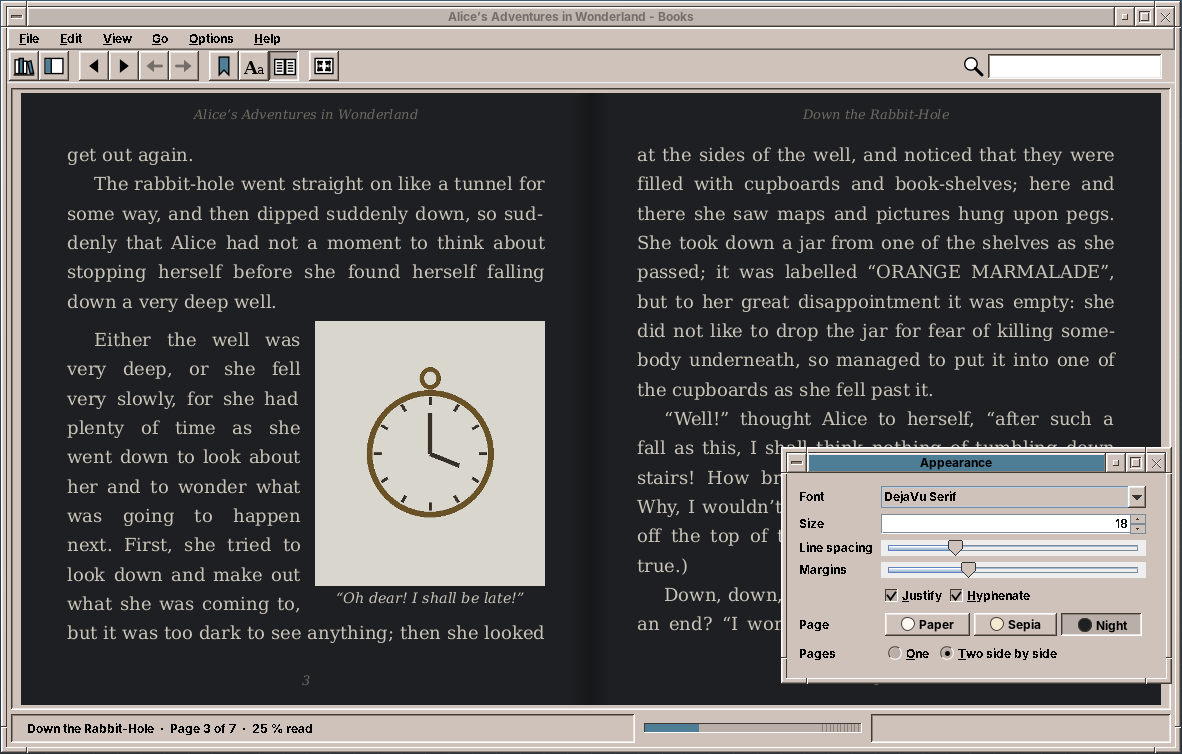
The appearance is saved twice, as the default and for the book in which it was changed:
    /** A change in the Appearance panel: saved for this book and as the default for books without their own. */
    public void setAppearance(Appearance changed) {
        if (changed.equals(appearance)) return;
        appearance = changed;
        preferences.setAppearance(changed);
        if (file != null && mode == Mode.BOOK) state = state.withAppearance(changed);
        saveState();
        relayout();
    }
Comics
A CBZ is a ZIP archive of pictures, in the order of their names. "Natural" order matters here: page10.jpg comes after page9.jpg, which plain string order gets wrong. An optional ComicInfo.xml (the format of ComicRack) gives the title, series, number, authors, genres, and whether it is a manga read from right to left:
    public static ComicBook open(Path file) throws IOException {
        ZipFile zip = new ZipFile(file.toFile());
        try {
            List<String> pages = new ArrayList<>();
            ZipEntry comicInfo = null;
            for (ZipEntry entry : zip.stream().toList()) {
                String name = entry.getName();
                String lower = name.toLowerCase(Locale.ROOT);
                String base = lower.substring(lower.lastIndexOf('/') + 1);
                if (entry.isDirectory() || lower.startsWith("__macosx/") || base.startsWith(".")) continue;
                if (base.equals("comicinfo.xml")) comicInfo = entry;
                else if (PICTURES.stream().anyMatch(lower::endsWith)) pages.add(name);
            }
            if (pages.isEmpty()) throw new IOException("No pictures in the comic archive " + file.getFileName());
            pages.sort(NaturalOrder.INSTANCE);
            String title = null;
            String series = "";
            double number = 0;
            List<String> authors = new ArrayList<>();
            List<String> genres = new ArrayList<>();
            String language = "";
            boolean rtl = false;
            if (comicInfo != null) {
                try (InputStream in = zip.getInputStream(comicInfo)) {
                    Document doc = Jsoup.parse(new String(in.readAllBytes(), StandardCharsets.UTF_8), "", Parser.xmlParser());
                    title = text(doc, "Title");
                    series = text(doc, "Series");
                    try {
                        number = Double.parseDouble(text(doc, "Number"));
                    } catch (NumberFormatException e) {
                        number = 0;
                    }
                    for (String role : List.of("Writer", "Penciller", "Artist")) {
                        for (String name : text(doc, role).split("\\s*,\\s*")) {
                            if (!name.isBlank() && !authors.contains(name)) authors.add(name);
                        }
                    }
                    for (String g : text(doc, "Genre").split("\\s*,\\s*")) {
                        if (!g.isBlank()) genres.add(g);
                    }
                    language = text(doc, "LanguageISO");
                    rtl = text(doc, "Manga").equalsIgnoreCase("YesAndRightToLeft");
                }
            }
            if ((title == null || title.isBlank()) && !series.isEmpty()) {
                title = series + (number > 0 ? " " + (number == Math.rint(number) ? String.valueOf((long) number)
                        : String.valueOf(number)) : "");
            }
            return new ComicBook(zip, pages, new BookInfo(file, BookFormat.CBZ, title, authors, series, number, genres,
                    language), rtl);
        } catch (IOException | RuntimeException e) {
            zip.close();
            throw e instanceof IOException io ? io : new IOException(e.getMessage(), e);
        }
    }
Two pages side by side are a spread. The cover stands alone, as the right page of a printed comic does, and a page that is wider than high is a double page that was scanned as one picture. It stands alone too:
    /**
     * @param wide for each page, whether its picture is wider than high; pages not decoded yet count as narrow
     */
    public static List<Spread> of(boolean[] wide, boolean twoPages) {
        List<Spread> result = new ArrayList<>();
        int i = 0;
        while (i < wide.length) {
            boolean alone = !twoPages || i == 0 || wide[i] || i + 1 >= wide.length || wide[i + 1];
            if (alone) {
                result.add(new Spread(i, -1));
                i++;
            } else {
                result.add(new Spread(i, i + 1));
                i += 2;
            }
        }
        return result;
    }
    @Test
    void spreadsKeepTheCoverAndWidePagesAlone() {
        boolean[] wide = {false, false, false, true, false, false, false};
        assertEquals(List.of(new Spreads.Spread(0, -1), new Spreads.Spread(1, 2), new Spreads.Spread(3, -1),
                new Spreads.Spread(4, 5), new Spreads.Spread(6, -1)), Spreads.of(wide, true));
        assertEquals(7, Spreads.of(wide, false).size());
        assertEquals(3, Spreads.indexOf(Spreads.of(wide, true), 4));
    }
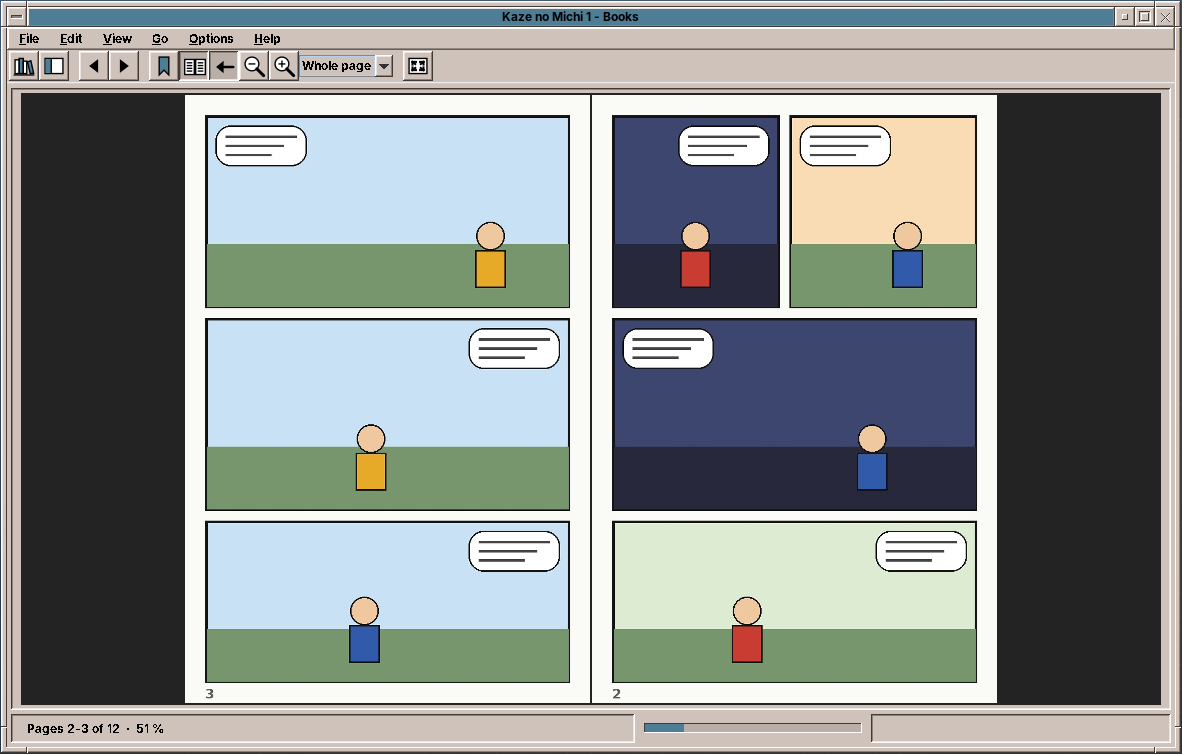
The presenter shows a spread with the pages it already has decoded, decodes the missing ones in the background, and decodes the next spread ahead, so a page turn does not wait. For a manga the two pages swap places: the first page is on the right. In arrow, the left arrow key turns forward:
    /** Shows the current spread; pages not decoded yet are decoded in the background and shown when ready. */
    private void showComicSpread() {
        if (comic == null) return;
        Spreads.Spread s = spreads.get(spread);
        List<Integer> reading = s.second() >= 0 ? List.of(s.first(), s.second()) : List.of(s.first());
        List<Integer> shown = rightToLeft ? reading.reversed() : reading;
        List<BufferedImage> pictures = new ArrayList<>();
        boolean missing = false;
        for (int p : shown) {
            BufferedImage image = comic.cached(p).orElse(null);
            missing |= image == null;
            pictures.add(image);
        }
        view.showComicPages(pictures, shown.stream().map(p -> p + 1).toList(), settings.comicFit(), zoom, rightToLeft,
                comicTwoPages);
        state = state.read(new Position(s.first(), 0), comic.pageCount() <= 1 ? 1 : (double) s.last() / (comic.pageCount() - 1),
                clock.getAsLong());
        saveState();
        int gen = generation;
        ComicSession session = comic;
        int current = spread;
        if (missing) {
            background.execute(() -> {
                for (int p : shown) session.page(p);
                ui.execute(() -> {
                    if (gen == generation && current == spread) showComicSpread();
                });
            });
        }
        // the next spread, so turning the page does not wait
        if (spread + 1 < spreads.size()) {
            Spreads.Spread next = spreads.get(spread + 1);
            background.execute(() -> {
                session.page(next.first());
                if (next.second() >= 0) session.page(next.second());
            });
        }
    }
ComicView scales both pages to one height, then to the window by the fit, then by the zoom:
    /** The scale of the pages: the fit for the window times the zoom; both pages share one height. */
    double scale() {
        int[] size = total();
        if (size[0] == 0) return 1;
        return fit.scale(size[0], size[1], viewWidth() - 2 * GAP, viewHeight() - 2 * GAP) * zoom;
    }

    /** The width of the pages side by side at the height of the tallest, and that height. */
    private int[] total() {
        int height = 0;
        for (BufferedImage p : pages) if (p != null) height = Math.max(height, p.getHeight());
        if (height == 0) return new int[]{0, 0};
        int width = 0;
        for (BufferedImage p : pages) {
            width += p == null ? height * 2 / 3 : (int) Math.round(p.getWidth() * (double) height / p.getHeight());
        }
        return new int[]{width + GAP * (pages.size() - 1), height};
    }
The library
LibraryScanner walks the library folders on the background thread and reads title, authors, series, genres and the cover of each book. Files whose size and date have not changed are taken from the last scan:
    /**
     * The books in the folders (and below) and the single files, in that order, each once.
     *
     * @param known the entries of the last scan by file; unchanged files are reused
     */
    public List<LibraryEntry> scan(List<Path> folders, List<Path> files, Map<Path, LibraryEntry> known) {
        Set<Path> found = new LinkedHashSet<>();
        for (Path folder : folders) {
            if (!Files.isDirectory(folder)) continue;
            try (Stream<Path> walk = Files.walk(folder, DEPTH)) {
                walk.filter(Files::isRegularFile).filter(p -> BookFormat.of(p).isPresent())
                        .filter(p -> !p.getFileName().toString().startsWith("."))
                        .sorted().forEach(p -> found.add(p.toAbsolutePath().normalize()));
            } catch (IOException | RuntimeException e) {
                LOG.warn("Cannot read the library folder {}: {}", folder, e.toString());
            }
        }
        for (Path file : files) {
            if (Files.isRegularFile(file) && BookFormat.of(file).isPresent()) found.add(file.toAbsolutePath().normalize());
        }
        List<LibraryEntry> entries = new ArrayList<>();
        for (Path file : found) {
            try {
                BasicFileAttributes attributes = Files.readAttributes(file, BasicFileAttributes.class);
                LibraryEntry old = known.get(file);
                long modified = attributes.lastModifiedTime().toMillis();
                if (old != null && old.size() == attributes.size() && old.modified() == modified
                        && old.cover().map(Files::isRegularFile).orElse(true)) {
                    entries.add(old);
                } else {
                    entries.add(read(file, attributes.size(), modified, old == null ? clock.getAsLong() : old.added()));
                }
            } catch (IOException | RuntimeException e) {
                LOG.warn("Cannot read {}: {}", file, e.toString());
                BookFormat.of(file).ifPresent(format -> entries.add(new LibraryEntry(
                        new BookInfo(file, format, null, List.of(), "", 0, List.of(), ""), 0, 0, clock.getAsLong(),
                        Optional.empty())));
            }
        }
        return entries;
    }
The covers are scaled to 360 pixels high and kept as JPEG in the cache folder, and LibraryCache writes the whole shelf there as JSON. At start the presenter shows the shelf from the cache at once, and then scans:
    /**
     * Shows the shelf from the cache at once and scans the library folders. A file on the command line opens
     * directly; without one the book read last opens again when the settings say so.
     */
    public void start(List<String> arguments) {
        EdtExecutor.requireEdt();
        settings = preferences.settings();
        view.showSettings(settings);
        entries = cache.load();
        showShelf();
        rescan();
        Optional<Path> argument = arguments.stream().filter(a -> !a.startsWith("-")).findFirst().map(MainPresenter::path);
        if (argument.isPresent()) open(argument.get());
        else if (settings.reopenLast()) preferences.lastBook().filter(Files::isRegularFile).ifPresent(this::open);
    }
Shelf is the domain of the left list and the covers: the facets with their counts, and the books that a filter and the search leave, sorted. A series is sorted by the number of its volumes, and an author by the last name:
/** The books the filter and the search leave, sorted; the search looks at title, authors and series. */
public List<LibraryEntry> books(ShelfFilter filter, String query, SortOrder order) {
String q = query == null ? "" : query.strip().toLowerCase(Locale.ROOT);
List<LibraryEntry> result = new ArrayList<>();
for (LibraryEntry e : entries) {
if (!matches(e, filter)) continue;
if (!q.isEmpty()) {
String text = (e.info().title() + " " + e.info().authorLine() + " " + e.info().series()).toLowerCase(Locale.ROOT);
if (!text.contains(q)) continue;
}
result.add(e);
}
Comparator<LibraryEntry> byTitle = Comparator.comparing(e -> e.info().title(), collator);
Comparator<LibraryEntry> comparator = switch (order) {
case RECENT -> Comparator.<LibraryEntry>comparingLong(e -> -states.apply(e).lastRead()).thenComparing(byTitle);
case TITLE -> byTitle;
case AUTHOR -> Comparator.<LibraryEntry, String>comparing(e -> sortName(e.info().authors()), collator)
.thenComparing(byTitle);
case SERIES -> Comparator.<LibraryEntry, String>comparing(e -> e.info().series().isEmpty() ? ""
: e.info().series(), collator)
.thenComparingDouble(e -> e.info().seriesIndex()).thenComparing(byTitle);
case ADDED -> Comparator.<LibraryEntry>comparingLong(e -> -e.added()).thenComparing(byTitle);
};
result.sort(comparator);
return result;
}
    @Test
    void facetsAndFilters() {
        LibraryEntry alice = entry("Alice", "Lewis Carroll", BookFormat.EPUB, "", 0, List.of("Fantasy"), 1);
        LibraryEntry kafka = entry("Die Verwandlung", "Franz Kafka", BookFormat.EPUB, "", 0, List.of("Novella"), 2);
        LibraryEntry kaze = entry("Kaze 2", "Aoi Senda", BookFormat.CBZ, "Kaze", 2, List.of("Fantasy"), 3);
        LibraryEntry kaze1 = entry("Kaze 1", "Aoi Senda", BookFormat.CBZ, "Kaze", 1, List.of("Fantasy"), 4);
        Map<Path, BookState> states = new HashMap<>();
        states.put(alice.file(), BookState.NEW.read(new Position(0, 10), 0.04, 100));
        states.put(kafka.file(), BookState.NEW.withFinished(true).withCollection("Holiday", true));
        Shelf shelf = new Shelf(List.of(alice, kafka, kaze, kaze1), e -> states.getOrDefault(e.file(), BookState.NEW),
                Locale.GERMAN);
        Map<ShelfFilter, Integer> facets = shelf.facets();
        assertEquals(4, facets.get(ShelfFilter.ALL));
        assertEquals(1, facets.get(ShelfFilter.of(ShelfFilter.Kind.READING)));
        assertEquals(2, facets.get(ShelfFilter.of(ShelfFilter.Kind.NOT_STARTED)));
        assertEquals(1, facets.get(ShelfFilter.of(ShelfFilter.Kind.FINISHED)));
        assertEquals(2, facets.get(ShelfFilter.of(ShelfFilter.Kind.COMICS)));
        assertEquals(3, facets.get(new ShelfFilter(ShelfFilter.Kind.GENRE, "Fantasy")));
        assertEquals(1, facets.get(new ShelfFilter(ShelfFilter.Kind.COLLECTION, "Holiday")));
        assertEquals(List.of(kaze1, kaze), shelf.books(new ShelfFilter(ShelfFilter.Kind.SERIES, "Kaze"), "", SortOrder.SERIES));
        assertEquals(alice, shelf.books(ShelfFilter.ALL, "", SortOrder.RECENT).getFirst());
        assertEquals(List.of(alice), shelf.books(ShelfFilter.ALL, "carroll", SortOrder.TITLE));
        assertEquals(List.of(kaze1, kaze, kafka, alice), shelf.books(ShelfFilter.ALL, "", SortOrder.ADDED));
        assertEquals(List.of(alice, kafka, kaze1, kaze), shelf.books(ShelfFilter.ALL, "", SortOrder.TITLE));
        // by last name: Carroll, Kafka, Senda
        assertEquals(List.of(alice, kafka, kaze1, kaze), shelf.books(ShelfFilter.ALL, "", SortOrder.AUTHOR));
    }
A book without a cover gets one drawn from its title, in a colour of its own:
    /** A cover for a book without one: a colour from the title, a frame, the title and the author. */
    static void plainCover(Graphics2D g, LibraryEntry book, int x, int y, int w, int h) {
        float hue = (book.info().title().hashCode() & 0xffff) / 65535f;
        Color base = Color.getHSBColor(hue, 0.45f, 0.55f);
        Graphics2D c = (Graphics2D) g.create(x, y, w, h);
        c.setPaint(new GradientPaint(0, 0, base.brighter(), 0, h, base.darker()));
        c.fillRect(0, 0, w, h);
        Color gold = new Color(0xe9d9a6);
        c.setColor(gold);
        c.drawRect(5, 5, w - 11, h - 11);
        c.setFont(new Font(Font.SERIF, Font.BOLD, Math.max(10, w / 8)));
        int ty = h / 5;
        for (String line : wrap(c.getFontMetrics(), book.info().title(), w - 20, 4)) {
            ty += c.getFontMetrics().getHeight();
            c.drawString(line, (w - c.getFontMetrics().stringWidth(line)) / 2, ty);
        }
        c.setFont(new Font(Font.SERIF, Font.ITALIC, Math.max(9, w / 11)));
        ty += c.getFontMetrics().getHeight() + 4;
        for (String line : wrap(c.getFontMetrics(), book.info().authorLine(), w - 20, 2)) {
            c.drawString(line, (w - c.getFontMetrics().stringWidth(line)) / 2, ty);
            ty += c.getFontMetrics().getHeight();
        }
        c.dispose();
    }
The window
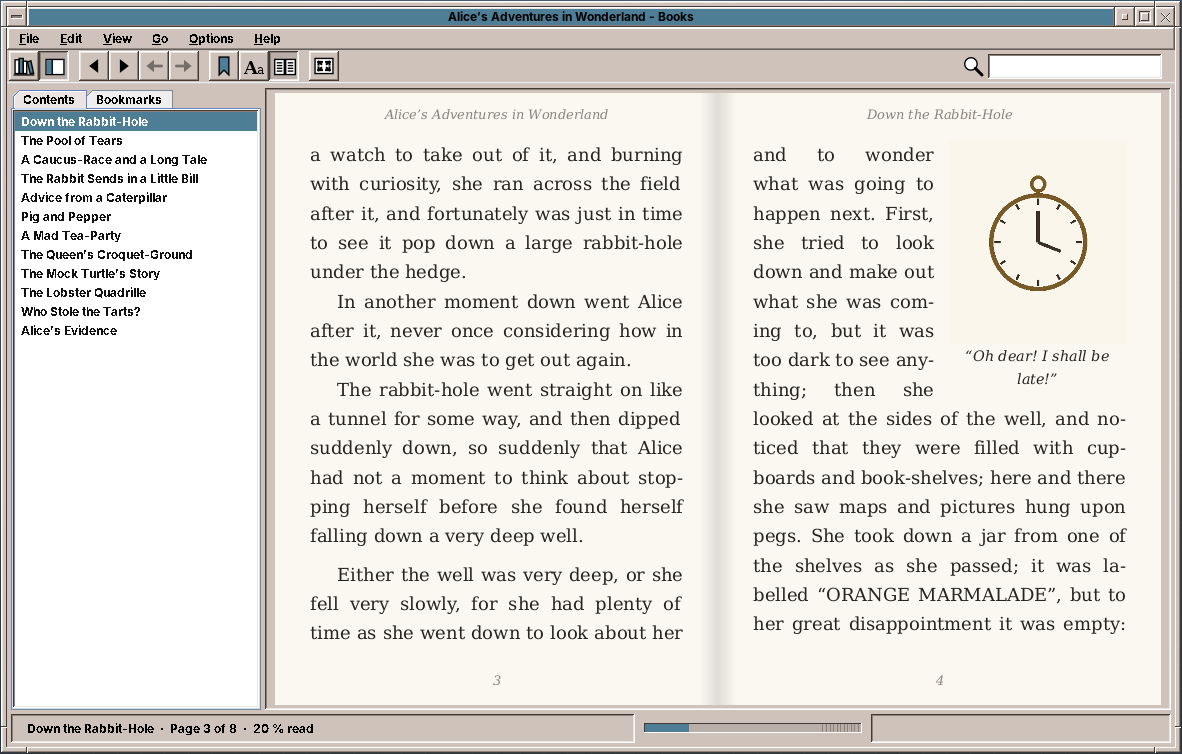
The window is a CardLayout of the shelf and the reader. The reader is a toolbar, the sidebar with contents and bookmarks, the pages or the comic, and a status bar with the progress strip. The toolbar shows the buttons for books or for comics, depending on what is open. Its icons are StandardGlyphs where amade-commons has one (open, find, zoom, refresh, full screen), and its own glyphs for the library, sidebar, bookmark, appearance, two pages and right to left.
The keys for reading work while the pages have the focus; ++space++ and ++arrow-down++ first scroll a comic page that is larger than the window:
    /** Keys for reading while the pages have the focus; Escape leaves the full screen. */
    private void keys() {
        for (JComponent c : List.of(pages, comic)) {
            bind(c, KeyEvent.VK_RIGHT, 0, () -> presenter.arrow(true));
            bind(c, KeyEvent.VK_LEFT, 0, () -> presenter.arrow(false));
            bind(c, KeyEvent.VK_PAGE_DOWN, 0, presenter::next);
            bind(c, KeyEvent.VK_PAGE_UP, 0, presenter::previous);
            bind(c, KeyEvent.VK_SPACE, 0, () -> down(true));
            bind(c, KeyEvent.VK_SPACE, InputEvent.SHIFT_DOWN_MASK, () -> down(false));
            bind(c, KeyEvent.VK_BACK_SPACE, 0, presenter::previous);
            bind(c, KeyEvent.VK_DOWN, 0, () -> down(true));
            bind(c, KeyEvent.VK_UP, 0, () -> down(false));
            bind(c, KeyEvent.VK_HOME, 0, presenter::first);
            bind(c, KeyEvent.VK_END, 0, presenter::last);
            bind(c, KeyEvent.VK_ESCAPE, 0, () -> {
                if (fullScreen) presenter.toggleFullScreen();
                else {
                    pages.clearSelection();
                    searchField.setText("");
                    presenter.clearSearch();
                }
            });
        }
        JComponent rootPane = getRootPane();
        for (int code : new int[]{KeyEvent.VK_EQUALS, KeyEvent.VK_ADD}) {
            for (int modifiers : new int[]{InputEvent.CTRL_DOWN_MASK, InputEvent.CTRL_DOWN_MASK | InputEvent.SHIFT_DOWN_MASK}) {
                global(rootPane, code, modifiers, "zoom-in", presenter::zoomIn);
            }
        }
        global(rootPane, KeyEvent.VK_SUBTRACT, InputEvent.CTRL_DOWN_MASK, "zoom-out", presenter::zoomOut);
    }
Full screen uses setFullScreenWindow without changing the display mode, as in Image Viewer. Where the screen does not support it, a borderless window covers the screen:
    /**
     * Full screen without changing the display mode; where the screen does not support it, a borderless window
     * that covers the screen. The toolbar, sidebar and status bar go away; F11 and Escape bring them back.
     */
    @Override
    public void setFullScreen(boolean on) {
        if (on == fullScreen) return;
        fullScreen = on;
        GraphicsDevice device = getGraphicsConfiguration().getDevice();
        readerBar.setVisible(!on);
        statusBar.setVisible(!on);
        getJMenuBar().setVisible(!on);
        sidebar.setVisible(!on && mode != MainPresenter.Mode.LIBRARY && settings.sidebar());
        readerArea.setBorder(on ? BorderFactory.createEmptyBorder() : AmadeUI.sunken());
        if (device.isFullScreenSupported()) {
            device.setFullScreenWindow(on ? this : null);
        } else if (on) {
            windowedBounds = getBounds();
            dispose();
            setUndecorated(true);
            setBounds(getGraphicsConfiguration().getBounds());
            setVisible(true);
        } else {
            dispose();
            setUndecorated(false);
            if (windowedBounds != null) setBounds(windowedBounds);
            setVisible(true);
        }
        fullScreenAction.putValue(Action.LARGE_ICON_KEY, new ToolIcon(on ? StandardGlyph.LEAVE_FULL_SCREEN : StandardGlyph.FULL_SCREEN));
        menuBar.showFullScreen(on);
        validate();
        (mode == MainPresenter.Mode.COMIC ? comic : pages).requestFocusInWindow();
    }
What amade-commons gives Books
| Part | Since | Books uses it for |
|---|---|---|
AmadeApplication, AppInfo, CommonsModule, EdtExecutor |
chapter 10 | start-up and wiring, --version, file arguments, the UI executor |
Messages, Mnemonics, LocaleSettings, TranslationCheck |
chapter 10 | five languages, the menu letters, the language menu, the translation test |
AmadeUI, DesktopTheme |
chapter 10 | the Motif look, the colours of the shelf and the sidebar |
DesktopLauncher |
chapter 11 | web links in books, Show in Folder |
AppDirectories, PropertiesFile, XdgDirectories |
chapter 20 | books.properties, the cache of the shelf and covers, ~/Books, library.json |
Json |
chapter 33 | library.json and the shelf cache |
ToolIcon, StandardGlyph, ToolButtons |
chapter 30 | the toolbars of the shelf and the reader, full screen |
And what stays in Books
- The typesetter. No other program sets text on pages from HTML. WritePad has its own pages, made from its own document model (chapter 23), and the two share only
TextLayout. - The hyphenator. WritePad could divide words too, and would then need exactly
HyphenatorandHyphenators. They move into amade-commons when it does (see the exercises). - The comic reader. PDF Viewer could open CBZ files with
ComicBookandSpreads. Until it does, comics are Books' own.
Exercises
- Hyphenation in WritePad. Move
HyphenatorandHyphenatorsinto amade-commons and divide words in WritePad's justified paragraphs. What must WritePad store in the ODT file, and what not? - Scrolling. Add View → Scroll, which shows a chapter as one long page. The typesetter already gives the lines with their heights; what does a page break become, and what happens to a deferred picture?
- Tables. Set simple tables (
<table>without merged cells) as blocks: measure each column's widest word, share out the rest of the width, and break a table between rows across pages. - CBR. Comics are often RAR archives. The only free Java libraries read RAR 4, not RAR 5. Would you call
unrarwithCommandRunner(chapter 31), and what does the presenter show while the archive is unpacked? - The CSS cascade. Add specificity to
Css: count ids, classes and elements of each selector, and sort the matching rules by it before applying them. Find a book where the result differs.
Summary
- Choose a typesetter of your own when you need pages, justification and offsets more than you need all of CSS.
- Keep one offset per character from the parser to the page, and never store a page number.
- Let
LineBreakMeasurerbreak lines, divide words with Liang's patterns from the system, and justify without ligatures. - Defer a picture that does not fit, take its captions along, and leave it out of the page's range of offsets.
- Set the chapter again when the font or the window changes, and show the spread that contains the reading position.
- Read a comic's order naturally, and let the cover and double pages stand alone.