32. Video
Imagescan (chapter 31) ran another program to do the work it could not do itself. Video goes one step further: it loads another program's library into its own process and calls its C functions directly. Playing video is a job for decades of specialised code (FFmpeg's decoders, DVD navigation, synchronising sound and picture, scaling on the graphics card). amade-video leaves all of that to libmpv, the library behind the mpv player, and does what a Java program is good at: the window, the controls and the state.
amade-video plays video files, internet streams and DVDs. It is the smallest program of the book so far, about 1,250 lines of Java and 350 lines of tests, and still a skeleton: playing works, while track selection, subtitles, fullscreen and volume come later. That makes it a clear example of one technique: a native library through JNA, with its picture inside a Swing window. Nothing moves into amade-commons in this chapter. The transport symbols (play, pause, stop) have their first user here, and Audio, their second user, moves them in chapter 33.
What you build
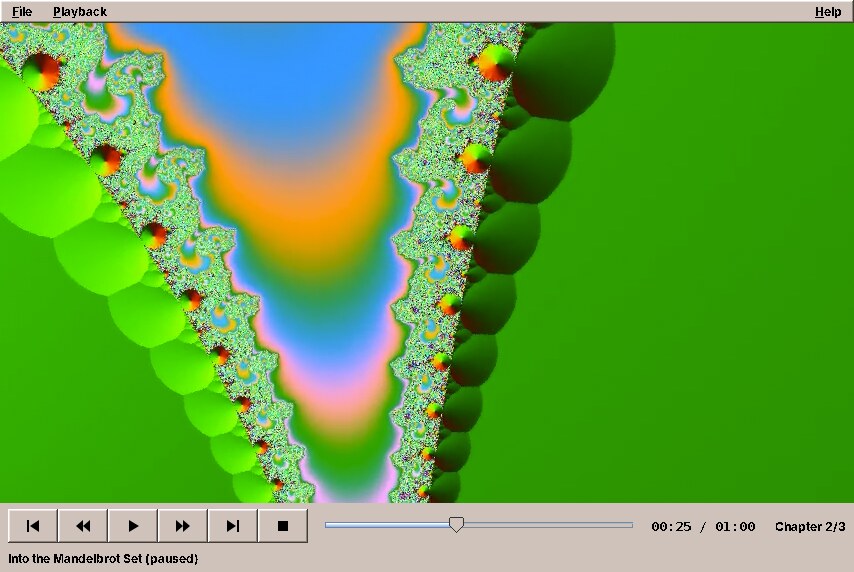
- Files, streams and DVDs: everything FFmpeg decodes; HTTP, HLS and DASH streams; DVDs from a drive, an ISO image or a
VIDEO_TSfolder, with titles and chapters. - Transport: play and pause, stop, back and forward ten seconds, previous and next chapter, a position slider, the time and the chapter.
- Keyboard: Space, S, the arrow keys, Page Up and Page Down.
- Five languages, following the desktop.
The picture in the screenshot is a video FFmpeg made by itself, with a test source that draws a zoom into the Mandelbrot set. The commands are at the end of this chapter, so you can make one too.
What you will learn
- How to map the functions of a C library to a Java interface with JNA, and read C structs without mapping them.
- How to let a native library draw into a Swing window, and what that costs.
- Why the thread that waits in native code is a platform thread, and how to shut it down without crashing the JVM.
- How to turn a stream of events from a library into one immutable state for the user interface.
- How to start when the machine has no GPU, or an older version of the library.
A C library as a Java interface
JNA (Java Native Access) calls functions in shared libraries without a line of C. You describe the functions as a Java interface, JNA loads the library and implements the interface at run time. The part of libmpv's client API (mpv/client.h) that Video needs is a dozen functions:
    long mpv_client_api_version();

    Pointer mpv_create();

    int mpv_initialize(Pointer handle);

    void mpv_terminate_destroy(Pointer handle);

    int mpv_set_option_string(Pointer handle, String name, String value);

    /** args is NULL-terminated by JNA. */
    int mpv_command(Pointer handle, String[] args);

    int mpv_set_property_string(Pointer handle, String name, String value);

    /** The result must be freed with {@link #mpv_free}; null if the property is unavailable. */
    Pointer mpv_get_property_string(Pointer handle, String name);

    void mpv_free(Pointer data);

    int mpv_observe_property(Pointer handle, long replyUserdata, String name, int format);

    int mpv_request_log_messages(Pointer handle, String minLevel);

    /** Blocks up to timeout seconds; never null. */
    Pointer mpv_wait_event(Pointer handle, double timeout);

    void mpv_wakeup(Pointer handle);
The C types map in the obvious way: int to int, int64_t to long, const char * to String, and the opaque mpv_handle * to JNA's Pointer. A String[] is passed as a C array of strings with a null at the end, which is exactly what mpv_command expects. The one thing JNA cannot know is who owns memory: a string that mpv_get_property_string returns belongs to the caller and must be given back with mpv_free, while the strings inside an event belong to mpv and are valid only until the next mpv_wait_event.
The library has different names on different systems, so the player tries them in turn and remembers why each failed:
    public MpvPlayer() {
        LibMpv lib = null;
        StringBuilder why = new StringBuilder();
        for (String name : LibMpv.NAMES) {
            try {
                lib = Native.load(name, LibMpv.class);
                break;
            } catch (UnsatisfiedLinkError e) {
                why.append(name).append(": ").append(e.getMessage()).append('\n');
            }
        }
        this.mpv = lib;
        this.unavailableReason = lib == null ? why.toString().strip() : "";
        if (lib == null) LOG.warn("libmpv is not installed:\n{}", unavailableReason);
    }
Without libmpv, the program still starts. The window shows the reason and the package to install, instead of a stack trace on the console. That is the native-library version of chapter 31's ProgramMissingException.
Structs without Structure
mpv reports what happens as events, and an event is a C struct: mpv_event with an id, an error code, a number the program chose and a pointer to more data, which is a struct of its own for each kind of event. JNA can map structs to Java classes (Structure), with field order, alignment and nested pointers. For four small structs that read a few fields each, Video reads the memory directly instead, at the offsets from the header file:
    // Offsets in mpv_event { int event_id; int error; uint64_t reply_userdata; void *data; }
    int EVENT_ID = 0;
    int EVENT_ERROR = 4;
    int EVENT_REPLY_USERDATA = 8;
    int EVENT_DATA = 16;
    // mpv_event_property { const char *name; mpv_format format; void *data; }
    int PROPERTY_NAME = 0;
    int PROPERTY_FORMAT = 8;
    int PROPERTY_DATA = 16;
    // mpv_event_log_message { const char *prefix; const char *level; const char *text; int log_level; }
    int LOG_PREFIX = 0;
    int LOG_LEVEL = 8;
    int LOG_TEXT = 16;
    // mpv_event_end_file { int reason; int error; ... }
    int END_FILE_REASON = 0;
    int END_FILE_ERROR = 4;
The offsets are those of a 64-bit system, where a pointer and a uint64_t take 8 bytes and are aligned to 8. That is every system amadeOS and the Windows build run on; a 32-bit port would need other numbers. MpvEvent.read copies an event out of native memory into Java records, so it can be used after mpv has reused the memory:
    /** Reads the event {@code mpv_wait_event} returned; layouts from mpv/client.h, see {@link LibMpv}. */
    static MpvEvent read(Pointer event) {
        int id = event.getInt(LibMpv.EVENT_ID);
        Pointer data = event.getPointer(LibMpv.EVENT_DATA);
        return switch (id) {
            case LibMpv.EVENT_NONE -> new None();
            case LibMpv.EVENT_SHUTDOWN -> new Shutdown();
            case LibMpv.EVENT_START_FILE -> new StartFile();
            case LibMpv.EVENT_FILE_LOADED -> new FileLoaded();
            case LibMpv.EVENT_END_FILE -> new EndFile(data.getInt(LibMpv.END_FILE_REASON), data.getInt(LibMpv.END_FILE_ERROR));
            case LibMpv.EVENT_PROPERTY_CHANGE -> new PropertyChange(event.getLong(LibMpv.EVENT_REPLY_USERDATA),
                    string(data.getPointer(LibMpv.PROPERTY_NAME)),
                    value(data.getInt(LibMpv.PROPERTY_FORMAT), data.getPointer(LibMpv.PROPERTY_DATA)));
            case LibMpv.EVENT_LOG_MESSAGE -> new Log(string(data.getPointer(LibMpv.LOG_LEVEL)),
                    string(data.getPointer(LibMpv.LOG_PREFIX)), string(data.getPointer(LibMpv.LOG_TEXT)).strip());
            default -> new Other(id);
        };
    }
MpvEvent is a sealed interface, so the switch that handles events can list all its cases, and the compiler says when one is missing. Reading native memory at fixed offsets sounds like something only a running mpv can test. It is not: JNA's Memory is a piece of native memory that a test can fill with the same layout:
    @Test
    void endFileReasonAndError() {
        Memory data = new Memory(16);
        data.setInt(LibMpv.END_FILE_REASON, MpvEvent.END_ERROR);
        data.setInt(LibMpv.END_FILE_ERROR, -13);
        assertEquals(new MpvEvent.EndFile(MpvEvent.END_ERROR, -13), MpvEvent.read(event(LibMpv.EVENT_END_FILE, 0, data)));
    }
Pitfall: native code does not throw, it crashes
A wrong offset, a pointer used after it was freed, or a call with a destroyed handle does not end in an exception you can catch. It ends the JVM, with a crash log in the working directory. Keep the native part small, copy data out at once, and test the reading code against memory you built yourself.
A native window in a Swing window
mpv can draw into a window that someone else created: its wid option takes the id of a native window (an X11 window id, a Windows HWND). Swing components have no native window of their own; the whole Swing window is one native window that Swing paints into. An AWT Canvas is different. It is a heavyweight component, with a native window of its own, and that is what mpv gets:
/**
 * The native window mpv renders into (through its {@code wid} option). It is heavyweight on purpose: Swing
 * cannot paint over the picture, so the controls sit around it. While mpv shows nothing, the canvas paints
 * a hint.
 */
final class VideoCanvas extends Canvas {
    private String hint = "";

    VideoCanvas() {
        setBackground(Color.BLACK);
        setPreferredSize(new Dimension(854, 480));
        // Keyboard shortcuts belong to the window, not to the native video window.
        setFocusable(false);
    }

    void setHint(String text) {
        if (text.equals(hint)) return;
        hint = text;
        repaint();
    }

    @Override
    public void paint(Graphics g) {
        g.setColor(Color.BLACK);
        g.fillRect(0, 0, getWidth(), getHeight());
        if (hint.isEmpty()) return;
        Graphics2D g2 = (Graphics2D) g;
        g2.setRenderingHint(RenderingHints.KEY_TEXT_ANTIALIASING, RenderingHints.VALUE_TEXT_ANTIALIAS_ON);
        g2.setFont(getFont() == null ? new Font(Font.SANS_SERIF, Font.PLAIN, 14) : getFont().deriveFont(14f));
        g2.setColor(new Color(0x9A, 0x9A, 0x9A));
        FontMetrics fm = g2.getFontMetrics();
        g2.drawString(hint, (getWidth() - fm.stringWidth(hint)) / 2, (getHeight() + fm.getAscent()) / 2);
    }

    @Override
    public void update(Graphics g) {
        paint(g);
    }
}
The native window exists only once the canvas is displayable, after the frame was made visible. Then JNA's Native.getComponentID returns its id, and the player attaches:
    /** Shows the window and, once the player runs, opens the first argument (file, URL or dvd://). */
    public void start(List<String> args) {
        window = new MainWindow(this);
        window.addWindowListener(new WindowAdapter() {
            @Override
            public void windowClosing(WindowEvent e) {
                quit();
            }
        });
        window.setVisible(true);
        player.addListener(state -> edt.execute(() -> show(state)));
        show(player.state());
        if (!player.isAvailable()) {
            window.video.setHint(tr("no-mpv.hint"));
            JOptionPane.showMessageDialog(window, tr("no-mpv.text", player.unavailableReason()), tr("app.title"),
                    JOptionPane.ERROR_MESSAGE);
            return;
        }
        // The canvas is displayable now, so it has a native window for mpv.
        long windowId = Native.getComponentID(window.video);
        executor.execute(() -> {
            try {
                // mpv_initialize can take a moment (GPU detection), so not on the EDT.
                player.attach(windowId);
                if (!args.isEmpty()) {
                    MediaSource source = MediaSource.parse(args.get(0));
                    edt.execute(() -> open(source));
                }
            } catch (RuntimeException e) {
                LOG.error("Cannot start the player", e);
                edt.execute(() -> JOptionPane.showMessageDialog(window, tr("player.failed", e.getMessage()),
                        tr("app.title"), JOptionPane.ERROR_MESSAGE));
            }
        });
    }
attach runs on the background executor, because mpv_initialize looks for the graphics card and takes a noticeable moment. A failure there comes back to the event dispatch thread as a message.
What it costs: mpv owns the pixels of the canvas, so Swing cannot paint over the picture. There are no controls that fade in over the video, and no Swing subtitles; the controls sit below the picture, and on-screen messages come from mpv itself. Menus are not affected. AWT knows which of its components are native and makes Swing's pop-up menus that overlap one visible on top of it, so the Playback menu opens over the running picture.
libmpv's own conditions
attach sets the options before mpv_initialize, and one of them comes before everything:
    /**
     * Creates the player inside the given native window (X11 window id, HWND). The window must exist,
     * i.e. its component must be displayable.
     */
    public synchronized void attach(long windowId) {
        if (mpv == null) throw new IllegalStateException("libmpv is not installed");
        if (handle != null) throw new IllegalStateException("already attached");
        // libmpv refuses to start unless LC_NUMERIC is "C"; the JVM sets the user's locale.
        if (!System.getProperty("os.name", "").startsWith("Windows")) {
            Native.load("c", LibMpv.LibC.class).setlocale(LibMpv.LibC.LC_NUMERIC, "C");
        }
        Pointer h = mpv.mpv_create();
        if (h == null) throw new IllegalStateException("mpv_create failed");
        handle = h;
        option("wid", Long.toString(windowId));
        Map<String, String> output = new LinkedHashMap<>(VideoOutput.forThisMachine());
        Map<String, String> overrides = overrides();
        output.keySet().removeAll(overrides.keySet());
        fastProfile = "fast".equals(output.get("profile"));
        output.forEach(this::outputOption);
        option("keep-open", "yes");
        option("idle", "yes");
        option("input-default-bindings", "no");
        option("input-vo-keyboard", "no");
        option("osd-level", "1");
        option("ytdl", "yes");
        overrides.forEach(this::option);
        check(mpv.mpv_initialize(h), "mpv_initialize");
        mpv.mpv_request_log_messages(h, LOG.isDebugEnabled() ? "info" : "warn");
        mpv.mpv_observe_property(h, TIME, "time-pos", LibMpv.FORMAT_DOUBLE);
        mpv.mpv_observe_property(h, DURATION, "duration", LibMpv.FORMAT_DOUBLE);
        mpv.mpv_observe_property(h, PAUSE, "pause", LibMpv.FORMAT_FLAG);
        mpv.mpv_observe_property(h, CHAPTER, "chapter", LibMpv.FORMAT_INT64);
        mpv.mpv_observe_property(h, CHAPTERS, "chapters", LibMpv.FORMAT_INT64);
        mpv.mpv_observe_property(h, EOF, "eof-reached", LibMpv.FORMAT_FLAG);
        mpv.mpv_observe_property(h, TITLE, "media-title", LibMpv.FORMAT_STRING);
        running = true;
        events = Thread.ofPlatform().daemon().name("mpv-events").start(this::eventLoop);
        LOG.info("libmpv {} attached to window 0x{}", apiVersion(), Long.toHexString(windowId));
    }
libmpv refuses to start unless the C library's LC_NUMERIC locale is C, because it parses and prints decimal numbers in its options and must not get "0,5" for "0.5". The JVM sets the C locale to the user's, so on a German desktop libmpv would not start. One call to setlocale in libc, also through JNA, sets the numbers back to C. Java's own formatting is not affected, because Java does not use the C locale.
The other options make mpv a component rather than a player. idle keeps it running without a file, keep-open keeps the last picture at the end, and input-default-bindings=no with input-vo-keyboard=no leave the keyboard to the Swing window. ytdl lets it play video pages through yt-dlp when that program is installed.
The event thread
mpv runs its own threads for decoding and output. The program sees them through one call, mpv_wait_event, which blocks until something happens or the time-out passes. One thread waits there for the whole life of the player:
    private void eventLoop() {
        while (running) {
            Pointer h = handle;
            if (h == null) break;
            handle(MpvEvent.read(mpv.mpv_wait_event(h, 1.0)));
        }
    }
It is a platform thread, not a virtual one. Chapter 30 said virtual threads are for waiting, and this thread does nothing but wait. But it waits inside a native function, and a virtual thread that calls native code cannot give its carrier thread back until the call returns. A virtual thread here would hold one of the carriers for as long as the program runs, and the rest of the program would have one carrier less. Virtual threads are for waiting in Java: on sockets, files, locks and queues.
Shutting down is where native code punishes mistakes. The handle must not be destroyed while the event thread is still inside mpv_wait_event with it, or the JVM crashes. So close wakes the thread, waits for it to leave, and only then destroys the handle:
    @Override
    public synchronized void close() {
        Pointer h = handle;
        if (h == null) return;
        running = false;
        // The event thread must leave mpv_wait_event before the handle is destroyed.
        mpv.mpv_wakeup(h);
        try {
            if (events != null) events.join(2000);
        } catch (InterruptedException e) {
            Thread.currentThread().interrupt();
        }
        handle = null;
        mpv.mpv_terminate_destroy(h);
    }
Commands such as seek or cycle pause can be sent from any thread; libmpv's client API is thread-safe. The presenter sends them from the event dispatch thread, and they return at once.
From events to one state
mpv reports changes property by property: the position, the duration, the pause flag, the chapter, the title. The program asked for them once with mpv_observe_property, giving each a number, and every change arrives as an event with that number. The user interface does not want twelve kinds of events; it wants to know what to show. So the player keeps one immutable record:
/**
 * What the player is doing, as the UI shows it. Immutable; the player publishes a new state on every change.
 *
 * @param title    media title (from the file's tags, the URL or the DVD), empty when idle
 * @param position seconds from the start, -1 if unknown
 * @param duration seconds, -1 if unknown (live streams)
 * @param chapter  current chapter, 0-based; -1 without chapters
 * @param error    why playback failed, empty otherwise
 */
public record PlayerState(Status status, String title, double position, double duration, boolean paused,
                          int chapter, int chapters, String error) {
    public enum Status {
        /** Nothing loaded. */
        IDLE,
        /** Opening a file, connecting to a stream, reading a disc. */
        LOADING,
        PLAYING,
        /** At the end; the last picture stays. */
        ENDED,
        FAILED
    }

    public static final PlayerState IDLE = new PlayerState(Status.IDLE, "", -1, -1, false, -1, 0, "");
Every event becomes a function from the old state to the new one:
    void handle(MpvEvent event) {
        switch (event) {
            case MpvEvent.None n -> {
            }
            case MpvEvent.Shutdown s -> running = false;
            case MpvEvent.StartFile s -> update(st -> st.status() == PlayerState.Status.LOADING ? st
                    : PlayerState.loading(st.title()));
            case MpvEvent.FileLoaded f -> update(st -> st.withStatus(PlayerState.Status.PLAYING));
            case MpvEvent.EndFile e -> update(st -> switch (e.reason()) {
                case MpvEvent.END_ERROR -> st.failed(mpv.mpv_error_string(e.error()));
                case MpvEvent.END_EOF -> st.withStatus(PlayerState.Status.ENDED);
                case MpvEvent.END_STOP, MpvEvent.END_QUIT -> PlayerState.IDLE;
                default -> st;
            });
            case MpvEvent.PropertyChange p -> update(st -> propertyChanged(st, p));
            case MpvEvent.Log l -> log(l);
            case MpvEvent.Other o -> LOG.debug("mpv event {}", mpv.mpv_event_name(o.id()));
        }
    }
propertyChanged is a static method of state and event, so its tests need no mpv at all. One of them covers the end of a film. With keep-open, mpv does not end the file; it pauses on the last picture and sets eof-reached. The state calls that ended, and seeking back makes it playing again:
    @Test
    void endOfFileWithKeepOpen() {
        PlayerState playing = PlayerState.loading("a").withStatus(PlayerState.Status.PLAYING);
        PlayerState ended = change(playing, 6, true);
        assertEquals(PlayerState.Status.ENDED, ended.status());
        // Seeking back from the end
        assertEquals(PlayerState.Status.PLAYING, change(ended, 6, false).status());
        // eof-reached while loading does not end anything
        assertEquals(PlayerState.Status.LOADING, change(PlayerState.loading("b"), 6, true).status());
    }
update applies the change, and only a real change goes to the listeners:
    private void update(UnaryOperator<PlayerState> change) {
        synchronized (stateLock) {
            PlayerState next = change.apply(state);
            if (next.equals(state)) return;
            state = next;
            for (Consumer<PlayerState> l : listeners) {
                try {
                    l.accept(next);
                } catch (RuntimeException e) {
                    LOG.warn("Player listener failed", e);
                }
            }
        }
    }
The listeners run on the event thread. The presenter's listener only hands the state to the event dispatch thread (edt.execute(() -> show(state))), where ControlBar.show sets the buttons, the slider, the time and the status line from it. A record that cannot change can cross threads without a lock: the event thread never touches it again after publishing it.
The slider shows the position and also sets it, and the two must not mix. When the player moves the slider, that is not the user seeking; and while the user drags, the player must not pull the knob back:
        // Seek when the knob is let go, not on every pixel of a drag.
        seek.addChangeListener(e -> {
            if (!following && !seek.getValueIsAdjusting() && duration > 0) {
                p.seekTo(duration * seek.getValue() / SCALE);
            }
        });
show sets following while it moves the slider, and does not move it at all while the user holds the knob (getValueIsAdjusting). The seek goes to mpv once, when the knob is let go.
Machines without a GPU, and older libraries
mpv's best video output renders with OpenGL or Vulkan on the graphics card. A virtual machine or a test display (Xvfb) has no graphics card, only software OpenGL, and there two things go wrong. mpv tries other ways to reach a screen, the Linux console among them, and its high-quality scalers do not compile in software, which leaves the picture black when a large video is shown smaller. VideoOutput chooses the options for the machine:
    static Map<String, String> options(String osName, boolean gpu) {
        Map<String, String> options = new LinkedHashMap<>();
        if (osName.startsWith("Windows") || osName.startsWith("Mac")) {
            options.put("vo", "gpu");
        } else {
            options.put("vo", "gpu,xv,x11");
            // mpv 0.41 has no GLX context any more.
            options.put("gpu-context", "x11egl,x11vk");
        }
        options.put("hwdec", "auto-safe");
        if (!gpu) options.put("profile", "fast");
        return options;
    }
Whether there is a GPU is guessed from the render nodes in /dev/dri. When the guess was wrong, mpv says so itself: it logs a warning about a software renderer, and the player switches to the simple scalers while running (apply-profile fast).
A bug the screenshots found
The screenshot above was taken with Ubuntu 24.04's libmpv, older than the Debian one amadeOS uses, and at first the player did not start at all. The log said option gpu-context=x11egl,x11vk: error setting option. The older libmpv does not know the x11vk context, rejects the whole value, and attach treated every rejected option as fatal. The same would happen on any distribution with an older mpv, for one option that is only a preference.
The video output options are now set leniently. A rejected value is logged, and mpv's own default stays:
    /**
     * Sets a video output option. These depend on the mpv version (older ones know fewer GPU contexts), so
     * a value this libmpv rejects is logged and its own default stays, instead of no player at all.
     */
    private void outputOption(String name, String value) {
        int result = mpv.mpv_set_option_string(handle, name, value);
        if (result < 0) {
            LOG.warn("libmpv {} rejects {}={} ({}); using its default", apiVersion(), name, value,
                    mpv.mpv_error_string(result));
        }
    }
The options that the program depends on (wid, idle, keep-open, the keyboard) are still checked, because without them it would misbehave in ways that are harder to find. The second part of the fix concerns the system properties -Dmpv.<option>=<value>, which let a user or a test override any option. They used to be applied after the defaults, so a default that failed stopped the player before the override was even tried. Now an override replaces the default of the same name before anything is set.
Tip: be strict about what you need, lenient about what you prefer
When a program configures a library, sort the settings into two kinds. Settings the program relies on should fail loudly. Settings that only make things better (a faster path, a nicer look) should fall back quietly with a line in the log. Native libraries come in many versions on users' machines, and an option that does not exist yet must not cost the user the whole program.
What to play
A command-line argument, a file from the dialog, a URL or a DVD drive becomes a MediaSource, a sealed interface of three records that each know what to tell mpv's loadfile command:
    /**
     * From a command-line argument: {@code dvd://[title]} (drive from {@link #defaultDvdDevice()}), a URL
     * with a scheme, a DVD image ({@code .iso}) or folder (with or named {@code VIDEO_TS}), or a video file.
     */
    static MediaSource parse(String argument) {
        String a = argument.strip();
        String lower = a.toLowerCase(Locale.ROOT);
        if (lower.startsWith("dvd://")) {
            String number = a.substring(6);
            return new Dvd(defaultDvdDevice(), number.isEmpty() ? 0 : Integer.parseInt(number));
        }
        if (lower.matches("[a-z][a-z0-9+.-]+://.*")) return new Url(a);
        Path path = Path.of(a);
        if (isDvd(path)) return new Dvd(a, 0);
        return new File(path);
    }
DVDs have one surprise: mpv numbers their titles from 0, while people and the dvd:// addresses they type count from 1, so Dvd.target() converts. Encrypted DVDs need libdvdcss, which libdvdnav loads by itself when it is installed. amade-video neither ships nor installs it, because whether its use is allowed depends on the country.
What amade-commons gives Video
| Part | Since | Video uses it for |
|---|---|---|
AmadeApplication, AppInfo, CommonsModule, EdtExecutor |
chapter 10 | start-up, wiring, the background executor for attach, states to the event dispatch thread |
Mnemonics, TranslationCheck |
chapter 10 | menu letters, the test that all five languages have every text |
Texts |
chapter 22 | the texts, through tr("...") |
And what stays in Video
- Everything about mpv:
LibMpv,MpvEvent,MpvPlayer,VideoOutput. No other program of the book loads a native library this way; Audio reads CDs through libcdio with JNA, but in a different way, and two different uses are not one shared part. PlayerStateand its transitions. Audio has a state of its own for its player, and the two have little in common beyond play and pause.TransportIcon, the symbols on the transport buttons. Audio has a copy with three more symbols (record, eject, favourite). Chapter 33 moves the symbols into amade-commons, as glyphs for theToolIconof chapter 30.
Make your own test video
FFmpeg has test sources that draw a picture instead of reading one. This makes a minute of Mandelbrot zoom with a quiet tone and three chapters, the video in the screenshot:
cat > chapters.txt <<'EOF'
;FFMETADATA1
title=Into the Mandelbrot Set
[CHAPTER]
TIMEBASE=1/1
START=0
END=20
title=Overview
[CHAPTER]
TIMEBASE=1/1
START=20
END=40
title=Seahorse Valley
[CHAPTER]
TIMEBASE=1/1
START=40
END=60
title=Deep
EOF
ffmpeg -f lavfi -i "mandelbrot=s=854x480:rate=25" -f lavfi -i "sine=frequency=220" -i chapters.txt \
       -map 0:v -map 1:a -map_metadata 2 -map_chapters 2 -t 60 \
       -c:v libx264 -pix_fmt yuv420p -c:a aac mandelbrot.mkv
./gradlew run --args=mandelbrot.mkv
On a machine without a sound card, add -Dmpv.ao=null to the JVM options, so that mpv does not look for one.
Exercises
- Volume. Add a volume slider. mpv has a
volumeproperty from 0 to 100 (and beyond). Observe it, so that the slider follows when the volume changes elsewhere. Which parts change:LibMpv,PlayerState,ControlBar? - Audio tracks and subtitles. Films have several. mpv lists them in the property
track-list, which is a structured value (MPV_FORMAT_NODE). Read it as JSON text instead, withmpv_get_property_string(handle, "track-list"), and offer the tracks in a menu. What is the cost of choosing text over the node structs? - Fullscreen. Use the fullscreen mode of the Paddle chapter in the Game Developer's Handbook:
setFullScreenWindowwithout changing the display mode. What happens to the control bar, and how do the keyboard shortcuts reach the window? - A crash on purpose. Remove the
joinfromcloseand quit while a film plays. Run it a few times. What does the crash log say, and why does it not happen every time? - Strict or lenient. Go through the options in
attachand sort them into "the program relies on it" and "a preference". Isosd-levelin the right group? Ishwdec?
Summary
- JNA turns a Java interface into calls of a C library. Map only the functions you need, and keep track of who frees which memory.
- Small C structs can be read at fixed offsets from the header file, without
Structureclasses. Copy what you need into Java records at once, and test the reading code againstMemoryyou filled yourself. - A native library can draw into a heavyweight AWT
Canvasthrough its window id, once the canvas is displayable. Swing cannot paint over it, so the controls go around it. - A thread that waits in native code is a platform thread. Shut it down in the right order: wake it, join it, then destroy the handle.
- Turn the library's events into one immutable state with pure transition functions. The state crosses to the event dispatch thread without locks, and its tests need no library.
- Be strict about the options you need and lenient about the ones you prefer: a rejected video output option now costs a log line, not the player.
- Nothing moves into amade-commons here. The transport symbols move in chapter 33, when Audio becomes their second user.