33. Audio
Video (chapter 32) left the hard work to a C library and kept to the window and the controls. Audio does the opposite: it plays sound in pure Java. It decodes the files, mixes, filters and measures the samples, and hands them to the sound card through Java Sound. Native code appears only where the operating system has the data: the audio CD in the drive.
amade-audio is the Audio Station of the desktop. It is a rack of devices in the style of the hi-fi systems of the 1990s: a mixer, a CD player, a file player and an internet radio, each with its own front, LCDs and transport buttons, and a playlist below. At about 11,600 lines of Java and 1,900 lines of tests it is the largest program of the book, so this chapter does not walk through all of it. It picks the ideas you will need again: a sound engine and its threads, decoders found at run time, a network stream with metadata inside, recording without decoding, a CD through JNA, a web service that wants politeness, and widgets drawn from scratch.
Two parts move into amade-commons. Json gets its second user, Mail. The transport symbols get theirs, Video.
What you build
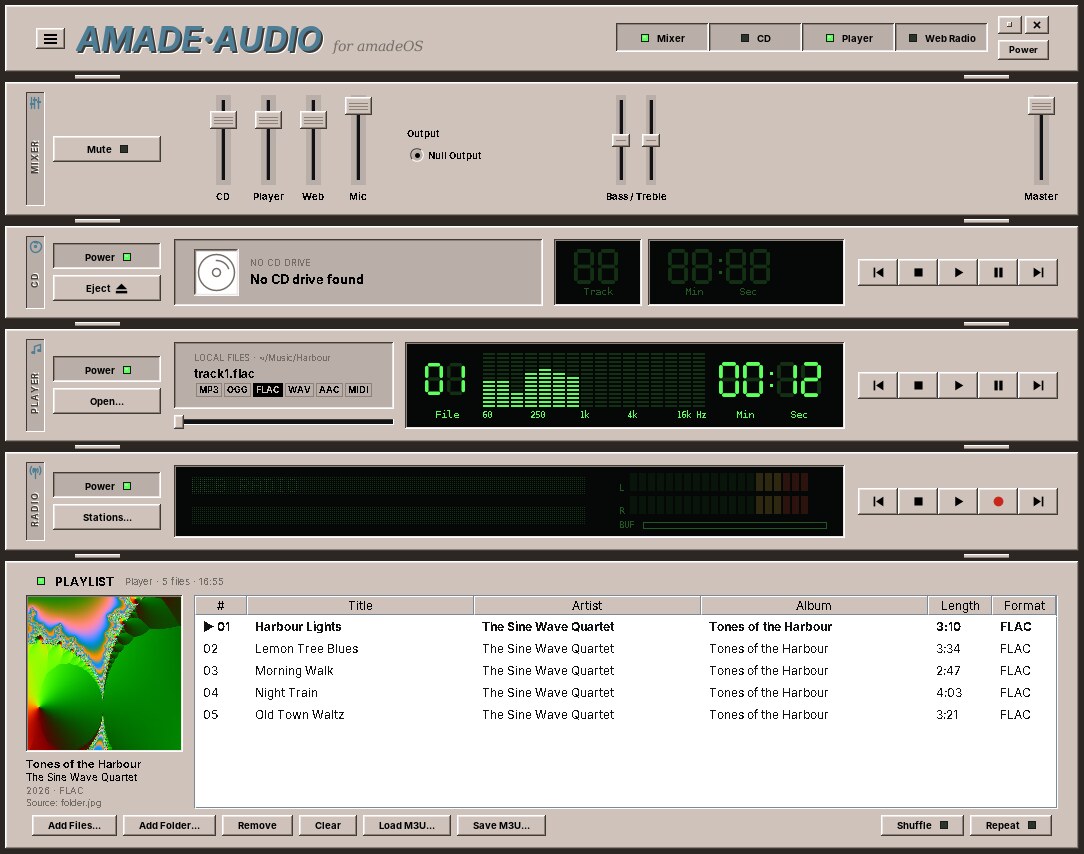
- Four racks: the Mixer with a fader per device, bass and treble, output device and master volume; the CD player; the file Player; and Web Radio. The header rack shows or hides them, and pressing Play on one device stops the others.
- Files: MP3, Ogg Vorbis, AAC, FLAC, WAV and AIFF, and MIDI rendered with Java's software synthesiser. Playlists with shuffle and repeat, M3U files, tags and the cover embedded in a file or found in its folder.
- CDs through libcdio on Linux and the system's CD driver on Windows, with titles from CD-Text or MusicBrainz and covers from the Cover Art Archive.
- Internet radio: favourites, search, genres and countries from radio-browser.info, the title that is playing, level meters, and recording to disk.
- LCDs with seven-segment digits, a 16-band spectrum and a scrolling dot-matrix line, in a glow that follows the desktop theme.
- Five languages, following the desktop.
The music in the screenshot is made up as well. FFmpeg made it from sine tones and pink noise, and the cover is a frame of its Mandelbrot test picture. The commands are at the end of the chapter.
What you will learn
- How to build a small sound engine: a source of samples, a channel per device on its own thread, and an output you can replace in tests.
- How Java Sound finds decoders at run time, and what to do when it cannot convert in one step.
- How internet radio carries song titles inside the audio stream, and how to record a stream without decoding it.
- How a second program uses JNA differently from Video, and how to test a checksum against the reference library.
- How to keep to a web service's rate limit and cache its answers.
- How to draw an LCD from a font written as text.
- How to move a set of icons into a library that already has an icon system.
A sound engine in four parts
Every device of the rack plays the same way. Something delivers decoded samples, a channel applies the fader and the tone control and measures the levels, and an output sends the samples to the sound card. The first part is the source:
/**
 * Decoded audio: signed 16-bit little-endian PCM in {@link #format()}. Implementations are read by one
 * thread at a time.
 */
public interface PcmSource extends Closeable {
    /** Signed 16-bit little-endian PCM; the sample rate may differ from what the decoder reports (HE-AAC). */
    AudioFormat format();

    /** Reads whole frames; returns -1 at the end. Blocks while a network stream is buffering. */
    int read(byte[] buffer, int offset, int length) throws IOException;
One format for the whole engine, signed 16-bit little-endian PCM, keeps everything after the decoder simple. A file, a CD track and a radio stream are all PcmSources: AudioInputStreamSource wraps what Java Sound decoded, CdPcmSource reads sectors from the disc, MidiRenderer renders a MIDI file. The output is an interface too, PcmOutput, with JavaSoundOutput as the real one.
AudioEngine holds one AudioChannel per device. Playing replaces whatever played before and starts a thread:
    /**
     * Stops what is playing and plays the source; the channel closes it when done.
     *
     * @param startMicros position the source starts at, for the position display after seeking
     */
    public synchronized void play(PcmSource source, long startMicros) {
        stopCurrent();
        Playback playback = new Playback(source, startMicros);
        current = playback;
        fireState(playback, TransportState.LOADING, null);
        Thread.ofVirtual().name("amade-audio-" + id.name().toLowerCase()).start(playback);
    }
The thread runs this loop. It reads from the source, applies the gain and the tone control, measures, and writes:
                while (!cancelled) {
                    synchronized (lock) {
                        while (paused && !cancelled) lock.wait();
                    }
                    if (cancelled) break;
                    int n = source.read(buffer, 0, buffer.length);
                    if (n < 0) {
                        if (!cancelled) out.drain();
                        ended = !cancelled;
                        break;
                    }
                    if (n == 0) continue;
                    byte[] data = buffer;
                    int length = n;
                    if (stereo != null) {
                        length = downmixToStereo(buffer, n, channels, stereo);
                        data = stereo;
                    }
                    applyGain(data, 0, length, muted.getAsBoolean() ? 0f : amplitude(volume) * amplitude((float) master.getAsDouble()));
                    tone.process(data, 0, length, format.getSampleRate(), format.getChannels());
                    var levels = analyzer.process(data, 0, length, format);
                    if (levels != null) fireLevels(this, levels);
                    int written = 0;
                    while (written < length && !cancelled) {
                        int w = out.write(data, written, length - written);
                        if (w <= 0) break;
                        written += w;
                    }
                }
The gain is a multiplication with clipping. The fader is squared on the way, because the ear hears loudness roughly on a logarithmic scale, and a linear fader would do all its work in the last centimetre:
    /** Amplitude factor for a fader position: roughly logarithmic, 0.5 is about -12 dB. */
    static float amplitude(float fader) {
        return fader * fader;
    }

    /** Multiplies 16-bit little-endian samples by the factor, clipping at full scale. */
    static void applyGain(byte[] buffer, int offset, int length, float factor) {
        if (factor >= 0.999f && factor <= 1.001f) return;
        for (int i = offset; i + 1 < offset + length; i += 2) {
            int s = (short) ((buffer[i] & 0xFF) | (buffer[i + 1] << 8));
            int v = Math.round(s * factor);
            if (v > Short.MAX_VALUE) v = Short.MAX_VALUE;
            if (v < Short.MIN_VALUE) v = Short.MIN_VALUE;
            buffer[i] = (byte) v;
            buffer[i + 1] = (byte) (v >> 8);
        }
    }
Which thread, and why a virtual one here
Video needed a platform thread, because mpv_wait_event waits inside native code for as long as it likes, and a virtual thread waiting there pins its carrier. Audio's playback threads are virtual. They wait in three places: in the decoder reading a file or a socket, which the JDK has built for virtual threads; in lock.wait() while paused; and in SourceDataLine.write, which waits for room in the line's buffer in short steps in Java code, so the native call only copies what fits. None of them blocks inside native code for long.
Stopping has to wake the thread wherever it waits. cancel sets the flag, wakes a paused thread, and closes the output and the source: closing the line returns a write that waits for buffer space, and closing a network stream returns a read that waits for data.
        void cancel() {
            cancelled = true;
            synchronized (lock) {
                lock.notifyAll();
            }
            PcmOutput o = output;
            if (o != null) {
                try {
                    o.flush();
                    o.close(); // unblocks a write waiting for buffer space
                } catch (RuntimeException e) {
                    LOG.debug("Closing output failed", e);
                }
            }
            try {
                source.close(); // unblocks a network read
            } catch (IOException | RuntimeException e) {
                LOG.debug("Closing source failed", e);
            }
        }
A stopped playback can still deliver an event or two before its thread ends: the last levels, an error from the closed stream. If they reached the listeners, the display would flicker back to the old track. So every event names its playback, and only the current one gets through:
    private void fireState(Playback playback, TransportState newState, String message) {
        if (!isCurrent(playback)) return;
        state = newState;
        for (Listener l : listeners) {
            try {
                l.stateChanged(id, newState, message);
            } catch (RuntimeException e) {
                LOG.warn("Listener failed", e);
            }
        }
    }
Pitfall: \"finished\" is not \"stopped\"
When a track ends by itself the player goes on to the next one. When the user presses Stop it must not. Both end the same loop, so the channel reports them as two events: stateChanged(STOPPED) for both, finished only for the end of the source. A test checks that Stop never counts as finished.
Testing sound without a sound card
The build machines have no sound card, and a test that plays sound would be slow anyway. The tests give the engine a FakeOutput that collects what is written, and a SineSource that computes a tone:
    @Override
    public int read(byte[] buffer, int offset, int length) {
        if (frame >= totalFrames) return -1;
        int frames = (int) Math.min(length / 4, totalFrames - frame);
        for (int i = 0; i < frames; i++) {
            short s = (short) (16384 * Math.sin(2 * Math.PI * frequency * (frame + i) / 44100));
            int at = offset + i * 4;
            buffer[at] = (byte) s;
            buffer[at + 1] = (byte) (s >> 8);
            buffer[at + 2] = (byte) s;
            buffer[at + 3] = (byte) (s >> 8);
        }
        frame += frames;
        return frames * 4;
    }
With them, a test plays half a second at full volume and checks that 22,050 frames arrived, that the level meter shows −6 dB for a half-scale sine, and that the states came in the order loading, playing, stopped. The fake output can also play "slowly", sleeping on every write, so that a test can catch the channel while it plays:
    @Test
    void stopIsNotFinished() throws Exception {
        FakeOutput.Factory outputs = new FakeOutput.Factory(true);
        AudioEngine engine = new AudioEngine(outputs);
        AudioChannel channel = engine.channel(SourceId.WEBRADIO);
        AtomicInteger finished = new AtomicInteger();
        channel.addListener(new AudioChannel.Listener() {
            @Override
            public void finished(SourceId source) {
                finished.incrementAndGet();
            }
        });
        SineSource sine = new SineSource(440, 60);
        channel.play(sine, 0);
        FakeOutput.await(() -> channel.state() == TransportState.PLAYING);
        channel.pause();
        assertTrue(channel.isPaused());
        assertEquals(TransportState.PAUSED, channel.state());
        channel.resume();
        channel.stop();
        FakeOutput.await(() -> sine.closed);
        Thread.sleep(100);
        assertEquals(0, finished.get());
        assertEquals(TransportState.STOPPED, channel.state());
    }
Levels, spectrum and tone
LevelAnalyzer measures the samples on their way to the output, about 25 times a second: the peak of each channel for the meters, and a fast Fourier transform of the last 2,048 samples for the 16 bands of the spectrum. The meters show decibels, not amplitudes, because that is how loud things sound:
    /** Peak (0..1 of full scale) to meter position 0..1 on a -40..0 dB scale. */
    static float meter(float peak) {
        if (peak <= 0) return 0;
        double db = 20 * Math.log10(peak);
        return (float) Math.max(0, Math.min(1, (db - FLOOR_DB) / -FLOOR_DB));
    }
Bass and treble are two shelving filters of the kind every equaliser uses, a "biquad" each, computed with the formulas from Robert Bristow-Johnson's Audio EQ Cookbook. ToneControl recomputes their coefficients only when a knob or the sample rate changes, and does nothing at all while both knobs are at zero.
Because the engine measures after the fader, the meters fall when you pull a fader down. That is how a mixing desk works, and it is also what users expect.
Decoders found at run time
Java Sound decodes only WAV, AIFF and AU by itself. The other formats come as service providers: jar files that declare an AudioFileReader and a FormatConversionProvider in META-INF/services. Java Sound finds them on the class path when it needs them. Audio's build.gradle lists them as runtimeOnly, and its code never names them, except where a radio stream's codec is already known:
    /** The service providers are found through the context class loader, which virtual threads may lack. */
    private static void withDecoderClassLoader() {
        Thread.currentThread().setContextClassLoader(DecoderFactory.class.getClassLoader());
    }
The search goes through the thread's context class loader. A platform thread inherits it from the thread that started it, while a virtual thread started from a library's executor may have none, and then Java Sound finds no MP3 decoder. One line before every decoding fixes that.
Two more traps are in the build file: the fat jar must merge the providers' META-INF/services files instead of keeping only the first one, and signed provider jars must lose their signatures, or the merged jar is rejected. Chapter 50 shows the packaging in detail.
A bug the screenshots found
The album in the screenshot did not play at first. The error was Unsupported conversion: PCM_SIGNED 44100.0 Hz, 16 bit ... from FLAC 44100.0 Hz, 24 bit. FFmpeg had written the FLAC files with 24 bits, as most high-resolution downloads are. The FLAC provider decodes only to the file's own depth, and the JDK's PCM converter turns 24 bits into 16, but Java Sound does not chain two conversions by itself. So the factory chains them:
    /** Converts to signed 16-bit little-endian PCM at the source's rate and channel count. */
    static AudioInputStream toPcm16(AudioInputStream encoded) {
        AudioFormat base = encoded.getFormat();
        float rate = base.getSampleRate() > 0 ? base.getSampleRate() : 44100f;
        int channels = base.getChannels() > 0 ? base.getChannels() : 2;
        AudioFormat target = PcmSource.pcm16(rate, channels);
        if (base.matches(target)) return encoded;
        int bits = base.getSampleSizeInBits();
        if (!AudioSystem.isConversionSupported(target, base) && bits > 16) {
            // A decoder that only delivers its own depth, e.g. FLAC at 24 bits: decode at that depth first,
            // then the JDK's PCM converter makes 16 bits of it. Java Sound does not chain the two by itself.
            AudioFormat wide = new AudioFormat(AudioFormat.Encoding.PCM_SIGNED, rate, bits, channels,
                    channels * ((bits + 7) / 8), rate, false);
            if (AudioSystem.isConversionSupported(wide, base)) {
                return AudioSystem.getAudioInputStream(target, AudioSystem.getAudioInputStream(wide, encoded));
            }
        }
        return AudioSystem.getAudioInputStream(target, encoded);
    }
The test uses a quarter of a second of 24-bit FLAC that FFmpeg wrote, 11 KB in the test resources:
    /** Found by the screenshots: Java Sound has no direct way from 24-bit FLAC to 16-bit PCM. */
    @Test
    void decodesHighResolutionFlac() throws Exception {
        Path flac = dir.resolve("tone-24bit.flac");
        try (var in = DecodeTest.class.getResourceAsStream("tone-24bit.flac")) {
            Files.copy(in, flac);
        }
        try (PcmSource source = new DecoderFactory().openFile(flac)) {
            assertTrue(PcmSource.pcm16(44100f, 1).matches(source.format()), source.format().toString());
            byte[] buffer = new byte[44100];
            int peak = 0;
            long total = 0;
            int n;
            while ((n = source.read(buffer, 0, buffer.length)) >= 0) {
                total += n;
                for (int i = 0; i + 1 < n; i += 2) peak = Math.max(peak, Math.abs((short) ((buffer[i] & 0xFF) | (buffer[i + 1] << 8))));
            }
            assertEquals(11025 * 2, total);  // a quarter of a second
            assertEquals(2048, peak, 50);    // the 1 kHz tone at 1/16 of full scale
        }
    }
Tip: test with the files your users have
The tests had a WAV file written by Java itself, and every decoder worked with the sample files during development, which were all 16 bits. The users' files are not. A small set of real files in the test resources (24-bit FLAC, mono MP3, HE-AAC, a file with a broken tag) catches more than a large set of perfect ones.
Internet radio
A radio station is an HTTP response that never ends. RadioSession downloads it on one virtual thread, and the decoder reads it on another. Between them sits a queue of 4 KB chunks, BufferedRadioInputStream. The downloader pushes into it:
    /** Adds a chunk; waits up to 5 s while the buffer is full. False if closed or still full. */
    public boolean push(byte[] chunk) {
        if (closed) return false;
        try {
            return queue.offer(chunk, 5, TimeUnit.SECONDS);
        } catch (InterruptedException e) {
            Thread.currentThread().interrupt();
            return false;
        }
    }
The decoder starts only after 16 chunks have arrived, a few seconds of sound. A short stall in the network then empties the cushion instead of interrupting the music, and the BUF bar on the radio's LCD shows how full it is. When the connection drops, the downloader reconnects up to five times while the decoder plays from the cushion.
Song titles inside the stream
Radio servers send the title that is playing inside the audio stream. A client that asks for it with the request header Icy-MetaData: 1 gets the header icy-metaint: 16000 in the answer, and then after every 16,000 bytes of audio one length byte and a block of text such as StreamTitle='Artist - Title';. A decoder that saw these blocks would play a click every few seconds or lose its place, so IcyInputStream takes them out:
    @Override
    public int read(byte[] b, int off, int len) throws IOException {
        if (metaint <= 0) return super.read(b, off, len);
        if (bytesUntilMetadata == 0) {
            readMetadata();
            bytesUntilMetadata = metaint;
        }
        int read = super.read(b, off, Math.min(len, bytesUntilMetadata));
        if (read > 0) bytesUntilMetadata -= read;
        return read;
    }
    /** {@code StreamTitle='Artist - Title';StreamUrl='';} gives {@code Artist - Title}; null if none. */
    static String streamTitle(String metadata) {
        String key = "StreamTitle='";
        int start = metadata.indexOf(key);
        if (start < 0) return null;
        start += key.length();
        int end = metadata.indexOf("';", start);
        if (end < 0) end = metadata.lastIndexOf('\'');
        if (end < start) return null;
        String title = metadata.substring(start, end).strip();
        return title.isEmpty() ? null : title;
    }
The trick in read is that it never reads past the next metadata block: it asks for at most bytesUntilMetadata bytes, so the block always starts at the beginning of a read.
The same stream can be MP3, AAC or Ogg Vorbis, and the Content-Type header is often wrong. StreamSniffer looks at the first bytes for the frame patterns of each codec before a decoder is chosen.
Recording without decoding
Recording does not record what you hear. It saves the bytes as they come from the station, before the decoder: an MP3 stream becomes an MP3 file, with no loss and almost no work. The downloader hands every chunk to a tap:
    private boolean deliver(byte[] data, int offset, int length) {
        if (length <= 0) return true;
        Tap t = tap;
        if (t != null) t.write(data, offset, length);
        byte[] copy = new byte[length];
        System.arraycopy(data, offset, copy, 0, length);
        // The decoder may fall behind for a while (e.g. paused): keep waiting rather than dropping the stream.
        while (running && !buffer.isClosed()) {
            if (buffer.push(copy)) return true;
        }
        return false;
    }
The recorder can start a new file when the title changes. It must not cut in the middle of a frame, or the new file starts with noise. So it waits for the next frame header, which in MP3 and in AAC's ADTS form starts with eleven or twelve 1-bits:
    /** Offset of the first frame header in {@code data[from, to)}, or -1. */
    static int find(byte[] data, int from, int to, StreamCodec codec) {
        for (int i = from; i + 3 < to; i++) {
            if ((data[i] & 0xFF) != 0xFF) continue;
            int b1 = data[i + 1] & 0xFF;
            if (codec == StreamCodec.AAC) {
                if ((b1 & 0xF6) == 0xF0) return i;
            } else if (codec == StreamCodec.MP3) {
                int b2 = data[i + 2] & 0xFF;
                boolean sync = (b1 & 0xE0) == 0xE0;
                boolean layer = (b1 & 0x06) != 0;
                boolean bitrate = (b2 >> 4) != 0 && (b2 >> 4) != 0x0F;
                boolean rate = ((b2 >> 2) & 0x03) != 0x03;
                if (sync && layer && bitrate && rate) return i;
            } else {
                return -1;
            }
        }
        return -1;
    }
    /** Appends stream data; splits at the next frame if a title change is pending. */
    public synchronized void write(byte[] data, int offset, int length) {
        if (!recording) return;
        try {
            int from = offset;
            int end = offset + length;
            if (pendingTitle != null) {
                int sync = FrameSync.find(data, from, end, codec);
                if (sync >= 0) {
                    writeRaw(data, from, sync - from);
                    String next = pendingTitle;
                    pendingTitle = null;
                    closeFile();
                    open(next);
                    from = sync;
                }
            }
            writeRaw(data, from, end - from);
            Instant now = clock.instant();
            if (settings.maxMinutes() > 0 && Duration.between(started, now).toMinutes() >= settings.maxMinutes()) {
                List<Path> files = stopInternal();
                listener.stopped(tr("recording.max-time", settings.maxMinutes()), files);
                return;
            }
            if (Duration.between(lastStatus, now).toMillis() >= 1000) {
                lastStatus = now;
                listener.status(new Status(file, Duration.between(started, now), bytes));
            }
        } catch (IOException e) {
            LOG.warn("Recording failed", e);
            List<Path> files = stopInternal();
            listener.stopped(tr("recording.failed", e.getMessage()), files);
        }
    }
A file being written ends in .part. Only a finished file gets its real name, with an atomic move, the same rule as the atomic saves of chapters 20 to 31:
    private void closeFile() throws IOException {
        if (out == null) return;
        out.close();
        out = null;
        Path part = RecordingNames.part(file);
        if (Files.size(part) == 0) {
            Files.delete(part);
            return;
        }
        Files.move(part, file, StandardCopyOption.ATOMIC_MOVE);
        finished.add(file);
        String[] at = RecordingNames.artistAndTitle(fileTitle);
        if (tagger != null) {
            try {
                tagger.tag(file, at[0], at[1], station);
            } catch (RuntimeException e) {
                LOG.warn("Cannot tag {}", file, e);
            }
        }
    }
The test builds the chunks itself: a fake MP3 frame for the old title, the title change, then a chunk with the rest of the old frame and a new frame. The split must fall exactly at the new frame:
    @Test
    void splitsAtTheNextFrameAfterATitleChange() throws Exception {
        StreamRecorder recorder = new StreamRecorder(new RecordingSettings(dir, "{title}", true, 0), "S",
                StreamCodec.MP3, new MutableClock(), null, listener());
        recorder.start("A - One");
        recorder.write(frame((byte) 1), 0, 100);
        recorder.titleChanged("B - Two");
        byte[] chunk = new byte[150];
        System.arraycopy(frame((byte) 1), 50, chunk, 0, 50); // rest of a frame of the old title
        System.arraycopy(frame((byte) 2), 0, chunk, 50, 100);
        recorder.write(chunk, 0, chunk.length);
        List<Path> files = recorder.stop();
        assertEquals(2, files.size());
        assertEquals(150, Files.size(dir.resolve("S/One.mp3")));
        byte[] second = Files.readAllBytes(dir.resolve("S/Two.mp3"));
        assertEquals(100, second.length);
        assertEquals((byte) 0xFF, second[0]);
    }
Ogg Vorbis is never split. Its pages carry a running sample count and checksums, and a file cut at a page would not start with the headers a player needs.
Recordings are for private use. Audio says so before the first recording, and the stations' terms are the user's business, not the program's.
Audio CDs through JNA
Audio is the second program with JNA, after Video, and it uses it differently. Video kept one handle for the whole life of the player and an event thread. Audio opens the drive for each job and closes it again, because the disc can change at any time. The mapping is just as short:
/** The parts of libcdio (libcdio.so.19) amade-audio uses, mapped with JNA. */
interface LibCdio extends Library {
    int DRIVER_UNKNOWN = 0;
    byte LEADOUT_TRACK = (byte) 0xAA;
    byte INVALID_TRACK = (byte) 0xFF;
    int TRACK_FORMAT_AUDIO = 0;
    int CDTEXT_FIELD_TITLE = 0;
    int CDTEXT_FIELD_PERFORMER = 1;

    Pointer cdio_open(String device, int driverId);

    void cdio_destroy(Pointer cdio);

    byte cdio_get_first_track_num(Pointer cdio);

    byte cdio_get_num_tracks(Pointer cdio);

    int cdio_get_track_lba(Pointer cdio, byte track);

    int cdio_get_track_format(Pointer cdio, byte track);

    Pointer cdio_get_cdtext(Pointer cdio);

    String cdtext_get_const(Pointer cdtext, int field, byte track);

    /** Reads raw 2352-byte audio sectors; returns 0 on success. */
    int cdio_read_audio_sectors(Pointer cdio, Pointer buffer, int lsn, int sectors);

    int cdio_eject_media_drive(String device);
}
An audio CD has no files. It has a table of contents with the start sector of each track, and sectors of 2,352 bytes: 588 stereo frames of 16-bit samples at 44.1 kHz, which is exactly the engine's format. CdPcmSource reads a third of a second at a time:
    @Override
    public int read(byte[] buffer, int offset, int length) throws IOException {
        if (chunkPos >= chunkLength) {
            if (nextLba >= endLba) return -1;
            int sectors = Math.min(CHUNK, endLba - nextLba);
            reader.read(nextLba, sectors, chunk);
            nextLba += sectors;
            chunkPos = 0;
            chunkLength = sectors * CdTrack.BYTES_PER_SECTOR;
        }
        int n = Math.min(length - length % 4, chunkLength - chunkPos);
        System.arraycopy(chunk, chunkPos, buffer, offset, n);
        chunkPos += n;
        return n;
    }
The reader behind it is either plain libcdio or libcdio-paranoia, which reads sectors several times and corrects scratches when it is installed. On Windows, WindowsCdDrive sends the same requests to the system's CD driver with DeviceIoControl, again through JNA, so Audio needs no extra library there.
A checksum, tested against the reference
To find the CD's titles, Audio asks MusicBrainz by disc ID: a SHA-1 hash of the table of contents, in a Base64 variant that fits into a URL:
    /** The 28-character disc ID. */
    public static String of(CdToc toc) {
        Audio a = audio(toc);
        StringBuilder sb = new StringBuilder();
        sb.append(String.format("%02X", a.first));
        sb.append(String.format("%02X", a.last));
        sb.append(String.format("%08X", a.leadOut));
        for (int i = 1; i <= 99; i++) {
            sb.append(String.format("%08X", offsetOf(a, i)));
        }
        try {
            byte[] sha = MessageDigest.getInstance("SHA-1").digest(sb.toString().getBytes(StandardCharsets.US_ASCII));
            return Base64.getEncoder().encodeToString(sha).replace('+', '.').replace('/', '_').replace('=', '-');
        } catch (NoSuchAlgorithmException e) {
            throw new IllegalStateException("SHA-1 missing", e);
        }
    }
Code like this is easy to get almost right: one wrong offset and every ID is different, the lookup finds nothing, and nobody knows why. The test therefore compares with what libdiscid, MusicBrainz' own C library, computes for the same table of contents:
    @Test
    void discIdHasTheMusicBrainzForm() {
        String id = DiscId.of(TOC);
        assertEquals(28, id.length());
        assertTrue(id.matches("[A-Za-z0-9._]{27}-"), id);
        // What libdiscid, MusicBrainz' own library, computes for this table of contents.
        assertEquals("TRSpskwpCRwj67pwDQEX6V5VJlU-", id);
        assertEquals(id, DiscId.of(CdToc.of(1, new int[]{150, 15363, 32314, 46592, 63414}, 95462, null)));
        assertNotEquals(id, DiscId.of(CdToc.of(1, new int[]{150, 15363, 32314, 46592, 63414}, 95463, null)));
        assertEquals("1+5+95462+150+15363+32314+46592+63414", DiscId.tocString(TOC));
    }
The expected value came from libdiscid itself, called once from Python, with no drive and no disc:
import ctypes
lib = ctypes.CDLL("libdiscid.so.0")
lib.discid_new.restype = ctypes.c_void_p
lib.discid_get_id.restype = ctypes.c_char_p
lib.discid_get_id.argtypes = [ctypes.c_void_p]
lib.discid_put.argtypes = [ctypes.c_void_p, ctypes.c_int, ctypes.c_int, ctypes.POINTER(ctypes.c_int)]
disc = lib.discid_new()
offsets = (ctypes.c_int * 100)(95462, 150, 15363, 32314, 46592, 63414)  # lead-out first
lib.discid_put(disc, 1, 5, offsets)
print(lib.discid_get_id(disc))  # b'TRSpskwpCRwj67pwDQEX6V5VJlU-'
Being polite to a web service
MusicBrainz is run by volunteers. It asks clients for no more than one request per second, and for a User-Agent header that names the program and how to reach its authors. The client keeps to it in one place:
    private synchronized Optional<byte[]> request(URI uri) throws IOException {
        long wait = lastRequest + 1100 - System.currentTimeMillis();
        if (wait > 0) {
            try {
                Thread.sleep(wait);
            } catch (InterruptedException e) {
                Thread.currentThread().interrupt();
                throw new IOException("Interrupted", e);
            }
        }
        try {
            return http.get(uri, "application/json");
        } finally {
            lastRequest = System.currentTimeMillis();
        }
    }
synchronized makes the calls queue up, and lastRequest is set in finally, so a failed request counts too. The answers go into a cache under ~/.cache/amadeos/audio/discs/, named after the disc ID, so a CD that was looked up once needs no network again. The order of the sources is: the cache (which also keeps what the user chose or typed), CD-Text on the disc, then MusicBrainz.
The answers are JSON, and so are radio-browser.info's station lists and the favourites file. Audio reads all of them with the Json class that now lives in amade-commons; more about it below.
One device at a time
Four devices, one pair of speakers. PlaybackCoordinator remembers which device is active and stops the others when one starts:
    /** Makes the device active and stops the others. */
    public void activate(SourceId id) {
        for (SourceId other : SourceId.values()) {
            if (other != id && engine.channel(other).state().isActive()) engine.channel(other).stop();
        }
        if (active != id) {
            active = id;
            listeners.forEach(l -> l.accept(id));
        }
    }
The rule sounds obvious, but it has cases. Inserting a CD while the radio plays shows the CD's track list only if nothing is playing (select), and a click on Stations... shows the station list without taking the speakers from the CD (showList). Each case has a test, without any rack on the screen.
Widgets drawn from scratch
No Swing component looks like a seven-segment LCD, so the racks draw their own: SevenSegmentDisplay, DotMatrixDisplay, SpectrumMeter, LevelMeter, Fader, Led. They share a base class, Widget, and two rules.
The first rule: the font of the dot-matrix display is text in the source. Each character is an enum constant with seven rows of five dots, written so you can see the letter:
    A('A',
        " XXX ",
        "X   X",
        "X   X",
        "XXXXX",
        "X   X",
        "X   X",
        "X   X"),
The constructor turns the rows into five bytes, one per column, with a bit per dot:
    LcdCharacter(char ch, String... rows) {
        this.ch = ch;
        this.cols = new byte[5];
        for (int r = 0; r < Math.min(rows.length, 7); r++) {
            String row = rows[r];
            for (int c = 0; c < Math.min(row.length(), 5); c++) {
                char dot = row.charAt(c);
                if (dot == 'X' || dot == 'O' || dot == '#' || dot == 'x') {
                    this.cols[c] |= (byte) (1 << r);
                }
            }
        }
    }
Painting is then two loops: for each column on the display, for each of the nine rows, a lit or an unlit dot. The unlit dots are drawn too, faintly, as on a real LCD:
    @Override
    protected void paintComponent(Graphics g) {
        Color on = LcdPanel.colorFor(this);
        Color off = LcdPalette.ghost(LcdPalette.glow());
        int columns = getWidth() / dot;
        int top = (getHeight() - 9 * dot) / 2;
        String shown = scrolls() ? text + "    " + text : text;
        int size = Math.max(1, dot - 1);
        for (int col = 0; col < columns; col++) {
            int global = col + (scrolls() ? offset : 0);
            int charIndex = global / COLUMNS_PER_CHAR;
            int inner = global % COLUMNS_PER_CHAR;
            byte bits = 0;
            if (charIndex < shown.length() && inner < 5) bits = glyph(shown.charAt(charIndex))[inner];
            for (int row = 0; row < 9; row++) {
                boolean lit = row > 0 && row < 8 && (bits & (1 << (row - 1))) != 0;
                g.setColor(lit ? on : off);
                g.fillRect(col * dot, top + row * dot, size, size);
            }
        }
    }
The translations brought accented letters. Instead of drawing é, ñ and ç by hand, DotMatrixDisplay splits a letter into its base letter and its accent with java.text.Normalizer and draws the accent in the top row. A test checks every letter the five languages use.
The second rule: colours come from the theme. The rack fronts, bevels and labels use AmadeUI.theme() at paint time, so they change at once when Settings changes the theme. The LCDs stay black, and their glow is picked to suit the theme:
    static Color forTheme(DesktopTheme theme) {
        return switch (theme.id()) {
            case "cde-desert" -> FIXED.get("amber");
            case "cde-brocade", "dark-slate" -> FIXED.get("blue");
            default -> FIXED.get("green");
        };
    }
Sizes
A rack of hi-fi devices is large. On a laptop with 768 lines it would not fit, so all pixel sizes of the rack fronts go through Scale.px, and Audio picks 60, 80 or 100 % at start-up to fit the screen. Texts shrink with the racks, but never below 9 pixels.
The screenshots found a second, smaller bug here: at 80 %, the line under the cover that names its source was drawn over the year and the format. The cover column now lays out all its lines in one column, so a line that does not fit is cut off at the bottom instead of being drawn over another.
What moves into amade-commons
Json
Mail had a JSON reader of 140 lines for the answers of OAuth2 token servers (chapter 22). Audio had a fuller one for MusicBrainz, radio-browser.info and its favourites file: the same parser, plus helpers that never throw and a writer. Audio's version moves to eu.amadeos.commons.json, and Mail's copy goes:
    /** Parses any JSON value. */
    public static Object parse(String text) {
        Json json = new Json(text == null ? "" : text);
        Object value = json.value();
        json.skipSpace();
        if (json.pos != json.text.length()) throw json.error("Trailing characters");
        return value;
    }

    @SuppressWarnings("unchecked")
    public static Map<String, Object> parseObject(String text) {
        if (!(parse(text) instanceof Map<?, ?> map)) throw new IllegalArgumentException("Not a JSON object");
        return (Map<String, Object>) map;
    }

    @SuppressWarnings("unchecked")
    public static List<Object> parseArray(String text) {
        if (!(parse(text) instanceof List<?> list)) throw new IllegalArgumentException("Not a JSON array");
        return (List<Object>) list;
    }
    /** String member, or "" if missing or not a string/number. */
    public static String str(Object object, String key) {
        if (!(object instanceof Map<?, ?> map)) return "";
        Object v = map.get(key);
        if (v instanceof String s) return s;
        if (v instanceof Double d) return d == Math.rint(d) ? Long.toString(d.longValue()) : d.toString();
        return v == null ? "" : v.toString();
    }

    /** Number member (also a number written as a string), or 0. */
    public static int integer(Object object, String key) {
        if (object instanceof Map<?, ?> map && map.get(key) instanceof Number n) return n.intValue();
        try {
            return Integer.parseInt(str(object, key).strip());
        } catch (NumberFormatException e) {
            return 0;
        }
    }

    /** Any member, or null; for nested objects: {@code Json.member(Json.member(o, "b"), "c")}. */
    public static Object member(Object object, String key) {
        return object instanceof Map<?, ?> map ? map.get(key) : null;
    }

    /** Array member, or an empty list. */
    @SuppressWarnings("unchecked")
    public static List<Object> list(Object object, String key) {
        return member(object, key) instanceof List<?> l ? (List<Object>) l : List.of();
    }
The helpers explain why the class exists at all, instead of a JSON library. Web services leave members out, and send numbers as strings or strings as numbers. Json.str(release, "date") returns "" for a release without a date, and Json.integer(medium, "track-count") returns 0, so code like MusicBrainzClient.parse reads like a description of the data, without a null check in every line. Objects become LinkedHashMaps, so a file written with Json.write keeps its order and stays readable for people.
A library would map JSON to records, validate it against a schema and stream gigabytes. None of the programs needs that. The test that came with Audio moves along, and Mail keeps its own test of the token answers.
The transport buttons
Video's TransportIcon drew seven symbols, Audio's ten. Chapter 30 gave amade-commons a way to draw icons: a ToolIcon paints a Glyph on a 16-unit grid in the button's colours. The transport symbols become one more set of glyphs, like StandardGlyph:
    @Override
    public void paint(ToolIcon.Pen pen) {
        switch (this) {
            case PREVIOUS -> {
                bar(pen, 2, 2, 2, 12);
                pen.triangle(14, 2, 14, 14, 5, 8);
            }
            case NEXT -> {
                pen.mirror();
                PREVIOUS.paint(pen);
            }
            case REWIND -> {
                pen.triangle(8, 2, 8, 14, 1, 8);
                pen.triangle(15, 2, 15, 14, 8, 8);
            }
            case FORWARD -> {
                pen.mirror();
                REWIND.paint(pen);
            }
            case STOP -> bar(pen, 3, 3, 10, 10);
            case PLAY -> pen.triangle(4, 2, 4, 14, 14, 8);
            case PAUSE -> {
                bar(pen, 3, 2, 4, 12);
                bar(pen, 9, 2, 4, 12);
            }
            case RECORD -> pen.fill(new Ellipse2D.Double(2, 2, 12, 12), pen.enabled() ? RECORD_RED : pen.ink());
            case EJECT -> {
                pen.triangle(8, 2, 15, 9, 1, 9);
                bar(pen, 1, 11, 14, 3);
            }
        }
    }
Next and forward are now the mirror images of previous and rewind, with the Pen.mirror() that redo uses in chapter 30, and a test checks this pixel by pixel:
    @Test
    void nextIsTheMirrorImageOfPrevious() {
        JButton button = new JButton();
        button.setForeground(Color.BLACK);
        BufferedImage previous = paint(new ToolIcon(TransportGlyph.PREVIOUS, 16), button);
        BufferedImage next = paint(new ToolIcon(TransportGlyph.NEXT, 16), button);
        for (int y = 0; y < 16; y++) {
            for (int x = 0; x < 16; x++) {
                assertEquals(previous.getRGB(x, y), next.getRGB(15 - x, y), "pixel " + x + "," + y);
            }
        }
    }
The buttons themselves are not ToolButtons. A toolbar button is a shortcut for a menu command, so it never takes the focus. A player's transport buttons are its main controls and must be reachable with the keyboard. They are also wider, and Audio scales them with its racks. TransportButtons is a record with the scale:
    /** The symbol: 16 pixels at 100 %, never less than 10. */
    public ToolIcon icon(TransportGlyph glyph) {
        return new ToolIcon(glyph, Math.max(10, px(16)));
    }

    /** A push button that runs the action. */
    public JButton button(TransportGlyph glyph, Runnable action) {
        JButton b = style(new JButton(icon(glyph)), glyph);
        b.addActionListener(e -> action.run());
        return b;
    }

    /** A button that stays pressed in, e.g. Record. */
    public JToggleButton toggle(TransportGlyph glyph) {
        return style(new JToggleButton(icon(glyph)), glyph);
    }

    private <B extends AbstractButton> B style(B b, TransportGlyph glyph) {
        b.setToolTipText(tr(glyph.key()));
        b.getAccessibleContext().setAccessibleName(tr(glyph.key()));
        b.setMargin(new Insets(px(6), px(14), px(6), px(14)));
        Dimension size = new Dimension(px(50), px(34));
        b.setPreferredSize(size);
        b.setMinimumSize(size);
        b.setName(glyph.key());
        return b;
    }
Audio passes its rack size, and Video uses TransportButtons.NORMAL:
    /** Transport buttons and symbols at the size of the racks. */
    public static TransportButtons transport() {
        return new TransportButtons(factor);
    }
JButton play = Scale.transport().button(TransportGlyph.PLAY, p::play);          // Audio
JButton next = TransportButtons.NORMAL.button(TransportGlyph.NEXT, () -> p.chapter(1)); // Video
What did not move is as instructive as what did:
- The tooltips stay in the programs. The same symbol means different things: Previous is the previous track in Audio and the previous chapter in Video.
TransportGlyph.key()names the text,transport.previous, and each program translates it in its own words. - The favourite star was in Audio's copy, but nothing used it any more. It was dropped, not moved. A library collects what programs share, not what one program once drew.
- Eject and record moved, although only Audio has them. They are transport symbols that any player may need, and the set is small; a program that needs a different symbol writes its own glyph enum, as chapter 30 showed.
What amade-commons gives Audio
| Part | Since | Audio uses it for |
|---|---|---|
AmadeApplication, AppInfo, CommonsModule, EdtExecutor |
chapter 10 | start-up, wiring, states and levels to the event dispatch thread |
Messages, LocaleSettings, TranslationCheck |
chapter 10 | five languages, the language setting, the test that every text is translated |
AmadeUI, DesktopTheme |
chapter 10 | the colours of the racks and the LCD glow |
AppDirectories, PropertiesFile |
chapter 20 | audio.conf, the favourites, the cache of CD titles and covers |
LanguageChooser |
chapter 21 | the language in the settings |
PasswordStore |
chapter 22 | the proxy password, in the desktop keyring |
Texts |
chapter 22 | the texts, through tr("...") |
CommandRunner |
chapter 31 | wpctl and pactl for the sound server, eject |
Json |
this chapter | MusicBrainz, radio-browser.info, the favourites and the title cache |
TransportGlyph, TransportButtons |
this chapter | the transport buttons of the CD, the player and the radio, and the Eject symbol |
And what stays in Audio
- The sound engine, the decoders and
ToneControl. No other program plays sound; amadeOS's desktop sounds go through the sound server, not through Java. - Web radio and recording. They are Audio's purpose, not a tool other programs need.
- The CD drive. It is native code for one device in one program.
- The rack widgets and
Scale. They are Audio's look. If a second program ever wants a seven-segment display, it moves then, and not before.
Make your own album
The album in the screenshot is five tracks of chords from sine tones, with pink noise for some width in the spectrum. aevalsrc computes the samples from a formula, and anoisesrc makes the noise:
mkdir -p album && cd album
ffmpeg -f lavfi -i "aevalsrc=0.25*sin(2*PI*220*t)*(0.6+0.4*sin(2*PI*0.5*t))+0.18*sin(2*PI*277.18*t)+0.14*sin(2*PI*329.63*t):s=44100:c=stereo" \
       -f lavfi -i "anoisesrc=color=pink:amplitude=0.06:sample_rate=44100" \
       -filter_complex "[0][1]amix=inputs=2:normalize=0" -t 190 \
       -metadata title="Harbour Lights" -metadata artist="The Sine Wave Quartet" \
       -metadata album="Tones of the Harbour" -metadata track=1 01-harbour-lights.flac
ffmpeg -f lavfi -i "mandelbrot=s=600x600" -frames:v 1 folder.jpg
cd .. && ./gradlew run --args=album/01-harbour-lights.flac
Change the three frequencies for the other tracks: 196, 246.94 and 293.66 Hz make a G major chord. The FLAC files have 24 bits, the case of the bug above. Add -sample_fmt s16 to get 16 bits.
On a machine without a sound card, Java Sound finds no line at all. A PulseAudio server with a null sink gives it one that plays in real time, which is how the screenshot was taken in a container:
pulseaudio --daemonize=yes --exit-idle-time=-1 -n \
    --load="module-null-sink" --load="module-native-protocol-unix"
printf 'pcm.!default {\n  type pulse\n}\n' > ~/.asoundrc
ALSA's own null device works too, but it swallows the samples as fast as they come, so a track ends in a second.
Exercises
- Gapless playback. Between two tracks of a live album there is a short gap, because the channel drains the line, closes it and opens a new one. Let the player hand the channel the next source before the current one ends, and keep the line open when the format is the same. Which parts of
AudioChannel.Playbackchange, and how do you test it withFakeOutput? - Replay gain. Many files carry a
REPLAYGAIN_TRACK_GAINtag, e.g.-6.5 dB. Read it withTagReaderand apply it withapplyGain, before the fader. What must happen to a track with a positive gain that would clip? - Dither. The 24-bit FLAC files lose their lowest 8 bits in the JDK's converter. Write your own converter that adds triangular noise of one 16-bit step before rounding. Compare the spectrum of a very quiet sine with and without it.
- A new character. Add the euro sign to
LcdCharacterand a test toDotMatrixGlyphTest. Where does the display fall back when a character is unknown? - A volume glyph. Video's planned volume slider (exercise 1 of chapter 32) wants a speaker symbol. Write it as a glyph in Video, not in
TransportGlyph. When would it move into amade-commons?
Summary
- A sound engine needs three interfaces: a source of samples in one fixed format, a channel per device on its own thread, and an output you can replace in tests.
- Virtual threads suit playback, because its waits are in Java code. Stop a playback by closing what it waits on, and drop the events of a playback that is no longer current.
- Java Sound finds decoders as service providers through the context class loader. It converts in one step only, so a 24-bit FLAC file needs two.
- Internet radio carries song titles inside the stream, every
icy-metaintbytes. A recorder saves the bytes as they come and splits only at frame headers. - Test a checksum against the reference implementation, not only against its own output.
- Keep to a web service's rate limit in one synchronized method, and cache its answers.
- A dot-matrix font written as text in the source is readable, testable and easy to extend.
Jsonand the transport buttons move into amade-commons, aseu.amadeos.commons.json.Json,TransportGlyphandTransportButtons. Their texts stay in the programs, and an unused symbol is dropped, not moved.- With Audio, the media programs are complete. Chapter 34 ends Part III with a small tool that knows the desktop around it.