22. Mail
Every program so far has worked with things on the user's own computer: text files, folders, a calendar file. A mail program works with someone else's computer. The mail is on a server, behind a password, over a network that is sometimes slow and sometimes gone. And what arrives is written by strangers: an HTML message can try to find out when you read it, and an attachment can try to run.
amade-mail is modelled on the CDE Mailer (dtmail): folders on the left, the message list, the message below it, and a compose window. It reads mail over IMAP and sends it over SMTP with Jakarta Mail. This chapter is about the three things that make a network program different: secrets, waiting, and content you cannot trust. And it moves a small class into amade-commons that four programs have copied: the Texts helper.
What you build
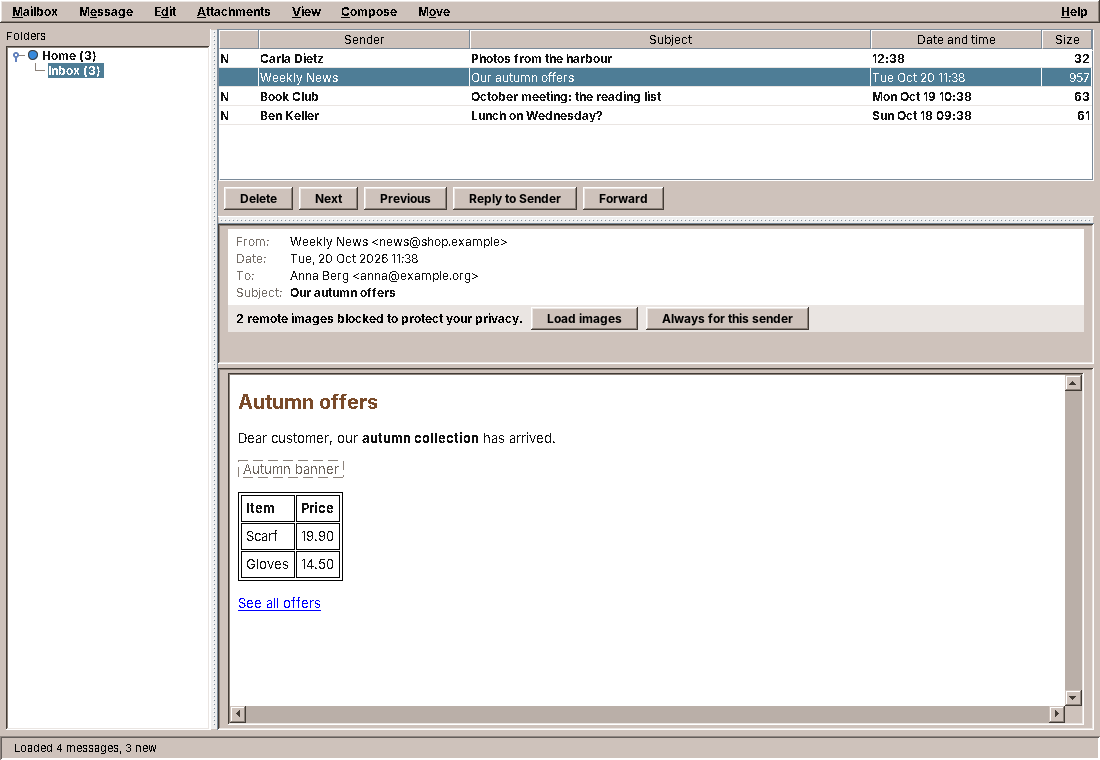
- Several accounts, each with its own colour in the folder tree, set up in Mail Options with a Guess settings button.
- Passwords in the desktop keyring, never in a configuration file; asked for when needed.
- Signing in through the web browser (OAuth2) for providers that no longer accept passwords.
- Folders and messages from IMAP: unread counts, read and unread, move, delete.
- Plain text or HTML for each message, the HTML cleaned and drawn by Flying Saucer, remote images blocked until you allow them.
- Attachments: save, open with their program, but never open one that could run.
- Compose, reply, forward, sent over SMTP with a copy in the Sent folder.
The program is about 6,200 lines of Java and 1,250 lines of tests. A third of it is the window and its dialogs; the gateway to the servers is under 500 lines.
What you will learn
- How to keep passwords out of files, in the desktop keyring, and what to do when there is no keyring.
- How a background thread asks the user a question and waits for the answer.
- How to share one network connection between threads.
- How a desktop program signs in through the web browser with OAuth2 and PKCE.
- How to show HTML from strangers without letting it phone home.
- How the
Textshelper moves into amade-commons, and why the application declares its texts in a file.
Accounts without passwords
An account is a record like the appointment of chapter 21: it normalises its fields in the compact constructor, so an Account that exists is valid. What it does not have is just as important:
public record Account(String id, String name, String displayName, String email, String username,
                      ServerSettings imap, ServerSettings smtp, String signature, AccountColor color,
                      AuthMethod auth) {
There is no password. The accounts are stored in ~/.config/amadeos/mail/accounts.conf through PropertiesFile from chapter 20, and a configuration file is the wrong place for a secret. It ends up in backups, in a dotfiles repository on the web, in a screenshot of an editor, in a bug report. The id is the key under which the password is kept elsewhere:
    @Override
    public synchronized void save(List<Account> accounts) {
        Properties p = new Properties();
        List<String> ids = new ArrayList<>();
        for (Account account : accounts) {
            ids.add(account.id());
            write(p, account);
        }
        p.setProperty("accounts", String.join(",", ids));
        PropertiesFile.store(file, p, "amade-mail accounts (passwords are kept in the keyring)");
    }
Even the comment at the top of the file says where the passwords are, so a user who opens it does not wonder. A test makes sure it stays that way, whatever field someone adds to the record later:
    @Test
    void neverWritesPasswords() throws IOException {
        Path file = dir.resolve("accounts.conf");
        new FileAccountRepository(file).save(List.of(account("a1", "Privat", AccountColor.BLUE)));
        for (String line : Files.readAllLines(file)) {
            // ".auth=PASSWORD" names the login method, it is not a secret.
            if (line.startsWith("#") || line.endsWith(".auth=PASSWORD")) continue;
            assertFalse(line.toLowerCase().contains("password"), line);
        }
    }
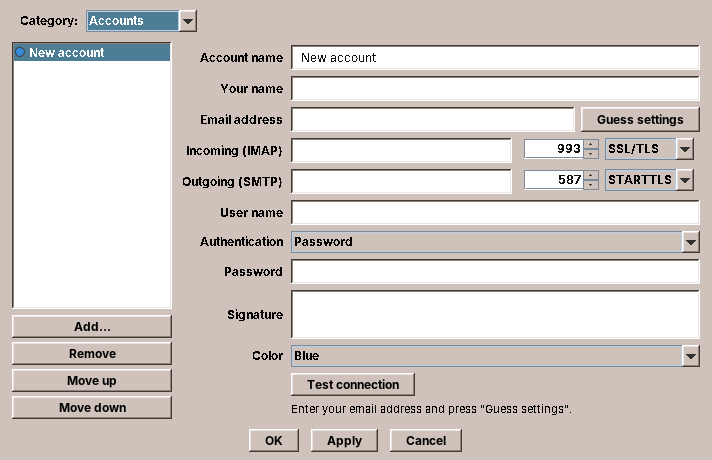
On first start Mail opens its options on the account page. Guess settings fills in the servers from the address: a small table of well-known providers, otherwise the convention imap.<domain> and smtp.<domain>. Test connection logs in to both servers in the background and says what went wrong in words the user can act on.
The keyring
The Linux desktop has a place for secrets: the Secret Service, a D-Bus interface that gnome-keyring, KDE Wallet and KeePassXC all offer. It keeps the secrets encrypted and unlocks them with the login password. Java has no API for it, and a D-Bus library would be a large dependency for three calls. There is a small command, secret-tool from the Debian package libsecret-tools, that does exactly the three calls. amade-commons wraps it behind an interface:
package eu.amadeos.commons.desktop;

import java.util.Optional;

/**
 * Keeps secrets (passwords, tokens) outside configuration files, keyed by an application-defined key
 * such as an account id.
 */
public interface PasswordStore {
    Optional<String> lookup(String key);

    void store(String key, String label, String password);

    void delete(String key);

    /** False if passwords only live for the running session. */
    boolean isPersistent();
}
CommonsModule binds it to a SecretToolPasswordStore named after the application, so every program can inject a PasswordStore and its secrets are filed under its own name (secret-tool search service amade-mail lists them). Storing a password looks like this:
    @Override
    public void store(String key, String label, String password) {
        cache.store(key, label, password);
        if (executable == null) return;
        Result result = run(password, executable, "store", "--label=" + label,
                "service", service, "account", key);
        if (result.exitCode() != 0) {
            LOG.warn("secret-tool could not store the password for {} (exit {}); keeping it for this session only",
                    key, result.exitCode());
        }
    }
The password goes into a session cache first, so it works for the rest of the session even if the keyring refuses it. Then secret-tool is started, and here is the detail that matters most in this chapter. Look at how run gets the password to the program:
    private static Result run(String input, String... command) {
        try {
            Process process = new ProcessBuilder(List.of(command)).redirectErrorStream(false).start();
            try (OutputStream stdin = process.getOutputStream()) {
                if (input != null) stdin.write(input.getBytes(StandardCharsets.UTF_8));
            }
            // The output is a single password, far below the pipe buffer, so waiting first cannot dead-lock
            // and a hanging keyring (e.g. waiting for an unlock prompt) cannot block the caller forever.
            if (!process.waitFor(30, TimeUnit.SECONDS)) {
                process.destroyForcibly();
                return new Result(-1, "");
            }
            String output;
            try (InputStream stdout = process.getInputStream(); InputStream stderr = process.getErrorStream()) {
                output = new String(stdout.readAllBytes(), StandardCharsets.UTF_8);
                stderr.readAllBytes();
            }
            return new Result(process.exitValue(), output);
        } catch (IOException e) {
            LOG.warn("Cannot run secret-tool", e);
            return new Result(-1, "");
        } catch (InterruptedException e) {
            Thread.currentThread().interrupt();
            return new Result(-1, "");
        }
    }
Pitfall: secrets on the command line
Never pass a secret as a command-line argument. The arguments of every process are readable by every user on the computer, in /proc/<pid>/cmdline and in the output of ps. secret-tool store reads the password from its standard input, and run writes it there. The label and the attributes are not secret, so they may be arguments.
run also waits at most 30 seconds. A locked keyring shows an unlock dialog, and a user who walks away must not leave Mail hanging for good; after the timeout, the password is simply not stored, and the cache keeps it for the session.
When there is no keyring
A minimal desktop may have no Secret Service at all, and secret-tool is then missing or fails. SecretToolPasswordStore notices that the command is missing and says so through isPersistent(). Mail shows it honestly instead of pretending:
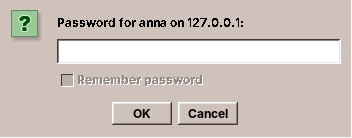
The Remember password box is off and greyed out, with a tooltip that explains why. The alternative, falling back to a file "just this once", is how passwords end up in plain text: there is no such fallback.
Asking for a password from a worker
When does Mail need a password? Not at start-up: when the gateway opens a connection, which happens on a worker thread in the middle of "load the folders" or "send this message". So the worker has to ask the user. PromptingCredentialProvider does it:
    @Override
    public synchronized String password(Account account) {
        if (account.auth().isOAuth2()) return accessToken(account);
        if (!rejected.contains(account.id())) {
            String known = session.get(account.id());
            if (known != null) return known;
            Optional<String> stored = store.lookup(account.id());
            if (stored.isPresent()) return stored.get();
        }
        Prompt prompt = ask(account);
        if (prompt == null) throw new MailServiceException(tr("credentials.no-password", account.label()));
        rejected.remove(account.id());
        session.put(account.id(), prompt.password());
        if (prompt.remember()) store.store(account.id(), "amade-mail " + account.email(), prompt.password());
        return prompt.password();
    }
The order is: the session's own memory, then the keyring, then the user. A password the server rejected is skipped in the first two places, so the user is asked again instead of being sent the same wrong password in a loop. The method is synchronized: when three workers need the password of the same account at the same moment (folders, counts, the open message), only the first one asks, and the other two find the answer in session when they get their turn.
The dialog itself must run on the EDT. The worker hands it over and waits:
    /** Runs a dialog on the EDT and waits for its result; null if interrupted. */
    private static <T> T onEdt(Supplier<T> dialog) {
        if (SwingUtilities.isEventDispatchThread()) return dialog.get();
        AtomicReference<T> result = new AtomicReference<>();
        try {
            SwingUtilities.invokeAndWait(() -> result.set(dialog.get()));
        } catch (InterruptedException e) {
            Thread.currentThread().interrupt();
            return null;
        } catch (InvocationTargetException e) {
            throw new MailServiceException("Dialog failed", e.getCause());
        }
        return result.get();
    }
This is the same idea as onEdtAndWait in Files (chapter 20), written differently. Files used CompletableFuture.supplyAsync(question, edt).join(); Mail uses SwingUtilities.invokeAndWait and first checks whether it already is on the EDT, in which case it simply calls the dialog. That check makes Mail's version safe to call from anywhere, where Files' version hangs the program when called on the EDT. Two programs with the same twelve lines would normally mean "move it to amade-commons", and the third exercise asks you to do it. But note how small the difference is that decides between a helper that is safe and one that hangs.
Note: who may call what
CredentialProvider says in its comment that password is only called from background threads. That is a rule the compiler cannot check. Mail checks it where it can: the onEdt fallback means a mistake costs a frozen window for as long as the dialog is open, not a dead program.
One connection per account
Logging in to an IMAP server takes a TLS handshake and a few round trips, easily a second on a slow line. Mail keeps one open connection (a Jakarta Mail Store) per account and lends it to whoever needs it:
    private <T> T withStore(Account account, StoreAction<T> action) {
        Connection connection = connections.computeIfAbsent(account.id(), id -> new Connection());
        connection.lock.lock();
        try {
            for (int attempt = 0; ; attempt++) {
                try {
                    return action.run(connect(connection, account));
                } catch (StoreClosedException | FolderClosedException e) {
                    // The server dropped an idle connection; reconnect once.
                    closeQuietly(connection);
                    if (attempt > 0) throw failure(account, e);
                } catch (AuthenticationFailedException e) {
                    closeQuietly(connection);
                    credentials.rejected(account);
                    throw failure(account, e);
                } catch (MessagingException | IOException e) {
                    if (connection.store != null && !connection.store.isConnected()) closeQuietly(connection);
                    throw failure(account, e);
                }
            }
        } finally {
            connection.lock.unlock();
        }
    }
Every IMAP operation in the gateway is a small lambda passed to withStore. Three things happen around it:
- One at a time. An IMAP connection is a conversation: a command, its answer, the next command. Two threads talking over one connection at once would mix up the answers. The
ReentrantLockof the account makes the second thread wait. Different accounts have different locks, so a slow server does not hold up a fast one. - Reconnect once. Servers close idle connections after some minutes. The first operation after a coffee break then fails with
StoreClosedException;withStorereconnects and tries again, once. A second failure is a real failure. - A rejected password is forgotten.
AuthenticationFailedExceptiontells the credential provider, which asks the user next time.
Why a ReentrantLock and not synchronized? Mail runs its background work on virtual threads (chapter 10's executor). A virtual thread that blocks inside a synchronized block used to pin its carrier thread in older Java versions; a ReentrantLock never did. With JDK 25 both are fine, but the lock also makes the intent visible: it is a lock for this connection, held across network calls.
The connections themselves are configured in MailSessions. With TLS or STARTTLS, Mail sets ssl.checkserveridentity, so the server's certificate must name the server Mail asked for, and starttls.required, so a server (or someone in between) cannot quietly skip the encryption. The third choice, no encryption, exists for local test servers, such as the one used for the pictures in this chapter.
Signing in through the browser
More and more mail providers do not accept passwords from mail programs any more. They want OAuth2: the user signs in on the provider's web page, in the browser, and the program receives a token that allows mail access and nothing else. A desktop program has no web server to receive the answer, so it starts one, for a minute, on the loopback address:
    /**
     * Lets the user sign in in the web browser and waits for the redirect. Blocks up to
     * {@link #SIGN_IN_TIMEOUT}; must not run on the EDT.
     *
     * @param browser   opens the authorization URL (also shown to the user in case no browser opens)
     * @param cancelled completing it aborts the wait
     * @return a new access token; the refresh token is stored in the keyring
     * @throws MailServiceException if the user denied access, cancelled or did not finish in time
     */
    public String signIn(Account account, OAuth2Client client, Consumer<URI> browser, CompletableFuture<?> cancelled) {
        OAuth2Provider provider = account.auth().provider();
        String verifier = randomToken(32);
        String state = randomToken(16);
        CompletableFuture<Map<String, String>> callback = new CompletableFuture<>();
        HttpServer server;
        try {
            server = HttpServer.create(new InetSocketAddress(InetAddress.getByName("127.0.0.1"), 0), 0);
        } catch (IOException e) {
            throw new MailServiceException(tr("oauth.error.listen", e.getMessage()), e);
        }
        server.createContext("/", exchange -> handleRedirect(exchange, state, callback));
        server.start();
        try {
            String redirectUri = "http://127.0.0.1:" + server.getAddress().getPort() + "/";
            cancelled.whenComplete((r, e) -> callback.cancel(false));
            browser.accept(authorizationUri(provider, client, redirectUri, state, challenge(verifier), account.username()));
            Map<String, String> result = callback.get(SIGN_IN_TIMEOUT.toSeconds(), TimeUnit.SECONDS);
            if (result.containsKey("error")) {
                throw new MailServiceException(tr("oauth.error.sign-in", provider.label(), String.valueOf(result.get("error"))));
            }
            Map<String, String> form = new LinkedHashMap<>();
            form.put("grant_type", "authorization_code");
            form.put("code", result.get("code"));
            form.put("redirect_uri", redirectUri);
            form.put("code_verifier", verifier);
            clientCredentials(form, client);
            Map<String, Object> answer = postToken(provider, form);
            if (answer.containsKey("error")) throw tokenError(provider, answer);
            return accept(account, answer);
        } catch (CancellationException e) {
            throw new MailServiceException(tr("oauth.cancelled", account.label()), e);
        } catch (TimeoutException e) {
            throw new MailServiceException(tr("oauth.timeout", account.label(), SIGN_IN_TIMEOUT.toMinutes()), e);
        } catch (InterruptedException e) {
            Thread.currentThread().interrupt();
            throw new MailServiceException(tr("oauth.interrupted", account.label()), e);
        } catch (ExecutionException e) {
            throw new MailServiceException(tr("oauth.failed", account.label()), e.getCause());
        } finally {
            server.stop(0);
        }
    }
Step by step:
- Mail starts an
HttpServer(it is part of the JDK) on127.0.0.1with port0, which lets the operating system choose a free port. Loopback means no other computer can reach it. - It opens the provider's sign-in page in the browser, through
DesktopLauncherfrom chapter 11. The URL carries the redirect addresshttp://127.0.0.1:<port>/, a randomstate, and a challenge. - The user signs in and agrees. The provider sends the browser to the redirect address, with a one-time code.
- Mail's little server receives the code, shows "Signed in, you can close this window", and completes the future.
- Mail exchanges the code for tokens, sending the verifier that belongs to the challenge.
The redirect handler only accepts the answer it is waiting for:
    private static void handleRedirect(HttpExchange exchange, String state, CompletableFuture<Map<String, String>> callback)
            throws IOException {
        Map<String, String> params = parseQuery(exchange.getRequestURI().getRawQuery());
        boolean ours = state.equals(params.get("state"));
        String message;
        if (!ours) message = "This is not the expected sign-in answer.";
        else if (params.containsKey("error")) message = "Sign-in was not completed (" + escape(params.get("error")) + ").";
        else message = "Signed in. You can close this window and return to the Mailer.";
        byte[] body = ("<!doctype html><html><head><meta charset=\"utf-8\"><title>amade-mail</title></head>"
                + "<body style=\"font-family:sans-serif;margin:3em\"><p>" + message + "</p></body></html>")
                .getBytes(StandardCharsets.UTF_8);
        exchange.getResponseHeaders().set("Content-Type", "text/html; charset=utf-8");
        exchange.sendResponseHeaders(ours ? 200 : 400, body.length);
        try (OutputStream out = exchange.getResponseBody()) {
            out.write(body);
        }
        if (ours) callback.complete(params);
    }
PKCE: why a challenge?
Any program on the computer can listen on a loopback port, and a desktop program cannot keep a secret from its users: its "client secret" is in the jar. So an intercepted code must be useless to anyone else. PKCE (Proof Key for Code Exchange, RFC 7636) does that. Mail makes up a random verifier, sends only its SHA-256 hash, the challenge, with the sign-in, and sends the verifier itself only with the code exchange. Whoever steals the code does not have the verifier:
    static String challenge(String verifier) {
        try {
            byte[] digest = MessageDigest.getInstance("SHA-256").digest(verifier.getBytes(StandardCharsets.US_ASCII));
            return Base64.getUrlEncoder().withoutPadding().encodeToString(digest);
        } catch (NoSuchAlgorithmException e) {
            throw new IllegalStateException("SHA-256 not available", e);
        }
    }
The RFC prints an example verifier with its challenge, and that makes a perfect test:
    @Test
    void challengeFollowsRfc7636() {
        // Example from RFC 7636, appendix B.
        assertEquals("E9Melhoa2OwvFrEMTJguCHaoeK1t8URWbuGJSstw-cM",
                OAuth2Service.challenge("dBjftJeZ4CVP-mB92K27uhbUJU1p1r_wW1gFWFOEjXk"));
    }
The sign-in waits at most five minutes and can be cancelled: while it waits, a small window tells the user to look at the browser, and closing it cancels the sign-in. What comes back is an access token, usually valid for an hour, and a refresh token, which gets new access tokens without asking the user again. The refresh token is a long-lived secret, so it goes where passwords go: into the PasswordStore. The access token is sent to the server through SASL XOAUTH2, and MailSessions turns the other login methods off for such accounts, so the token is never sent as if it were a password.
Tip: test the browser by playing it
signIn takes the browser as a Consumer<URI>. In the program it is DesktopLauncher.browse; in the test it is a lambda that reads the redirect address from the URI and calls it with an HttpClient, first with a wrong state (expecting 400), then with the right one. The whole flow, including the local server, is tested without a browser and without a provider.
HTML from strangers
Chapter 11 showed HTML pages with jsoup and Flying Saucer, and refused to load anything from the network. Documentation from /usr/share/doc is written by people you trust, more or less. Mail is written by anyone. A newsletter contains an image of one pixel whose address is unique to you: when your mail program loads it, the sender learns that you opened the message, when, and from where. That is the tracking pixel, and it is in most commercial mail.
So the HTML of a message goes through a stricter cleaner first:
    /**
     * @param html        the text/html body of a message
     * @param allowRemote true to keep references to remote images
     */
    public SanitizedHtml sanitize(String html, boolean allowRemote) {
        Document dirty = Jsoup.parse(html == null ? "" : html);
        Document clean = new Cleaner(safelist).clean(dirty);
        int blocked = 0;

        for (Element img : clean.select("img")) {
            String src = img.attr("src").strip();
            String lower = src.toLowerCase(Locale.ROOT);
            if (lower.startsWith("data:") && !lower.startsWith("data:image/")) {
                img.removeAttr("src");
            } else if (isRemote(lower) && !allowRemote) {
                img.removeAttr("src");
                blocked++;
            }
            if (img.attr("src").isBlank()) replaceWithAltText(img);
        }
        for (Element element : clean.select("[style]")) {
            String style = element.attr("style");
            Matcher matcher = CSS_URL.matcher(style);
            StringBuilder result = new StringBuilder();
            boolean changed = false;
            while (matcher.find()) {
                String target = matcher.group(1).replace("\"", "").replace("'", "").strip().toLowerCase(Locale.ROOT);
                boolean keep = target.startsWith("cid:") || (allowRemote && isRemote(target));
                if (!keep) {
                    if (isRemote(target)) blocked++;
                    matcher.appendReplacement(result, "none");
                    changed = true;
                }
            }
            if (changed) {
                matcher.appendTail(result);
                element.attr("style", result.toString());
            }
        }
        for (Element link : clean.select("a[href]")) {
            link.removeAttr("target");
        }

        clean.head().appendElement("style").attr("type", "text/css").appendText(BASE_CSS);
        // W3CDom puts the elements into this namespace; Flying Saucer's default XHTML style sheet only
        // matches elements in the XHTML namespace.
        Element root = clean.selectFirst("html");
        if (root != null) root.attr("xmlns", XHTML_NAMESPACE);
        clean.outputSettings().syntax(Document.OutputSettings.Syntax.xml).prettyPrint(false);
        return new SanitizedHtml(clean, blocked);
    }
- jsoup's
Cleanerkeeps only what aSafelistallows: text formatting, tables, links, images, thestyleattribute. Scripts, forms, frames,<object>and event handlers such asonloadare gone. - An image whose source is on the web loses its source, and is counted. Images that came with the message (
cid:addresses) stay; so dodata:image/ones. Adata:address with any other type is removed. - CSS can load images too (
background-image: url(...)). Those addresses becomenone, and the remote ones are counted. targetattributes of links are removed: a link opens in the browser, never in a "new window" of the mail program.- The XHTML namespace and a small base style sheet are added, as in chapter 11.
The count is what the bar above the message shows: "2 remote images blocked to protect your privacy", with Load images and Always for this sender.
A black box
The first screenshot for this chapter showed a big black rectangle in the newsletter, where the banner should be. Flying Saucer draws an <img> without a source as a black box of its width and height, and the tracking pixel was a black dot. The sanitizer had done its job, and the result still looked broken. The fix replaces an image that lost its source with its alternative text, or with nothing:
    private static void replaceWithAltText(Element img) {
        String alt = img.attr("alt").strip();
        if (alt.isEmpty()) {
            img.remove();
        } else {
            img.replaceWith(new Element("span").addClass("blocked-image").text(alt));
        }
    }
A tracking pixel never has an alternative text, so it disappears; the banner becomes "Autumn banner" in a dashed frame, as you see in the picture at the top. Look at the picture you produce, not only at the tests: a test checks what you thought of.
The test for the blocking is a small catalogue of the tricks:
    @Test
    void blocksRemoteImagesAndKeepsEmbeddedOnes() {
        SanitizedHtml html = sanitizer.sanitize("""
                <img src="https://tracker.example/pixel.gif" width="1" height="1">
                <img src="http://cdn.example/logo.png" alt="Logo">
                <img src="cid:logo@example">
                <div style="background-image: url('https://cdn.example/bg.png'); color: red">x</div>
                """, false);
        String out = body(html);
        assertEquals(3, html.blockedRemote());
        assertTrue(html.hasBlockedRemoteContent());
        assertFalse(out.contains("tracker.example"), out);
        assertFalse(out.contains("cdn.example"), out);
        assertTrue(out.contains("src=\"cid:logo@example\""), out);
        assertTrue(out.contains("color: red"), out);
    }
Loading images when the user says so
When the user clicks Load images, the renderer still does not touch the network. The presenter prepares the message again in the background, this time downloading the images itself, and hands them to the renderer as bytes:
    /** Runs in the background: sanitises the HTML and downloads remote images if allowed. */
    DisplayedMessage prepare(MessageSummary summary, MessageContent content, boolean preferHtml, boolean forceRemote) {
        String text = content.hasPlainText() ? content.plainText()
                : content.hasHtml() ? sanitizer.toPlainText(content.html()) : "";
        boolean html = content.hasHtml() && (preferHtml || !content.hasPlainText());
        if (!html) return new DisplayedMessage(summary, content, text, null, Map.of());
        boolean allowRemote = forceRemote || preferences.loadsRemoteImagesFrom(content.senderAddress());
        SanitizedHtml sanitized = sanitizer.sanitize(content.html(), allowRemote);
        Map<String, byte[]> resources = new HashMap<>();
        content.inlineParts().forEach((id, part) -> resources.put("cid:" + id, part.data()));
        if (allowRemote) resources.putAll(remoteImages.load(RemoteImageLoader.imageUrls(sanitized.document())));
        return new DisplayedMessage(summary, content, text, sanitized, resources);
    }
Mail's user agent for Flying Saucer works like the one in chapter 11, but it answers only from this map of resources: the images that came with the message, and the ones downloaded here. Downloading before rendering has a second advantage: Flying Saucer would load images one by one, on the thread that lays out the page, which is the EDT. RemoteImageLoader loads them in parallel on virtual threads, at most 60 images of at most 5 MB, with timeouts, and leaves out the ones that fail.
Showing the right message
Clicking through the message list fast starts many loads. The one for the third message may finish before the one for the second, and the window must show the third. Chapter 11 solved this for pages with a counter of navigations, and Mail does the same with a counter of selections:
    public void messageSelected(MessageSummary message) {
        int generation = ++messageGeneration;
        displayed = null;
        if (message == null) {
            view.clearMessage("");
            return;
        }
        Optional<Account> account = account(message.accountId());
        if (account.isEmpty()) return;
        boolean html = showHtml;
        async(() -> {
            MessageContent content = gateway.loadMessage(account.get(), message.folder(), message.uid());
            return prepare(message, content, html, false);
        }, prepared -> {
            if (generation != messageGeneration) return;
            displayed = prepared;
            view.showMessage(prepared);
            if (!message.seen()) {
                view.updateMessage(message.withSeen(true));
                adjustUnread(message, -1);
            }
        }, error -> {
            if (generation == messageGeneration) view.clearMessage(error);
        });
    }
Every selection increments messageGeneration. The background load remembers the number it started with, and when it finishes it shows its message only if no newer selection has happened since. Slow answers to old questions are dropped. It is the same pattern as in Web, and it is the reverse of the Calendar's save queue: there, every save had to happen, in order; here, only the last one counts.
Attachments that could run
An attachment called invoice.pdf.desktop is a desktop entry, and opening it runs whatever command it names. Mail does not open such files at all:
    @Override
    public void openAttachment(Attachment attachment) {
        if (DesktopLauncher.isRisky(attachment.fileName())) {
            view.showError(tr("attachment.risky", attachment.fileName()));
            return;
        }
        async(() -> {
            Path file = writeTemporary(attachment);
            try {
                desktop.open(file);
            } catch (IOException e) {
                throw new MailServiceException(tr("attachment.error.open", file.getFileName().toString(), e.getMessage()), e);
            }
            return file;
        }, file -> view.setStatus(tr("attachment.opened", file.getFileName().toString())), view::showError);
    }
DesktopLauncher.isRisky from chapter 11 knows the endings that can run something: scripts, desktop entries, executables, Java archives, packages. The user can still save such a file and decide what to do with it; Mail just refuses to be the one that starts it. Everything else is written to a new temporary directory that only the user can read and opened with its program through DesktopLauncher.open.
The Texts helper moves into amade-commons
Chapter 21 ended with an observation: Calendar, Mail, Audio and Video each have a class Texts that differs only in the name of the bundle. With this chapter, it moves. Here is the core of the shared version:
    /** The application's texts in the default locale. */
    public static Messages messages() {
        Source s = source();
        Loaded l = loaded;
        if (l == null || l.source() != s || !l.messages().locale().equals(Locale.getDefault())) {
            l = new Loaded(s, Messages.load(s.anchor(), s.bundle(), Locale.getDefault()));
            loaded = l;
        }
        return l.messages();
    }
The texts are loaded on first use in the default locale, which AmadeApplication has set to the resolved language (chapter 10). If the default locale changes, as it does in tests that try all five languages, they are loaded again. The two volatile fields hold immutable records, so a thread either sees the old texts or the new ones, never a mix.
But where does the shared class learn the name of the bundle, eu.amadeos.apps.mail.messages?
A call or a file?
The obvious answer is a call: Texts.use(AmadeMailApplication.class, "eu.amadeos.apps.mail.messages") at the start of main. That was the first version, and it broke 50 tests across the four programs. A test that creates a dialog does not run main, so tr had no bundle. Every test class would need a set-up line, and every new test class would fail until someone remembered it.
The version in amade-commons asks the class path instead. Each application declares its bundle in a resource with a fixed name:
# The application's texts for eu.amadeos.commons.i18n.Texts.tr: messages.properties and its translations.
bundle=eu.amadeos.apps.mail.messages
    /** Reads {@value #DECLARATION}; there must be exactly one, the application's. */
    static Source declared(ClassLoader loader) {
        List<URL> found;
        try {
            found = Collections.list(loader.getResources(DECLARATION));
        } catch (IOException e) {
            throw new UncheckedIOException("Cannot look for " + DECLARATION, e);
        }
        if (found.isEmpty()) {
            throw new IllegalStateException("No " + DECLARATION + ": the application has not named its text files");
        }
        if (found.size() > 1) throw new IllegalStateException("Several " + DECLARATION + " files: " + found);
        Properties properties = new Properties();
        try (InputStream in = found.getFirst().openStream()) {
            properties.load(in);
        } catch (IOException e) {
            throw new UncheckedIOException("Cannot read " + found.getFirst(), e);
        }
        String bundle = properties.getProperty("bundle", "").strip();
        if (bundle.isEmpty()) throw new IllegalStateException(found.getFirst() + " names no bundle");
        return new Source(Texts.class, bundle);
    }
The program and its tests have the same class path, so they find the texts the same way, with no set-up at all. It is the same trick as the META-INF/services files of Java's ServiceLoader, and it has the same rule: there must be exactly one. Two declarations on the class path mean two applications in one program, which is an error worth a clear message. Texts.use still exists for the one case where there is no application: the tests of amade-commons itself, and of other libraries.
Moving it
For each of the four programs, the move is the same:
- Delete
i18n/Texts.java. - Change
import static eu.amadeos.apps.<app>.i18n.Texts.trtoimport static eu.amadeos.commons.i18n.Texts.tr(a search and replace over the sources). - Add
META-INF/amadeos/texts.properties. - Let the translation test ask
Texts.bundle()instead of writing the name a second time. - Pin the amade-commons commit that has the new class, and run all tests.
The diff of each program is mostly import lines, which is what a good move looks like: the code that uses the texts does not change at all. Calendar, Audio and Video went through the same five steps as Mail.
What amade-commons gives Mail
| Part | Since | Mail uses it for |
|---|---|---|
AmadeApplication, CommonsModule, EdtExecutor |
chapter 10 | start-up, wiring, the two threads |
Messages, LocaleSettings, AmadeUI |
chapter 10 | five languages, the language setting, the theme's colours |
DesktopLauncher |
chapter 11 | the browser for OAuth2 and links; opening attachments; isRisky |
AppDirectories, PropertiesFile, LaunchFeedback |
chapter 20 | accounts.conf and the preferences; the busy cursor when an invitation opens Calendar |
LanguageChooser |
chapter 21 | the language page of the options |
PasswordStore, SecretToolPasswordStore |
this chapter | passwords and refresh tokens in the keyring |
Texts |
this chapter | tr(...) everywhere, declared in texts.properties |
ContactDirectory, AddressCompletion |
chapter 25 | completing To, Cc and Bcc from the address books (how) |
And what stays in Mail
Json, a small reader for the token answers of OAuth2, 140 lines. Audio has one too, for its music metadata. That makes two, and it moves with Audio in chapter 33, when the second user is written about.- The HTML cleaning. Web and Mail both run jsoup and then add the XHTML namespace. But their rules are different (Web keeps local pictures and drops scripts; Mail keeps far less and blocks the network), and the shared part is five lines. Sharing it would mean a class with options for every difference.
onEdt, the worker's way to ask the user. It is the third exercise.
Exercises
- A real server in the tests. The gateway is tested only through the presenter's fake. Add GreenMail, a mail server written in Java for tests, as a test dependency, and test
JakartaMailGatewayagainst it: list folders, load a message, send one and find the copy in Sent. Then stop the server in the middle and check thatwithStorereconnects once. - Autoconfiguration. Guess settings knows a few providers. Many providers publish their settings as DNS
SRVrecords (RFC 6186,_imaps._tcp.example.org) or as an XML file atautoconfig.example.org. Look them up in the background, and keep the table as the fallback. Which result wins when they disagree? - One onEdtAndWait. Move a method that runs a
Supplieron the EDT and waits for its result intoEdtExecutor. It must be safe on the EDT (like Mail's) and handle interruption. Change Files and Mail to use it, and write a test that calls it from the EDT. - Tracking links. Remote images are blocked, but a link can track too:
https://news.example/click?id=8f3a.... Show the real address of a link in the status line when the mouse is over it, and warn when the text of a link is an address that differs from its target. - A keyring per account? Today a password is filed under the account's random id. A user who deletes
accounts.confleaves orphaned passwords in the keyring. Add a "Forget all passwords" button to the options that removes every entry ofservice=amade-mail. What doessecret-tooloffer for that, and how do you test it without a keyring?
Summary
- A configuration file is no place for a secret. Store passwords in the desktop keyring, behind an interface, and say honestly when there is no keyring.
- Pass a secret to another program on its standard input, never as an argument.
- A worker asks the user by handing a dialog to the EDT and waiting; make the helper safe for a call that is already on the EDT.
- One connection per account, lent out under a lock, reconnected once when the server dropped it.
- OAuth2 for a desktop program: a loopback server for the redirect, a random
state, and PKCE, because a desktop program cannot keep a client secret. - HTML from strangers is cleaned with a safelist; remote images are blocked and counted, and downloaded by the program only when the user agrees. Look at the result, not only at the tests.
- A counter of selections drops slow answers to old questions; attachments that could run are not opened.
Textsmoves into amade-commons. The application declares its texts inMETA-INF/amadeos/texts.properties, so the program and its tests find them without set-up code.